Dataset: Docker Hub official image repository (public image tags and layer sizes).
You write a Dockerfile, push it to CI, and watch the build log scroll past a 1 GB Python download for the third time today. The deploy takes four minutes, the registry bill climbs, and the running container carries a full Debian stack your app never touches. A poorly written Dockerfile downloads the full Python image on every build, burns CI minutes, and ships 2 GB images that slow every deploy. The right base image and layer order cut that to under 100 MB.
This is the practical stakes of understanding the Docker container vs virtual machine distinction. Containers are not just lighter VMs. They are a fundamentally different isolation model built on Linux kernel primitives, and getting that model wrong is what produces bloated images, slow pipelines, and insecure defaults.
Here is the breakdown a builder needs: what a container actually is, how Docker isolates processes without a hypervisor, where containers win and where VMs still hold ground, and what the lifecycle from Dockerfile to running container looks like in practice.
Containers package an app, VMs package a machine
A container is a standard unit of software that packages code and all its dependencies so the application runs the same way regardless of the environment, as Docker's documentation defines it. A container image includes the code, runtime, system tools, system libraries, and settings needed to run an application. At runtime, the image becomes a container process on a container engine.
A virtual machine is a different abstraction. A VM emulates physical hardware through a hypervisor, and each VM carries a full guest operating system, binaries, and libraries. AWS explains that VM image files are typically several gigabytes because they contain an entire OS, while container images are measured in megabytes because they only package what a single application needs.
The core difference is what gets virtualized. Red Hat's comparison frames it precisely: containers virtualize the operating system, VMs virtualize the hardware. A container shares the host kernel with other containers, each running as an isolated process in user space. A VM runs on a hypervisor that gives it its own kernel, its own CPU scheduling, and its own memory management.
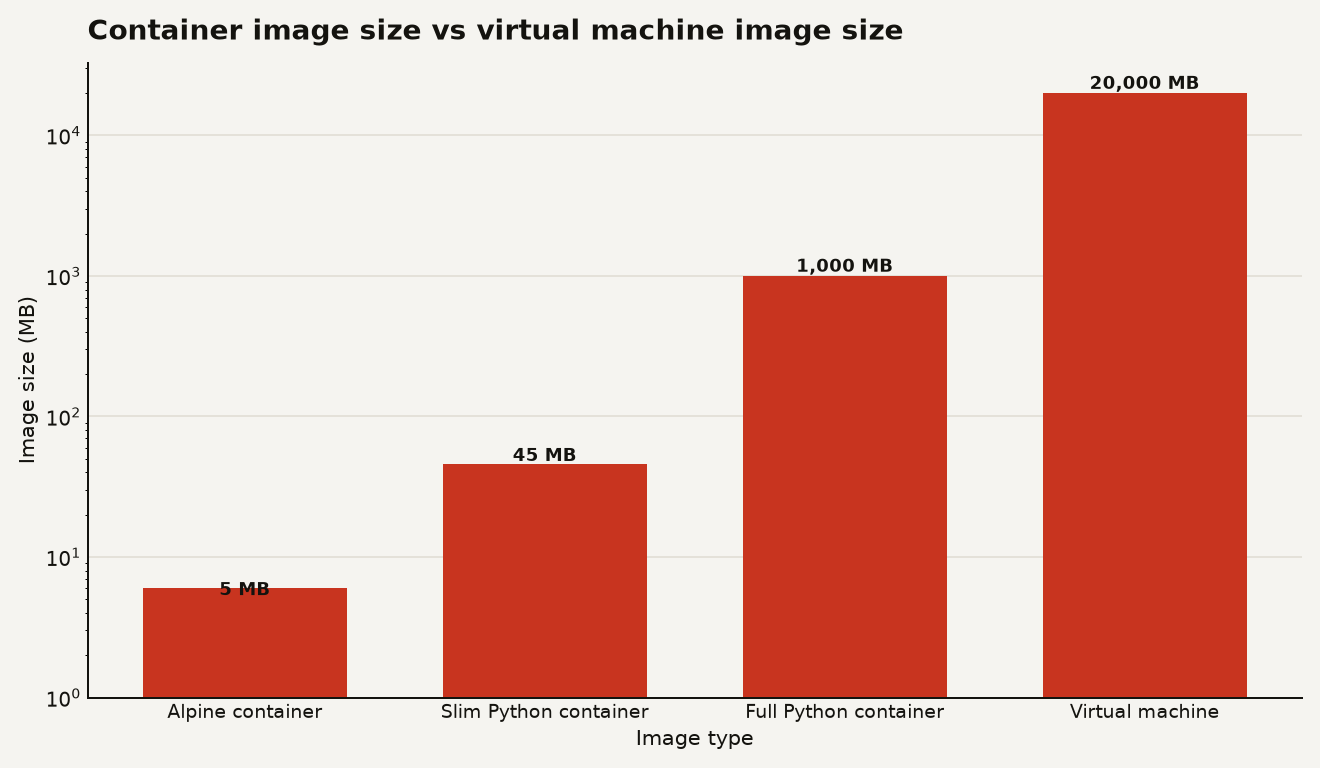
The chart above shows the magnitude of the difference. An Alpine Linux container image is roughly 5 MB. A slim Python base image is about 45 MB. A full Python base image reaches roughly 1,000 MB. A typical VM image exceeds 20,000 MB. That is a 4,000x spread between the lightest container and a standard VM, and it is why image choice dominates your build time and registry costs.
For your codebase, this means the base image you pick in the first line of your Dockerfile is the single biggest lever on CI speed, deploy time, and storage cost. If you are shipping a Python web service on the full python:3.12 image, you are carrying a Debian toolchain, a C compiler, and locale data your app never uses. Switch to python:3.12-slim and you drop to 45 MB. Switch to a multi-stage build with Alpine and you can get under 10 MB for a compiled binary.
Kernel namespaces and cgroups do the work
Docker does not emulate hardware. It does not run a guest OS. It uses three Linux kernel features to create isolation: namespaces, cgroups, and a union filesystem.
Namespaces give a container its own view of system resources. Docker uses several namespace types defined in the Linux man pages: PID namespaces make processes inside the container invisible to the host and vice versa, network namespaces give each container its own network stack and interface, mount namespaces isolate the filesystem view, and UTS namespaces set the hostname. A container process sees itself as PID 1 in its own world, even though the host kernel scheduled it.
Cgroups, or control groups, limit how much CPU, memory, and I/O a container can consume. The Linux kernel documentation on cgroups version 2 describes them as a hierarchy of resource controllers. Docker sets cgroup limits when you pass flags like --memory=512m or --cpus=1.0, and the kernel enforces them. This is why you can run ten containers on one machine without one runaway process starving the rest.
The union filesystem, typically OverlayFS, is what makes layers work. Each instruction in a Dockerfile creates a layer. Layers are read-only and shared across images. If you and a teammate both build from python:3.12-slim, you both pull the same base layers once. Only the layers you add on top are unique. The OverlayFS documentation in the kernel docs describes how a read-only lower layer and a writable upper layer combine into a single coherent filesystem view.
Here is what this means for your Dockerfile. Layer order determines cache hits. If you copy your source code before installing dependencies, every code change invalidates the dependency layer and triggers a full reinstall. Put the dependency install first and the code copy last:
FROM python:3.12-slim
WORKDIR /app
COPY requirements.txt .
RUN pip install --no-cache-dir -r requirements.txt
COPY . .
CMD ["uvicorn", "main:app", "--host", "0.0.0.0", "--port", "8000"]
This ordering means dependency layers stay cached across builds. Only the final COPY . . layer changes when you edit code. For a project with 50 dependencies, that is the difference between a 3 second rebuild and a 90 second one.
Google Cloud's containers overview notes that containers are deployed from images by an orchestration platform like Kubernetes, which manages scheduling and scaling. The kernel primitives do the isolation. Docker Engine does the packaging. Kubernetes does the fleet management. Understanding which layer does what tells you where to debug when something breaks.
Where containers win and where VMs still do
Containers excel at speed, density, and consistency. A container starts in milliseconds because it is just a process. A VM boots in tens of seconds because it boots an entire operating system. AWS's comparison guide points out that containers are fast to modify and iterate on because they only include high-level software, while VMs are laborious to build and regenerate since any modification requires validating a full-stack environment.
Here is what containers let you do that VMs make painful:
- Scale individual microservices independently. If your auth service gets 10x the traffic of your billing service, you scale the auth containers to 20 replicas and leave billing at 2. With VMs, you are scaling whole machines for each service.
- Ship identical environments. The same image runs on your laptop, your staging server, and your production cluster. The kernel is the only variable, and on Linux that kernel is shared.
- Rebuild from version control. Containers are short-lived and frequently rebuilt from source, which Red Hat notes minimizes configuration drift and makes vulnerability scanning straightforward.
- Run more workloads per machine. A host that fits 4 VMs might fit 40 containers, because containers share the kernel instead of each demanding its own OS overhead.
But VMs still win in several scenarios, and pretending otherwise is how teams end up with security gaps.
Strong isolation
Containers share the host kernel. A kernel vulnerability affects every container on the machine. A VM gives each guest its own kernel, so a hypervisor escape is far harder than a container escape. Google Cloud's containers vs VMs guide explicitly notes that VMs provide a high level of isolation important for security and compliance.
Full environment control
If your application needs a specific kernel version, custom kernel modules, or a non-Linux OS, a container cannot help you. Containers can only run Linux processes on a Linux kernel. A VM can run Windows on a Linux host or vice versa.
Legacy software
Older applications that expect full control over their environment, including system services and init systems, are often easier to lift into a VM than to containerize. HowToGeek's Docker vs VM explainer notes that Docker containers run code directly on the machine without emulation, which is great for modern apps but limiting for software that expects a complete OS.
For your roadmap, the practical rule is: containerize everything you can, VM what you must. Multi-tenant workloads with strict compliance requirements often run containers inside VMs, getting the density of containers with the isolation boundary of a VM. Most cloud Kubernetes platforms, including Google's GKE and Amazon's EKS, already run this pattern under the hood.
If you are building AI infrastructure, this matters doubly. As we have covered in GPU utilization analysis, enterprise GPU utilization often sits around 5 percent because teams provision whole VMs per workload. Containerizing model serving lets you pack multiple inference endpoints onto the same GPU with cgroup limits, which is a direct cost reduction.
Build, ship, run, clean
The container lifecycle has four stages: build, ship, run, and clean. Each stage has a failure mode that wastes money or introduces risk.
Build
You write a Dockerfile and run docker build. Docker reads each instruction, creates a layer, and caches it. The build produces an image tagged with a name and version. The failure mode here is the bloated image: pulling a 1 GB base when a 45 MB slim image would do, or failing to use multi-stage builds to strip build dependencies from the final image.
Multi-stage builds are the single most effective technique for shrinking images. You compile in a full build environment, then copy only the binary into a minimal runtime image:
FROM golang:1.22 AS builder
WORKDIR /src
COPY . .
RUN go build -o /app/server
FROM alpine:3.20
COPY /app/server /app/server
CMD ["/app/server"]This pattern takes a Go service from a 900 MB image to roughly 20 MB. The build stage carries the Go toolchain. The final stage carries only the compiled binary and Alpine's base files.
Ship
You push the image to a registry. Docker Hub, Amazon ECR, GitHub Container Registry, or a self-hosted registry. The registry stores layers deduplicated. If two images share a base layer, it is stored once. The failure mode here is pushing unreproducible images. If your Dockerfile pulls latest tags, the image you push today and the one a teammate builds tomorrow may have different base layers. Pin your base image versions.
Run
You pull the image and start a container. Docker creates the namespaces, applies the cgroup limits, mounts the union filesystem, and starts the process. The container runs until the process exits or you stop it. The failure mode here is running as root. By default, container processes run as root inside the namespace. If an attacker escapes the container, they get root on the host. Add USER 1000:1000 to your Dockerfile to run as a non-root user. Most cloud platforms now enforce this by default.
Clean
Stopped containers, dangling images, and orphaned volumes accumulate. docker system prune removes unused data. In production, Kubernetes handles this automatically through garbage collection. In development, neglecting it fills your disk.
Here is a summary of where the cost leaks hide at each stage:
| Stage | What wastes money | What to do |
|---|---|---|
| Build | Pulling full base images, invalidating cache with wrong layer order | Use slim or Alpine bases, put dependencies before code |
| Ship | Pushing unreproducible images with unpinned tags | Pin versions, use multi-stage builds to strip build deps |
| Run | Running as root, no resource limits, no health checks | Set USER, add cgroup limits, add HEALTHCHECK |
| Clean | Orphaned volumes and stopped containers filling disk | Run docker system prune or automate with cron |
Every row in that table is a real cost. A 1 GB image pushed 50 times a day across a team of 20 is 1 TB of registry transfer per day. At typical cloud egress rates, that is real money. The slim image cuts it by 95 percent.
The smallest image that runs is the one that ships fastest
The Docker container vs virtual machine question is not academic. It determines your build time, your deploy frequency, your registry bill, and your attack surface. Containers share a kernel and isolate processes. VMs virtualize hardware and carry a full OS. The right answer for most modern applications is containers, with VMs as the isolation boundary underneath.
The practical takeaway for anyone writing a Dockerfile today: your first line is your most expensive decision. Choose the smallest base image that runs your code. Order your layers so dependencies cache. Use multi-stage builds to strip everything your runtime does not need. Run as a non-root user. Pin your tags. These five habits turn a 2 GB image into a 20 MB one, a 4 minute deploy into a 10 second one, and a root-level security risk into a contained process.
Sources
- Docker: What is a Container?
- AWS: Containers vs VMs
- Red Hat: Containers vs VMs
- Google Cloud: Containers vs virtual machines
- HowToGeek: Docker vs Virtual Machine
- Linux man pages: namespaces
- Linux kernel docs: cgroup v2
- Linux kernel docs: OverlayFS
- Docker Hub: Python official image
- Data Today: Enterprise GPU utilization at 5%