The hardest part of an agent workflow may be the most human one: doing nothing until the right thing changes.
SentinelBench is a new benchmark for long-running monitoring agents, the class of AI systems that watch a changing environment and act only when a condition becomes true. The key number is 100 tasks. In a paper submitted to arXiv on June 3, 2026, Matheus Kunzler Maldaner, Adam Fourney, Amanda Swearngin and five co-authors describe SentinelBench as an open-source benchmark spanning 10 synthetic web environments, including email, calendars, finance, professional networking and entertainment. The target is whether an agent can wait, notice, react and avoid burning your budget while pretending to be vigilant.
That last part matters. Most agent demos reward visible activity: tool calls, page refreshes, browser moves, screenshots, logs. Monitoring work punishes that instinct. If your agent checks a dashboard every 10 seconds for 6 hours, it may look alive while quietly turning a simple alert into an expensive loop. If it checks every 2 hours, it misses the moment your customer, incident, trade, inventory change or contract reply needed action.
The useful agent is the one that knows when to be boring.
SentinelBench and the waiting problem
The new SentinelBench paper puts a sharper frame around a problem many builders already hit in production: agents are usually evaluated as if the world is static. The task arrives, the agent thinks, the agent acts, the grader checks the final state. That covers a lot of browser automation. It misses workflows where the correct action depends on an external event that has not happened yet.
SentinelBench makes those events repeatable. Each task runs inside a synthetic web environment with a live interface and a scripted sequence of state changes. The paper says the benchmark includes 100 tasks across 10 environments, and evaluates completion, reaction time and resource use. That combination is the interesting part. Completion alone would reward brute force polling. Reaction time alone would reward frantic checking. Resource use forces the benchmark to price the waiting strategy.
The authors also report baselines across 3 models and 2 browser-agent control programs, according to the arXiv abstract. That matters because the software that runs the browser agent is now part of the model result. A strong model inside a wasteful loop can be worse than a weaker model wrapped in a scheduler that understands the task.
Microsoft Research previewed the same family of ideas in 2025 with SentinelStep, a mechanism for agents that need to monitor over time. In that Microsoft Research post, the team described three pieces: actions to collect information, a condition that decides when the task is done and a polling interval that controls when the agent checks again.
The chart below uses Microsoft Research's earlier public SentinelStep results, not the new arXiv paper's full baseline table. It is still the cleanest numeric picture of the failure mode. At 1 hour, success rose from 5.6 percent without SentinelStep to 33.3 percent with it. At 2 hours, it rose from 5.6 percent to 38.9 percent.
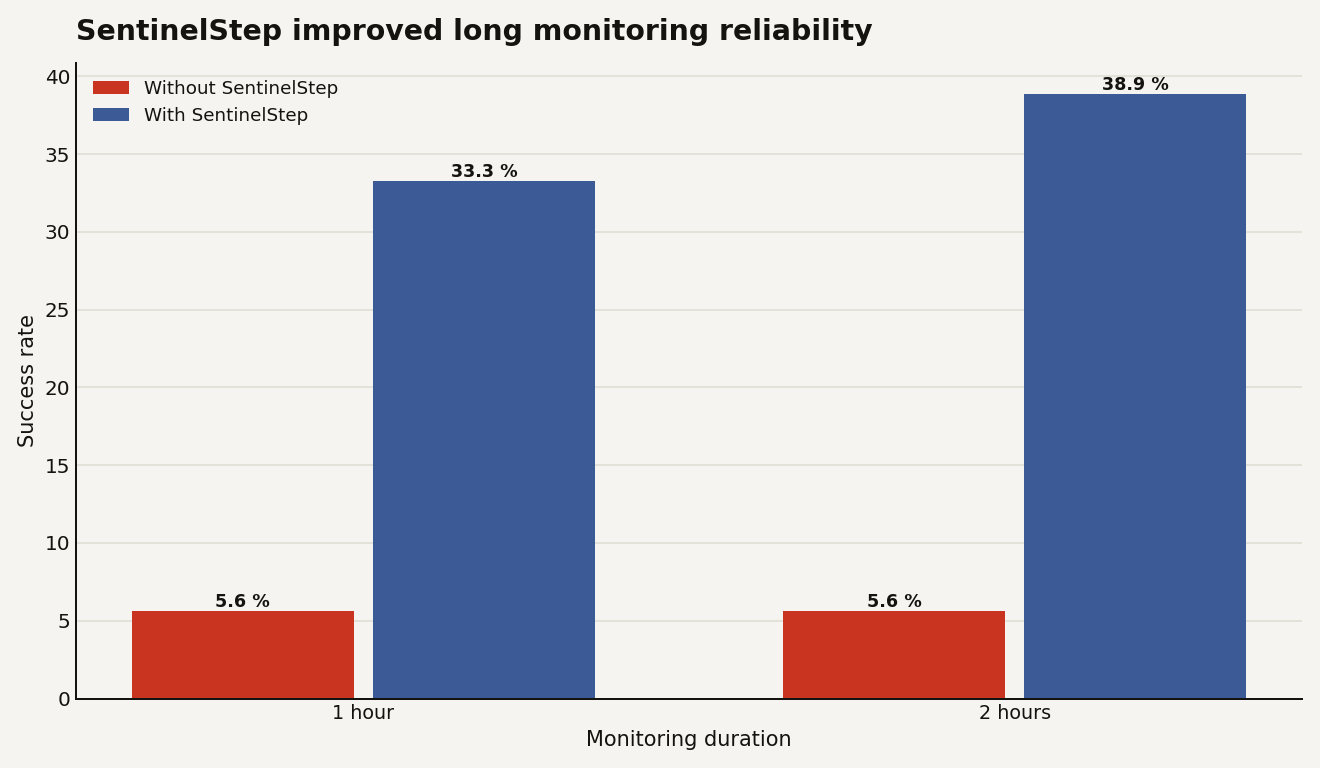
The lesson is that architecture changed the result by 33.3 percentage points on a 2 hour task before anyone changed the underlying product story. Waiting is an agent capability, but it is also a systems design choice.
That puts SentinelBench next to web-agent benchmarks like WebArena and OSWorld, but with a different stress test. WebArena's arXiv paper released 812 tasks and reported a best GPT-4 based end-to-end success rate of 14.41 percent versus 78.24 percent for humans. OSWorld's arXiv paper built 369 computer tasks across real web and desktop apps. Those benchmarks ask whether agents can move through interfaces and execute. SentinelBench asks whether they can keep their place while time passes.
That sounds smaller. For production, it matters a great deal.
Monitoring agents have to pace
A demo agent can sprint. A monitoring agent has to pace.
A browser agent asked to buy a ticket, file a form or summarize a web page can spend its full context and tool budget immediately. That is often ugly, but at least the task shape is bounded. A monitoring agent gets a condition like: tell me when a vendor updates the portal, when a customer replies, when the calendar slot opens, when the price crosses 500 dollars, when the incident page flips from investigating to resolved.
The naive implementation is a loop:
every N seconds:
  open the page
  inspect the state
  ask the model if the condition is true
  if yes, act
  if no, repeat
That code is honest. It is also a trap. It creates three production problems.
First, token spend scales with elapsed time, not task difficulty. A 10 minute wait and a 10 hour wait may require the same final action, but the second can be dozens or hundreds of model calls if you poll blindly. That is where agent cost stops looking like inference and starts looking like a cron job with a graduate degree.
Second, context gets stale or bloated. Microsoft Research's SentinelStep design explicitly resets agent state between checks to avoid context overflow, while preserving the information needed for the next monitoring pass. The Magentic-UI project page on GitHub describes the system as a research prototype for web and coding tasks that may require monitoring, with user control and approval for sensitive actions.
Third, responsiveness has a real business cost. If a support agent notices an enterprise customer reply 45 minutes late, the product did not fail in the benchmark sense. It failed in the account manager's calendar. If a procurement agent misses a short inventory window, the model's final answer quality is irrelevant.
For builders, the practical consequence is blunt: your agent scheduler is now part of your product surface. The thing that decides when to wake the model affects cost, latency, trust and safety. Treat it like infrastructure, not glue code.
This is also why Data Today has been skeptical of agent success stories that only count completed demos. In our earlier piece on agents that work too hard, the problem was wasted effort inside a task. SentinelBench extends that critique across time. If your agent cannot distinguish useful idleness from failure, your dashboard will fill with activity while your margin leaks out of the API bill.
One shift for agentic roadmaps
If you are building agentic workflows, SentinelBench should push one feature up your backlog: explicit monitoring semantics.
Do not hide monitoring inside a general agent loop. Make it a first-class step with its own contract. The user or planner should define the action, the condition and the polling policy. The system should persist the minimum state needed between checks. The evaluator should log enough to tell whether the agent succeeded by being smart or by hammering the environment.
Here is what that means in practice:
- For your codebase: split monitoring from acting. The monitor checks state and emits an event. The actor handles the event. This gives you separate retries, logs and safety approvals.
- For your roadmap: add latency and cost targets to every long-running agent feature. A task is not done when it completes once in staging.
- For your infra budget: track tool calls per hour, model calls per hour and total elapsed time. Completion rate without resource use is a vanity metric for monitoring tasks.
- For your hiring: the person who understands queues, schedulers, backoff and observability may matter more than the person who can squeeze 2 more points out of a prompt.
- For your moat: reliable waiting is unglamorous, but it is sticky. Customers remember the system that caught the thing on time.
Magentic-UI is a useful reference architecture because it exposes the orchestration layer instead of pretending the model alone owns the workflow. In Microsoft's Magentic-UI announcement, the team described an orchestrator, a WebSurfer, a Coder and a FileSurfer, plus human approval for sensitive actions. That split is not just a safety story. It gives the product places to attach monitoring policy.
The bigger product read is that agent evaluation is moving from answer quality to operating behavior. SentinelBench measures task completion, reaction time and resource use. Those are operational metrics. They map to support SLAs, cloud cost and customer annoyance much more directly than a leaderboard score.
A founder deciding whether to ship a monitoring agent should ask four questions before choosing a model:
- What is the maximum acceptable delay after the trigger event?
- What is the maximum cost per monitored item per day?
- What information must survive between checks?
- What action requires human approval when the condition fires?
If you cannot answer those, a larger context window will not save you. It may only let the agent carry more confusion for longer.
A small in-house test runner first
Start with a small in-house SentinelBench-style test runner. You do not need 100 tasks on day 1. You need the shape.
Pick 10 workflows from your product that involve waiting: a reply arrives, a status changes, a threshold crosses, a slot opens, a file appears, a payment clears. Script the environment so the trigger happens at known times. Run your agent under at least 3 polling policies: aggressive, conservative and adaptive. Then score four numbers.
The first number is completion rate. This is the familiar one. Did the agent eventually do the right thing?
The second is reaction delay. If the event happened at 10:00:00 and the agent acted at 10:07:30, your delay is 450 seconds. For some workflows, that is fine. For incident response, it may be embarrassing.
The third is resource use. Count model calls, browser actions, page loads and tool calls. If two agents both complete 80 percent of tasks, the one using one-tenth the calls is the product candidate.
The fourth is false action rate. Monitoring agents can be dangerous because they wait near real workflows. A bad summary is annoying. A bad trigger can send the email, place the order, escalate the ticket or ping the executive channel at 3:00 a.m.
SentinelBench's 100 task design is useful because it makes those tradeoffs visible under controlled time changes. The caveat is also clear: synthetic environments are not production. Real web apps have auth expiry, rate limits, visual redesigns, noisy notifications and adversarial content. The benchmark can tell you whether your agent has a timing strategy. It cannot certify that your vendor portal automation is safe.
That is the bet worth making. Use SentinelBench as a design pressure, not as a launch certificate.
Patience will be the moat
The next agent moat will come from controlled attention.
SentinelBench is valuable because it attacks a quiet assumption in agent design: that action is the default and waiting is absence. In real operations, waiting is work. The system that checks less, reacts on time and leaves an audit trail will beat the one that thrashes through tabs to look productive.
If you are shipping agents in 2026, build for the boring interval between instruction and trigger. That is where the demo ends and the product starts.
Sources
- arXiv: SentinelBench: A Benchmark for Long-Running Monitoring Agents
- Microsoft Research: Tell me when: Building agents that can wait, monitor, and act
- GitHub: microsoft/magentic-ui
- Microsoft Research: Magentic-UI, an experimental human-centered web agent
- arXiv: WebArena: A Realistic Web Environment for Building Autonomous Agents
- arXiv: OSWorld: Benchmarking Multimodal Agents for Open-Ended Tasks in Real Computer Environments