A coding agent default is not a small UI choice when the editor is where your secrets, terminals, tests, and half-finished ideas already live. VS Code Autopilot now sits in that blast radius.
VS Code Autopilot is Microsoft's permission mode for coding agents that can act without asking you to approve every step. In the VS Code 1.124 release notes, Microsoft says Autopilot is now enabled by default and that Advanced Autopilot can loop up to 3 times before stopping. That is the key number. The bigger story is that agent autonomy just moved from a deliberate toggle to the default path inside the most used developer environment.
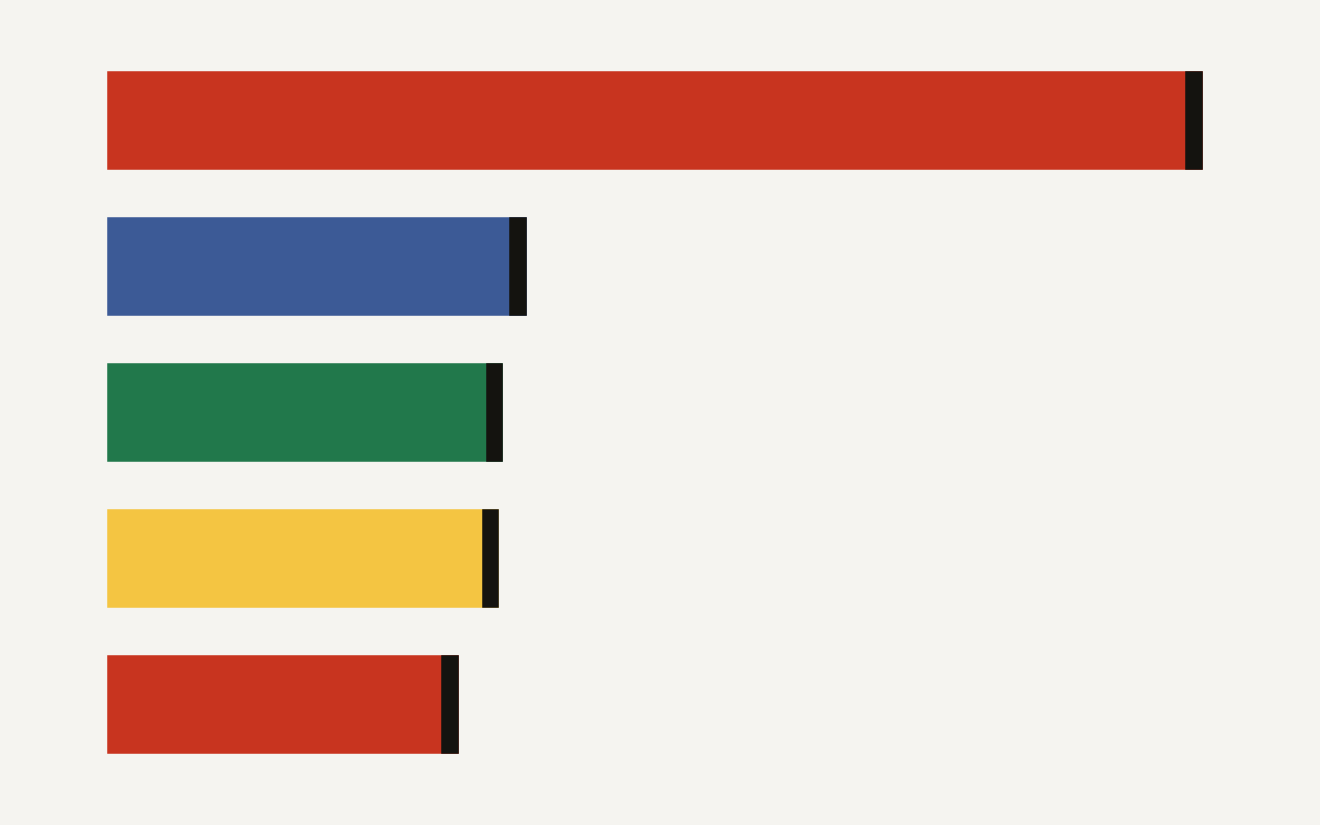
The surface area is enormous. Stack Overflow's 2025 Developer Survey says Visual Studio Code was used by 75.9 percent of respondents, while the next named environments in its top five were Visual Studio at 29 percent, Notepad++ at 27.4 percent, IntelliJ IDEA at 27.1 percent, and Vim at 24.3 percent. The chart below shows why a default in VS Code lands differently from a feature in a niche agent IDE: it reaches the center of the developer workflow.
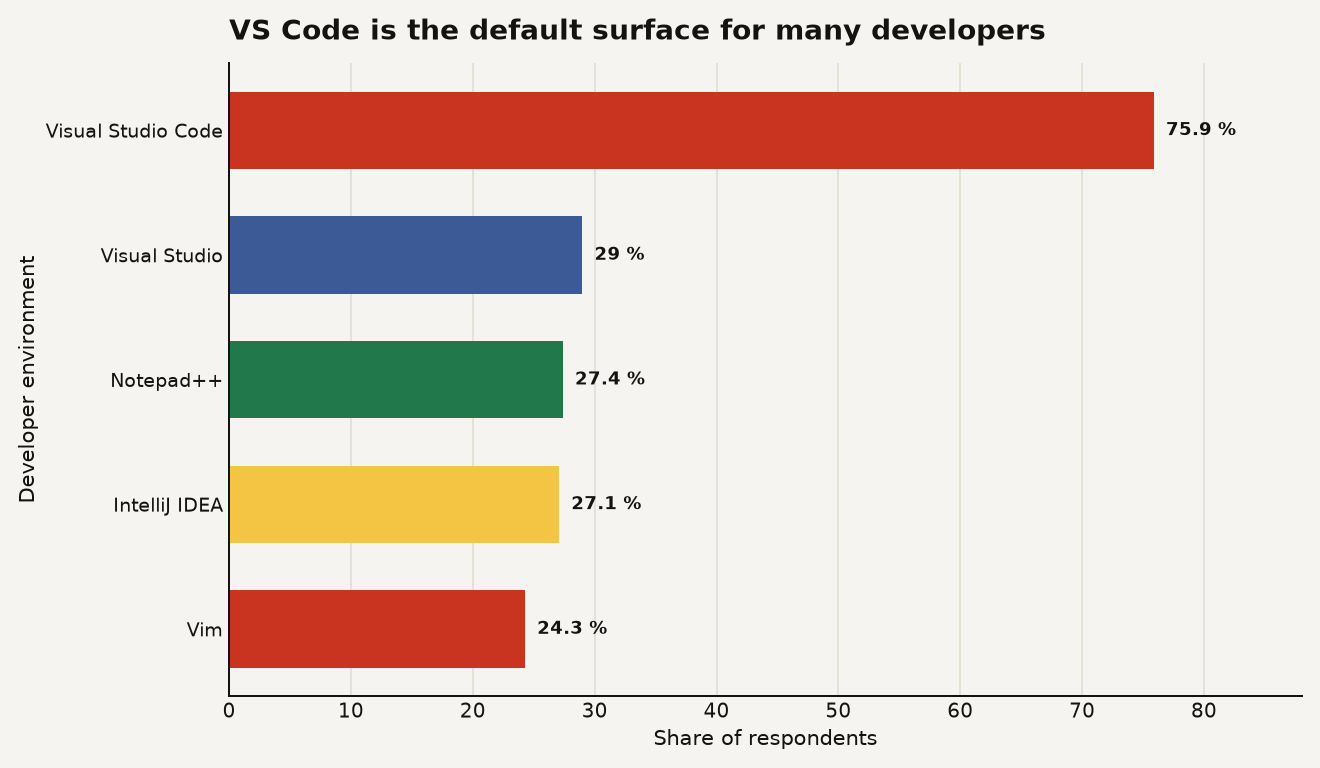
This is not an anti-agent argument. Autonomy is useful. Parallel sessions are useful. Fewer approval popups are useful when the task is scoped and the repo is isolated. But defaults are governance. If you ship software with a team, VS Code 1.124 should trigger a quick policy review before it triggers a productivity victory lap.
What did Microsoft change in VS Code 1.124?
Microsoft shipped VS Code 1.124 on June 10, 2026 with three agent-facing changes that belong in the same mental bucket: agents get more autonomy, agent sessions become easier to queue, and the editor becomes a stronger control plane for multiple agent jobs.
First, Autopilot is enabled by default. Microsoft describes Autopilot as one of the chat permission levels that lets agents act autonomously without explicit user approval for each action, and the 1.124 notes say organizations can still control visibility and usage through chat.tools.global.autoApprove while users can set the default permission level with chat.permissions.default.
Second, Advanced Autopilot changes how the agent decides that a task is done. Instead of relying only on fixed rules, Microsoft says a small utility model reads the chat transcript and decides whether the task is complete. To keep the loop bounded, Advanced Autopilot stops after 3 loops. That cap matters. Open-ended agent loops are where costs, weird edits, and test-suite roulette go to breed.
Third, VS Code adds background send for new sessions. In the Agents window, pressing Alt+Enter starts a new request in the background and immediately resets the new session view so you can compose another one. Microsoft says each started session appears in the session list once it commits. The workflow shift is plain: one developer can queue multiple independent agent tasks without waiting for the first session to load.
There are also smaller workflow changes that reinforce the same direction. VS Code 1.124 adds Ctrl+R or Cmd+R session picking, Ctrl+1 through Ctrl+9 session focus, automatic session layout restore after reload, and a Close All Sessions command on Ctrl+K Ctrl+W. In the integrated browser, agents can now type text and submit it in 1 tool call through the typeInPage tool, where the old path required 2 separate calls.
Here is the compact read:
| Change in VS Code 1.124 | Number to remember | Practical meaning |
|---|---|---|
| Autopilot enabled by default | 1 default permission path | Fewer pauses before agent action |
| Advanced Autopilot loop cap | 3 loops | Better bounds on autonomous iteration |
| Background send | 1 Alt+Enter shortcut | Easier queuing of parallel tasks |
| Session focus shortcuts | 1 to 9 | Agents become a navigable work surface |
| Browser submit tool | 1 tool call instead of 2 | Less friction for browser-driving agents |
The product direction is coherent. VS Code is not just adding a chatbot. It is becoming a dispatcher for local, background, and cloud-like agent work. If you want the broader protocol backdrop, our explainer on MCP for data engineers covers why tool access, not prose generation, is where agent systems become operationally interesting.
Why does a default setting change the risk model?
Defaults decide what happens on tired Tuesdays. Most developers do not audit every release note before accepting an update, and many teams do not centrally manage editor AI settings with the same seriousness they bring to CI secrets or GitHub branch protection.
That is the uncomfortable bit. VS Code 1.124 does give organizations control hooks. The official notes name chat.tools.global.autoApprove for Autopilot visibility and usage, plus chat.permissions.default for the default permission level. The Enterprise section also says VS Code now reads plugin policy from the same configuration file used by Copilot CLI enterprise plugin standards, with three policy-backed settings introduced in 1.123: enabled plugins, extra marketplaces, and strict marketplaces.
Good. Use them.
The risky version of this release is not an evil agent deleting prod. The ordinary failure modes are duller and more likely:
- An agent edits 14 files when the task needed 3, and review fatigue lets a bad change through.
- A background session runs tests, installs packages, or hits networked tools without the developer watching each step.
- A plugin or tool marketplace setting quietly expands what an agent can call.
- A junior developer treats Autopilot output as a patch, not a proposal.
- A team burns premium AI credits on retries, loops, and parallel sessions that nobody budgeted for.
Stack Overflow's 2025 survey gives the right frame. 66 percent of developers said their top AI frustration was solutions that are almost right, and 45.2 percent said debugging AI-generated code is more time-consuming. Those numbers are not a reason to ban agents. They are a reason to bind agents to reviewable, reversible workflows.
Autopilot's 3 loop cap is a meaningful safety rail. It bounds one class of runaway behavior. It does not solve the harder problem: a bounded agent can still make a plausible bad edit. A 3-step autonomous path that confidently changes authentication middleware is still a path you must review.
The best mental model is a very eager contractor with shell access. You can get leverage from that contractor, but you do not give them the production SSH key and say, "surprise me."
Why should teams care if agents can run in parallel?
Parallel agent sessions change the unit economics of software work. A single developer can now run a refactor, a test repair, and an investigation at the same time, then review the diffs as they land. That sounds small until it hits planning.
The Copilot CLI sessions documentation says VS Code can run agent sessions in the background using GitHub Copilot CLI, and that multiple Copilot CLI sessions can tackle independent tasks simultaneously. It also distinguishes two isolation modes: Worktree isolation and Folder isolation. In Worktree isolation, VS Code creates a Git worktree in a separate folder, while Folder isolation applies changes directly to the current workspace.
That distinction should drive policy. Worktree isolation is the safer default for most product teams because it gives each agent a sandboxed patch surface. Folder isolation is tempting for speed, but it mixes agent changes with your active work. If you have ever lost 20 minutes untangling your own half-staged files, imagine adding two autonomous sessions to that soup.
The business consequence is bigger than code hygiene. Parallel agents can compress the time between ticket creation and reviewable patch, but they can also shift bottlenecks into review, testing, and product judgment. If your team already struggles to review 15 pull requests a day, giving everyone a way to create 30 almost-ready patches is not automatically progress.
For builders, the interesting workload split looks like this:
- Good Autopilot jobs: scoped migrations, dependency updates, test repairs, fixture generation, documentation sync, small UI variants, and investigations that end in Markdown.
- Risky Autopilot jobs: auth changes, billing logic, data deletion paths, permission model edits, cryptography, deployment scripts, and anything touching production credentials.
- Great parallel jobs: independent tasks with clear acceptance checks, such as "update these 6 snapshots" or "make the same lint fix across 12 files."
- Bad parallel jobs: overlapping refactors across the same module, especially when humans are also editing the branch.
The moat question is not whether your team uses agents. Everyone serious will use them. The moat is whether your team builds the boring machinery around them: task specs, test gates, isolation defaults, code ownership, audit logs, and review discipline. That is where agent speed becomes shipped quality instead of a pile of clever diffs.
What should you change before rolling this to a team?
Start by treating VS Code 1.124 like a rollout, not an editor update. You do not need a 40-page policy. You need 5 concrete decisions before Autopilot becomes muscle memory.
First, set a team default permission level. If your organization manages VS Code settings, decide whether chat.permissions.default should be Autopilot, Bypass Approvals, or Default Approvals. For production repos, Default Approvals is a sane baseline until the team has measured how agents behave on your codebase. For sandbox repos, Autopilot may be fine.
Second, control tool and plugin access centrally. Microsoft says enterprise admins can manage chat plugins and plugin marketplaces through policy-backed settings, including an allowlist and a strict marketplace mode. That matters because agents are only as safe as the tools they can call. A model with no dangerous tools is chatty. A model with file, shell, browser, package, and internal API tools is an operator.
Third, make worktree isolation the normal path for background agents. The Copilot CLI docs say Worktree isolation uses a separate Git worktree and automatically sets the permission level to Bypass Approvals, while Folder isolation exposes all three permission levels, including Autopilot. For a team, the key is not the label on the permission mode. The key is whether the agent's edits are isolated from a developer's active workspace.
Fourth, add an agent label to pull requests. It can be simple: agent-assisted, autopilot, or copilot-cli. The label is not a scarlet letter. It tells reviewers to check the task prompt, inspect generated tests, and watch for broad edits outside the requested scope. If you already require security review on certain paths, extend that rule to agent-made changes touching those paths.
Fifth, put a spending guardrail in place. Microsoft warns in nearby VS Code AI documentation that larger context windows can consume more tokens per interaction, and agent loops multiply that effect. A 3-loop cap is useful, but a developer queuing 8 background sessions can still create a bill that surprises a manager at the end of the month.
One practical rollout plan for a 10-person engineering team:
- Week 1: leave Autopilot off for production repos and allow it in sandbox repos.
- Week 2: permit Worktree isolation for scoped tickets under 200 changed lines.
- Week 3: require the
agent-assistedPR label and track review defects. - Week 4: allow Autopilot only for task classes that passed review cleanly.
That is not bureaucracy. That is how you turn a default into a controlled advantage.
What happens next if the editor becomes the agent control plane?
VS Code 1.124 points to a future where the editor is less a place where you type every line and more a cockpit for agent sessions. The buttons tell the story: background send, session restore, session picker, position-based focus, close all sessions. This is queue management.
The next fight will be over observability. If agents run in parallel, teams will need to answer simple questions after the fact. Which prompt started this change? Which tools did the agent call? Which files did it touch? Did it run tests? Did it browse external pages? Did it ask for permission? Which model made the stop decision after loop 2?
Some of that exists already in session history and tool activity. The Copilot CLI docs say remote control streams session history, tool activity, and status updates to a linked GitHub task page when enabled. That is the right shape. The missing enterprise layer is a clean audit story across local agents, background sessions, cloud agents, plugins, MCP servers, and pull requests.
If Microsoft gets that layer right, VS Code keeps its position while agent-first competitors fight over taste. If it gets it wrong, teams with security pressure will push agent work into narrower tools where the audit trail is easier to reason about.
Do not bet against VS Code here. A tool used by 75.9 percent of Stack Overflow survey respondents has distribution that specialist AI IDEs would love to rent for a week. But distribution cuts both ways. When the default changes in VS Code, it changes the industry's baseline behavior.
The quiet line to draw now
Let agents move fast in places where reversal is cheap. Make them ask in places where accountability is expensive. VS Code Autopilot makes the first path easier by default. Your job is to make sure the second path still has a gate.