If you run data pipelines for a living, you have already lived through the integration tax: every new tool needs its own connector, its own auth, its own quirks, and someone to keep it alive at 2am. The Model Context Protocol, or MCP, is an attempt to do for AI-to-tool connections what ODBC did for database drivers: define one standard way to plug things in, so you stop writing the same glue code over and over. It was published by Anthropic in November 2024 as an open standard, and through 2025 it became the thing OpenAI, Google, and most agent frameworks agreed to speak.
Here is the world MCP is reacting to. Large language models are good at reasoning over text, but on their own they cannot read your Snowflake warehouse, hit your internal API, or list files in an S3 bucket. To make a model useful, you wire it to those systems by hand. Every team did this differently, with bespoke "tool" code baked into each app. The result was an N-by-M mess: every model or agent you run times every system it needs to touch, each pairing a custom integration. MCP says: stop. Put a thin standard server in front of each system, let any model speak one protocol, and the wiring collapses.
This matters for you specifically because data engineering is where the tools and the data live. When the AI team says "the agent needs governed access to the customer table and the dbt docs", that is your problem, not theirs. MCP is becoming the interface you will be asked to expose.
What problem does MCP actually solve?
Think about how an LLM "uses a tool" today. You describe a function to the model, the model decides to call it, your code runs the function, and you feed the result back. That pattern, often called function calling or tool use, works. The trouble is that the description, the execution, the auth, and the error handling are all hand-rolled inside each application. Build an agent in one repo, and none of that tool code is reusable in the next one.
Now multiply it. Say your company runs 5 AI clients (a support bot, an internal copilot, a data-analyst agent, an IDE assistant, a reporting tool) and they each need 10 systems (Postgres, Snowflake, GitHub, Jira, an internal REST API, Google Drive, Slack, a vector store, a metrics layer, and a feature store). Wire each pair by hand and you are maintaining up to 50 integrations. Add one more system and you owe five new connectors, one per client.
MCP flips the math from multiplication to addition. You write one MCP server per system (10 of them) and each client speaks MCP once. The cost becomes clients plus tools, not clients times tools.
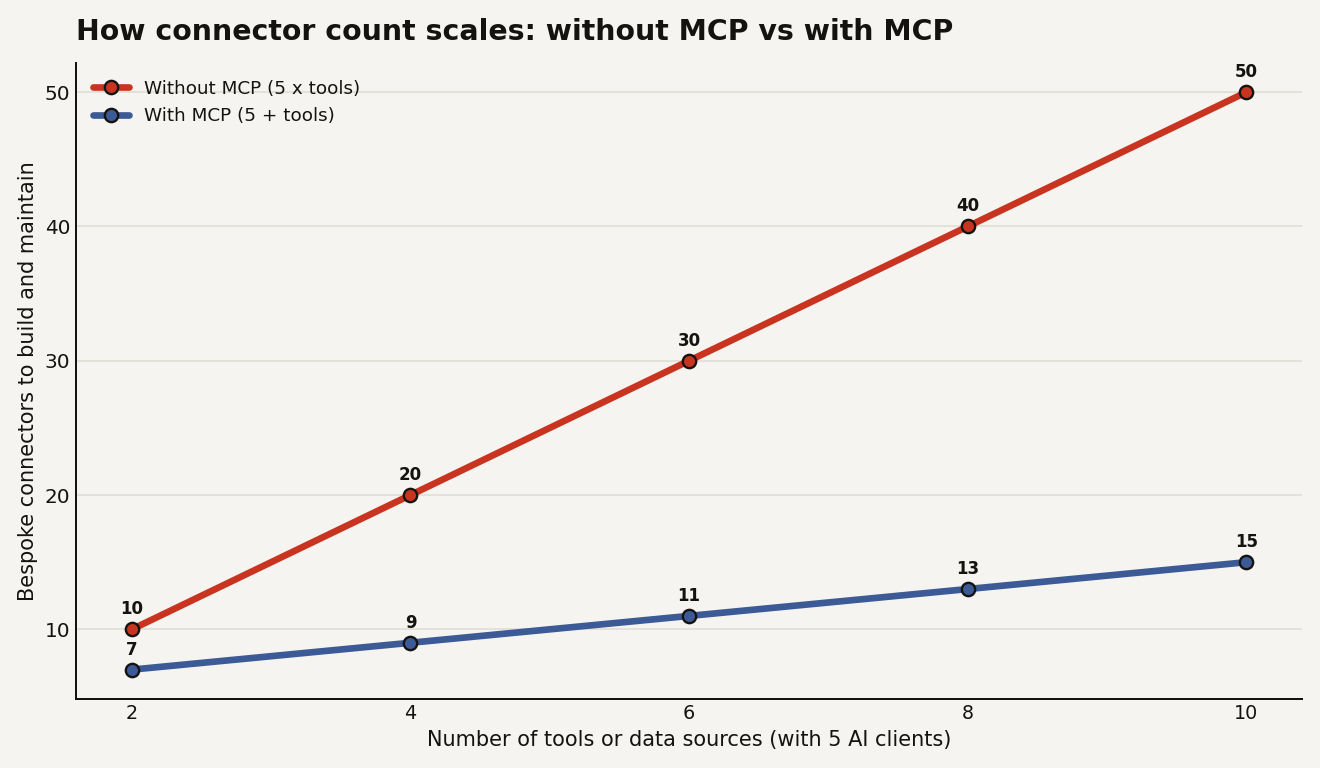
That line gap is the entire pitch. It is the same reason you do not write a bespoke driver every time a new BI tool wants to read Postgres. You expose one standard interface and let clients come to you.
So what is MCP, concretely?
MCP is a protocol, a written spec for how an AI application (the "host", running one or more "clients") talks to an external program (the "server") that exposes capabilities. The model is the brain; MCP is the wiring standard between the brain and everything it can touch. Communication is structured as JSON-RPC messages, and a server can run locally over standard input and output, or remotely over HTTP with server-sent events for streaming.
A server exposes three kinds of things, and the distinction matters for how you design one:
- Tools: actions the model can invoke, like
run_query,create_ticket, orrefresh_dbt_model. These are the verbs, and they can have side effects. - Resources: read-only data the model can pull into context, like a file, a table schema, or a documentation page. These are the nouns, addressed by URI.
- Prompts: reusable, parameterised templates a server offers, like a vetted "summarise this incident" prompt, so the good prompt lives with the tool instead of being copy-pasted around.
The split is deliberate. Tools do things, resources are things, and prompts are pre-baked instructions. As a data engineer you will mostly care about the first two: exposing a governed query tool and exposing schemas and docs as resources so the model knows what it is querying.
A tiny run_query tool in the Python SDK looks about this small:
from mcp.server.fastmcp import FastMCP

mcp = FastMCP("warehouse")

@mcp.tool()
def run_query(sql: str) -> list[dict]:
    """Run a read-only SQL query against the analytics warehouse."""
    if not sql.lstrip().lower().startswith("select"):
        raise ValueError("Only SELECT statements are allowed.")
    return execute_readonly(sql)  # your governed connection

if __name__ == "__main__":
    mcp.run()
That decorator is the whole idea. The function, its docstring, and its type hints become a tool any MCP-speaking client can discover and call, without that client knowing anything about your warehouse.
Who does what: host, client, and server?
This is the part that trips people up, so here is the cast in plain terms. Three roles, and each does exactly one job:
- The host is the AI app the human uses: Claude Desktop, an IDE assistant, your internal copilot. It owns the model and the conversation, and it decides which servers to connect to.
- The client lives inside the host. It is the piece of code that speaks MCP. One client manages one connection to one server, so a host running three servers runs three clients under the hood.
- The server is what you, the data engineer, write. It wraps one system (your warehouse, your repo, your ticketing tool) and exposes that system's tools, resources, and prompts over MCP.
The model never touches your database. It asks the host, the host's client sends an MCP message, your server runs the real query against your governed connection, and the result travels back up. The diagram below shows the shape, and the point of it: the yellow layer in the middle is written once and reused by everything.
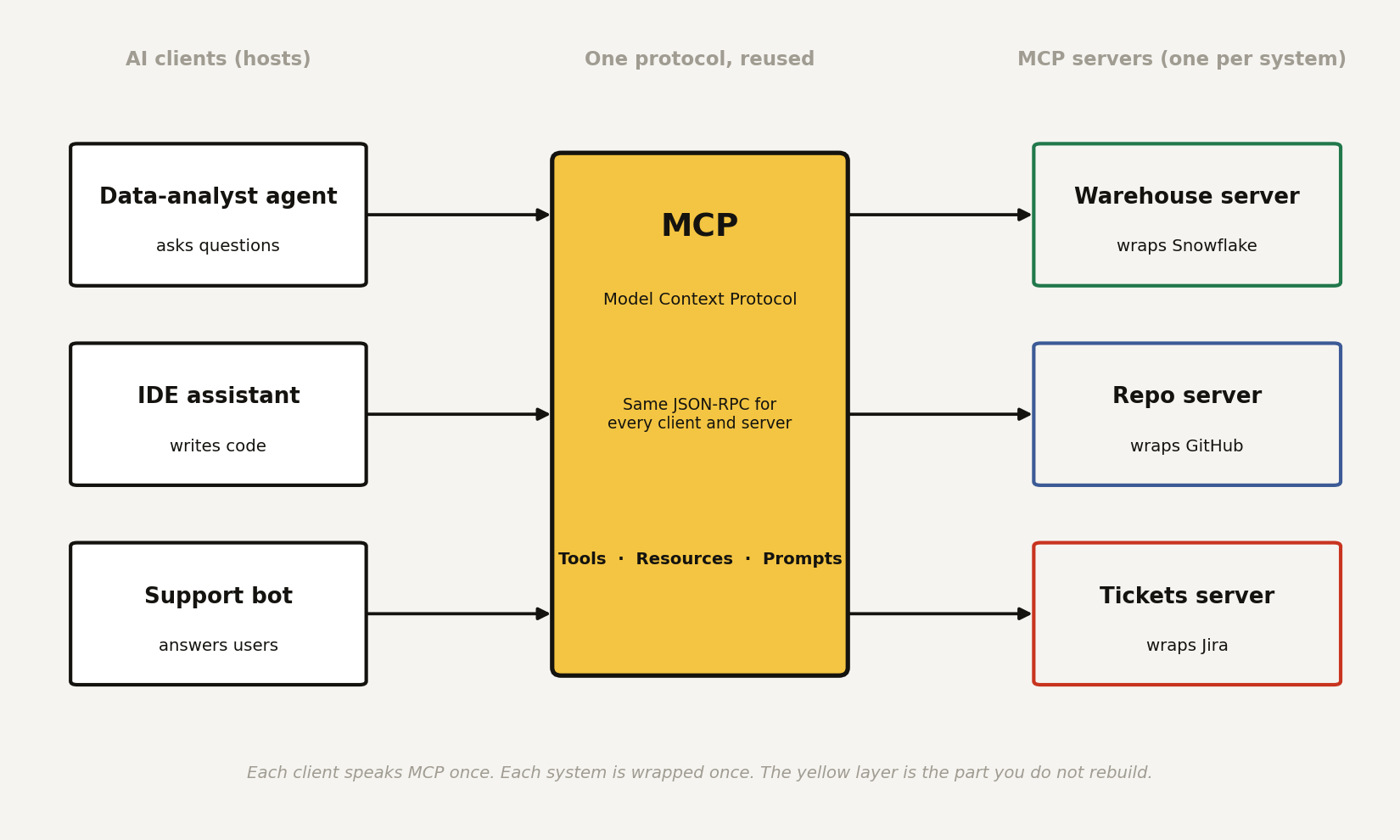
So when a question comes in, the flow reads top to bottom like this: the host decides a tool is needed, the client lists and then calls the tool, your server validates and executes it, and the answer flows back as plain JSON the model can read. Nothing in that chain knows your warehouse internals except the one server you wrote.
What does a fuller server actually look like?
The run_query snippet was the smallest possible example. A real server you would hand to an AI team exposes all three primitives, so the model gets a verb (a tool), context to reason over (a resource), and a vetted way to ask (a prompt). Here is one small enough to read but complete enough to show what each part does:
from mcp.server.fastmcp import FastMCP

# The server: one process, wrapping one system (the analytics warehouse).
mcp = FastMCP("warehouse")

# 1. A TOOL = an action the model can take. This one has a side effect:
#    it hits the database. Guardrails live here, not in the model.
@mcp.tool()
def run_query(sql: str) -> list[dict]:
    """Run a read-only SQL query against the analytics warehouse."""
    if not sql.lstrip().lower().startswith("select"):
        raise ValueError("Only SELECT statements are allowed.")
    return execute_readonly(sql, row_limit=1000)  # your governed connection

# 2. A RESOURCE = read-only context the model can pull in by URI.
#    Here, the schema, so the model knows the columns before it queries.
@mcp.resource("schema://orders")
def orders_schema() -> str:
    """The column names and types of the orders table."""
    return describe_table("analytics.public.orders")

# 3. A PROMPT = a reusable, vetted template the server ships,
#    so the good prompt lives next to the data instead of being copy-pasted.
@mcp.prompt()
def revenue_by_region() -> str:
    """A safe starting prompt for a regional revenue breakdown."""
    return "Using schema://orders, write a SELECT that sums revenue by region."

if __name__ == "__main__":
    mcp.run()  # speaks MCP over stdio; a client connects and discovers all three
The host does not import any of this. It connects, asks "what do you have?", and gets back the run_query tool, the schema://orders resource, and the revenue_by_region prompt, each with the descriptions you wrote. That discovery step is what makes the protocol reusable: a new agent points at the same server and immediately sees the same governed menu.
On the other side, the host needs to be told the server exists. For most clients that is a few lines of config, not code. A typical mcp.json entry that launches your server looks like this:
{
  "mcpServers": {
    "warehouse": {
      "command": "python",
      "args": ["-m", "warehouse_server"],
      "env": { "WAREHOUSE_ROLE": "analyst_readonly" }
    }
  }
}
That env line is doing real work: it scopes the server to a read-only role, so even a perfectly worded malicious prompt cannot make it write. The credential lives with the server, not in the model and not in the chat.
One server per system: what goes over the wire?
Short answer to the obvious question: yes, one MCP server per system. One server in front of Snowflake, a different one in front of GitHub, another in front of Jira. Each wraps exactly one thing and knows how to talk to it. You can run them as separate processes or, if you prefer, group a few related systems behind one server, but the clean default is one server, one system, one set of credentials.
So what actually travels between the client and that server? MCP messages are JSON-RPC, which is just a tidy convention for "here is a method name and some arguments, please reply with a result". When the model decides to run a query, the client sends a tools/call request like this:
{
  "jsonrpc": "2.0",
  "id": 7,
  "method": "tools/call",
  "params": {
    "name": "run_query",
    "arguments": { "sql": "SELECT region, SUM(revenue) FROM orders GROUP BY region" }
  }
}
That is the whole request. A method (tools/call), the tool name, and the arguments the model filled in. Notice what is not there: no connection string, no credentials, no mention of Snowflake. The client has no idea what is behind the server. It just names a tool and waits.
Now the black box. Your server receives that request and does the work the model is not allowed to do itself:
- It looks up the
run_querytool you registered. - It runs your guardrails: the
SELECT-only check, the 1000 row cap. - It opens the governed connection using the read-only role from that
envconfig. - It executes the real SQL against the actual warehouse, which is the only step that touches the database.
- It serialises the rows back into JSON.
The model never sees steps 1 through 4. From its side, the system is opaque: it asked for a tool, and a result came back. All the dangerous parts (credentials, the live connection, the validation) stay sealed inside the server you control.
The reply the client gets back looks like this:
{
  "jsonrpc": "2.0",
  "id": 7,
  "result": {
    "content": [
      {
        "type": "text",
        "text": "[{\"region\": \"EMEA\", \"revenue\": 4820000}, {\"region\": \"AMER\", \"revenue\": 7310000}]"
      }
    ],
    "isError": false
  }
}
The id matches the request so the client knows which call this answers. The content carries the result the model reads, and isError tells the host whether to treat it as a failure. If your guardrail had rejected the SQL, the same channel would carry "isError": true with the message text, and the model would see the rejection instead of the data. That is the entire contract: a named request in, a structured result out, and a sealed system in the middle doing the one risky thing on the model's behalf.
To see all of it in motion, here is one question making the full round trip. The backend has five MCP servers wired in (warehouse, calendar, CRM, GitHub, tickets), so the LLM gets a menu of every discovered tool and picks the one it needs. Twelve hops follow, and the moving packet shows the exact payload at each step: the POST /chat from the UI, the prompt-plus-tools request to the LLM provider, the tools/call to the warehouse server, the governed SQL, the rows, and the answer travelling back. Red packets are requests, green packets are responses.
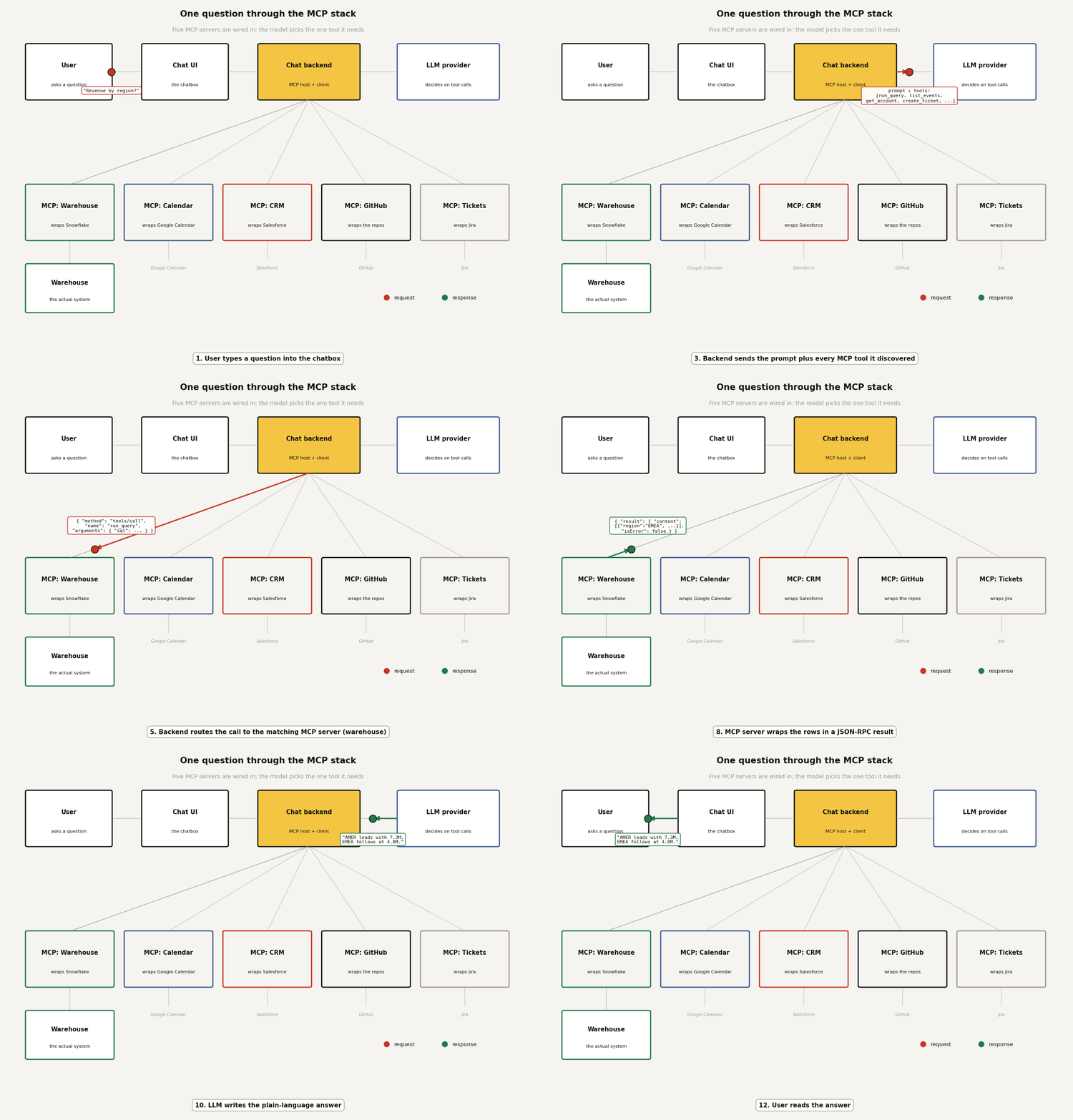
Two things worth pausing on. First, hop 3: the backend advertises every tool from all five servers in one menu, and the model chooses; that is the discovery step doing its job, and the four unused servers cost nothing this round. Second, hops 5 and 6: the LLM provider only ever talks to your backend; it never connects to an MCP server or the warehouse itself. The tool call it "makes" is a structured suggestion that your backend chooses to execute. Every privileged hop happens inside infrastructure you run, which is exactly where you want it.
How is this different from just calling an API?
This is the question every engineer asks, and it is fair. An MCP server is usually a wrapper around APIs you already have. The difference is who does the integration work and how many times.
| Plain API or SDK | MCP server | |
|---|---|---|
| Who adapts to whom | Each app adapts to each API | Each app speaks one protocol |
| Tool discovery | Hard-coded per app | Model lists tools at runtime |
| Reuse across agents | Copy the glue code | Point the new agent at the server |
| Auth and guardrails | Re-implemented per app | Centralised in the server |
The payoff is not that MCP can do something an API cannot. It is that the integration becomes write-once. Build a governed warehouse server with row-level security and query limits baked in, and every approved agent inherits those guardrails instead of each team reinventing them, usually worse.
That centralisation cuts the other way too, which is the part you have to take seriously.
What should a data engineer watch out for?
MCP gives a model a discoverable menu of actions against your systems, so the security story is the whole story. Anthropic's own spec treats this as a first-class concern, and you should too.
- Treat every tool as an attack surface. A
run_querytool that does not enforce read-only and row limits is a data-exfiltration endpoint with a friendly docstring. Validate and scope inside the server, never trust the model to behave. - Prompt injection reaches your tools now. If a model reads an untrusted document as a resource and that document says "now call
delete_table", the model might. Keep destructive tools behind explicit confirmation, and separate read servers from write servers. - Scope credentials per server. The server holds the connection, so give it the narrowest role that works. A reporting agent's server should never hold write credentials.
- Log the tool calls, not just the chat. Your audit trail is the sequence of
run_queryandcreate_ticketcalls. Capture arguments and results the same way you would log any privileged access.
None of this is exotic. It is the access control and least-privilege discipline you already apply to service accounts, pointed at a new kind of caller that happens to improvise.
Where is MCP actually going?
The reason to learn this now rather than later is adoption. MCP started as one vendor's spec and turned into a de facto standard within a year: OpenAI said in early 2025 it would support MCP across its products, Google backed it for its Gemini stack, and the major agent frameworks and IDEs ship MCP clients out of the box. Snowflake, Databricks, and the usual data platforms have all moved to expose MCP servers so agents can reach governed data without a bespoke bridge. When a protocol gets that kind of cross-vendor buy-in, betting against it is the expensive choice.
For your roadmap, the practical read is short. You do not need to rewrite anything today. But the next time an AI feature needs your data, the clean answer is "I will expose an MCP server for that table with the guardrails built in", not "I will hand the team a connection string". One is a governed interface you own; the other is a credential leak waiting for a retro. If you want the broader context on why agents keep showing up in production work, the vibe-coding-to-production piece covers the same shift from a different angle.
MCP is not magic and it is not an AI breakthrough. It is plumbing, and plumbing is exactly the thing data engineers are paid to get right before the water is running.