A tiny meter inside your editor says more about AI coding economics than another glossy agent demo.
The Copilot spend meter in VS Code 1.125 shows the percentage of your additional Copilot budget used inside the Copilot status dashboard. That sounds like housekeeping. It is really a price signal landing exactly where developers make expensive choices: in the editor, mid-flow, while asking an agent to chew through a repo. Microsoft shipped VS Code 1.125 on June 17, 2026, and the key number is 1,500 monthly AI credits for Copilot Pro under GitHub's new individual plan docs.
GitHub moved Copilot to usage-based billing on June 1, 2026, replacing the old premium request mental model with GitHub AI Credits consumed by input tokens, output tokens, and cached context. GitHub's April announcement said all Copilot plans would transition on June 1, 2026, with code completions and Next Edit suggestions staying included while chat, agents, CLI, Spaces, Spark, and similar features draw from the meter.
That distinction matters. Inline completion remains the cheap snack. Agent mode is the tasting menu with a credit card attached.
VS Code 1.125 adds budget visibility
VS Code 1.125 added a budget visibility feature. The release notes say the Copilot status dashboard now shows the percentage of your additional Copilot budget consumed, so you can adjust usage before hitting a configured limit. Microsoft describes that feature in the VS Code 1.125 release notes under Agents, alongside a link out to Copilot settings for detailed usage and budget management.
The timing is the story. GitHub's usage-based model had already gone live on June 1, 2026, and by June 17, 2026, VS Code was adding in-editor budget telemetry. GitHub's own community FAQ, opened on May 27, 2026, had already drawn 481 comments and 718 replies when the page was captured, which is a useful proxy for the level of developer heat around the rollout. The FAQ states that usage-based billing is in effect for all GitHub Copilot plans and that additional usage limits vary by plan, usage patterns, billing history, and account verification state.
The product change is small. The workflow change is large.
Before metered agents, many teams treated Copilot as a seat cost. You paid for the developer, then argued about adoption later. With AI credits, the spend profile moves closer to cloud infrastructure: usage spikes, model choice matters, and a few power users can consume a shared pool quickly. GitHub's organization docs say 100 Copilot Business users get a shared pool of 190,000 AI credits, rather than 100 isolated buckets, which means one team running heavy refactors can change the budget picture for everyone.
The individual plan ladder makes the new shape obvious. GitHub's docs list 1,500 monthly AI credits for Copilot Pro, 7,000 for Pro+, and 20,000 for Max, with paid plans using base credits first and then a flex allotment.
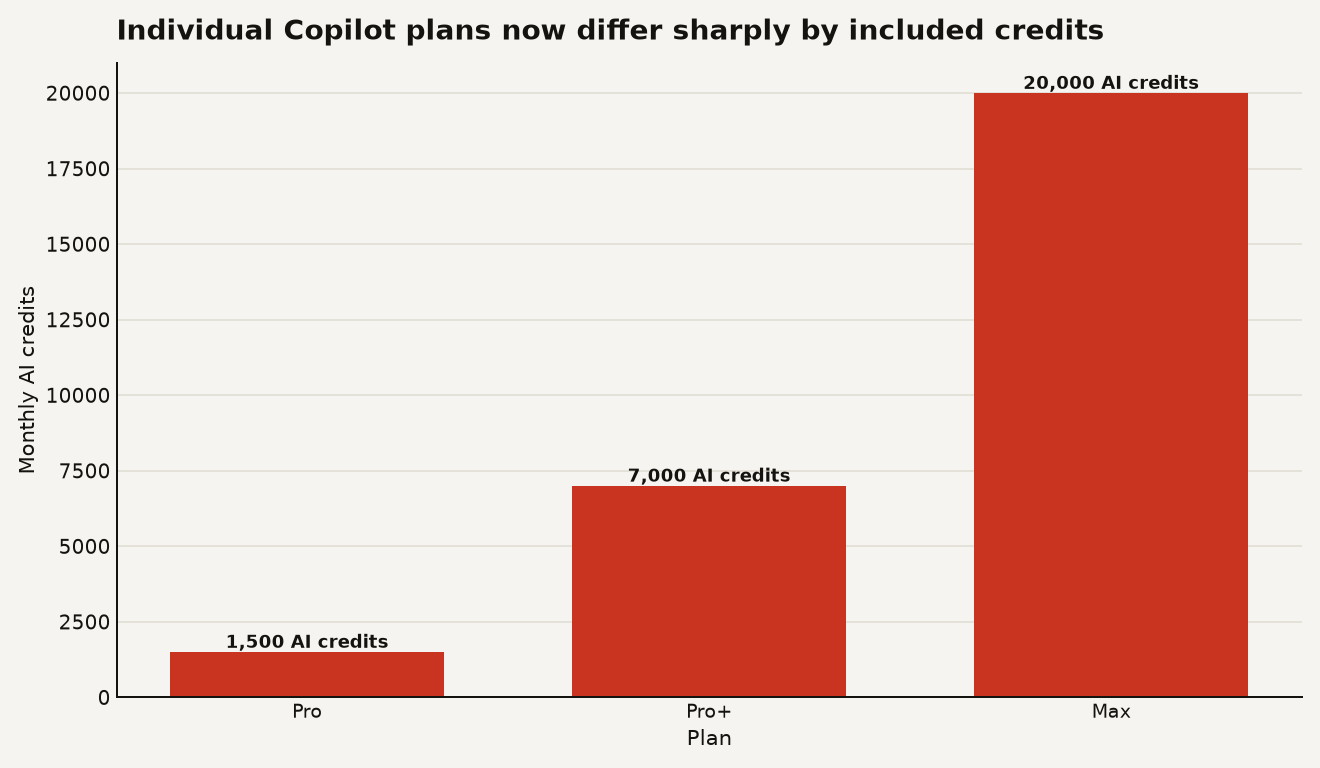
The chart above shows the first practical lesson: Pro+ is not a 3.9x jump from Pro in included usage. It is 4.7x, because Pro+ includes 7,000 credits against Pro's 1,500. Max is 13.3x Pro. If you sell an internal agent workflow to a team on the assumption that every developer is a Pro user, your cost model starts wrong.
Requests turned into token bills
The surprise comes from turning a request into a token bill. Under the legacy annual plan docs, Copilot Pro had 300 premium requests per month and Copilot Pro+ had 1,500 premium requests per month, with additional premium requests priced at $0.04 each. GitHub now labels that legacy request-based billing page as applying only to Pro and Pro+ annual subscribers who stayed on the old model after June 1, 2026, which makes the comparison useful mainly as history.
The new bill follows model rates. GitHub's pricing table says 1 AI credit equals $0.01, and it lists different per 1 million token prices for each model. A lightweight GPT-5.4 nano output costs $1.25 per 1 million tokens, while Claude Fable 5 output costs $50 per 1 million tokens in the same table.
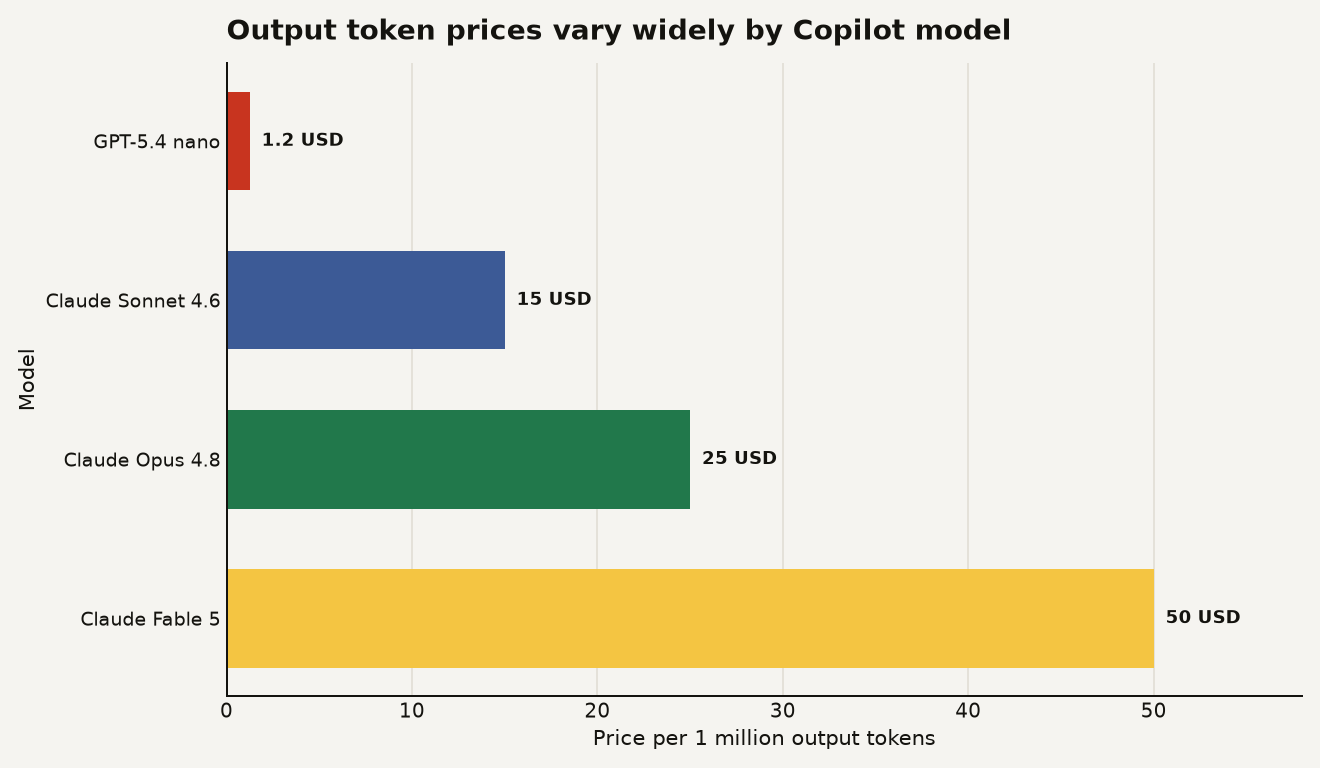
The chart above is the part builders should tape to the monitor. GitHub's current table puts GPT-5.4 nano output at $1.25 per 1 million tokens, Claude Sonnet 4.6 at $15, Claude Opus 4.8 at $25, and Claude Fable 5 at $50. That is a 40x spread between the cheapest and most expensive output price shown here, before you count input, cached input, or cache writes.
The meter helps because the expensive thing often looks like normal work. A developer asks for a plan, tells the agent to inspect a repo, steers it through a failing test, asks for a refactor, and then requests a PR summary. In the old mental model, that felt like a handful of prompts. In the new model, that can be a long context session with repeated model calls.
GitHub says Copilot code review is billed in two ways: token consumption uses AI credits, and the agentic infrastructure consumes GitHub Actions minutes. That matters for teams that already pushed review automation into protected branch workflows. A review bot can now hit both the AI budget and the CI budget, which makes it a finance event as much as a developer experience feature.
There is also a visibility mismatch. GitHub says older clients may display incorrect model pricing, inaccurate usage information, or outdated billing terminology, and the organization docs recommend at least VS Code 1.120 for the best usage-based billing experience. The new spend meter in 1.125 tightens that loop, but it still shows additional budget consumption rather than giving every prompt a clean itemized receipt in the editor.
That is the part to watch. Developers do not need another dashboard tab. They need a price cue before an agent starts a 20 minute repo crawl.
AI coding becomes an operating control
The meter turns AI coding from a perk into an operating control. If you run a product team, that changes how you budget, how you set defaults, and how you judge whether agentic workflows belong in the happy path.
GitHub's budget docs say a user-level budget caps a person's AI credit consumption across both the shared pool and metered phase, and a $0 user-level budget blocks the user immediately. The same docs warn that enterprise budgets cap metered charges after the shared pool is exhausted, so a 400 seat Copilot Business deployment at $19 per month still has $7,600 in license fees before any extra enterprise budget is counted.
Here is the practical read for builders:
- Your default model is now a cost policy. If a workflow silently routes routine questions to a premium model, you will pay for taste, not output quality.
- Your agents need spending tests. A pull request that adds a new agent loop should include a budget fixture: expected model, expected token range, retry ceiling, and failure behavior.
- Your team needs two lanes. Use cheap models for explanation, search, and boilerplate. Reserve expensive models for architecture, hairy migrations, and tasks where correctness beats volume.
- Your procurement story changes. A $19 Copilot Business seat with pooled credits can be a good deal for light users, but heavy agent users should be modeled like cloud workloads.
- Your security review should include cost abuse. Prompt injection that burns credits is still an incident, even if it never exfiltrates a token.
This also reframes the agent safety conversation. Data Today's earlier read on VS Code Autopilot risk argued that default agent behavior belongs inside a trust boundary. Metered billing adds a second boundary: how much autonomous work the tool can buy before a human notices.
The business consequence is uncomfortable but useful. AI coding assistants are starting to look less like SaaS seats and more like developer-controlled compute. You would not let every engineer spin up any GPU instance without quotas, alerts, and labels. The same discipline now belongs in the IDE.
Start with a boring inventory
Start with a boring inventory. That is where the money is.
First, separate completion usage from agent usage. GitHub says code completions and next edit suggestions do not consume AI credits, while Copilot Chat, CLI, cloud agent, Spaces, Spark, and third-party coding agents do. If your team mostly uses inline suggestions, the panic is probably overstated. If your team uses agents to modernize code, write tests, review PRs, and summarize issues, the meter matters.
Second, set user-level budgets before you optimize. GitHub's budget docs say user-level budgets are active during both pool usage and metered usage, while cost center, organization, and enterprise budgets apply only after the shared pool is exhausted. That means the user-level budget is the hard per-person governor, and the enterprise budget is the overage guardrail.
Third, make model selection explicit in team guidance. A useful policy can fit on one page:
| Task | Default model class | Budget rule |
|---|---|---|
| Quick syntax help | Lightweight | No agent loop |
| Test generation for one file | Versatile | Stop after one failed repair cycle |
| Multi-file refactor | Powerful | Require ticket ID and budget owner |
| Automated PR review | Platform default | Track AI credits and Actions minutes |
Fourth, instrument the work, not just the vendor bill. If an agent session edits 12 files and opens a PR, record the model, elapsed time, approximate credits, tests run, and human review time. You are building a local benchmark for your codebase. That is more useful than arguing from screenshots on social media.
Finally, do a month-end retro on value per credit. One team may find that agents save hours on test scaffolding. Another may discover that a frontier model writes confident migrations that senior engineers spend 40 minutes unwinding. The spend meter tells you when the cash leaves. Your engineering process has to tell you whether the work was worth buying.
The meter is the product now
The smartest part of VS Code 1.125 is not that it shows a percentage. It is where it shows the percentage.
AI coding cost used to hide behind a subscription page. Now it appears in the tool where prompts are born. That is healthy. Builders make better choices when the price of a choice is visible before the agent starts spending.
The next wave of AI coding tools will compete on model quality, context handling, and integrations. They will also compete on cost ergonomics. The winner will make the cheap path feel natural and the expensive path feel deliberate. Anything else is just cloud bill roulette with better autocomplete.
Sources
- Visual Studio Code: VS Code 1.125 release notes
- GitHub Blog: GitHub Copilot is moving to usage-based billing
- GitHub Blog: GitHub Copilot individual plans, flex allotments, and Max
- GitHub Docs: Usage-based billing for individuals
- GitHub Docs: Usage-based billing for organizations and enterprises
- GitHub Docs: Models and pricing for GitHub Copilot
- GitHub Docs: Budgets for usage-based billing
- GitHub Community: All GitHub Copilot plans are now on usage-based billing