A 17-gigabyte file that can write code, analyze images, and call tools landed on Friday, and it runs on a laptop. Qwen 3.8 27B, released by Alibaba's Qwen research lab on August 14, 2026, is an open-weights AI model with a generous Apache 2 license. "Open weights" means anyone can download the model files for free and run them on their own hardware instead of paying for a cloud API. The 27B in the name means it has 27 billion parameters, which are the internal numbers that determine how the model processes text. Twenty-seven billion is a sweet spot: big enough to be genuinely capable, small enough to fit on a well-equipped laptop.
There is one problem. Out of the box, Qwen 3.8 27B defaults to a reasoning setting called "xhigh," and that setting makes the model spend enormous amounts of time thinking before it answers. Simon Willison, who spent the weekend testing the model, calls it "a hilarious default" and says it is "absolutely not a good way to run the model, especially on consumer hardware." The good news: you can fix this in about ten seconds. We will get to how.
A dense model with 27 billion parameters
Qwen 3.8 27B is what the AI world calls a "dense" model, meaning all 27 billion of its parameters are active during every response. Some competing models use a "Mixture of Experts" architecture that activates only a fraction of their parameters at once, which makes them faster but more complex to run. Dense models are simpler but slower, because they need to push data through every parameter on every token.
The model handles four major capabilities that matter for practical work:
- Code generation. Willison ran it as a coding agent using a tool called Pi, pointed it at a real codebase, and it correctly explained how authentication worked and wrote a working Python script to convert session logs to Markdown.
- Vision. It can look at a photograph and draw bounding boxes around objects, a task Willison tested by asking it to find pelicans in an image. The boxes landed in the right places.
- Tool calling. The model can invoke external tools during a conversation, which is the foundation for building AI agents that do multi-step work.
- Long context. The model supports up to 262,144 tokens of context. A token is roughly three-quarters of a word, so that is enough to load a small codebase or a long document and ask questions about it.
Alibaba's own benchmarks claim the model matches or beats Opus 4.6, one of the strongest proprietary models available, on agentic coding tasks. Benchmarks from the company that built a model should always be treated with caution. The New Stack notes that benchmarks do not always measure how well a model performs in the real world, and for agentic use cases, the testing environment can be as important as the model itself. Independent testing is still rolling in, but Willison's hands-on results are encouraging.
For a deeper look at the model's architecture and how it compares to other local options, see our Qwen 3.8 27B explainer for beginners.
Overthinking shows up on the first prompt
Bad enough that you will notice it on your first prompt. The model ships with a setting called reasoning_effort that controls how much internal thinking it does before answering. According to kie.ai's deep dive, the three options are xhigh (the factory default), medium, and low. There is also an option to turn reasoning off entirely.
The xhigh default means the model treats every request, no matter how simple, as a problem deserving deep analysis. Willison asked it to "draw an svg of a circle." The model's internal reasoning trace started with: "The user is asking for an SVG drawing of a circle. Simple request, but I want it to be a carefully crafted piece." It then spent several minutes deliberating about "concentric guide circles," "tick marks," "a soft gradient fill," "restrained ambient motion," and a "Bauhaus/compass-drawing vibe" color palette. It eventually produced a beautiful animated circle that was entirely not what was asked for.
The more dramatic example: Willison asked the model to generate an SVG of a pelican riding a bicycle. With xhigh reasoning, the model took 21 minutes and burned 22,276 reasoning tokens to produce 3,223 tokens of output. The result was impressive, possibly the best pelican SVG he had ever generated from a local model. But 21 minutes is an eternity in AI time. The chart below shows the gap.
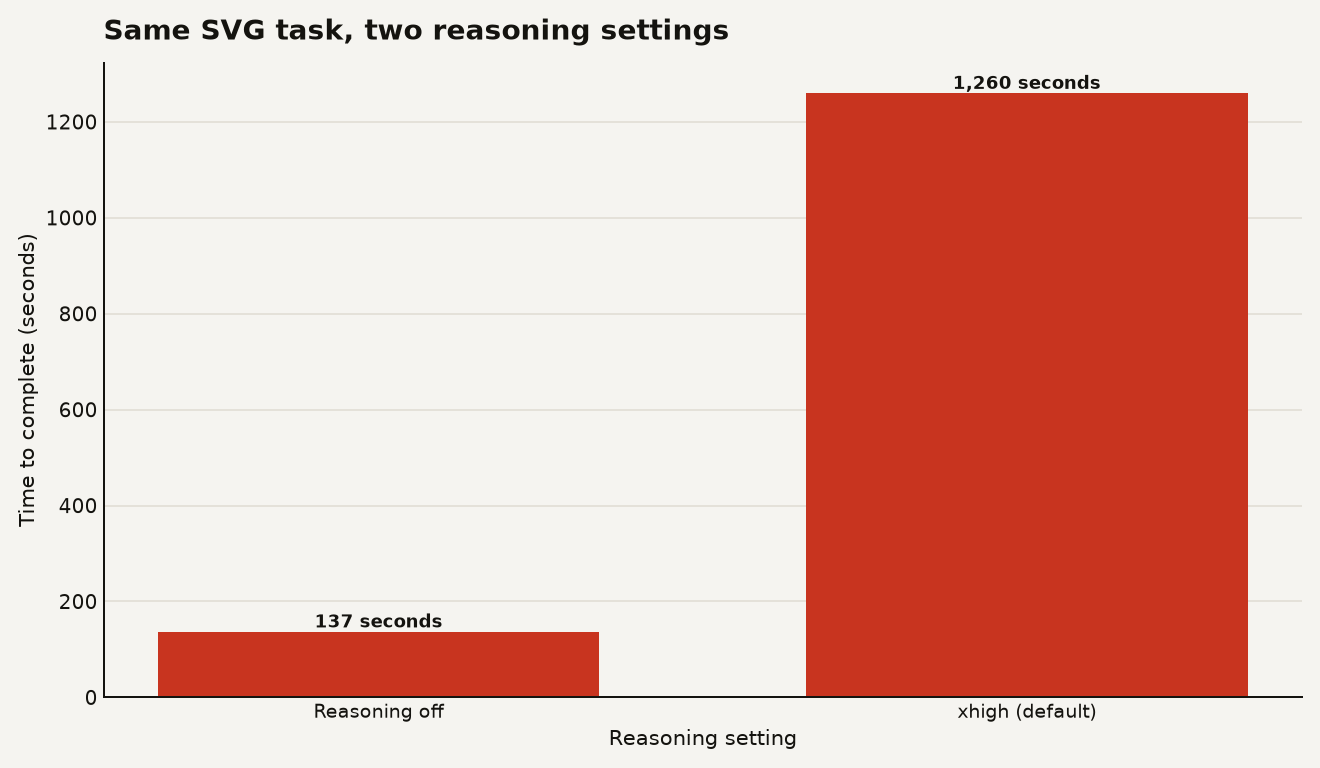
Here is the same pelican prompt with reasoning turned off entirely. The model produced comparable output in 137 seconds, generating 3,715 tokens. That is roughly a 9x speedup for a task where the output quality was, by Willison's own assessment, similar.
There is a second trap hiding in the default settings. LM Studio, the most popular app for running local models on a Mac or PC, sets a default context limit of 8,192 tokens. With xhigh reasoning turned on, the model can eat through that entire context window just thinking about a mundane problem, leaving no room for the actual answer. Willison hit this wall immediately. The fix is to increase the context length to the model's maximum of 262,144 tokens, but that uses more memory.
Is the reasoning ever worth it? Sometimes. Willison found that when he asked the model to build an HTML tool for rendering bounding boxes on images, the reasoning-off version nearly worked but placed the boxes in the wrong place. The xhigh version got it right on the first try. Reasoning can make a real difference on complex tasks. The problem is that the default applies maximum reasoning to everything, including drawing a circle.
55.6 GB unquantized, far less quantized
The unquantized model is 55.6 GB on disk, which is the full, uncompressed version. Almost nobody runs that on a laptop. Most people run a "quantized" version, which is a compressed copy that trades a small amount of quality for a much smaller file. Quantization is like saving a photo as a JPEG instead of a raw file: you lose a little detail, but the file becomes practical to work with.
The New Stack reports the community-created MLX conversions for Apple silicon in these sizes: the 4-bit version is about 16.1 GB, while the 8-bit version is 29.5 GB. The GGUF format that LM Studio uses, which is what Willison tested, comes in at roughly 17 GB for the Q4_K_M build.
Here is what the options look like in practice:
| Version | File size | Minimum RAM | Notes |
|---|---|---|---|
| Q4_K_M (4-bit, GGUF) | ~17 GB | 32 GB | Most popular for CPU/GPU inference via LM Studio |
| MLX 4-bit | ~16.1 GB | 32 GB | Apple silicon optimized, best for Mac users |
| MLX 8-bit | ~29.5 GB | 48 GB | Higher quality, still fits on a good Mac |
| Unquantized | 55.6 GB | 64 GB+ | Best quality, overkill for most users |
The key number for Mac buyers is 32 GB of unified memory, which The New Stack calls "a reasonable platform for running a 4-bit version at a moderate context length." If you have 48 GB or 64 GB, you get more room for longer prompts or higher precision. Willison tested on a 128 GB M5 Max MacBook Pro and an NVIDIA DGX Spark, both well above the minimum.
One caveat: the context cache (the memory the model uses to keep track of the conversation as it grows) consumes additional RAM on top of the model file. A 17 GB model with a 262,144-token context window can need significantly more total memory than the file size alone suggests.
Three settings that make it usable
Three changes make Qwen 3.8 27B practical on consumer hardware. Do all three before you start prompting.
Turn down the reasoning effort
Set reasoning_effort to medium for most tasks. Use low for simple questions or quick drafts. Only reach for xhigh when you have a genuinely hard problem and you are willing to wait. The difference between xhigh and off was a 9x speedup in Willison's pelican test. You can also turn reasoning off entirely for tasks where you just want a fast answer and do not need the model to deliberate.
Increase the context window
In LM Studio, the default is 8,192 tokens. Change it to at least 32,768 for general use, or up to 262,144 if your machine has the memory. The model needs room to think, but more importantly, it needs room to answer.
Enable Multi-Token Prediction if you can
Qwen 3.8 27B supports a technique called Multi-Token Prediction, or MTP, where a smaller, cheaper mechanism guesses several tokens ahead and the main model verifies them. Willison found that running the model with MTP on an NVIDIA DGX Spark outperformed the default LM Studio setup by about 72 percent. The catch: MTP support in consumer tools is still early. LM Studio may not expose it yet. If you are comfortable with command-line tools, you can run llama-server directly with the --spec-type draft-mtp flag.
For more on speeding up local models on Apple silicon, our guide to MTPLX v2 and local AI on Mac covers the optimizations that matter most.
Privacy, cost and speed against hosted APIs
That depends on how much you value privacy, cost, and speed.
On speed, the local model loses. Willison measured 15 to 30 tokens per second on LM Studio across both his test machines. For comparison, Artificial Analysis reports OpenAI's 5.6 Sol at 74 tokens per second and 5.6 Luna at 184 tokens per second over their APIs. The chart below shows the gap.
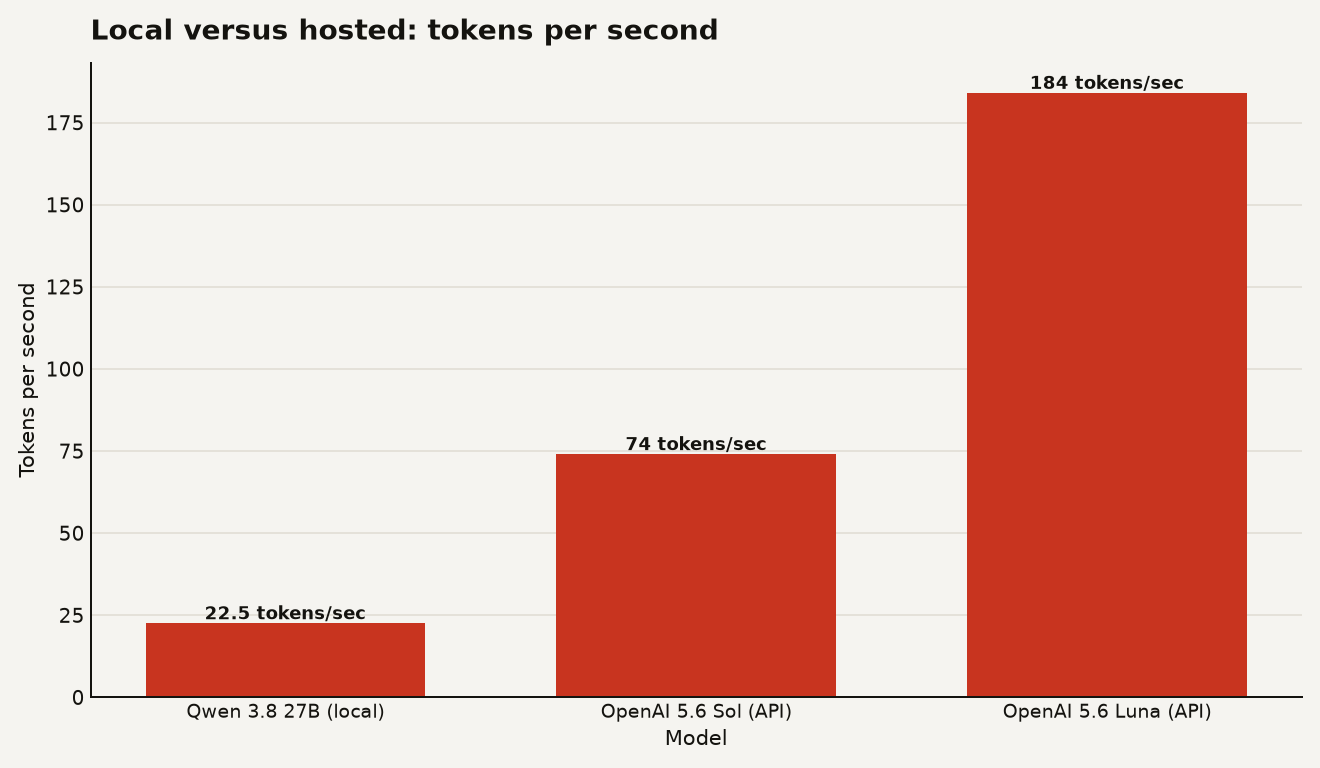
Hosted models are simply faster, because they run on datacenter hardware optimized for inference. Willison notes that the speed "is going to be hard to win me away from hosted API models, which can return results a whole lot faster." If your workflow involves many back-and-forth prompts or you are building something that needs quick responses, the local model will test your patience.
On cost and privacy, the local model wins decisively. Once you have the hardware, Qwen 3.8 27B is free to run, with no API bills, no rate limits, and no data leaving your machine. If you are working with sensitive code, private documents, or anything you do not want to send to a third party, that matters more than speed. For choosing between local and hosted models more broadly, see our 2026 AI agent guide.
On capability, the model is surprisingly close to what you get from a hosted API. Willison summarizes it well: "We can have an open weights general purpose model with a long context, effective tool calling, strong vision ability, and competent code generation, and we can fit the whole thing in just a 17GB file." A year ago, that combination required expensive cloud APIs. Today it runs on a capable laptop.
The honest read: use Qwen 3.8 27B when you need privacy, offline access, or zero ongoing cost. Use a hosted API when you need speed or are doing high-volume work. The two approaches serve different jobs, and the gap between them is shrinking fast.
A miracle of compression with bad defaults
A 17-gigabyte file that can code, see, and reason is a miracle of compression. The fact that it ships with a default that makes it 9x slower than necessary is a packaging problem you can fix in ten seconds. Fix the defaults and you have a serious local AI tool. Leave them alone and you will spend 21 minutes watching a model contemplate the philosophical implications of drawing a circle.
Sources
- simonwillison.net - Simon Willison, "Qwen 3.8 27B is excellent, but it defaults to wildly overthinking things"
- thenewstack.io - The New Stack, "Alibaba's new model promises Opus 4.6-level performance on your laptop"
- kie.ai - kie.ai, "Qwen 3.8 27B Release: A Deep Dive"