MTPLX: Running a 27B Model at 82 Tokens Per Second on a MacBook Pro
Running a capable AI model on your own laptop used to mean accepting a painful trade. You could pick a small, fast model that gives shallow answers, or a large, smart model that types out words at the speed of a slow human. The team behind MTPLX v2 announced on Reddit on July 9, 2026 claims a headline figure of 82 tokens per second on a 27-billion-parameter model running on a MacBook Pro. If that number holds up, it changes what a beginner can do with local AI on a Mac without paying for cloud APIs.
MTPLX (pronounced "em-tee-plex") is a free, open-source application that runs AI models locally on Apple Silicon Macs. It builds on MLX, Apple's own machine learning framework designed specifically for M-series chips. The key innovation is a technique called multi-token prediction, or MTP, which lets the model guess several words ahead at once and then verify them in a single batch. The result, according to its creators and independent testers, is that local models generate text roughly twice as fast as before, with no loss in answer quality.
Multi-token prediction in plain English
To understand why MTPLX matters, you need to understand how AI models normally generate text. A language model (an LLM, or large language model) produces text one token at a time. A token is roughly three-quarters of a word. When you ask a model a question, it predicts the next token, then feeds that token back into itself, predicts the next one, and repeats. This is called autoregressive decoding. Each step requires a full pass through the model's neural network, which is the expensive part.
Multi-token prediction changes this. Some newer models, like Qwen 3.5 and Qwen 3.6 from the Chinese AI lab Alibaba, ship with extra built-in components called MTP heads. These heads let the model draft multiple tokens in a single forward pass, say two or three at once, before the main model checks whether those guesses are correct. Think of it like a student who writes three sentences of a draft, then has a teacher verify each one. If a sentence is wrong, the teacher crosses it out and the student tries again from that point. If it is right, you just saved two rounds of editing.
The critical detail is that MTPLX uses a mathematical technique called rejection sampling, based on work by researchers Leviathan and Chen, to ensure that the output distribution stays identical to normal generation. That means if you set your model to temperature 0.6 and top_p 0.95 (settings that control how creative or focused the output is), you get the exact same answers you would get without MTPLX, just faster. There is no second model eating your RAM, and no shortcut that quietly changes what the model would have said.
82 tokens per second on a MacBook Pro
The Reddit announcement claims 82 tokens per second on Qwen 3.6 27B on a MacBook Pro, which would be a remarkable result for a model that large running locally. A 27B model is serious hardware: it has 27 billion parameters (the internal weights that define the model's knowledge), and running it typically requires 32 GB of RAM or more.
Independent testing from before the v2 release gives us grounded numbers to compare against. The tech blog evolvingviews.com measured roughly 28 tokens per second at baseline on an M5 Max running Qwen 3.6 27B, rising to about 63 tokens per second with MTPLX's MTP enabled. That is a 2.24x speedup, matching the claim on MTPLX's GitHub repository.
A separate test by developer Andrew Zhu on GoPenAI found 24.3 tokens per second at baseline and 41.6 tokens per second with MTP depth 2, meaning the model drafts two tokens ahead. That is a 1.71x speedup, lower than the M5 Max result but still meaningful.
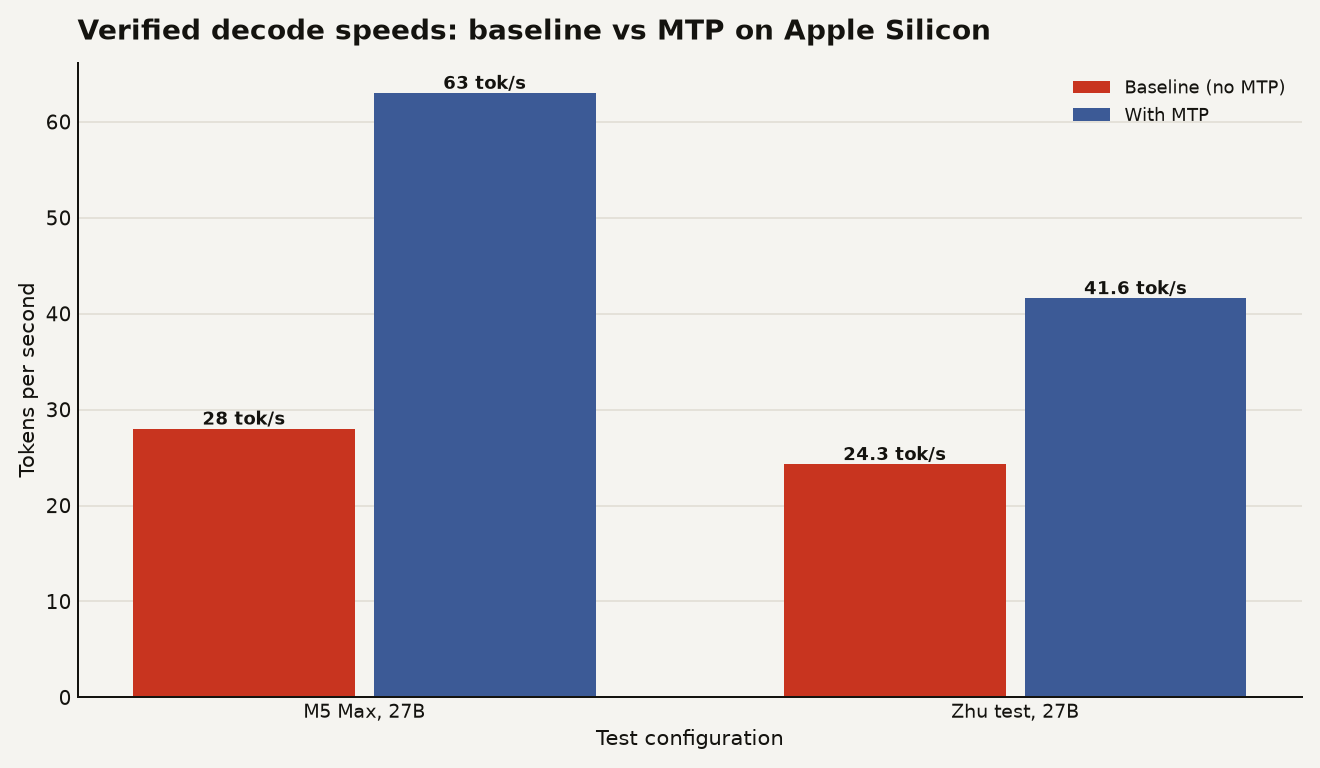
The chart above shows the verified speeds from independent testers. The gap between the 1.71x and 2.24x results comes down to hardware: the M5 Max has faster memory bandwidth and a cheaper verification step (around 47 milliseconds versus 130 to 180 milliseconds on older M1 and M2 chips), which means the MTP trick pays off more on newer silicon. The 82 TPS claim from the v2 Reddit announcement may reflect additional optimizations in the new version, but it has not yet been independently verified by outside testers at the time of writing.
There is also an important caveat about long conversations. Andrew Zhu found that when the input prompt is long (3,366 tokens in his test), decode speed drops to 16.9 tokens per second. MTPLX only speeds up token generation, not the initial processing of your prompt (called prefill). So if you are pasting in a long document and asking the model to analyze it, the speedup applies only to the answer, not to the time the model spends reading your question.
The speedup depends on which Mac you have
This is where beginners need to pay close attention. The speedup is heavily dependent on which Mac you own. MTPLX requires Apple Silicon, meaning an M1 chip or newer, and macOS 14 or later. But the actual performance gain varies dramatically by chip generation.
On M5 chips, the verification step that MTP relies on is fast and cheap, so the speedup is real and consistent. On older M1 and M2 chips, community testers repeatedly found that MTP actually made things slower at default settings, because the verification step took too long to be worth the draft. Think of it as the teacher taking so long to check the student's draft that it would have been faster to just write it yourself.
Memory also matters. The MTPLX documentation specifies that 16 GB of RAM runs the 4B and 9B models comfortably, but the 27B model wants 32 GB or more. If you have an 8 GB Mac, you are limited to the smallest models, and the MTP speedup may not be worth the setup effort. The MTPLX app checks your hardware during installation and recommends a model that actually fits, which is a thoughtful touch for beginners who might otherwise try to load a model that crashes their machine.
The tool also includes an auto-tune feature. When you first run it, MTPLX benchmarks your specific Mac at different draft depths (how many tokens ahead the model guesses), with fans pinned for consistent timing, and saves the fastest configuration. If no MTP setting beats the baseline, it tells you so and sticks with normal decoding. This honesty matters: it means the tool will not silently make your model slower just to say it is using MTP.
A local model that feels fast
The practical appeal of MTPLX is that it turns a local model into something that feels like a cloud API. Once installed, MTPLX runs a local server that is compatible with the OpenAI and Anthropic API formats. That means if you have been using tools like Claude Code, Cline, Continue, or Open WebUI, you can point them at your local MTPLX server instead of paying for cloud inference.
The setup is straightforward for a beginner. You can download the Mac app from mtplx.com, drag it to Applications, and the app handles the rest: it checks your hardware, downloads a recommended model, installs its own Python engine (no Homebrew required), and starts serving an API on your local machine at port 8000. If you prefer the command line, you can install it with brew install youssofal/mtplx/mtplx and run mtplx start.
The official model catalog on Hugging Face includes Qwen 3.5 in 4B and 9B sizes, Qwen 3.6 in 27B and 35B MoE variants, and Gemma 4, each available in speed, balance, and quality builds. MoE stands for Mixture of Experts, a model architecture where only a subset of the model's parameters are active for any given token, which lets you run a larger model with less compute. For a beginner with a 16 GB Mac, the 9B model is the sweet spot: large enough to be genuinely useful for coding help and question answering, small enough to run comfortably in memory.
If you are coming from cloud APIs and wondering whether local AI is worth the effort, MTPLX narrows the gap meaningfully. A cloud model might generate 60 to 100 tokens per second, and MTPLX on an M5 Mac can hit similar speeds for a 27B model. The trade-off is that you are running a smaller, less capable model than GPT-4 or Claude, but you are not sending your data anywhere, and you are not paying per token. For learning, prototyping, or running coding agents on personal projects, that is a compelling proposition. If you want a deeper comparison of local LLM runtimes, our guide to Qualcomm's GenieX for Snapdragon laptops covers the Windows and ARM equivalent of what MTPLX does for Mac.
Try it now on an M5 Mac with 32 GB
If you have an M5 Mac with 32 GB or more of RAM, the answer is yes, try it now. The speedup is real, the setup is genuinely beginner-friendly, and the OpenAI-compatible API means you can plug it into tools you already use. Start with the 9B model to get comfortable, then try the 27B if your memory allows.
If you have an M3 or M4 Mac with 16 GB, MTPLX is still worth trying, but temper your expectations. The speedup will be more modest, closer to 1.6x than 2.24x, and you will be limited to smaller models. Run the auto-tune feature and trust what it tells you.
If you have an M1 or M2 Mac, wait. The verification overhead on older chips means MTP may not help at all, and you might get better results from a standard MLX runtime without the extra complexity. The MTPLX app will be honest about this during auto-tune, but there is no point installing a tool whose core feature does not work on your hardware.
The speed floor is rising
The bigger picture is that multi-token prediction is becoming a standard feature in new models across labs. As more models ship with MTP heads and more runtimes learn to use them, the objection that local AI is too slow weakens by the month. MTPLX is an early taste of where local inference is heading: same models, same quality, half the wait. The 82 TPS claim may or may not survive independent testing, but the 2.24x verified speedup already tells you the direction.
Sources
- reddit.com - MTPLX v2 announcement on r/LocalLLaMA
- github.com - MTPLX GitHub repository and documentation
- mtplx.com - MTPLX official website
- evolvingviews.com - Independent MTPLX benchmark on M5 Max
- blog.gopenai.com - Andrew Zhu's MTPLX usability analysis
- pypi.org - MTPLX v2.0.0 on PyPI