On August 14, 2026, Alibaba's Qwen research lab released Qwen 3.8 27B, a free, downloadable AI model that you can run on your own computer without paying for cloud access. One week later, the local AI community on Reddit's r/LocalLLaMA and r/LocalLLM had posted over 2,000 messages stress-testing it. Their compiled verdict: this is the closest a free model has come to matching paid cloud AI on coding, reasoning, and image understanding, but it has a thinking problem and a speed problem you need to understand before downloading it.
This piece covers what happened after launch: the community's real-world findings after a week of hammering the model on everything from coding agents to hardware limits.
Qwen 3.8 27B and its community
Let us define the terms. "Parameters" are the internal numbers that make up an AI model, similar to how a brain has synapses. More parameters generally means smarter, but also means the model needs more memory to run. Qwen 3.8 27B has 27 billion parameters, which puts it in a sweet spot: big enough to be genuinely capable, small enough to run on high-end consumer hardware.
"Open weights" means the model's files are downloadable for free under an Apache 2.0 license, which allows commercial use. You download a file, put it on your computer, and run it locally with no internet connection required and no per-message fee. "Dense" means the model activates all 27 billion parameters for every response, unlike "Mixture-of-Experts" models that only use a fraction of their parameters at a time.
The model also has three features that matter for practical use. It has a 262,144-token context window, meaning it can consider about 262,000 tokens (roughly 200,000 words) of input at once, which is enough for a large codebase or a long document. It is "multimodal," meaning it can understand images and video, not just text. And it supports "agentic workflows," meaning it can use tools like running code or browsing files in a loop to accomplish tasks.
The community cares because a model this capable, running locally for free, used to require a paid API. Now it fits in a 17GB file.
Strong coding and reasoning scores
The benchmark numbers from Alibaba's launch are strong. VentureBeat reported that the company scored 61.7 on SWE-bench Pro, a test that asks the model to fix real bugs in open source projects. For comparison, Anthropic's Claude Opus 4.6 Max scored 53.4 on the same benchmark. On LiveCodeBench v6, which tests coding problem-solving, Qwen 3.8 27B scored 90.3.
Third-party benchmarking outfit Artificial Analysis gave Qwen 3.8 27B a score of 52 on its Intelligence Index, a composite of nine evaluations spanning coding, science, reasoning, and professional tasks. That happens to be the same score Artificial Analysis currently assigns OpenAI's GPT-5.6 Luna at its maximum reasoning setting, a proprietary cloud-only model.
On the Artificial Analysis Agentic Index, which measures how well a model performs tasks that require using tools in a loop, Qwen 3.8 27B scored 51, beating Claude Opus 4.8 at maximum reasoning effort, a frontier model Anthropic released less than three months ago.
But the community pushback was immediate. The highest-signal thread on Hacker News, which accumulated 587 comments, featured this exchange: one commenter wrote "they do not beat Opus on real-world usage," and the follow-up reply captured the honest version of the debate: "then we just need meaningful benchmarks that clearly show that. Otherwise it is hand waving." The synthesis most of the community landed on is that Qwen 3.8 27B is now close enough that benchmark-versus-real-world arguments are about margins, not about whether the model is usable. Developer Simon Willison tested the model extensively and wrote that it could write code, interpret images, and drive a coding-agent loop through the Pi agent framework.
The one line of advice the community kept repeating: benchmark the model against your own work, not against published scores.
Hardware Corner's independent tests
This is where the community did the most useful work. Hardware Corner ran independent llama.cpp benchmarks measuring actual VRAM usage across different context lengths. VRAM is video memory on your GPU, the fast memory used for AI inference. Here is what they found with the 4-bit quantized build, which is the 17GB version most people will run:
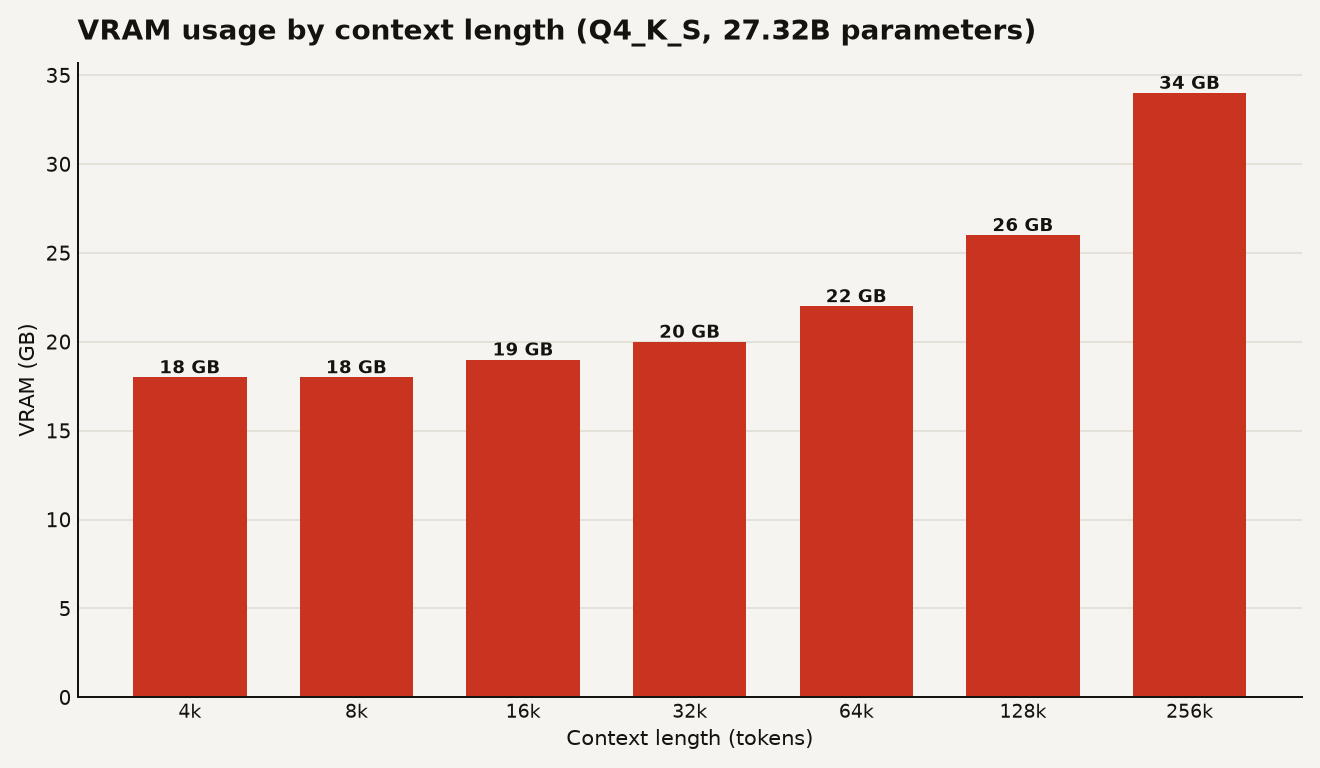
The chart below shows that the model itself fits on a 24GB GPU card like an RTX 4090, but the context window also uses memory. The practical ceiling on a single 24GB card is about 64,000 tokens of context, which uses roughly 22GB and leaves limited headroom for the operating system. At 128,000 tokens of context, you need about 26GB, which means a 24GB card is no longer enough. A 32GB card like the RTX 5090 can handle 128k. The full 262,144-token context requires about 34GB.
"Quantization" is the process of shrinking a model by reducing the precision of its numbers. The full 16-bit version of Qwen 3.8 27B requires about 56GB of GPU memory. An 8-bit version needs about 28GB. A 4-bit version, which is what most local users will run, cuts the model to roughly 17GB while losing only 0 to 5 percent accuracy depending on the benchmark, according to community measurements posted on Hacker News.
The most-upvoted practical advice in the thread was blunt: "quantized models lose focus after long context and can do damages or thinking loop." If you are doing agentic work or using very long context, run the official higher-precision weights if your hardware can handle it. If you are on consumer hardware, the 4-bit quant is the realistic choice, and you should test it against your own workload.
15 to 30 tokens per second on LM Studio
Here is the honest catch. Willison measured 15 to 30 tokens per second on LM Studio running the 4-bit quant on both an M5 Max MacBook Pro and an NVIDIA DGX Spark. For comparison, Artificial Analysis tracks OpenAI's GPT-5.6 Sol at 74 tokens per second and GPT-5.6 Luna at 184 tokens per second over cloud APIs.
That speed gap is the main thing keeping Qwen 3.8 27B from being a daily driver. Dense models like this one require a lot of memory bandwidth to perform well, and most consumer machines are not top performers in that regard.
There is a fix, though it requires some setup. Qwen 3.8 27B includes Multi-Token Prediction, an architecture trick where a cheaper mechanism inside the model guesses multiple tokens at once instead of generating them one at a time. Willison reported about a 72 percent performance improvement on his DGX Spark after enabling MTP through llama.cpp compared with his default LM Studio configuration. That would bring the 15 to 30 tokens per second range closer to 26 to 52 tokens per second, which starts to feel usable.
There is also a configuration problem that trips up beginners. LM Studio's default context limit is 8,192 tokens, and Qwen 3.8 27B will use all of that thinking about even simple questions before it answers. The model has a reasoning_effort setting that controls how deeply it reasons before responding, and the default is set high. The fix is to either lower the reasoning effort or load the model with the full 262,144-token context length so it has room to think and answer.
Where 2,000 posts agree and disagree
After 2,000 posts, the picture is clearer on some things than others.
On capability: the community agrees Qwen 3.8 27B is genuinely good at coding, reasoning, and image understanding for a model this size. The disagreement is whether it truly matches frontier cloud models on real work, and the consensus is that it is close enough that the gap is a matter of margins, not usability.
On quantization: the community agrees that 4-bit quants are the practical choice for consumer hardware and that the accuracy loss is small, 0 to 5 percent across benchmarks. The disagreement is about whether that loss matters for long-context or agentic work, where some users report degraded performance.
On speed: everyone agrees it is slow compared to cloud APIs. The MTP optimization helps, but you need to configure it manually.
On benchmarks: the most repeated line in the threads was "only useful benchmarks are those you don't have access to," meaning the benchmark you build for your own stack is the one that matters.
One useful debate emerged when quantization provider Unsloth published KL-divergence numbers for its compressed versions. KL divergence is a measure of how much a compressed model's probability distribution differs from the original. The community pushback was correct: "KL divergence is nothing close to a replacement for benchmarks." Unsloth's reply was also right: they do publish real benchmark numbers and treat KL divergence as a complementary measure, not a quality score. The takeaway for you: look for benchmark deltas per quant level, not single distribution-shift numbers.
Running it on 24GB of VRAM or 32GB of memory
If you have a GPU with 24GB of VRAM or a Mac with 32GB of unified memory, you can run the 4-bit quantized version. Here is what the community recommends:
- Download the model through LM Studio or use llama.cpp directly. Set the context length to at least 32,000 tokens if your memory allows, because the default 8,192 tokens will get eaten by the model's thinking before it answers your question.
- Lower the
reasoning_effortsetting for simple questions. The model's default is to think deeply about everything, which wastes time and tokens. For straightforward tasks, a lower setting gives faster, shorter answers. - If speed matters for your workflow, enable Multi-Token Prediction if your inference engine supports it. The 72 percent improvement Willison measured is significant enough to justify the setup effort.
- Test the model on your actual work, not on published benchmarks. Write a prompt that reflects what you do, run it, and judge the output yourself. The community's strongest consensus after a week is that the only benchmark that matters is the one you run on your own tasks.
If you want to understand the broader landscape of local AI options, our guide to which AI to use in 2026 puts Qwen 3.8 27B in context alongside other local and cloud choices.
A 17GB file that codes, sees and reasons
A 17GB file that can write code, interpret images, drive tools, and reason about complex problems, running on a laptop you already own, for free. A year ago that would have been competitive with the best and most expensive proprietary models. Today it runs on a capable laptop. The community spent a week proving that the capability is real. The speed and the default overthinking are real too, and both are fixable with configuration. Download it, tune the reasoning effort, benchmark it on your work, and decide for yourself.
Sources
- simonwillison.net , Simon Willison: Qwen 3.8 27B is excellent, but it defaults to wildly overthinking things
- dev.to , Qwen 3.8-27B One Week In: What 587 HN Comments Actually Say About Running It
- VentureBeat , Qwen3.8-27B runs frontier-class coding agents and reasoning locally, no cloud API required
- hardware-corner.net , We Tested Qwen3.8 27B: How Much GPU and VRAM Do You Really Need?
- dev.to , Qwen 3.8-27B Week Two: The Default-Overthinking Problem Nobody Wanted, and the Speed Wave That Followed