You can buy a used Nvidia RTX 3090 graphics card for around $700 in 2026. For that one-time cost, a community of local AI builders has pushed a 27-billion-parameter language model to read input text at 2,000 tokens per second and generate responses at 132 tokens per second on that single card. A token is roughly three-quarters of a word, so 132 tokens per second means the model writes about 100 words per second, faster than most people can read.
The model is Qwen3.8-27B, an open-weights AI model you can download and run yourself. The short version: a capable model that fits on consumer hardware, and the community keeps finding ways to make it faster. A Reddit poster on r/LocalLLaMA shared their latest work pushing prefill speed, how fast the model reads your prompt, to just under 2,000 tok/s. A group of GitHub contributors published a full setup with reproducible benchmarks for anyone to copy.
The community's optimizations for one RTX 3090
Running a large language model on a consumer graphics card is a squeezing game. Qwen3.8-27B has 27 billion parameters, the numerical values that store its knowledge. In full precision, those parameters would need over 100 GB of memory. The RTX 3090 has 24 GB. The community bridged that gap with several techniques stacked together.
The first is quantization, which compresses parameters from 16-bit numbers down to 8-bit or 4-bit. The project uses int8 math for the heavy matrix calculations and keeps the model's recurrent state, a key part of its architecture, in 16-bit precision to preserve quality. The Reddit poster claims their custom kernel matches full-precision output with 0.99997 similarity at int8, meaning the quality loss is nearly invisible. That is the builder's own claim, not a peer-reviewed result, but it lines up with what other community members report.
A separate community test on the club-3090 discussion board compared int4 (4-bit) and int8 (8-bit) quantization on a dual-3090 setup. The int4 configuration was faster across the board: 26 percent faster decode on code tasks and 72 percent faster prefill on 10,000-token prompts. One caveat: the int8 run had a memory swap failure that may have slowed it down, so the gap might be smaller in a clean comparison. The broader point stands: lower precision means faster math, and the quality cost is small enough that community builders prefer it.
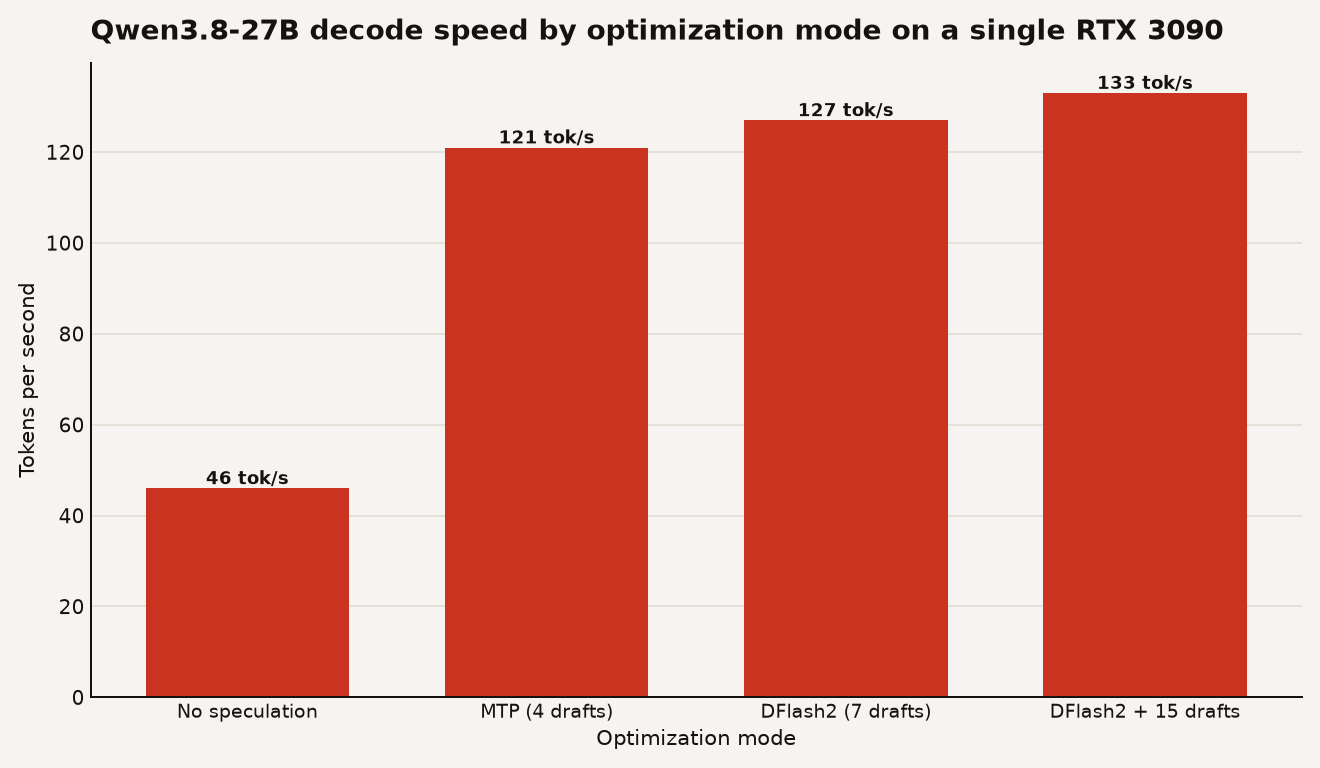
The second technique is speculative decoding, specifically a variant called MTP, or multi-token prediction. Normally, a language model generates text one token at a time: it predicts the next word, checks its confidence, then moves on. Speculative decoding uses a smaller, faster draft model to guess several tokens at once, and the main model verifies all guesses in a single pass. If the guesses are right, you get multiple tokens for the cost of one verification step. The project reports MTP acceptance of about 3.15 tokens per step, meaning about three correct guesses per verification round on average.
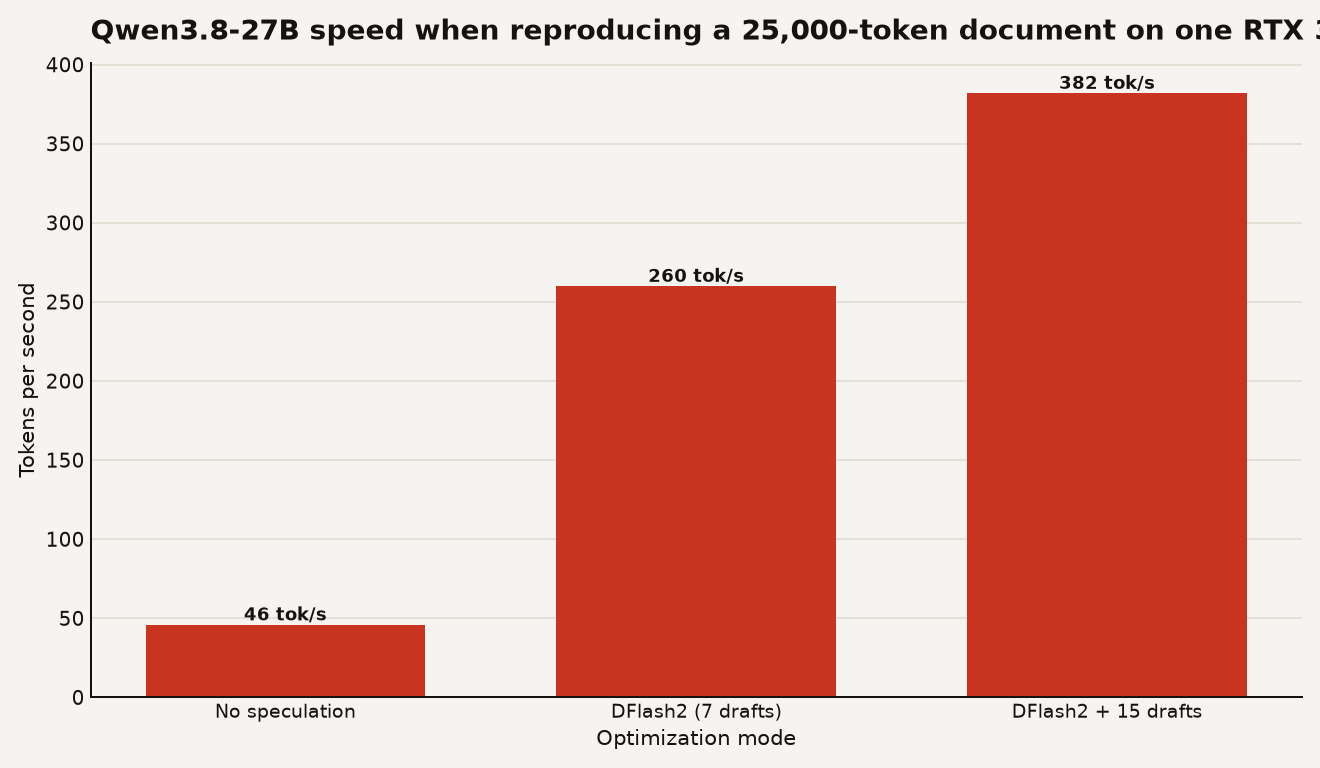
An optional mode called DFlash2 goes further, pushing seven draft tokens in one pass instead of the default four. It can also pull draft tokens directly from the input text when the model is reproducing something you already provided, which we will look at next.
The chart below shows single-user decode speed across the optimization modes, using the project's benchmark numbers.
2,000 tokens per second of prefill in use
Two phases matter when you interact with an AI model. Prefill is when the model reads your prompt. Decode is when it writes its response. The Reddit poster focused on pushing prefill from about 1,300 to just below 2,000 tok/s at 4,000 tokens of context in a single morning, thanks to a custom kernel. The GitHub documentation shows prefill at about 1,810 tok/s for 1,000-token inputs in batch mode, and about 1,000 tok/s for 100,000-token prompts.
What does that feel like? Paste a 10,000-token document (roughly 7,500 words, a long essay or several code files) into the chat, and the model finishes reading it in under six seconds. A 100,000-token document, which is a short book, takes about 100 seconds. The response then streams at 132 tok/s, so a 500-word answer appears in about five seconds.
The project supports a context window of 150,000 to 262,000 tokens depending on configuration. A context window is how much text the model can hold in working memory at once. At the low end, 150,000 tokens is about 110,000 words, longer than most novels. You can feed the model entire codebases or extended conversation histories without paying for cloud compute.
When multiple people use the model at once, the numbers change. With 64 concurrent requests, the project reports about 1,035 tok/s aggregate decode, serving all 64 users from one card. That is the throughput number that matters for someone building an API backend or a shared tool, not the single-user figure.
The chart below shows how DFlash2 transforms a specific but common task: reproducing text from a long document already in the model's context. The baseline with no speculation is 46 tok/s, but DFlash2 with 15 draft tokens reaches 382 tok/s, an eightfold speedup.
A 3090 or cloud APIs
This depends on what you are building. If you just want to chat with an AI occasionally, paying per token through OpenAI or Anthropic is simpler and probably cheaper. A cloud API handles scaling, updates, and infrastructure for you.
The case for a local GPU gets stronger when one of three things is true. First, you are processing large volumes of text and the API costs add up. At 132 tok/s on a $700 card, you pay zero per-token cost after the hardware purchase. Second, you need privacy: the data never leaves your machine, which matters for proprietary code, medical text, or anything under a non-disclosure agreement. Third, you want to customize the model or build on top of it without rate limits.
The RTX 3090 is a specific recommendation here because of its 24 GB of video memory, which is the sweet spot for a 27-billion-parameter model with quantization. Newer cards like the RTX 4090 have 24 GB too and are faster, but they cost $1,600 or more. The 3090 is the value pick. Cards with less memory, like the RTX 4060 Ti with 16 GB, cannot hold this model without aggressive compression that hurts quality.
One thing this does not solve: the model still needs electricity and cooling. An RTX 3090 draws 350 watts under load. Running it 24/7 costs about $30 to $40 per month on average US electricity rates. That is cheap compared to API bills for heavy use, but it is not free.
First steps on a 24 GB Nvidia card
If you have a compatible Nvidia card with at least 24 GB of memory, the project repository provides a ready-to-use setup with vLLM, an open-source inference engine that serves models as an API. You do not need to write the optimization kernels yourself. The project ships with two configurations: one for single-user chat and one for batch serving with multiple concurrent requests.
Start with the default MTP mode, which gives about 121 tok/s for a single user. That is already faster than most cloud API responses feel. Try DFlash2 only if you regularly work with long documents where the model needs to quote or edit existing text, because that is where the 382 tok/s speedup appears.
Be honest about what you cannot verify. The 0.99997 similarity claim is the kernel author's own measurement. The benchmark numbers are community-reported, not independently audited. They are consistent across multiple GitHub mirrors of the same project, which is a good sign, but treat them as best-case numbers from people who built the system.
Watch for two things over the coming weeks. First, whether vLLM merges the DFlash2 patches upstream, which would make this available without custom builds. The project references vLLM PR #52816 as a backported patch, so check the repository for the latest merge status. Second, whether the broader community adopts int4 quantization as the default, given the club-3090 results showing it is faster on every axis. If you want to see what other local testers found after a week with this model, our community verdict roundup has the details.
Local AI works on a $700 used card
Local AI is viable. A $700 used graphics card runs a 27-billion-parameter model with a context window larger than most novels, at speeds that feel instant. The optimization techniques are community-built and freely shared. The practical question for a builder is whether you have a reason not to try it.