Meta just dropped a model that runs on your desktop GPU, reads images, writes code, and calls tools, all under a license you can actually use. Muse Glimmer is a 30 billion parameter open-weights model released on August 10, 2026, and the early community results look surprisingly good for anyone who has been waiting for a serious local agent that does not require a data center.
Muse Glimmer is Meta's newest open-weights model, optimized for local agentic workflows, and it fits on a single RTX 3090 while hitting 280 tokens per second with speculative decoding.
If those words are new to you, here is the quick translation. "Open weights" means Meta published the model's parameters (the numbers that define what the model knows) so anyone can download and run them locally instead of paying for API access. "Agentic" means the model can take multi-step actions on its own: call a tool, read the result, decide what to do next, and keep going until the task is done. "30 billion parameters" means it is a mid-size model, big enough to be capable but small enough to run on consumer hardware. The whole point of this release is bringing agent-grade AI to the machine already sitting on your desk.
Muse Glimmer and its license
Muse Glimmer is the newest member of Meta's Muse family of models, which began with Muse Spark in April 2026 and has since grown through Spark 1.1 and Spark 1.2. Those earlier models were large, cloud-first releases focused on Meta's own platform. Glimmer is different: it is built specifically for people running AI locally.
The license is the first thing that matters. Muse Glimmer ships under Apache 2.0, which is a clean, permissive open-source license. You can use it commercially, modify it, distribute it, and build products on top of it without negotiating special terms. This is a real upgrade from Meta's older Llama licenses, which came with usage restrictions and fine print that made some developers nervous. Simon Willison, who tested the model on release day, called it a step up from what he described as the "janky Llama licenses of old."
For a beginner, the practical effect is simple: if you build an app that uses Muse Glimmer, you do not need to worry about whether Meta will change the rules later or ask for a cut. You download the weights, you run the model, you own the output.
280 tokens per second and the hardware behind it
The headline number from the community is 280 tokens per second with speculative decoding enabled, running on a single NVIDIA RTX 3090. If you are new to these terms, a "token" is roughly three-quarters of a word, so 280 tokens per second means the model can generate text at a pace that feels instant. You type a prompt, and the answer streams out faster than you can read it.
Speculative decoding is a speedup technique where a smaller, faster model drafts text and the larger model checks it. Because the check is cheaper than writing from scratch, the whole process runs much quicker. You do not need to understand the internals to benefit: if your inference software supports it, you turn it on and get faster output.
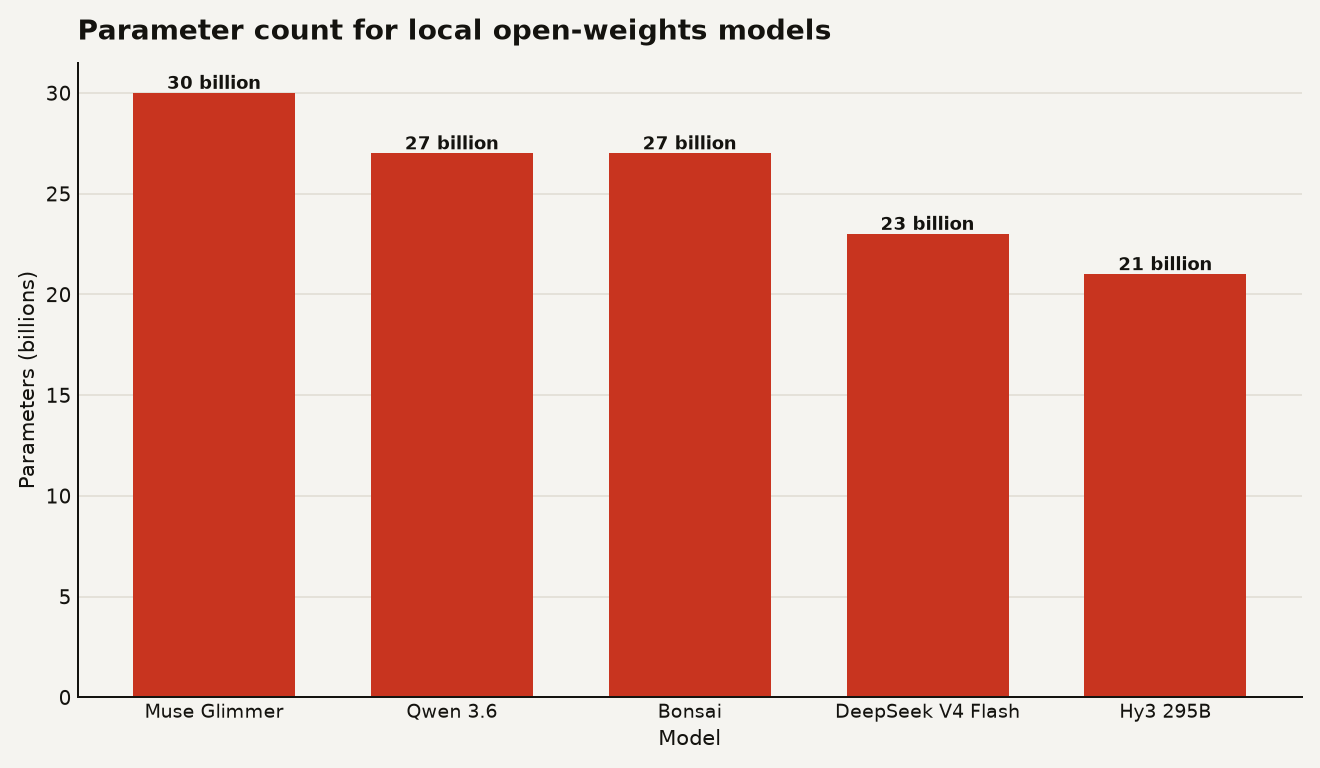
The chart above shows how Muse Glimmer's 30 billion parameter count compares to other local-friendly open-weights models. It sits in the same size class as Qwen 3.6 27B and Bonsai 27B, both of which we have covered for beginners before. The key difference is that Glimmer is specifically tuned for tool use and agentic tasks, while most models in this size range are general-purpose text generators.
Willison ran the 18.16 GB version of the model through LM Studio, which is a popular desktop app for running local models. He noted that on a machine with 32 GB of RAM or more, the model leaves plenty of memory free for other applications. If you have 16 GB, you will likely need to use a smaller quantized version (a compressed version of the model that trades a little quality for less memory usage). If you have 32 GB or an RTX 3090 with 24 GB of VRAM, you are in good shape.
Built for coding and tool use
This is where Glimmer gets interesting. Meta says they optimized it for what they call "end-to-end agentic task completion," and they benchmarked it on four tests that measure whether a model can finish a real task from start to finish:
- DeepSearch QA: can the model search for information, read results, and answer questions accurately?
- MCP-Atlas: can the model use the Model Context Protocol (a standard way for AI to connect to external tools and data sources) to find and operate tools?
- Tau-Bench: can the model handle multi-turn conversations where each step depends on what happened in the previous one?
- SWE-Bench: can the model fix real bugs in real open-source codebases?
Meta claims strong results across all four, though they have not yet published full benchmark numbers for independent verification. What we do have is a real-world test from Willison, who pointed Glimmer at a fresh copy of Datasette (an open-source data tool) and asked it a simple question: "how does auth work?" The model explored the codebase by calling tools to read files, trace function calls, and build an understanding of the authentication system, then produced a detailed explanation at the end of a long transcript.
That matters because tool use is the hardest part of local AI. Plenty of models can generate text. Far fewer can reliably call a function, read the output, decide whether the result was useful, and call the next function without getting confused. If Glimmer can do this consistently on consumer hardware, it changes what a solo builder can accomplish without an API key.
Glimmer is also a vision model, meaning it can look at images and describe what it sees. Willison tested it with a photo of pelicans on a rocky shore, and the model produced a detailed, accurate description including species identification (Pelecanus occidentalis), plumage details, and notes on the smaller birds in the background. For beginners, this means you can ask Glimmer to read a screenshot, analyze a chart, or describe what is on your screen, all locally.
Switching from Qwen 3.6
This is the question that actually matters for most readers. If you already run Qwen 3.6 27B or a similar local model, is Glimmer worth switching to?
The honest answer is: probably for agent workloads, probably not for pure text generation. Here is the breakdown of what changes for you:
- If you build agents or coding assistants: Glimmer's tool-use tuning and SWE-Bench results make it a strong candidate. The ability to call tools reliably, maintain context across many steps, and debug code is exactly what you need for an agent that does real work. Qwen 3.6 is a strong general model but was not specifically optimized for this loop.
- If you use local models for chat or writing: the difference will be smaller. Both models are in the same size class and both produce fluent text. You would be switching for the agentic features, not for better prose.
- If you are building a product to ship: Apache 2.0 is the deciding factor. Qwen's license has commercial restrictions depending on usage scale. Glimmer's license is clean and unrestricted. If you plan to embed a local model in a product you sell, Glimmer removes a layer of legal uncertainty.
- If you have limited hardware: both models need roughly the same amount of RAM and VRAM. The 18.16 GB quantized Glimmer fits where a 27B Qwen model fits. No hardware upgrade required to switch.
One thing to watch: Meta has not yet published full independent benchmark comparisons between Glimmer and Qwen 3.6 on the same tests. The claims are encouraging but self-reported. The community will run its own comparisons within days, and that data will tell you whether the agentic advantage is real or marketing.
The fastest way to try Glimmer
If you want to test Muse Glimmer yourself, here is the fastest path for a beginner:
- Download LM Studio (a free desktop app that lets you run local models without writing code).
- Search for "muse-glimmer" in the model browser and download the 18.16 GB version, or a smaller quantized version if your machine has less than 32 GB of RAM.
- Start a chat, upload an image, and ask the model to describe it. This tests the vision capability.
- If you want to try the agentic side, install an MCP-compatible tool like the llm-coding-agent plugin Willison used, point it at a small codebase, and ask a question that requires the model to explore files.
The vision test is the easiest way to see if the model works on your hardware. The coding agent test is the one that tells you whether Glimmer is actually different from the model you already have.
If you are also exploring cloud-based agent tools, our guide to Claude Code's auto mode covers what a hosted agent looks like, which is a useful contrast to running everything locally.
What to watch next
Three things will tell you whether Glimmer is a lasting shift or a one-week story. First, watch for independent SWE-Bench results. Meta's self-reported numbers are a starting point, but the open-source community will rerun the benchmarks within days. Second, watch for MCP server compatibility reports. Glimmer claims zero-shot generalization to new MCP servers (meaning it can figure out how to use a tool it has never seen before), but that is a claim that needs real-world testing across many different tools. Third, watch whether Meta keeps the Apache 2.0 license for future Muse models or pulls back to a more restrictive terms.
The bet worth making: try Glimmer for any local agent or coding project you have on the back burner. The cost is a download and an evening. The bet worth skipping: do not rewrite your existing local AI pipeline on day one. Let the community verify the benchmark claims first, then commit.
The model that makes local agents practical
Muse Glimmer is not the biggest model released this year, and it will not top every leaderboard. But it is the first model that combines a clean license, a consumer-GPU size, and agent-specific tuning in one package. For a beginner who wants to build something with AI without paying per token or trusting a cloud provider, that combination is the one that matters.