Claude Code is about to stop asking you before it does things. Starting August 14, 2026, new sessions on Pro, Max, and Team plans will run in auto mode by default, meaning the AI coding assistant will run commands, edit files, and iterate on its own, routing each action through a classifier that decides whether it is safe. Anthropic says the classifier catches more dangerous actions than human reviewers do, and that it held up under third-party security testing with a zero percent attack success rate. If you are a beginner using Claude Code to learn or build, this changes how the tool feels and what you need to watch for. Claude Code auto mode is the name for the new permission system, and understanding it before it turns on is worth ten minutes of your time.
Claude Code auto mode replaces per-step permission prompts with a classifier that blocks destructive or irreversible actions before they run.
Auto mode stops asking before every command
Until now, Claude Code worked like a cautious intern: it proposed a command, paused, and waited for you to press a key to approve. Every file edit, every terminal command, every web request came with a yes-or-no prompt. That flow is safe in theory and exhausting in practice. People stop reading those prompts carefully after a few rounds, clicking through to keep the work moving.
Auto mode flips that. Instead of pausing for every action, Claude Code runs a small classifier, a lightweight AI model, on each tool call before it executes. The classifier checks whether the action is irreversible, destructive, or aimed outside your environment. If it looks safe, the action runs without interruption. If it looks risky, the classifier blocks it, and Claude either finds a safer way to proceed or asks you directly.
The classifier has specific rules baked in. It checks whether a git push or pull request destination is public, private, or trusted, so code from your private repository does not end up somewhere public. It looks at git status before destructive commands like git reset --hard so it knows what work would be lost. Data exfiltration, like sending your code or secrets to an external server, is a hard deny: the classifier is designed to never approve it no matter what.
If the classifier blocks three actions in a row or twenty across a session, Claude Code falls back to manual approvals, the old per-step flow. You can also switch back to manual mode at any time. If you have already pinned a default permission mode, nothing changes unless you accept the one-time switch prompt.
Anthropic's test with 1,053 professional testers
Anthropic ran a controlled experiment with 1,053 paid professional testers. Partway through each session, a single permission prompt was swapped for a clearly dangerous command, and the testers recorded whether the participant approved it.
The results: human reviewers refused the dangerous command just 13.6% of the time (143 out of 1,053). Auto mode would have blocked 89% of the same commands (937 out of 1,053). Head to head, auto mode blocked 800 commands that a human approved, while humans blocked only 6 that auto mode allowed.
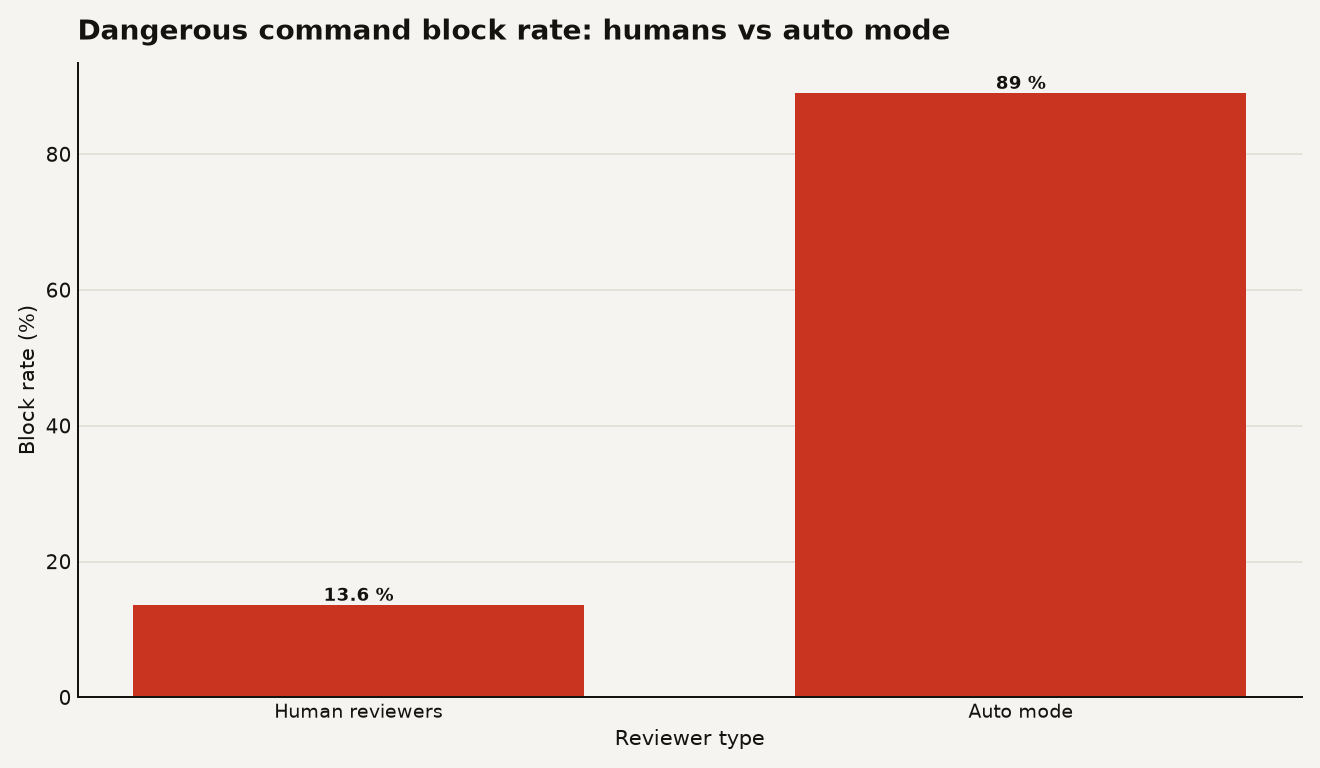
The pattern gets worse for humans as sessions drag on. Testers blocked about 17% of dangerous commands early in a session, but that dropped to about 5% after 50 or more prior prompts. Auto mode's block rate stayed flat regardless of how long the session ran. Confirmation fatigue is real, and it sets in fast.
Anthropic also looked at internal usage data. Among flagged sessions, those that went through manual approval contained serious unintended harm more than twice as often as auto mode sessions. At production-level severity, 6.3% of manually approved sessions contained a harmful action the user had not explicitly asked for, compared to 2.4% of auto mode sessions.
The practical upside: auto mode lets Claude work 9x longer between interruptions than under the old default, according to Anthropic's production data. If you are building something and want the agent to iterate without babysitting, that matters.
Prompt injection under auto mode
Prompt injection is the security problem that matters most for coding agents. It works like this: an attacker hides malicious instructions inside content your AI reads from elsewhere, a web page, a file, a package, and the AI follows those instructions instead of yours. If your agent has access to your code, your cloud, and your terminal, a successful injection can exfiltrate data or run destructive commands.
Anthropic commissioned an independent evaluation from Trajectory Labs, a third-party testing firm. They tested 72 indirect prompt injection scenarios, each run 10 times, for 720 total attack attempts. The attacks were optimized against Claude Opus 4.7, which was not in the reported set, so every model faced them as unseen attacks.
The headline result: 0% of the 720 attacks succeeded against Claude Fable 5, Opus 5, or Sonnet 5 running auto mode. Not a single one.
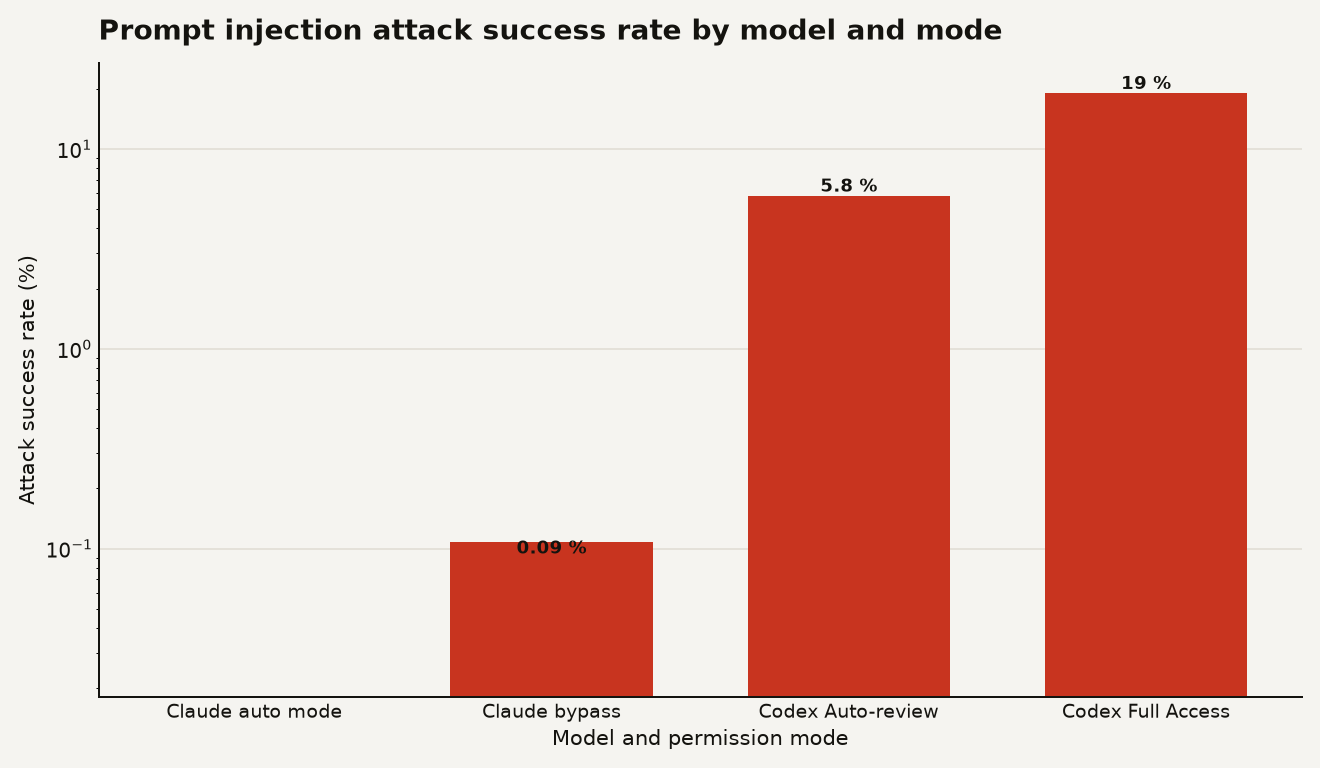
For comparison, GPT-5.6 Sol running in Codex's Auto-review mode had a 5.83% attack success rate, and in Codex's Full Access mode, that jumped to 19.03%. Even Claude models running in bypassPermissions mode, which skips all safeguards, only let through 0.09% of attacks on average. That shows the underlying model resists these attacks, but you should not rely on it.
Anthropic also ran a two-week red-teaming pilot with Apollo, a security firm. After hardening the classifier based on what Apollo found, Apollo re-tested on a separate held-out attack set Anthropic never saw. Auto mode caught about half of the attacks it previously missed, at a cost of missing about 2% of attacks it previously caught. The classifier's overall miss rate fell from 12% to 7%.
Simon Willison, a well-known AI commentator, noted that he has been predicting a "challenger disaster for coding agents security" in 2026 and would like to be proved wrong. He also pointed out a gap: a malicious package that instructs the agent to fetch files via a command that itself exfiltrates data might slip through, since the individual steps look reasonable. He is doubling down on running agents with limited access to sensitive data and tools. That is good advice regardless of which mode you use.
It is worth being clear about what was tested and what was not. Trajectory Labs tested the underlying models through a common browser integration, not the full set of safeguards in first-party tools like the Chrome extensions from Anthropic and OpenAI. The results measure the model and the classifier, not every deployment configuration. And one evaluation, however thorough, is still one evaluation.
Check your plan before August 14
First, check whether you are even affected. Auto mode becomes the default for new sessions on Pro, Max, and Team plans starting August 14. If you are on Enterprise, or using the Claude API, Amazon Bedrock, Google Cloud's Agent Platform, or Microsoft Foundry, auto mode remains opt-in for now. Anthropic says it plans to make auto mode the default across those surfaces in the coming month, working with cloud partners.
If you have already pinned a default permission mode, nothing changes unless you accept a one-time switch prompt. If you have not, new sessions will start in auto mode. You can switch back to manual at any time.
Here is what you should do:
- Audit what Claude Code can reach. Auto mode trusts only your working directory and your current repo's configured remotes by default. If Claude needs to push to your company's source-control org or write to a team cloud bucket, add those to the
autoMode.environmentsettings block so the classifier stops blocking routine internal operations. The auto mode configuration docs spell out the full syntax. - Review the hard deny rules. Data exfiltration is blocked by default, and you can add your own rules for actions you never want allowed, even if a user in your organization requests them.
- Watch the fallback behavior. If the classifier blocks three actions in a row or twenty across a session, Claude Code falls back to manual approvals. That is your signal to pay attention.
- Keep prompt injection in mind. Auto mode screens external content for injection attempts and adds warnings to Claude's context when something looks malicious. But no classifier is perfect. If you are pulling content from untrusted sources, like third-party packages or random web pages, stay alert. For a deeper look at how agents connect to external tools, our MCP explainer covers the protocol that makes those connections possible.
- Do not blindly trust the 89% block rate in all contexts. That number comes from a specific test with specific dangerous commands. Your real workload will look different. The gap between human and auto mode is real, but auto mode still let through 11% of dangerous commands in that test. That is better than the 86.4% humans let through, but it is not zero.
Anthropic is no longer charging Pro, Max, and Team users for the classifier overhead, so there is no cost penalty for running auto mode.
A better default, backed by evidence
Auto mode is a better default than per-step permission prompts, and the evidence backs that claim. Humans are bad at staying vigilant through hundreds of approval dialogs, and the data shows it: they approve dangerous commands 86% of the time. Auto mode cuts that to 11%, and in the prompt injection evaluation, it cut it to zero.
But auto mode reduces risk without eliminating it. The 7% miss rate after hardening, the untested attack vectors Willison described, and the fact that one evaluation is still just one evaluation all argue for keeping your own guard up. Give the agent the least access it needs to do the job. Put sensitive data and production systems behind a wall the agent cannot reach. Use auto mode because it is better than clicking OK, not because it lets you stop thinking.
If you want a broader guide to which AI tools to use for what, our AI agent guide for 2026 walks through the available AI tools.
Sources
- claude.com - Auto mode is now the default in Claude Code for Pro, Max, and Team plans
- claude.com - Running auto mode in production
- code.claude.com - Auto mode configuration documentation
- simonwillison.net - Auto mode is now the default in Claude Code (link post)
- thenewstack.io - Auto Mode will soon be the default in Claude Code
- 9to5mac.com - PSA: Claude Code enabling auto mode as default next week