Snowflake has always wanted your Python code to live inside the warehouse. The problem was the wrapper. To run Python on Snowflake, you packaged it as a stored procedure, matched handler signatures, re-declared your packages in DDL, and split a multi-file project into separate database objects. That friction kept real Python pipelines on external VMs and Spark clusters you paid for whether they ran or not.
Snowflake Code Bundles, in Public Preview as of September 24, 2026, remove the wrapper. You package a Python project as-is, ship it to a Snowflake stage, and execute it with a single SQL command. The September release adds two execution paths: warehouse execution, which runs Python directly on your warehouse compute, and Spark jobs, which run Scala, Java, or Python applications on Snowflake's native Spark engine with no cluster to provision.
This is a real shift for how you deploy Python on Snowflake, but it is a preview, and the cost model has three flavors you need to understand before you point production traffic at it.
What actually shipped on September 24?
Snowflake's release notes for Code Bundles describe the feature as a way to "package non-SQL code, like Python, and run it directly on Snowflake compute with a single command, without wrapping it in a stored procedure." The September 2026 release expands it with two new execution modes, both in preview.
- Warehouse execution: Set
compute_type: warehousein your bundle specification and Python runs on warehouse compute. The same virtual warehouse that serves your SQL queries also runs your Python scripts, billed at standard warehouse credit rates. - Spark jobs: Set
type: sparkand submit Spark applications written in Scala, Java, or Python. Snowflake's quickstart guide says this is built on Snowpark Connect, so existing Spark code runs on Snowflake without re-platforming. No Spark cluster, no driver or executor sizing.
The release also marks scheduling notebooks on compute pools as generally available. That capability was previously called Notebook Projects and runs on Snowpark Container Services compute pools. Other preview additions include inline specification overrides via WITH SPECIFICATION, and client support through the REST API, Python API, and Snowflake CLI.
A Code Bundle is defined by two files. snowflake.yml tells the Snowflake CLI how to package and deploy the project. src/bundle.yml tells Snowflake how to execute it. Here is a minimal bundle.yml from Snowflake's own quickstart, which processes roughly 50,000 clickstream events through a two-stage pipeline:
default:
  entrypoint: sessionize.py
  compute:
    warehouse: CODE_BUNDLES_WH
  runtime:
    language: python
    version: '3.11'
    dependencies:
      requirements: requirements.txt
This tells Snowflake to run sessionize.py as the default entrypoint, on warehouse CODE_BUNDLES_WH, using Python 3.11, with dependencies installed from requirements.txt. Snowflake installs those dependencies into the job's execution environment automatically. No manual package declaration in DDL, no handler signature matching.
How do you define and run a Code Bundle?
The deployment flow has three steps: package with the Snowflake CLI, upload to a stage, and register with CREATE OR REPLACE CODE BUNDLE. Once registered, you execute with a single SQL statement:
USE DATABASE CODE_BUNDLES_QUICKSTART;
USE SCHEMA CLICKSTREAM;
USE WAREHOUSE CODE_BUNDLES_WH;

EXECUTE CODE BUNDLE CLICKSTREAM_BUNDLE;
That runs the default entrypoint on the warehouse declared in the bundle spec. You can also name a specific entrypoint and override the specification at execution time:
EXECUTE CODE BUNDLE CLICKSTREAM_BUNDLE
ENTRYPOINT = 'sessionize'
WITH SPECIFICATION = $$
  compute:
    warehouse: CODE_BUNDLES_WH
  env:
    LOG_LEVEL: DEBUG
$$;
The WITH SPECIFICATION block is the most useful preview feature for testing. You can point a job at an ad-hoc warehouse, enable debug logging, or swap environment variables without redeploying the bundle. You are overriding the YAML spec inline, in SQL, at call time.
For Spark jobs, the model is different. You do not use EXECUTE CODE BUNDLE. Instead, you submit through a Spark-compatible REST API endpoint:
curl -X POST \
"https://${SNOWFLAKE_ACCOUNT}.snowflakecomputing.com/api/v2/spark/jobs" \
-H "Authorization: Bearer ${SNOWFLAKE_TOKEN}" \
-H "Content-Type: application/json" \
-d '{
  "mainApplicationFile": "@CODE_BUNDLES_QUICKSTART.CLICKSTREAM.BUNDLE_STAGE/CLICKSTREAM_BUNDLE/analytics.py",
  "appArgs": ["--source-table", "SESSIONS", "--target-table", "FUNNEL_METRICS"],
  "sparkProperties": {
    "spark.snowflake.database": "CODE_BUNDLES_QUICKSTART",
    "spark.snowflake.schema": "CLICKSTREAM"
  }
}'
The PySpark job reads from a Snowflake table, processes data using the standard Spark DataFrame API, and writes results back. Snowflake handles the compute. You can also submit Spark jobs via SQL or from a stage, not just the REST API.
For asynchronous execution, the Python API exposes an async_exec parameter that defaults to True, meaning the call returns once the server accepts the job. Pass False to run synchronously. You can also execute directly from a stage location without first creating a named bundle, using the from_location parameter.
How is a Code Bundle billed?
This is where you need to pay attention. The three execution modes bill differently, and picking the wrong one turns a cost win into a cost problem.
Warehouse execution bills at standard warehouse credit rates. If your bundle runs on an X-Small warehouse, you pay the same credits per second you already pay for SQL queries. The warehouse auto-suspends when idle, so you are not paying for compute between jobs. This is the simplest model and probably the default for most teams. But if your Python job is long-running and CPU-intensive, it will hold the warehouse alive for the full duration, and a size Large warehouse costs 8 credits per hour versus 1 credit for X-Small. The warehouse sizing decision you already make for SQL now applies to Python too.
Compute pool execution bills on compute pool capacity. Compute pools are Snowpark Container Services resources, provisioned ahead of time, and billed per second of active usage. This makes sense for jobs that need containers, custom environments, or GPU access. It makes less sense for a Python script that could run on a warehouse.
Spark jobs run on Snowflake's native Spark engine. The quickstart material is explicit that no Spark cluster is required and no driver or executor sizing is needed. Snowflake manages the compute. The billing model for this engine is not fully documented in the release notes, which is a flag for anyone putting production spend through it. Monitor your ACCOUNT_USAGE views after the first few runs.
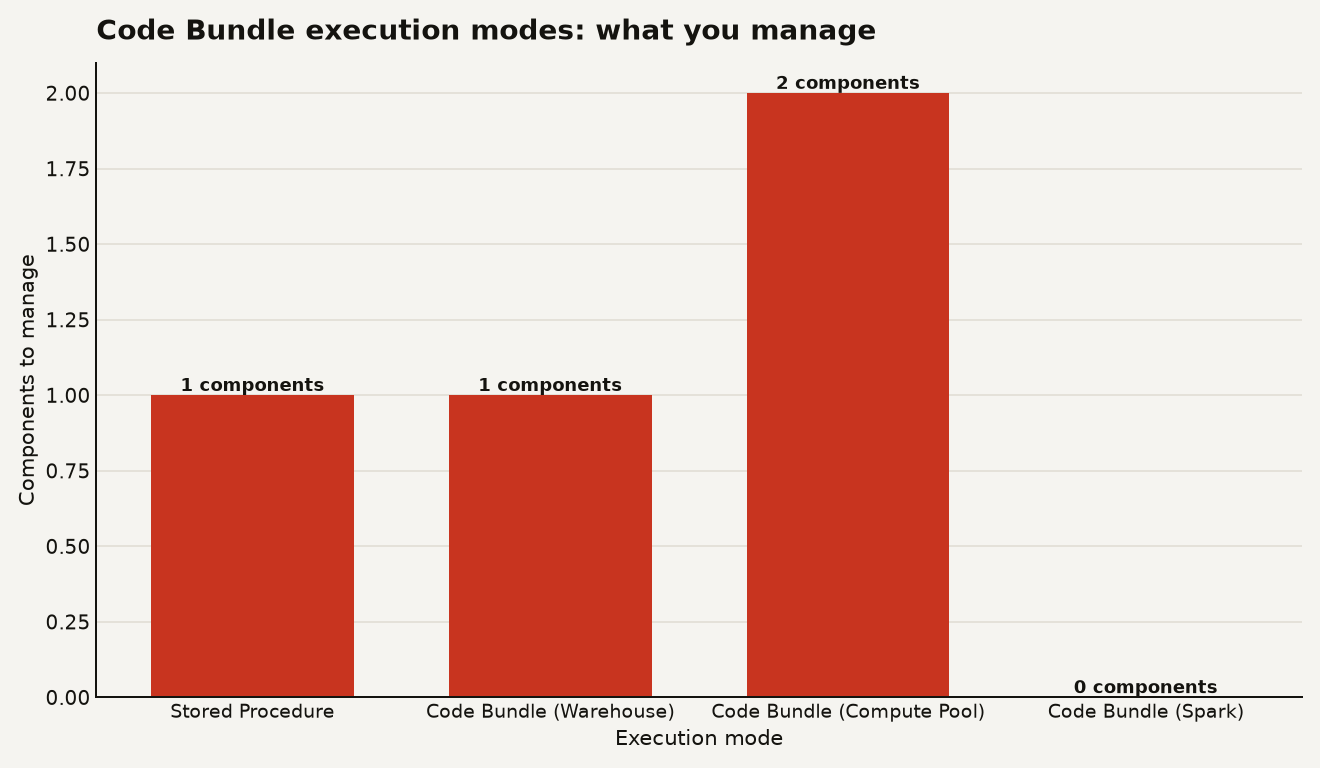
The chart above compares the three modes plus stored procedures on how many infrastructure components you must provision and manage. Warehouse execution is the most familiar: you already know the credit math. Compute pools add operational overhead but unlock container capabilities. Spark jobs are the newest and least documented on cost.
To monitor spend, query the same ACCOUNT_USAGE views you use for warehouse cost tracking:
SELECT
  warehouse_name,
  credits_used_compute,
  start_time,
  end_time
FROM SNOWFLAKE.ACCOUNT_USAGE.WAREHOUSE_METERING_HISTORY
WHERE start_time >= DATEADD(day, -7, CURRENT_TIMESTAMP())
ORDER BY credits_used_compute DESC;
This will not separate Code Bundle execution from regular SQL queries on the same warehouse, which is a limitation. If a Python bundle and a BI dashboard share a warehouse, the credits blend. For clean chargeback, dedicate a warehouse to your Code Bundle workloads.
When is a Code Bundle better than a stored procedure?
Stored procedures on Snowflake have real constraints. You declare a handler function with a fixed signature, list packages in the procedure DDL, and each procedure is a single database object. A multi-file Python project becomes a series of separate objects with duplicated package declarations. Versioning is manual. Dependencies between files are awkward.
Code Bundles solve this by treating the project as a unit. You ship a directory of Python files, a requirements.txt, and a bundle.yml. Snowflake installs dependencies, resolves entrypoints, and runs the whole thing. The bundle supports versioning and aliases, so you can deploy new code without breaking downstream tasks or consumers.
| Dimension | Stored Procedure | Code Bundle (Warehouse) | Code Bundle (Spark) |
|---|---|---|---|
| Packaging | Single handler per object | Multi-file project as a unit | Multi-file Spark app as a unit |
| Dependencies | Declared in DDL | requirements.txt, auto-installed |
Native pyspark.sql imports |
| Execution command | CALL proc() |
EXECUTE CODE BUNDLE |
Spark REST API or SQL |
| Compute source | Warehouse or serverless | Warehouse credits | Snowflake native Spark engine |
| Versioning | Manual, one object at a time | Built-in, with aliases | Built-in, with aliases |
| Runtime override | Not supported | WITH SPECIFICATION |
Spark properties in API call |
| Spark code support | Not supported | Not supported | Runs as-is on Snowpark Connect |
The trade-off is maturity. Stored procedures are GA, well-documented, and have years of operational tooling. Code Bundles are in preview. The EXECUTE CODE BUNDLE syntax, the Python API, and the REST API are all new. If you have a stable stored procedure pipeline in production, do not rush to migrate it. Start with a new workload.
What are the limits and what should you watch?
Code Bundles are in Public Preview. That means features can change before GA, and some capabilities may not have full documentation. Here is what to watch.
- Cost visibility for Spark jobs. The release notes and quickstart do not specify the credit model for Snowflake's native Spark engine. Run a small job, then check
WAREHOUSE_METERING_HISTORYandQUERY_HISTORYto see where the credits land. If you cannot find the spend, open a support ticket before you scale up. - Warehouse contention. Running a long Python job on a shared warehouse blocks other workloads from using that warehouse's full capacity. Consider a dedicated warehouse for bundle execution, sized to the job.
- Preview status of clients. The REST API, Python API, and Snowflake CLI support are all in preview. Do not build a production pipeline on a single preview client without a fallback.
- Orchestration with Tasks. The quickstart chains Python and PySpark stages using Snowflake Tasks. This works, and it integrates with the pipeline patterns you may already run. But task error handling and retry semantics for
EXECUTE CODE BUNDLEinside a task are not fully documented yet.
The versioning and alias system is the sleeper feature. If Snowflake lets you pin a task to a specific bundle version and roll forward or back atomically, that closes a gap that stored procedures have always had. Watch for GA documentation on how aliases interact with Tasks and serverless task runs.
The bet worth making
Code Bundles are the most practical step Snowflake has taken toward making Python a first-class workload on the platform, not a SQL accessory. Warehouse execution alone, billed on credits you already understand, is enough reason to try it on a non-critical pipeline this quarter. The Spark path is more ambitious and less proven. Run a benchmark, watch the credits, and let the numbers decide.
What you should skip is treating this as a free migration pass. Stored procedures are not going away, and for simple single-handler jobs they remain the simpler object. Code Bundles earn their keep when your Python project has multiple files, shared helpers, real dependencies, and a versioning story. That is where the wrapper was always the bottleneck, and that is where removing it changes what you build.
Sources
- Snowflake Documentation: September 24, 2026 Code Bundles release notes
- Snowflake Quickstart: Run Python or Spark Jobs on Snowflake with Code Bundles
- Snowflake Documentation: Code Bundle REST API reference
- Snowflake Documentation: Code Bundle Execution Python API
- Snowflake Documentation: Code Bundle Resource Python API