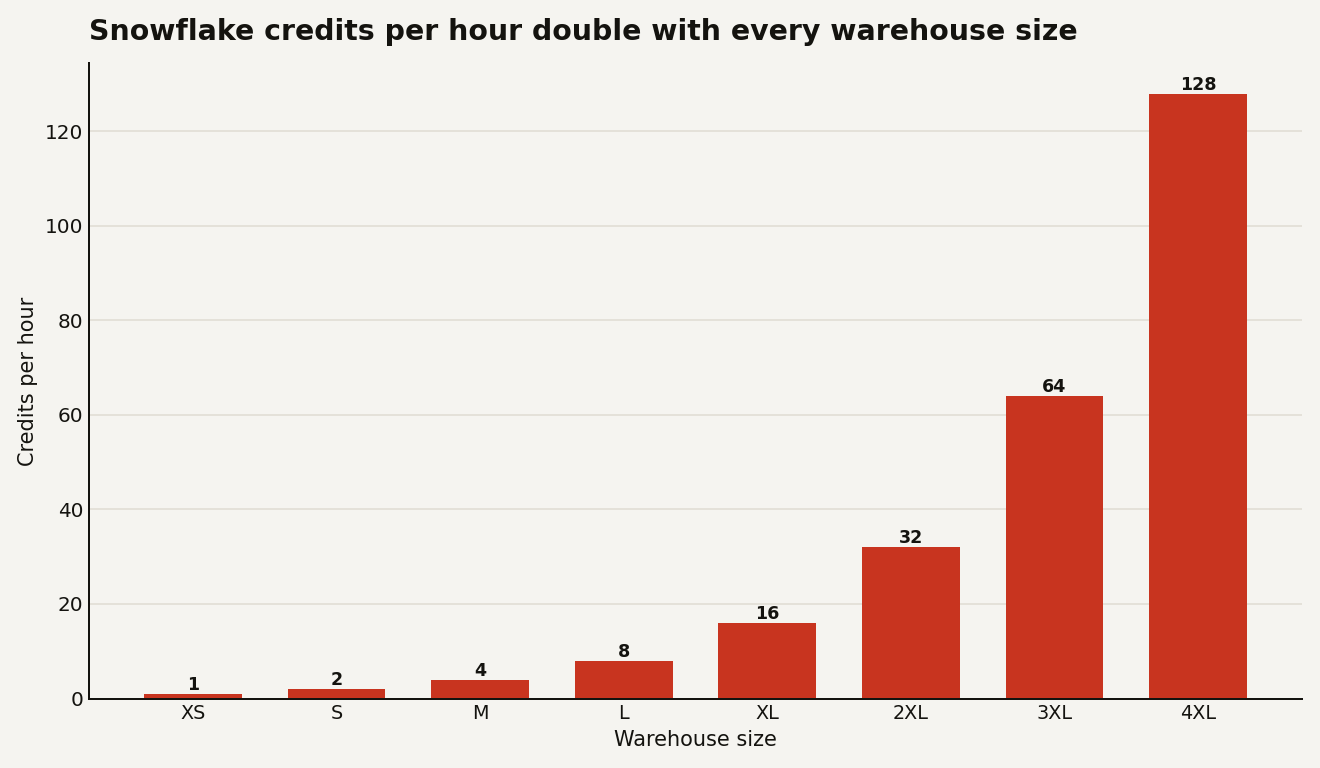
If your Snowflake bill jumped last quarter and nobody changed the data, the culprit is almost always compute, and almost always a warehouse that is bigger or busier than the work needs. A Snowflake virtual warehouse is just a cluster you rent by the second, and its size is the single dial that sets how fast credits drain. Get the dial wrong and you either throttle every analyst or you torch budget on idle compute. An XS warehouse burns 1 credit per hour; a 4XL burns 128 for the same wall-clock hour. That is a 128x spread on one setting, and most teams pick it once and never revisit it.
This guide is for the person who owns the warehouse and answers to finance when the credit line spikes. The goal is to size by workload, not by reflex, and to prove the change with numbers you can pull from your own account.
Each size step doubles credits
Snowflake sizes go XS, S, M, L, XL, then 2XL through 6XL. Each step up doubles the compute, and it doubles the credit rate in lockstep. The pricing is not a curve you have to model; it is a clean power of two.
The trap is assuming bigger is wasteful and smaller is safe. It is the opposite as often as not. A larger warehouse finishes a heavy query faster, and because billing is per-second after the first 60 seconds, a query that runs in 2 minutes on an L can cost the same as one that crawls for 8 minutes on an S. The size that wins is the smallest one that does not spill to disk and does not queue. Doubling the size only saves money when it more than halves the runtime, which holds for large scans and big joins but breaks for small, serial, or metadata-bound queries.
You can see the difference in the query profile. Two signals tell you a warehouse is too small for the job:
- Spilling. When a query runs out of memory it spills to local then remote storage, and remote spill is brutally slow. Any remote spill is a sign to size up.
- Queuing. If queries wait for a slot, the warehouse is saturated. That is a concurrency problem, not a size problem, and the fix is different.
Sizing up fixes spilling, not queuing
Sizing up fixes spilling. It does nothing for queuing, because a single larger cluster still runs a fixed number of concurrent queries before it starts holding them in a line. The right tool for a crowd of small queries is multi-cluster scaling: keep the size modest and let Snowflake add clusters under concurrency, then retire them when the rush passes. Reach for a bigger size when one query is slow; reach for more clusters when many queries are waiting.
Here is the comparison that matters when you are deciding which lever to pull:
| Symptom | Right lever | Wrong lever | Why |
|---|---|---|---|
| One query spills to remote disk | Size up one step | Add clusters | Extra clusters do not give a single query more memory |
| Many short queries queue at 9am | Multi-cluster (min 1, max 3) | Size up | A bigger single cluster still serializes the crowd |
| Warehouse runs all day at 5% load | Auto-suspend at 60s | Bigger warehouse | You are paying for idle, not for slow |
| Nightly batch runs 40 minutes | Size up, measure cost | Leave it on an S | Faster finish can cost the same and frees the window |
The most expensive mistake is not the wrong size at all. It is idle time. A warehouse left running with no queries bills every second until it suspends. Set auto-suspend to 60 seconds for interactive warehouses and confirm auto-resume is on so the next query wakes it. The classic 600-second default means each abandoned warehouse quietly bills ten minutes of nothing, over and over.
Size from query history, not vibes
Do not size by vibes. Snowflake records every query and every credit in ACCOUNT_USAGE, so you can measure the real distribution before you touch anything. Start by finding your spillers, because those are where sizing up pays for itself:
-- Queries that spilled to remote storage in the last 7 days,
-- ranked by how much they spilled. These are your size-up candidates.
SELECT
    warehouse_name,
    query_id,
    ROUND(bytes_spilled_to_remote_storage / POWER(1024, 3), 1) AS remote_spill_gb,
    ROUND(total_elapsed_time / 1000, 1) AS elapsed_s,
    LEFT(query_text, 80) AS query_preview
FROM snowflake.account_usage.query_history
WHERE start_time > DATEADD('day', -7, CURRENT_TIMESTAMP())
  AND bytes_spilled_to_remote_storage > 0
ORDER BY remote_spill_gb DESC
LIMIT 50;
Then look at the other end: warehouses that bill credits while doing almost nothing. Pair the credit spend from WAREHOUSE_METERING_HISTORY with the query counts from QUERY_HISTORY, and any warehouse with high credits and low query volume is an auto-suspend problem, not a sizing one.
Once you have the data, roll out in three controlled moves:
- Set guardrails first. Put a
RESOURCE MONITORon each warehouse with a monthly credit quota and a suspend trigger, so a runaway query or a forgotten session cannot run up an open-ended bill. This is your seatbelt before you start changing sizes. - Change one warehouse, then measure. Resize a single warehouse with
ALTER WAREHOUSE ... SET WAREHOUSE_SIZE, leave it for a few days, and compare credits and median runtime against the week before. Changing everything at once means you learn nothing. - Split workloads. Stop running dashboards, ad-hoc analysis, and heavy ELT through one shared warehouse. Give each workload its own warehouse so you can size and monitor them independently, and so a 3XL backfill never starves the analyst running a quick count.
The rollback is trivial, which is why this is safe to try: resizing takes effect on the next query, and you can drop back a size in one statement if the cost does not move the way you expected.
If you run dbt or scheduled ELT, point those at their own warehouse and size it for the heaviest model in the run, not the average. Batch work is exactly where a larger warehouse earns its credits, because it finishes faster and hands the time window back. The rest of the Snowflake guides go deeper on the pipeline and governance side.
The one number to watch
Track credits per active query-hour, not raw credits. Raw credits go up when usage grows, which can be healthy. Credits burned per hour of actual query work is the number that exposes idle warehouses and oversized clusters, and it is the one that drops the day you right-size. Pull it weekly, watch the trend, and let the warehouse that does the least work for the most credits be the first one you fix.