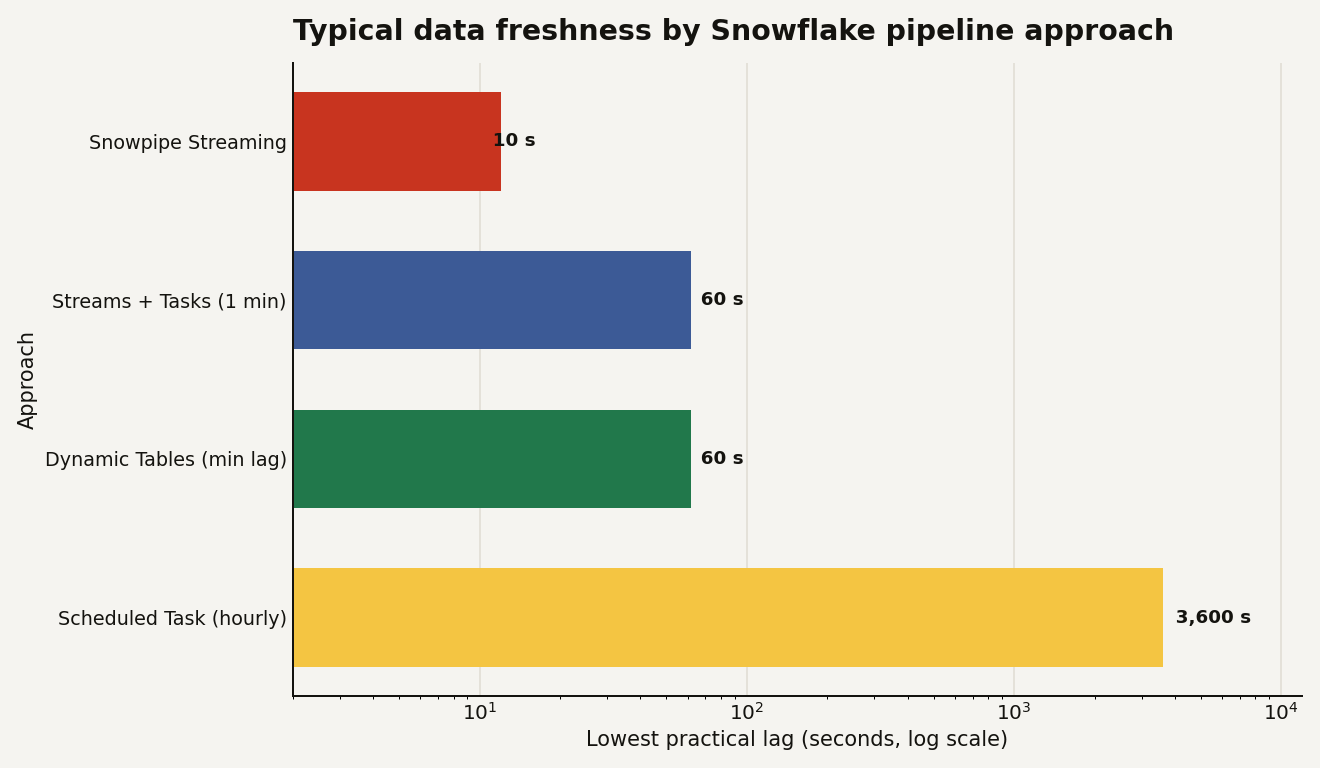
Most Snowflake data teams hit the same fork. You have raw data landing in a table and you need a clean, transformed version that stays current. Do you write the transformation as a declarative Dynamic Table and let Snowflake keep it fresh, or do you wire up a Stream to capture changes and a Task to process them on a schedule you control? Pick wrong and you either fight the orchestration you did not need or hit a freshness wall you did not see coming. The single hard number that settles a lot of these arguments: Dynamic Tables cannot refresh faster than a 60-second target lag. If your SLA is tighter than a minute, that choice is already made for you.
This guide is for the engineer designing a transformation pipeline on Snowflake who wants to stop relitigating the same build-versus-declare debate on every table. We will use real Snowflake behavior, not vibes.
Dynamic Tables versus Streams and Tasks
A Dynamic Table is a materialized result of a SELECT that Snowflake keeps up to date for you. You write the query and a TARGET_LAG, and Snowflake figures out the dependency graph, watches the base tables, and refreshes, incrementally when it can, so readers never see a partial result.
CREATE OR REPLACE DYNAMIC TABLE dt_orders
    TARGET_LAG = '10 minutes'
    WAREHOUSE = transform_wh
    REFRESH_MODE = INCREMENTAL
AS
    SELECT order_id, customer_id, order_date,
           TRIM(UPPER(product_name)) AS product_name,
           quantity * unit_price AS line_total
    FROM raw_orders
    WHERE order_status != 'returned';
That is the whole pipeline. No scheduler, no change-tracking code. Set TARGET_LAG = '10 minutes' and Snowflake tries to keep the table no more than ten minutes behind its source. Chain dynamic tables that read from each other and Snowflake refreshes them in dependency order against a consistent snapshot, which is the part that makes them genuinely pleasant for multi-step transforms.
Streams and Tasks are the imperative alternative. A Stream is a change-tracking cursor over a table: it records the rows inserted, updated, or deleted since you last consumed it. A Task runs a SQL statement (or calls a procedure) on a schedule or when a predecessor finishes. You compose them yourself: a Stream captures what changed, a Task reads the Stream and applies the change with a MERGE. You own the logic, the ordering, and the failure handling.
Dynamic Tables are the right default
The honest answer is that Dynamic Tables are the right default for most analytical transforms now, and Streams and Tasks are the tool you keep for the cases Dynamic Tables cannot express. Snowflake's own rule of thumb is blunt: if your logic fits in a SELECT, it is a candidate for a Dynamic Table.
- Reach for Dynamic Tables when the transform is expressible as SQL, you want declarative freshness you tune with one parameter, and a minute or more of lag is fine. This is the bulk of cleaning, joining, and aggregating work.
- Reach for Streams and Tasks when you need procedural logic (calling a stored procedure, an external function, branching), sub-minute freshness, or fine control over exactly when and how a change is applied. CDC into a slowly changing dimension with custom merge rules is the classic case.
- Reach for Snowpipe Streaming when the requirement is genuinely low-latency ingestion, rows available in seconds, which neither of the above delivers on its own.
A practical gotcha sits inside the freshness column: a Task scheduled "every 1 minute" is not the same as one-minute freshness. The task has to start, the warehouse has to resume if it was suspended, and the merge has to run, so real end-to-end lag is the schedule plus the run time. Snowflake's triggered tasks, which fire when an underlying Stream gets data instead of on a fixed clock, close most of that gap and are usually the better choice than a tight cron when you want responsiveness without polling an empty stream every minute.
Here is the comparison that actually drives the decision:
| Dimension | Dynamic Tables | Streams + Tasks |
|---|---|---|
| Programming model | Declarative: write a SELECT | Imperative: you orchestrate |
| Lowest freshness | 60-second target lag minimum | Down to ~1 minute on a schedule, faster with triggered tasks |
| Multi-step pipelines | Auto dependency graph, consistent snapshot | You sequence tasks yourself |
| Stored procedures / external functions | Not supported in the definition | Fully supported |
| Failure handling | Managed by Snowflake | Yours to design and monitor |
| Best fit | Cleaning, joins, aggregations | CDC, custom merge logic, procedural steps |
The same underlying meters
Both approaches bill the same underlying things, so cost is rarely the deciding factor, but the shape differs. A Dynamic Table charges warehouse compute for each refresh query, Cloud Services for the dependency tracking and change detection, and storage for the materialized rows plus Time Travel. The trap is target lag: a shorter lag means more frequent refreshes and more scheduling overhead, so setting TARGET_LAG = '1 minute' on a table nobody reads more than hourly just burns credits for freshness no one consumes. Match the lag to how fresh the data genuinely needs to be, and use TARGET_LAG = DOWNSTREAM on intermediate tables so they only refresh when something downstream needs them.
Streams and Tasks bill the warehouse (or serverless compute) for each task run. The classic waste here is a frequent schedule on a Stream that is usually empty: guard every task with WHEN SYSTEM$STREAM_HAS_DATA('my_stream') so it skips the run, and the credits, when nothing changed.
If you run dbt, this maps cleanly: dbt can materialize models as Dynamic Tables, so you get declarative freshness inside your existing project rather than hand-rolling tasks. Point that work at its own warehouse, sized for the heaviest refresh, as covered in the warehouse sizing guide. The other Snowflake guides go deeper on cost monitoring.
The rule that saves the most rework
Start declarative, escalate only when blocked. Build the table as a Dynamic Table with a target lag that matches the real SLA. If you hit something a SELECT cannot express, or you need freshness under a minute, drop that one table down to Streams and Tasks. Choosing imperative orchestration for a whole warehouse of tables you could have declared is the most common way teams sign up for maintenance they never needed.