Every BI assistant eventually hits the same wall: it can only see the warehouse. Your analyst asks "what changed with the churn cohort this week," the assistant runs SQL, and it has no idea that the head of customer success posted a Slack thread three hours ago explaining exactly why. Databricks just removed that wall for Genie. On September 10, 2026, Databricks shipped generally available MCP connectors for Genie One and Genie Code, covering Google Drive, Gmail, Google Calendar, Microsoft 365, Atlassian, Slack, and GitHub. Every connection runs through Unity Catalog and the Unity AI Gateway, which authorizes each tool call, enforces policies and approval requirements, and logs usage and audit activity. Each user authenticates individually with their own OAuth token; tokens are never shared.
This is the first mainstream BI assistant with governed, per-user MCP tool use. That distinction matters more than the connector count. If you run Genie in production, the governance story is the whole feature: it is what stops an agent from quietly reading a private GitHub repo or pulling confidential Slack threads into an answer because someone left a scope too wide.
Seven managed MCP connectors went GA
Seven Databricks-managed MCP connectors went GA: Google Drive, Gmail, Google Calendar, Microsoft 365 (SharePoint, Teams, Outlook, and Calendar), Atlassian (Jira and Confluence), Slack, and GitHub. A Glean connector is also listed for cross-application search. Each connector lets Genie One and Genie Code search and read content from the external tool while answering a question. The connectors are managed by Databricks, meaning Databricks holds the OAuth credentials and the connector configuration lives in Unity Catalog.
The connection model is per-user, not per-workspace. When you click "Sign in" on a connector, you complete an OAuth consent screen with the provider. Databricks manages the OAuth credentials but the token is yours. OAuth tokens are not shared between users. That means if Alice connects her Gmail, Bob cannot read Alice's mail by asking Genie. Access still depends on your permissions in the source application: if you cannot see a Slack channel in Slack, the connector cannot see it either.
There are hard limits and format constraints you should know before you plan a rollout:
| Connector | What it can search or read | Key limits |
|---|---|---|
| Google Drive | Google Docs, Sheets, and Slides | 10 MB max file size; PDFs and binary formats not supported; only built-in Google file types |
| Gmail | Email content (read and search only) | Cannot send or modify emails |
| Microsoft 365 | SharePoint, Teams, Outlook, and Calendar | 10 MB max for SharePoint files; PDFs and binary formats not supported |
| Atlassian | Jira and Confluence | A workspace admin must configure the Atlassian connection before non-admin users can use it |
| Slack | Messages and channels | Subject to your Slack workspace permissions |
| GitHub | Public repositories by default | Private repos require a GitHub org admin to enable access; GitHub Enterprise Server (self-hosted) is not supported |
The connectors require the Third Party Connectors for Agents Beta to be enabled in your workspace. They are only available in regions where Model Serving is supported, which you can check in your workspace settings.
A practical gotcha from the docs: the data source tools might not always trigger automatically. If document search does not start, you should explicitly prompt Genie to use the tool, for example by typing "use Google Drive" or "use SharePoint" in the conversation. It is a tool the model decides to call, and sometimes the model decides not to. Plan for that in your user training.
Unity Gateway governs every connection
This is where the feature earns its GA badge. In August 2026, all Databricks-managed MCP connectors for Genie One and Genie Code migrated to Unity Gateway, and Unity Gateway itself reached general availability on August 4. Unity Gateway is the Databricks governance solution for enterprise AI, part of Unity Catalog. It gives you a single control plane for governing AI cost, security, and access across models, MCP servers, and agents.
For MCP connectors specifically, Unity Gateway handles four things:
- Authorization of each tool call. Every time Genie wants to call an MCP connector, Unity Gateway checks whether the user and the agent are allowed to make that call.
- Built-in policies and approval requirements. You can set policies that require approval before certain tools are used, or block specific tools entirely for certain groups.
- Usage and audit logging. Every connector call is logged, so you can see who queried what, when, and what the tool returned.
- Cost visibility. Because the connectors are under Unity Gateway, their usage appears alongside your other AI traffic, so you can monitor cost from one place.
If you were using the connectors before the August migration, users must reauthenticate to continue using them. Databricks notes that a notification in Genie prompts impacted users to reconnect. That is a one-time disruption, but you should plan for a small wave of support tickets if you had early adopters on the Beta.
You can also create custom MCP connections in Unity Catalog beyond the seven Databricks-managed connectors. The docs recommend machine-to-machine (M2M) OAuth for custom connections, since user-to-machine (U2M) OAuth requires additional setup to register the workspace redirect URI in a custom OAuth app. If your team needs a connector Databricks does not provide, you can build one and bring it under the same governance umbrella.
Genie moves beyond SQL
Before this release, Genie was a SQL-native assistant: it could query tables, views, and metric views in Unity Catalog, and it could reason about your warehouse data. Now it can also pull context from the collaboration and documentation tools where your organization actually works. The practical shift is that a Genie answer can now combine structured warehouse data with unstructured context from Slack, Jira, or Google Drive in a single response.
Databricks also raised the Genie Agent capacity limits in the same release. Each Genie Agent now supports up to 50 tables, views, or metric views as data sources, up from 30. The conversation cap jumped from 10,000 to 200,000 conversations per agent. Those are order-of-magnitude increases, and they matter because MCP connectors make each conversation potentially richer and longer.
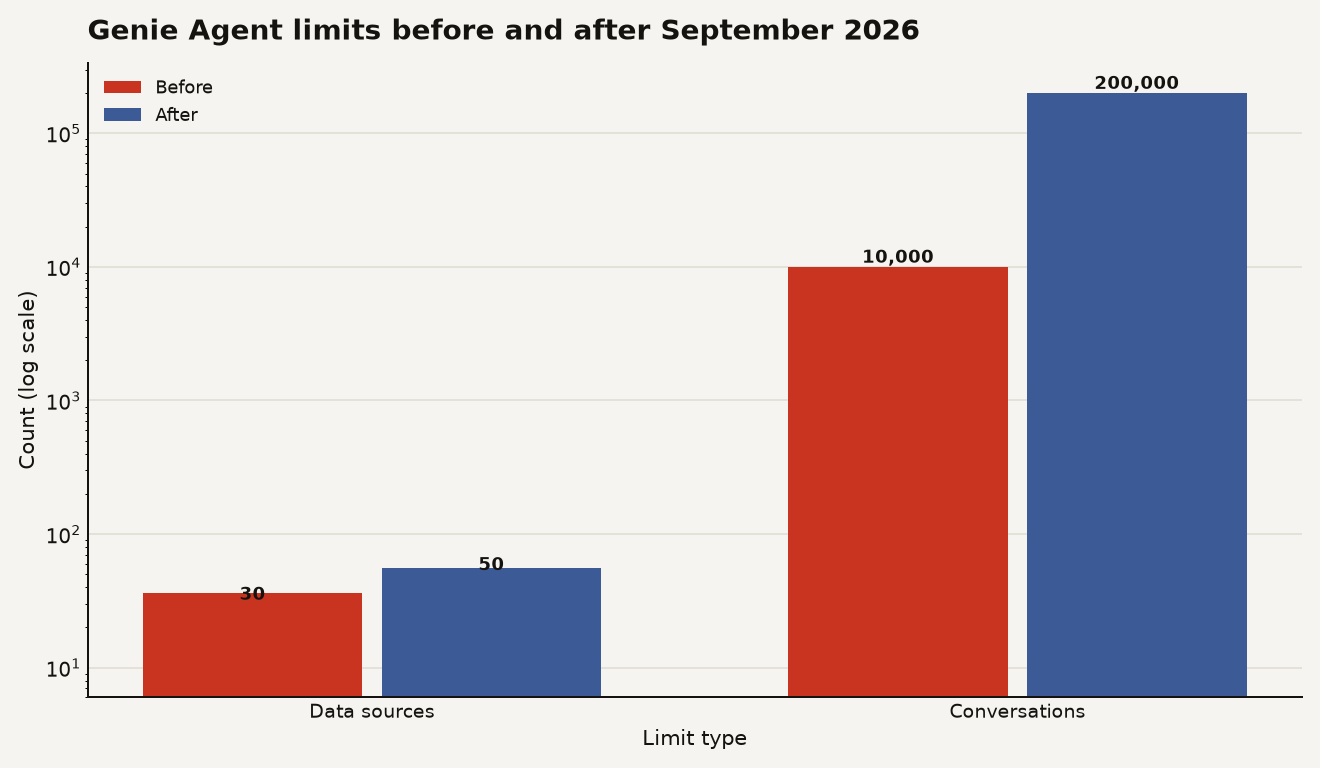
The chart above shows the two limit increases on a log scale. The conversation cap rising from 10,000 to 200,000 is the more dramatic change: a 20x increase. If you are planning a Genie Agent that serves an entire department and now pulls in context from five external tools, you need that headroom. The data source limit going from 30 to 50 is a 67 percent increase, which matters for agents that need to join across many semantic views.
For a data engineer who influences the bill, the cost picture has two parts. First, the connectors themselves do not have a separate per-call price listed in the release notes; they run through Unity Gateway, which is part of your existing Unity Catalog entitlement. Second, the real cost driver is the underlying model serving. Every time Genie calls a connector, it sends the retrieved content back to the model for reasoning. More connectors means more context means more tokens. If you turn on all seven connectors for a busy agent, expect the model serving bill to rise because the agent is doing more work per conversation. You can use Unity AI Gateway budgets to set spend guardrails before you turn this on broadly.
Configuration paths for admins and users
The configuration path is different depending on whether you are an end user adding a personal connection or an admin setting up a shared, governed connector.
For a personal connection, the flow is simple. In Genie One, you click "More connections" at the bottom of the connection list, select a provider, click "Sign in," and complete the OAuth consent. The connection is added to your conversation, and chat can now search your documents when answering. After a connection is created, metastore admins and connection owners can manage or revoke user permissions on it.
For admin-managed connectors, the setup is heavier. Atlassian requires a workspace admin to configure the connection before non-admin users can use it. GitHub private repository access requires a GitHub organization admin to complete additional setup. Glean requires a metastore admin to configure the tenant ID first. These are not self-service flips; they require coordination between your Databricks admin and the admin of the external tool.
If you need a connector Databricks does not ship, you create a custom MCP connection in Unity Catalog. The connection must be created before you can add it to a chat conversation. Use M2M OAuth where possible:
CREATE CONNECTION my_custom_mcp
  TYPE MCP
  OPTIONS (
    host 'https://my-mcp-server.example.com',
    port '443',
    oauth_client_id '<client_id>',
    oauth_client_secret '<secret>',
    oauth_token_endpoint 'https://auth.example.com/oauth/token'
  );
This is a simplified illustration. Your exact options depend on the MCP server you are connecting to, and you should verify the supported parameters in the Unity Catalog connection docs before deploying.
Do not enable all seven for every agent
Do not turn on all seven connectors for every agent. The governance model is solid, but the practical risk is context overload. If an agent has access to Google Drive, Slack, Jira, and GitHub simultaneously, the model has to decide which tool to call for each question. That decision is not always correct, and a wrong tool call means wasted tokens, a slower response, and sometimes a misleading answer that cites a stale Confluence page instead of the current warehouse data.
The connectors are read-only for most tools. Gmail can search and read email but cannot send or modify. That is the right default, but it means Genie is not going to take actions for you. If you were hoping for an agent that posts a Slack message when a dashboard metric breaches a threshold, this is not that feature. You would build that with Agent Bricks or a Lakeflow pipeline that calls the Slack API directly.
File format limits are real. PDFs and binary formats are not supported in Google Drive or SharePoint connectors. If your organization stores a lot of knowledge in PDFs, the connectors will not surface that content. The 10 MB per-file limit also means large documents are out of scope.
Finally, external connections are only available in regions where Model Serving is supported. If your workspace is in a region without Model Serving, you cannot use these connectors at all.
Start with one connector and one agent
Start with one connector and one agent. Pick the tool where your organization's decision-relevant context actually lives. For most teams, that is Slack or Atlassian. Connect it, test it with a small group, and watch the Unity Gateway audit logs to see what the agent is actually calling. You will learn more from a week of audit logs than from any feature page.
Set Unity AI Gateway budgets before you broaden access. The connectors do not have a standalone price, but the model serving behind them does. A budget guardrail is cheaper than a surprise invoice.
If you had early adopters on the Beta connectors before August 2026, tell them to reauthenticate. The migration to Unity Gateway broke existing tokens, and users will see a reconnection prompt in Genie. Get ahead of that with a short internal note.
For a deeper look at the governance plane that makes these connectors safe to turn on, read the Unity AI Gateway GA governance guide. If you are planning to use Genie with attribute-based access control to scope what each user can see across both warehouse tables and external tools, the ABAC context attributes guide covers how agent-aware governance works.
A governed tool layer is the shift
The connectors are not the story. The story is that Databricks built a governance plane for AI tool use, shipped it as GA, and then plugged seven connectors into it. Most BI assistants that can call external tools do so with a shared service account and a prayer. Genie now does it with per-user OAuth, Unity Gateway authorization, and full audit logging. If you have been holding back on Genie because the security story was incomplete, that hold just expired.