AI cost control used to be a spreadsheet problem. Then Genie, coding agents, ai_query, and model endpoints put LLM spend directly in the path of normal work. That is a better product experience and a worse surprise-invoice experience.
Unity AI Gateway budgets are Databricks account-level controls for monthly AI spend. In July 2026, Databricks says Unity AI Gateway budgets become generally available across AWS, Azure, and Google Cloud, while Unity AI Gateway itself remains in Beta. The key fact for data teams: admins can set shared and per-user spending thresholds for requests managed through Unity AI Gateway and Genie, with actions such as email alerting or usage blocking.
That split matters. A data engineer does not need another dashboard that explains yesterday's bill. You need a control plane that stops one overexcited analyst, agent loop, or internal app from turning a demo into an account-wide cost incident.
Budgets become GA in July 2026
Databricks is making the budget feature generally available, not the whole gateway surface. The release note is explicit: Unity AI Gateway budgets roll out for all accounts on AWS, Azure, and Google Cloud in July 2026, but Unity AI Gateway itself remains in Beta and accounts that receive budgets are not automatically enrolled in Unity AI Gateway.
That is the first trap to avoid in your rollout plan. Budget availability does not mean all gateway traffic controls are automatically active in every workspace. For a gateway-specific budget, Databricks still lists three requirements in the current docs: Unity AI Gateway enabled for the account, the billable usage system table enabled, and the Unity AI Gateway Budget Public Preview enabled in the account console before GA arrives. The Unity AI Gateway budget docs also say endpoint tags propagate into system.billing.usage.custom_tags, which is what makes team, project, and cost center scoping practical.
Here is the useful mental model:
| Control | What it governs | Confirmed scope | Where you manage or inspect it |
|---|---|---|---|
| Account budget | Total Databricks usage or filtered usage | Monthly USD list-price spend | Account console Usage tab or Budgets API |
| Unity AI Gateway budget | Gateway endpoint spend | Pay-Per-Token and ai_query inference |
Account console, budget details, billing tables |
| Genie budget | Genie product LLM spend | Genie, Genie Spaces, Genie Code, and Genie One through databricks-product: genie |
Account console with shared, per-user, and override controls |
The feature is narrow in the right way. It does not try to become a model router, prompt firewall, FinOps warehouse, and procurement system in one gulp. It takes billing records, filters them, and lets an account admin decide when a line gets noisy or blocked.
Budgets measured at list price in dollars
Budgets are measured in US dollars using Databricks list prices, including platform add-ons. The account budget documentation says the spent amount does not factor in negotiated discounts or billing credits, so the number you see is a guardrail number, not necessarily the final invoice number.
That is the right trade for a runtime control. If you wait for negotiated net cost, you get accuracy after the blast radius. List price gives you a conservative tripwire while the workload is still live.
For Unity AI Gateway specifically, Databricks says budget scope can use the Unity AI Gateway resource type and endpoint tags such as team, project, or cost_center. The gateway budget page says Unity AI Gateway budgets currently track Pay-Per-Token, also called PAYGO, and ai_query batch inference, while provisioned throughput and external-model inference are not currently tracked.
That last clause should shape your design. If your AI estate includes provisioned throughput endpoints or direct external provider billing, a Unity AI Gateway budget will give you a partial control plane. Useful, yes. Complete, no.
The billing table is where engineering teams should verify what the console tells them. The cost observability docs say Unity AI Gateway enriches MODEL_SERVING records in system.billing.usage with fields such as usage_metadata.ai_gateway_endpoint_name, usage_metadata.ai_gateway_destination_model, identity_metadata.run_by, and custom_tags.
A practical query for the platform team:
SELECT
  custom_tags['team'] AS team,
  usage_metadata.ai_gateway_endpoint_name AS endpoint_name,
  identity_metadata.run_by AS run_by,
  SUM(usage_quantity) AS dbus
FROM system.billing.usage
WHERE billing_origin_product = 'MODEL_SERVING'
  AND usage_metadata.ai_gateway_endpoint_name IS NOT NULL
  AND usage_unit = 'DBU'
  AND usage_date >= current_date() - INTERVAL 30 DAYS
GROUP BY team, endpoint_name, run_by
ORDER BY dbus DESC;
Notice the billing shape. You can hold teams accountable only if they send traffic through endpoints with tags that survive into custom_tags. If the endpoint is untagged, your budget can still catch global spend, but your allocation story gets mushy fast.
Genie budgets without blocking the wrong people
Genie is the reason this feature deserves attention from data engineers, not just account admins. Databricks says Genie products move to pay-as-you-go pricing on July 6, 2026, with each identified user receiving 150 DBUs of free LLM usage every month, equal to about $10.50 in US East and roughly 80 to 100 Genie questions or 20 to 30 Genie Code coding sessions.
The free tier is generous enough for casual use and too small to ignore for broad rollout. A 300-person analytics org can burn through the free layer unevenly: 250 people ask a few questions, 20 power users live in Genie Code, and 5 people accidentally discover an expensive workflow. A seat license would hide that shape. Pay-as-you-go exposes it.
For Genie, Databricks documents a specific budget pattern. The Genie budget docs say you create the budget with resource type Unity AI Gateway and the resource tag databricks-product: genie, and they warn that adding other resource tags to a Genie budget is not supported and prevents the budget from tracking Genie usage.
Use that rule exactly:
Resource type: Unity AI Gateway
Resource tag key: databricks-product
Resource tag value: genie
Then layer the controls:
- Set a shared monthly threshold for the workspace or account segment.
- Set a per-user threshold for normal users.
- Add overrides for trusted groups such as
genie-codeorpower-users. - Use alerts first, then block usage only where the failure mode is acceptable.
Databricks gives a concrete example configuration in its docs: $5,000 shared, $100 per user, $200 for genie-code, and $300 for power-users. The chart below shows that shape as a control design, not a recommendation for every account.
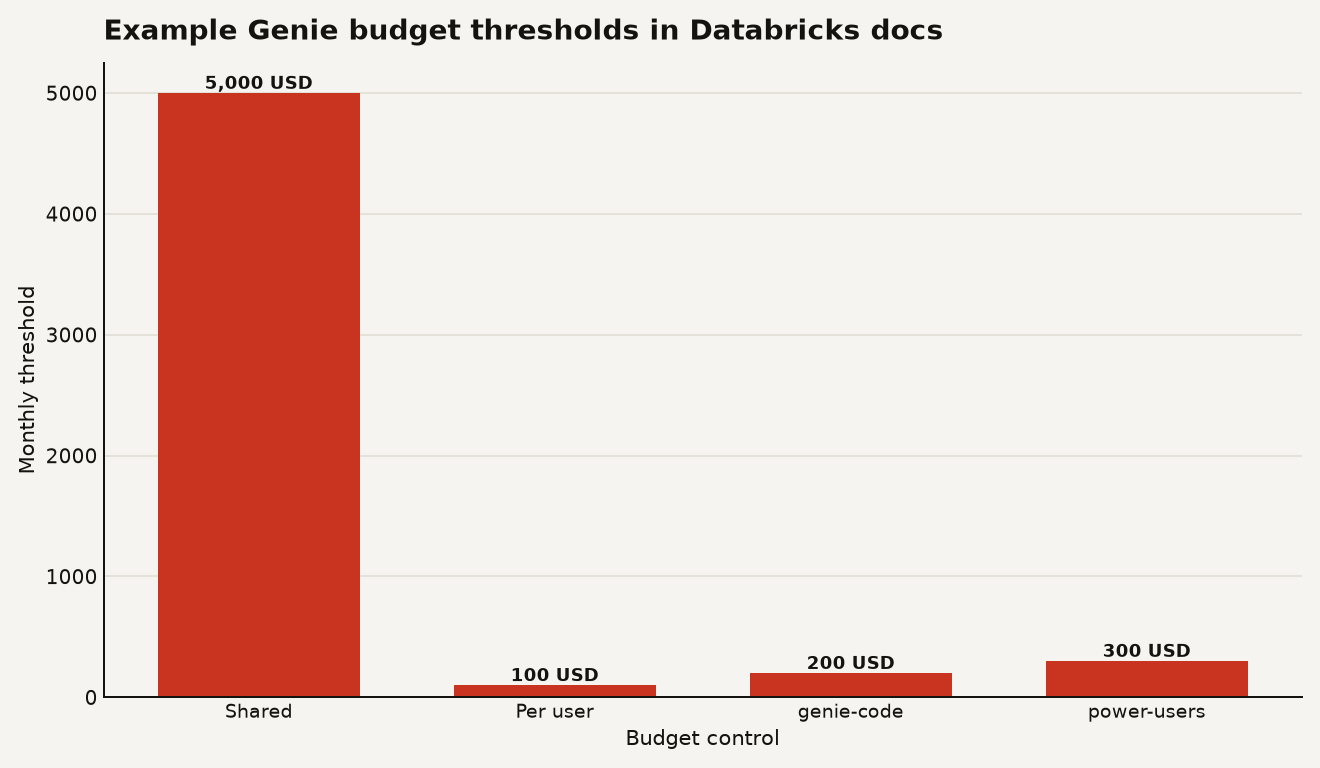
The override logic has teeth. The Genie docs say that within one budget, a user in multiple groups inherits the most permissive threshold, so a user in both genie-code and power-users gets $300 in the documented example. Across multiple Genie budgets, the most restrictive limit applies, so a $100 limit in one budget beats a $200 limit in another.
That is sane, but it also means budget sprawl can create confusing support tickets. If you let every workspace admin create their own Genie budget, a blocked user may be blocked by a different budget than the one your team is looking at. Keep ownership centralized until your naming and group model are boring.
Blocking turns observability into control
Blocking is the feature that changes this from observability to control. The budget docs say thresholds can trigger email notifications, and for Unity AI Gateway budgets the known limitations include a small amount of spend beyond a blocking threshold because active requests are not interrupted and enforcement has a brief delay.
That caveat matters less for a human asking Genie questions. It matters more for an agentic workflow that can generate a lot of calls in a tight loop. If you expose Genie or gateway-backed functionality inside an internal portal, usage blocking should be part of the launch checklist, not a follow-up after finance asks why Tuesday looks weird.
A sane default policy looks like this:
| Workload | Budget action | Why |
|---|---|---|
| Exploratory Genie use | Alert at shared threshold, block at per-user threshold | Preserve broad access while stopping individual runaway spend |
| Executive dashboard backed by Genie | Alert first, avoid hard block unless there is a fallback | A blocked dashboard becomes a business incident |
| Agent or app calling gateway endpoints | Block at project or service-principal boundary | Loops and retries can outspend humans quickly |
| External-model path billed by provider | Do not rely on Unity AI Gateway budget alone | Databricks says external-model inference is not currently tracked by these budgets |
The right policy is also a product decision. If Genie is replacing ad hoc analyst requests, blocking at $30 may be penny-wise and queue-building. If Genie is embedded in a public-facing workflow with weak throttling, a hard stop may save the month.
This is where the broader Databricks Data Intelligence Platform architecture matters. Cost control belongs beside identity, Unity Catalog permissions, and workload ownership. Treat AI spend as a governed workload dimension, not a chat feature tucked into the corner of BI.
A Budgets API with thin documentation
There is a public Budgets API, but Databricks documentation is still cleaner for basic monthly budgets than for every Genie-specific UI control. The Budgets API reference exposes POST /api/2.1/accounts/{account_id}/budgets, requires the billing API scope, and shows fields such as display_name, filter, alert_configurations, quantity_threshold, quantity_type, time_period, and trigger_type.
A minimal account budget creation payload looks like this:
curl -X POST \
  https://accounts.cloud.databricks.com/api/2.1/accounts/$ACCOUNT_ID/budgets \
  -H "Authorization: Bearer $TOKEN" \
  -H "Content-Type: application/json" \
  -d '{
    "budget": {
      "display_name": "ai-gateway-ml-platform",
      "filter": {
        "tags": [{
          "key": "team",
          "value": {"operator": "IN", "values": ["ml-platform"]}
        }]
      },
      "alert_configurations": [{
        "time_period": "MONTH",
        "trigger_type": "CUMULATIVE_SPENDING_EXCEEDED",
        "quantity_type": "LIST_PRICE_DOLLARS_USD",
        "quantity_threshold": "1000",
        "action_configurations": [{
          "action_type": "EMAIL_NOTIFICATION",
          "target": "[email protected]"
        }]
      }]
    }
  }'
Do not overread that snippet. It demonstrates the public budget API shape and tag filtering. The current Databricks Genie budget page documents shared thresholds, per-user thresholds, blocking, and overrides in the account console flow. If you need those exact Genie controls as code, verify the live API and provider support in your account before promising GitOps parity.
There is also a CLI surface. The Databricks CLI account budgets command group can create, list, get, update, and delete budget configurations, with JSON passed through --json. That makes it useful for inventory and drift checks even if your first rollout uses the UI for the per-user pieces.
Attribution before thresholds
Start with attribution, not thresholds. A $5,000 budget attached to a bad tag model is a smoke alarm in the wrong building.
For Unity AI Gateway endpoints, standardize endpoint tags before you standardize alert values. At minimum, require team, env, and cost_center on every endpoint that can generate billable traffic. Databricks says only AI Gateway endpoint tags are propagated to custom_tags for budget scoping, and budgets do not support request tags, so request-level tags are useful for dashboards but not for budget filters.
For Genie, decide whether your cost boundary is workspace, user group, or individual user. The docs say Genie budgets are shared across Genie, Genie Spaces, and Genie Code under the single databricks-product: genie resource tag, so separate product budgets need to be modeled through groups rather than separate product tags.
Then run this checklist:
- Confirm
system.billing.usageis enabled for the account. - Create one account-level AI budget in alert-only mode for the first month.
- Create a Genie budget scoped with
databricks-product: genieand no extra resource tags. - Set per-user thresholds for normal users and higher overrides for named groups.
- Query
system.billing.usageweekly and compare the table to the budget details page. - Add blocking only where the user experience is understood.
The strongest use case is controlled self-service. Give analysts and engineers Genie access without turning every prompt into a procurement conversation. Give app teams gateway endpoints without making finance reverse engineer MODEL_SERVING records after the fact.
The weakest use case is pretending this controls all AI spend. It does not cover every serving mode today, and it does not replace provider-side budgets for external models. The honest architecture is layered: Databricks budgets for Databricks-billed gateway and Genie usage, provider budgets for provider-billed calls, and SQL checks over billing tables for audit.
The useful guardrail is the one users can hit
The best thing about Unity AI Gateway budgets is that they are close to the work. Genie questions, ai_query inference, and gateway endpoints are where AI cost enters a Databricks account. Putting shared and per-user thresholds there is more useful than explaining the invoice later with a pie chart.
The risk is false comfort. GA budgets make the control plane easier to adopt, but they do not make every AI path governed by default. If your team exposes Genie broadly in July 2026, budget it on day one. If your agents call models outside the tracked paths, budget those too.
AI spend does not need a war room. It needs boring limits, good tags, and one person willing to say that a demo gets $100 before it gets $10,000.
Sources
- Databricks Release Notes: What's coming?
- Databricks documentation: Manage budgets for Unity AI Gateway
- Databricks documentation: Create and monitor budgets
- Databricks documentation: Manage budgets and cost controls for Genie
- Databricks documentation: Monitor Unity AI Gateway cost
- Databricks REST API reference: Budgets API
- Databricks CLI reference: account budgets commands