Passkeys were supposed to kill phishing. They did not even survive first contact with a determined vishing crew.
Since at least May 2026, Microsoft Security Research has been tracking a campaign where attackers call employees on their personal phones, pretend to be IT helpdesk staff, and convince them to register a new passkey through phishing sites that mirror Microsoft's real sign-in pages. The passkey pitch is a lure. The real objective is stealing session tokens and enrolling attacker-controlled authentication methods that persist long after the phone call ends. The campaign feeds data to named extortion groups including ShinyHunters and Helix, and it has been running for months.
The attackers throttled exfiltration to fewer than 1,000 files or emails per hour, spreading theft across hours to days to blend with normal enterprise traffic.
Here is what happened, why the passkeys-stop-phishing claim is thinner than you thought, and what to change in your identity stack this week.
Five fast stages of passkey phishing
The attack chain has five stages and they happen fast. Microsoft's analysis lays out the sequence: identity-focused social engineering, authentication persistence, cloud reconnaissance, content discovery, and exfiltration.
Stage one is a phone call. The caller claims to be from IT and says the user's passkey, MFA, or SSO configuration needs an urgent update to avoid disruption. They send a link via SMS to the user's personal phone. The link goes to a phishing site that mimics Microsoft's sign-in experience closely enough to fool someone who is not examining the URL bar on a mobile device.
Stage two is credential and token capture. Microsoft details two capture methods. In adversary-in-the-middle phishing, the attacker proxies the sign-in in real time, capturing both credentials and the session token issued after MFA. In device code flow attacks, the user is persuaded to enter a code on the real Microsoft authentication page, which issues a token to an attacker-controlled client. The device code method leaves almost no endpoint telemetry, especially when the victim opens the phishing link on a personal phone that is not enrolled in your EDR.
Stage three is persistence. The attacker uses the stolen session to access Microsoft Approval Management and registers their own authentication methods: phone numbers, authenticator apps, software OTP tokens. Cybernoz reports that this gives the attacker a way to satisfy future MFA challenges without the legitimate user ever being involved.
Stage four is reconnaissance. The attacker enumerates SharePoint, OneDrive, and directory objects through the Graph API. Microsoft observed sessions persisting for approximately one hour during this phase, mapping out sensitive files and internal applications.
Stage five is data collection. This is where the campaign separates itself from smash-and-grab operations. The exfiltration is measured, sustained, and deliberately throttled.
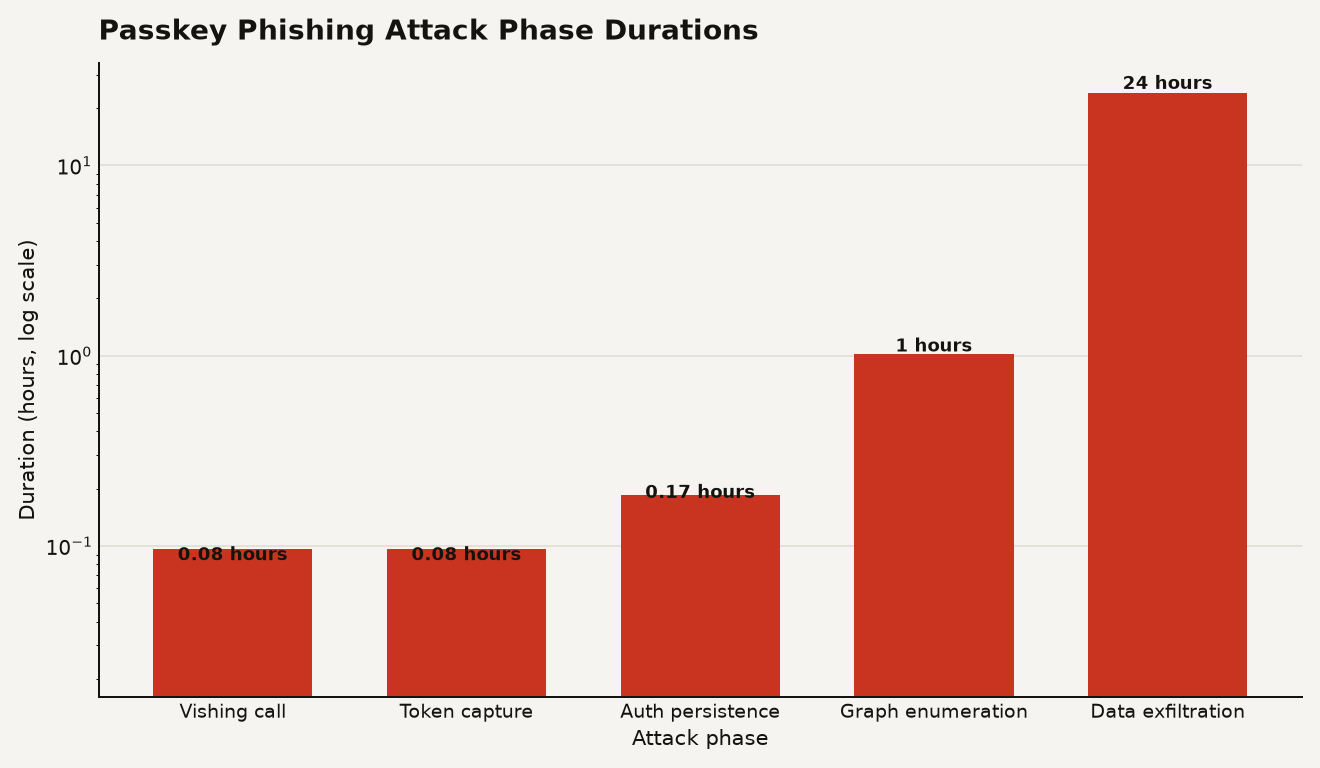
The chart above shows the approximate time attackers spend in each phase, based on Microsoft's observations. The first three phases take minutes. Enumeration runs about an hour. Exfiltration is where the clock really moves, stretching across hours to days.
Multiple threat actors behind initial access
Microsoft attributes the initial access activity to multiple threat actors operating in the same extortion ecosystem. The Microsoft Security Blog names two clusters:
- Storm-3121: conducts initial access that leads to ShinyHunters and Falcon extortion operations.
- Storm-3032: a splinter group from the BlackFile extortion operation, now operating under the Helix banner.
Okta Threat Intelligence has been tracking a parallel cluster since April 2026, tracked as O-UNC-066, which operates a data leak site called Pink. Okta's observations cover enterprise organizations across food and beverage, technology, healthcare, automotive, construction, and aviation. The primary motivation across all observed activity is data extortion.
The fact that multiple initial access brokers are selling into the same extortion pipeline matters for defenders. The phone call you intercept today might feed ShinyHunters tomorrow and Helix next week. The initial access is commoditized. The downstream impact is not.
Microsoft also states that Defender has detection coverage for the known TTPs from these groups, which is useful if you are a Defender customer but cold comfort if you run a multi-vendor identity stack.
Exfiltration that stays under DLP radar
This is the part that should worry anyone running DLP or anomaly detection on Microsoft 365 workloads.
BleepingComputer's coverage confirms the Microsoft finding: data theft lasts from a few hours to multiple days, with attackers accessing fewer than 1,000 files or emails in a single hour to blend in with legitimate traffic.
That throttle is the design choice that defeats naive volume alerts. A user downloading 800 files in an hour looks like someone catching up after vacation. A user downloading 50,000 files in an hour triggers every rule you have. The attackers know this. They chose the first option.
The attacks target three Microsoft 365 workloads. SharePoint Online generates FileAccessed and FileDownloaded events. OneDrive for Business shows the same pattern. Exchange Online is accessed through REST APIs for email content, which may not trigger the same file-based monitoring you have built for SharePoint.
If your detection strategy relies on volume thresholds alone, this campaign is designed to walk under them. The signal is in the sequence: a risky sign-in, followed by an authentication method enrollment, followed by Graph API enumeration, followed by sustained file access from a session that did not exist an hour ago.
Passkeys still work; the flow around them does not
This campaign does not invalidate passkeys as an authentication method. FIDO2 and Windows Hello for Business remain the strongest phishing-resistant authentication methods available. The problem is that attackers are using the concept of passkey enrollment as a social engineering pretext before the user ever touches a real passkey flow.
Three things change for you:
- Your helpdesk is now an attack vector. The vishing calls target personal phone numbers, not corporate channels. An employee who trusts a caller claiming to be IT will follow instructions to a phishing site. Okta's analysis notes the phishing kit is panel-controlled and specifically targets the passkey enrollment process, which means the attackers have industrialized the lure.
- Session tokens are the new credentials. Both AiTM and device code attacks produce valid tokens. MFA was satisfied during the original authentication, so the token sails through any policy that checks for MFA completion. If your Conditional Access policies do not require managed devices or compliant endpoints for Graph-privileged applications, a token stolen from a personal phone works against your tenant.
- The Graph API is the exfiltration highway. SharePoint enumeration, OneDrive downloads, Exchange mailbox access through REST: all of it flows through Graph. If you are not logging Microsoft Graph activity and alerting on anomalous enumeration patterns, you are blind to stages three through five of this attack.
This is also a reminder that the identity perimeter is where modern attacks live. If you have been treating identity as a solved problem because you deployed MFA, this campaign is your wake-up call. You can read more about how identity compromise chains into broader cloud attacks in our coverage of the LiteLLM default key exposure, where a single default gateway key opened a path to full cloud compromise through a similar pattern of credential theft and API access.
Microsoft's specific guidance
Microsoft's defensive guidance is specific and actionable. Here is the priority list for identity operators.
Conditional Access changes, do these today:
- Require phishing-resistant MFA (FIDO2, Windows Hello for Business) as an authentication strength for sensitive workloads.
- Require a managed, compliant device for Exchange, SharePoint, and Graph-privileged apps. A token stolen from an unmanaged personal phone should not work.
- Block the device code authentication flow via Conditional Access unless you have an explicit business need. Most organizations do not.
- Set sign-in frequency to always for security info registration, and require managed devices or named locations for that registration. Add a separate policy that blocks security info registration when sign-in risk is high.
- Enable risk-based access policies. Block access at the highest risk levels. Remediate elevated risk with phishing-resistant MFA or secure password change.
Detection changes, do these this week:
- Enable Microsoft Graph activity logs and mailbox auditing if you have not already. Without them, stages three through five are invisible.
- Alert on the sequence, not just the volume. A risky sign-in followed by an authentication method enrollment followed by Graph enumeration is your strongest signal. A file download count alone will not catch this campaign.
- Review newly registered authentication methods for users with risky or unusual sign-ins. Remove anything the user did not enroll.
- Correlate SharePoint and OneDrive download anomalies with Exchange REST activity and identity events. The attack touches multiple workloads. Your detection should too.
Containment for confirmed compromises:
- Revoke active sessions and refresh tokens immediately.
- Reset credentials and remove attacker-registered authentication methods.
- Remove attacker-created mailbox rules.
- Require secure re-registration of all authentication methods.
User training:
- Give employees a verified channel to report unsolicited authentication requests. The attack works because the caller sounds authoritative and the user has no fast way to verify. Fix that gap.
- Train helpdesk staff to verify user identity through a rigorous process before performing any helpdesk-initiated authentication changes. The social engineering can also flow in the other direction, as we noted in our coverage of identity-focused attack patterns in Citrix Bleed.
The helpdesk call is the exploit
The phone call is the most important detail in this campaign. Attackers are calling employees on their personal numbers, using the language of passkey enrollment, and directing them to phishing sites through SMS. The technical defenses matter, and you should deploy every one of them. But the attack starts with a human who trusts a voice on the phone more than they trust the URL bar on their mobile browser.
The claim that passkeys unilaterally solve phishing is what is broken here. Passkeys themselves remain the strongest phishing-resistant authentication method available. A phishing-resistant authenticator still requires the user to present it to the right party. If the user is convinced to authenticate through an attacker-controlled flow first, the passkey never enters the picture. Your identity stack needs to assume that the user will be socially engineered, and build controls that survive that assumption. Managed device requirements, device code flow blocks, and session-level anomaly detection are the controls that work after the phone call succeeds.
Sources
- Microsoft Security Blog: Passkey-themed social engineering leads to identity and cloud compromise
- bleepingcomputer.com: Passkey-themed phishing attacks lead to Microsoft 365 data theft
- Okta Threat Intelligence: Vishing actors target Entra passkey enrollment
- Cybernoz: Attackers use passkey-themed scams to hijack Microsoft 365 accounts
- thecyberdef.com: Fake Passkey Setup Calls Trigger Cloud Account Takeovers, Data Theft