You deploy a LiteLLM proxy in front of your LLM provider APIs to control spend, route traffic, and centralize keys. If you left the admin credential at its default value, anyone on the internet can do all of that for you. Wiz Research scanned roughly 3,000 internet-facing LiteLLM gateways in February and found that nearly 1 in 10 accepted sk-1234, the example master key straight from the setup guide, or required no authentication at all.
The master key is the admin credential, the API auth token, and the JWT signing secret all at once. Leaving it at default hands the gateway to anyone who asks.
LiteLLM is the most popular open-source AI gateway. It sits between your application and the model providers you pay for. The master key gates access to the proxy, authenticates API requests, and signs session tokens. When an operator follows the quickstart and never rotates the key, every one of those functions is wide open. The Wiz findings, presented at DEF CON 34 and published in a detailed technical writeup, chain the default key through two CVEs and a pass-through abuse into full cloud compromise.
Wiz found 3,074 exposed LiteLLM deployments
The Wiz team scanned Shodan for internet-facing LiteLLM deployments and found 3,074 instances in February 2026. They tested each one against the default master key and for the presence of authentication. The breakdown:
- 191 instances had no master key configured at all, so every request was accepted and every caller had
PROXY_ADMINaccess. - 103 instances still had the setup guide value
sk-1234in place and accepted it. - 330 instances were confirmed exploitable via the MCP authentication bypass, CVE-2026-59822, which allows an arbitrary Bearer token to create a valid session.
The combined exposure was 294 of 3,074 instances, or 9.6 percent, accepting the default key or running with no authentication. A follow-up scan in August found more than 85,000 instances, but Wiz says most appear to be honeypots or test systems, so the two scans are not comparable. There is no current accurate count of production exposure.
As of September 9, LiteLLM's setup documentation still uses sk-1234 as the example master key in quickstart guides, Docker Compose examples, and configuration tutorials. A comment tells operators to replace it with a long random value before production use.
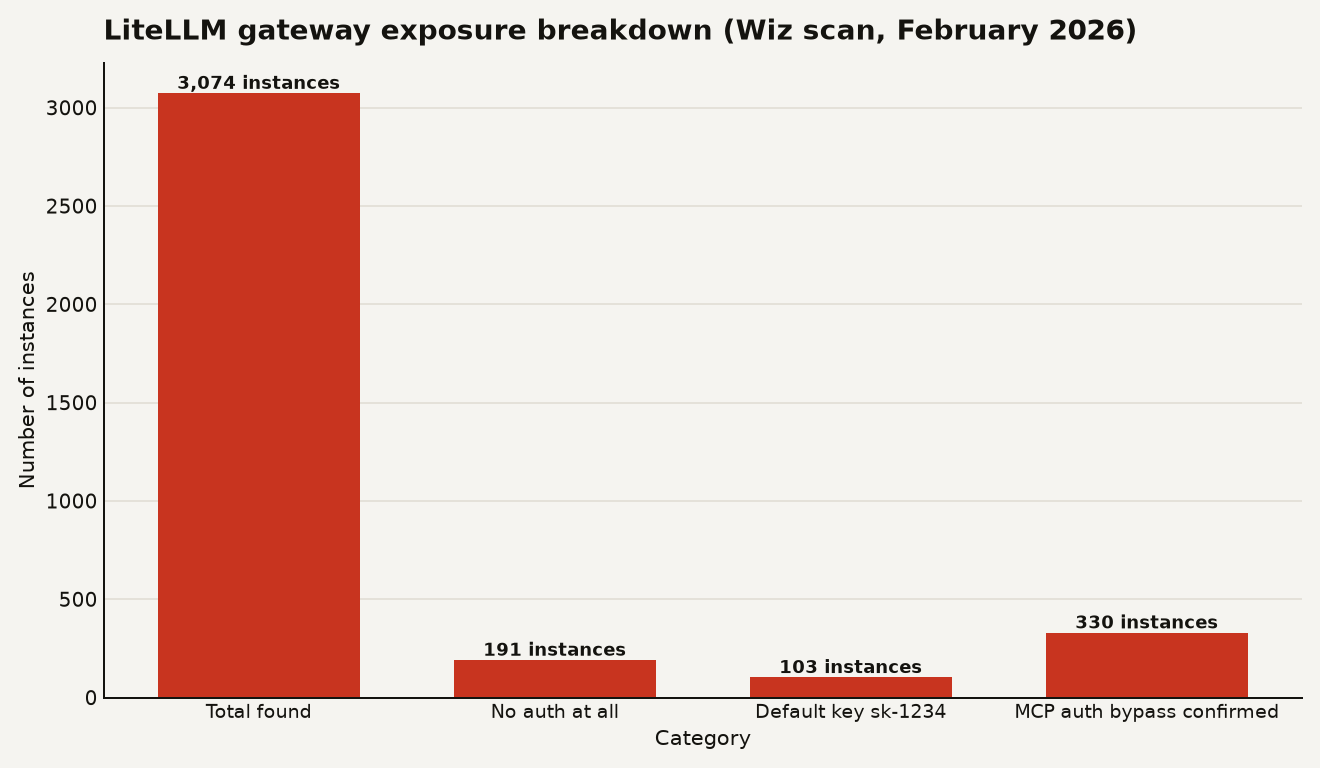
The chart above breaks down the February scan results: 3,074 total instances, 191 with no authentication, 103 accepting the default key, and 330 confirmed vulnerable to the MCP auth bypass.
The default key signs every token
The default master key is not just a credential. LiteLLM uses it as the HS256 secret for signing session JWTs. With the default value in place, anyone can forge arbitrary user sessions for the entire proxy, including admin sessions, without needing any other exploit.
From there, Wiz identified two chained vulnerabilities that escalate from admin access to code execution and credential theft:
CVE-2026-59821 is a post-authentication, root-level remote code execution via LiteLLM's custom code guardrails feature. An admin can register a guardrail that executes arbitrary Python code inside the gateway process. In any instance where the default key is unchanged and the version is below 1.82.0, a single request yields root access to the container and everything it can reach. On versions after 1.82.0, the guardrails endpoint requires the master key, but if that key is still sk-1234, the attack remains effectively pre-auth.
CVE-2026-59822 is the MCP authentication bypass, where an arbitrary Bearer token creates a valid session. Wiz confirmed it exploitable across hundreds of internet-facing instances and observed it being exploited in the wild via their honeypot infrastructure. CISA added it to the Known Exploited Vulnerabilities catalog.
Beyond the CVEs, Wiz documented a pass-through endpoint abuse that LiteLLM does not classify as a vulnerability. The pass-through feature lets admins create proxy routes forwarding requests to arbitrary URLs, and the target URL is never validated. There are no checks against private IP ranges, localhost, or cloud metadata endpoints. An attacker who holds the master key can point a pass-through endpoint at the AWS metadata service and exfiltrate IAM credentials.
This works against both IMDSv1 and IMDSv2. Even on instances where only IMDSv2 is available, LiteLLM's header forwarding mechanism defeats it. Any header prefixed with x-pass- is forwarded to the target with the prefix stripped, so x-pass-X-aws-ec2-metadata-token-ttl-seconds: 21600 arrives at the IMDS endpoint as X-aws-ec2-ec2-metadata-token-ttl-seconds: 21600, satisfying the IMDSv2 token request.
Microsoft published a related case study in August documenting attackers who ran commands inside a LiteLLM gateway process, read the container environment for the master key, provider keys, and the database connection string, then used that string to access the underlying PostgreSQL database and copy records from LiteLLM's model and virtual-key tables.
Blast radius of a weak master key
If you run LiteLLM in production, the blast radius of a default or weak master key is your entire AI stack. The master key is the root of trust for the proxy, the signing secret for sessions, and the gateway to every provider key and virtual key the system stores.
The practical consequences for a builder:
- Model provider key exposure. Every API key for OpenAI, Anthropic, Google, or any other provider configured in LiteLLM is readable by anyone holding the master key. An attacker can clone your keys and run inference on your bill, a practice Wiz calls LLMjacking.
- Database compromise. The master key gives access to the database connection string. An attacker can connect directly to PostgreSQL and dump the model and virtual-key tables, extracting every credential and usage record.
- Cloud IAM theft. Through the pass-through endpoint, an attacker can reach the cloud metadata service and steal the IAM role credentials of the host. This turns a gateway misconfiguration into a cloud account compromise.
- Code execution on the host. Combined with CVE-2026-59821, the default key enables root-level RCE on the container. An attacker can persist by registering a malicious guardrail or adding an SSH key, neither of which is removed by upgrading LiteLLM.
The threat model LiteLLM uses assumes admins are trusted. The pass-through feature, the guardrails code execution, and the master key's broad access all fit that model. The problem is that 9.6 percent of scanned deployments broke the trust model by leaving the admin credential at its default value. When the admin credential is public, the trusted-admin attack surface becomes a public attack surface.
This is the same class of risk as shipping a database with default credentials, but the database here holds your AI infrastructure's crown jewels. For teams that stood up LiteLLM quickly to manage LLM costs, the master key was often a checkbox item that got skipped. As we noted in our coverage of MLflow SSRF flaws that let attackers steal cloud credentials, AI infrastructure tools routinely expose cloud metadata endpoints when their URL validation is lax. LiteLLM is the latest example.
Change the master key, no upgrade needed
The fix for the default key exposure requires no upgrade. Changing the master key from sk-1234 to a long random value closes every path in the Wiz report that depends on holding the default key. Do this first.
Before rotating the key, check whether a separate salt key is set on the server. LiteLLM uses the salt key alongside the master key to hash stored virtual API keys. If a salt key exists, the rotation procedure differs, and using the wrong sequence can leave stored credentials unreadable. The Wiz advisory and LiteLLM documentation cover the rotation steps.
The full remediation checklist:
- Change the master key from
sk-1234to a long, unique random value. This needs no upgrade and is the single highest priority action. - Upgrade to LiteLLM 1.84.0 or later. That release includes fixes for every flaw in the Wiz report.
- Block MCP endpoints if you cannot upgrade immediately. Restrict
/mcp/,POST /mcp-rest/test/connection, andPOST /mcp-rest/test/tools/listat your reverse proxy or API gateway. - Block and restrict guardrails endpoints. Block
POST /guardrails/test_custom_code, and restrictPOST /guardrailsandPUT /guardrails/{guardrail_id}to administrators. These are the workarounds in LiteLLM's own advisories. - Audit pass-through endpoints on the gateway and restrict the container's outbound network access. Give the workload the narrowest cloud IAM role it can function with, ideally using IRSA or equivalent workload identity.
- Check for prior access. If you suspect an attacker may have had access, review the guardrails list for entries you did not create and restart the process to clear code held in memory. Rotate the provider keys, the master key, and the database credentials. Upgrading LiteLLM removes neither a guardrail an attacker registered nor an SSH key they added.
For internet-facing deployments, the master key should never have been public. If your LiteLLM instance is exposed and you have not checked the key, assume it is compromised and start with rotation.
Sources
- Wiz Research: OffGuard , Breaking the Most Popular AI Gateway
- The Hacker News: Nearly 1 in 10 Exposed LiteLLM Gateways Accepted the Example "sk-1234" Admin Key
- DEF CON 34: OffGuard presentation by Yaara Shriki
- Wiz Research: Attacks on AI Infrastructure: 90-Day Honeypot Telemetry