The npm registry just absorbed one of the most aggressive supply-chain attacks in its history. A self-propagating worm called ChainDrop has compromised more than 1,300 packages with a combined 2 billion monthly downloads, turning popular caching libraries into credential-harvesting traps that execute before your npm install even finishes. If your CI/CD pipeline or developer workstation pulled an affected version in the past week, you should assume the machine is compromised. Full stop, not maybe compromised, compromised. The blast radius is wide and the attack is still propagating. Here is what happened, what it steals, and what to do about it right now. The attack began when the threat actor seized control of the GitHub account belonging to the maintainer of Keyv, a widely used key-value storage library. From that single foothold, the ChainDrop worm pushed malicious code directly to main branches, triggered legitimate GitHub Actions build workflows, and published poisoned npm releases with valid provenance signatures. Security firm Aikido reports that at least 868 packages across 1,381 versions have been confirmed compromised, and the number is still growing as the worm self-propagates through dependency chains. Infected packages include Keyv, Cacheable, flat-cache, and file-entry-cache, all caching utilities from the same maintainer. The worm then spread to packages associated with Deliveroo, Ornikar, OneReach, Picsart, Qlik, and ServiceTitan. BleepingComputer first reported the full scope on August 4, 2026, with multiple application security companies independently confirming the campaign.
ChainDrop runs on the Shai-Hulud framework
ChainDrop is built on the Shai-Hulud worm framework, which JFrog Security Research has been tracking across both npm and PyPI ecosystems. The propagation model is straightforward and brutal. Each poisoned package contains two malicious files: setup.mjs, the payload dropper, and Math_Symbol.js, the infostealer script. The package's package.json includes a "preinstall": "node setup.mjs" entry, which means the malicious code runs automatically during npm install, before the package itself is even fully installed. BleepingComputer also identified a variant using math_init.js instead of Math_Symbol.js. The setup.mjs dropper downloads the Bun JavaScript runtime from its official GitHub releases page to execute the infostealer, then deletes the temporary runtime directory to cover its tracks. Using the legitimate Bun binary means the attacker does not need to ship a suspicious executable or trigger antivirus heuristics on the runtime itself. The self-propagation works because the infostealer searches the compromised environment for tokens that grant access to additional source code repositories and npm packages. When it finds those tokens, the worm uses them to publish new compromised versions of those packages, continuing the chain. Every stolen token is first validated in real time against registry.npmjs.org/-/whoami to confirm it is live before exfiltration. The compromised packages were built and published through their legitimate GitHub Actions workflows, which means they carried valid provenance information. The npm registry's provenance system, designed to verify that a package was built from a specific source commit, did not flag these releases. The attacker had write access to the repository, pushed to main, and let the existing CI pipeline do the rest.
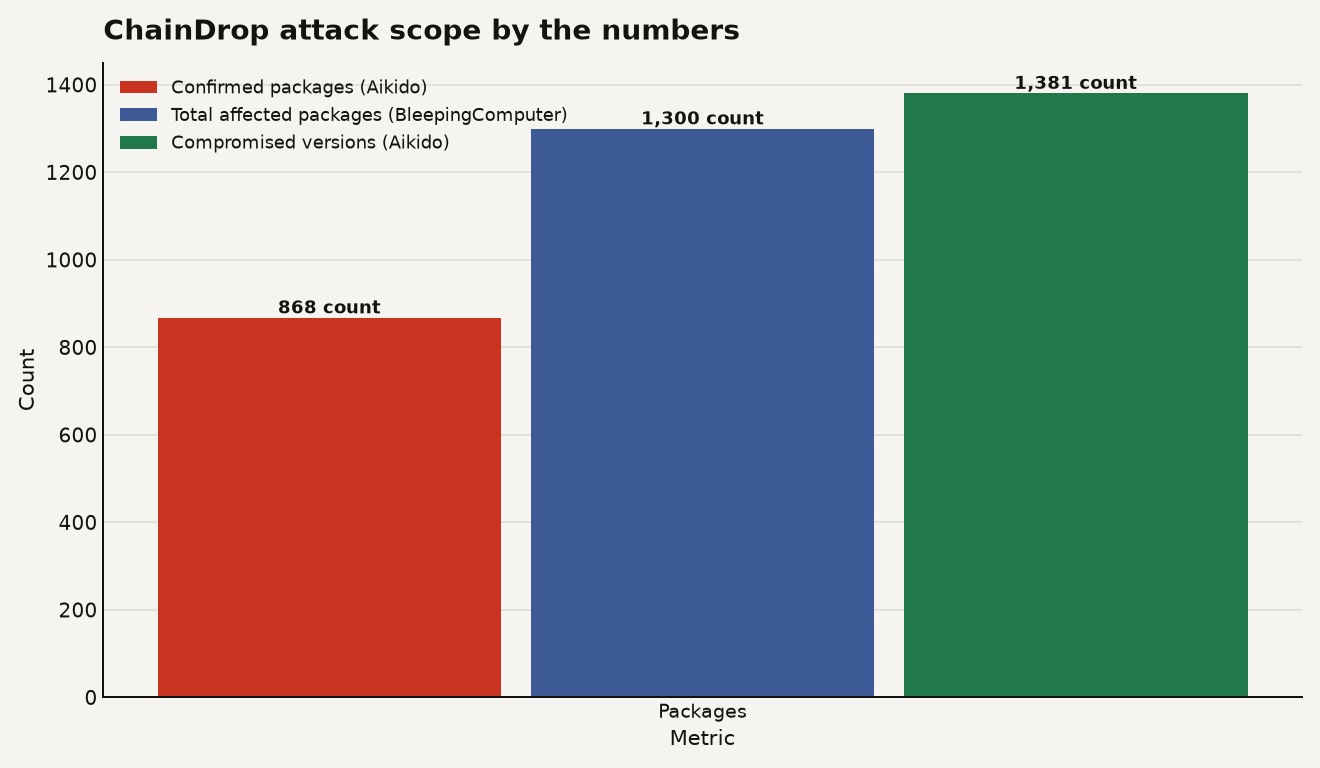
The chart below shows the confirmed scope: 868 compromised packages and 1,381 versions confirmed by Aikido, with BleepingComputer reporting over 1,300 total packages affected. The combined monthly downloads of these packages reached 2 billion.
The infostealer takes everything it finds
The short answer is everything it can find. The Math_Symbol.js payload is a comprehensive credential vacuum. According to Aikido's analysis, the malware collects the following from infected systems:
- The complete process environment, including all environment variables
- Local configuration and credential files on the filesystem
- GitHub personal access tokens, workflow tokens, and any
ghp_,gho_, orghs_prefixed tokens - npm tokens beginning with
npm_ - GitHub Actions secrets, including code designed to extract
isSecret:truevalues from self-hosted runners - AWS credentials, SSM Parameter Store values decrypted with
WithDecryption: true, and Secrets Manager secrets - Kubernetes secrets from accessible namespaces
- HashiCorp Vault tokens and KV secrets
- Database credentials, private keys, and Stripe, Slack, Twilio, Azure, and GCP credentials
The malware encrypts stolen data before exfiltrating it to a public GitHub repository with the description "Shai-Hulud: Here We Go Again." Cloud security company Wiz also identified the domain npm-cache.com as an exfiltration endpoint and recommends treating any connection to it as a strong indicator of compromise. The credential list reads like a cloud engineering checklist because that is exactly what the attacker is targeting. This is a purpose-built tool to escalate from a single npm package install into full cloud environment compromise. If you ran an affected package on a CI/CD runner with AWS credentials injected via environment variables or OIDC, the attacker may have your cloud keys. The malware also specifically targets self-hosted GitHub Actions runners, extracting secrets marked isSecret:true from the runner environment. If your organization uses self-hosted runners with elevated cloud permissions, the exposure is significantly worse.
Provenance and allowlists fall short
Here is the uncomfortable part. The standard supply-chain defenses that security teams have been recommending for the past two years largely failed here. Provenance verification did not help because the attacker pushed to the main branch and used the project's own GitHub Actions workflow. The provenance attestation correctly confirmed that the package was built from the repository's main branch. The problem is that the main branch itself was compromised. Package signing did not help for the same reason. The packages were published through the maintainer's legitimate npm account, using their real publish tokens. Allowlisting partially helps. If your organization had pinned specific package versions and blocked automatic updates, you would not have pulled the poisoned versions. But many teams use npm install or npm ci with caret ranges, which means they automatically picked up the latest, now-malicious release. What does still work:
- Lockfile pinning with integrity checks: If your
package-lock.jsonpins a specific version andintegrityhash,npm ciwill refuse to install a version with a different hash. This works if you have not regenerated your lockfile recently. - Network egress controls: Blocking outbound connections to
npm-cache.comand unusual GitHub repositories during CI runs would have stopped exfiltration, though not initial execution. - Scoped token permissions: If your CI/CD npm tokens only had publish access to specific package scopes, the worm could not self-propagate through your account. Many teams use broad-scoped tokens for convenience.
This attack reinforces what we noted in our coverage of the Mastra npm supply-chain attack: the npm ecosystem's reliance on individual maintainer accounts creates a structural vulnerability that no single tool can patch. When one maintainer controls multiple widely depended-upon packages, compromising that one account creates a cascade. Palo Alto Networks' Unit 42 has been monitoring npm supply-chain attacks and notes that attackers increasingly use legitimate build tooling and runtime downloads to evade detection, exactly the pattern ChainDrop follows.
Triage if you ran npm install
The attack is still unfolding. Here is the triage plan. Step 1: Check exposure. Cross-reference your dependency tree against the compromised package lists published by Wiz, StepSecurity, Aikido, Socket, and Ox Security. Run npm ls or use a tool like Socket to scan your lockfile. The lists include specific version numbers and file hashes. Step 2: Assume compromise if exposed. Aikido's guidance is clear: if an affected package version was installed, treat the developer workstation or CI/CD runner as compromised even if the package was subsequently removed. The infostealer ran during the preinstall phase and may have already exfiltrated credentials. Step 3: Rotate everything. Rotate all tokens that were accessible from the impacted environment. That includes GitHub PATs, npm tokens, AWS keys, Vault tokens, database credentials, and any third-party API keys stored in environment variables or local config files. Do not rotate selectively. The malware collected the complete process environment. Step 4: Rebuild from scratch. Rebuild affected systems from safe backups or from clean images. Do not attempt to clean a compromised runner in place. Review CI/CD logs for unauthorized access, unexpected workflow runs, or commits you did not make. Check your repositories for unauthorized changes to main branches or new package publications you did not authorize. Step 5: Lock down going forward. Enable dependency allowlisting, enforce lockfile integrity checks, and consider tools that block preinstall and postinstall scripts by default. Review which of your CI/CD runners have broad token scopes and narrow them. If you are using self-hosted GitHub Actions runners, audit what secrets they can access and move sensitive workflows to GitHub-hosted runners with ephemeral credentials.
The cost of trusting the registry
The ChainDrop attack exposes a fault line that every builder who runs npm install needs to reckon with. The npm registry processes billions of downloads per week and depends on thousands of unpaid individual maintainers controlling critical infrastructure. When one maintainer's GitHub account falls, the blast radius can reach 2 billion monthly downloads. Provenance attestations, the security industry's preferred answer to supply-chain risk, verified these malicious packages as legitimate. That system was designed to detect packages built outside the maintainer's control. It cannot detect packages built inside the maintainer's control when the maintainer has been compromised. The threat model has a gap, and ChainDrop walked right through it. The practical takeaway for anyone building with Node.js: treat npm install the way you would treat executing an untrusted script. Because with preinstall hooks, that is exactly what it is.
Sources
- BleepingComputer - Massive ChainDrop npm supply-chain attack infects hundreds of packages
- JFrog Security Research - Shai-Hulud: Here We Go Again
- Unit 42 / Palo Alto Networks - The npm Threat Landscape: Attack Surface and Mitigations