If you bought a Windows laptop with a Qualcomm Snapdragon chip in the last year, you noticed the marketing. "AI PC" was everywhere. What you probably did not notice was any software that actually used the dedicated AI processor inside. Qualcomm's answer to that gap arrived in early July 2026: GenieX, a runtime released in developer preview that lets you run large language models, or LLMs, directly on Snapdragon hardware. An early tester on the r/LocalLLaMA subreddit reported 20 tokens per second on a 26-billion-parameter model, fast enough to read along with the output as it appears on screen. GenieX is a first-party tool that finally gives Snapdragon laptop owners a way to run local AI without waiting for cloud servers or fiddling with unsupported frameworks.
GenieX gives Snapdragon laptop owners their first first-party path to local LLM inference. It is a developer preview, the ecosystem is thin, and the early numbers are promising but not class-leading.
GenieX, Qualcomm's on-device runtime
GenieX is what Qualcomm calls an on-device Gen AI inference runtime. In plain terms, it is software that lets you run AI models locally on your device instead of sending requests to a cloud server like ChatGPT or Claude. Everything happens on your laptop or phone. No internet connection required after the initial download.
It works on three classes of Snapdragon hardware: Windows laptops powered by Snapdragon X and X Elite chips, Android phones using Snapdragon 8 Elite processors, and Linux ARM devices built for IoT applications. If your Windows laptop has an Intel or AMD chip, GenieX will not work. The runtime is exclusive to Qualcomm silicon.
Underneath, GenieX dispatches your model to one of three compute units on a Snapdragon chip. The Hexagon NPU is a Neural Processing Unit, a dedicated chip designed specifically for AI math. The Adreno GPU is the graphics processor, which can also do AI calculations in parallel. The CPU is the main processor, which is the slowest option but the most compatible. You pick where the model runs, or let GenieX decide.
Qualcomm needed this because they were behind. As the Reddit poster who shared the launch noted, Qualcomm was trailing every major chipmaker when it came to software development kits for AI. Apple has had MLX and Core ML for years. NVIDIA dominates GPU computing with its CUDA platform. Intel ships OpenVINO. AMD has ROCm. Qualcomm had the Qualcomm AI Engine, but that tool was aimed at enterprise developers compiling models for commercial deployment, not at hobbyists who want to download a file from Hugging Face and start chatting.
GGUF is the file format that has become the standard in the open-source community for storing compressed LLMs. Hugging Face is the largest repository of open AI models, and almost every model there has a GGUF version available. GenieX supports GGUF files natively through llama.cpp, the popular open-source inference engine that runs on CPU, GPU, or NPU. GenieX also supports pre-compiled model bundles from Qualcomm's own AI Hub, which are optimized specifically for the Hexagon NPU and deliver peak performance.
GenieX is the community version of Qualcomm GENIE, the company's enterprise-grade AI inference product. The community version strips away the enterprise complexity and gives you a clean interface with five entry points: a command-line tool, a Python library, a Java or Kotlin SDK for Android apps, a Docker container, and an OpenAI-compatible local server.
20 tokens per second on a Snapdragon laptop
The only public performance numbers so far come from a Reddit user named DerpSenpai who posted their results shortly after the launch. The same post that broke the news reported 20 tokens per second running Gemma 4 26B on the GPU or NPU, with a 0.5-second wait before the first token appeared. The user also reported 10 tokens per second on the GPU for Qwen 3.6 27B.
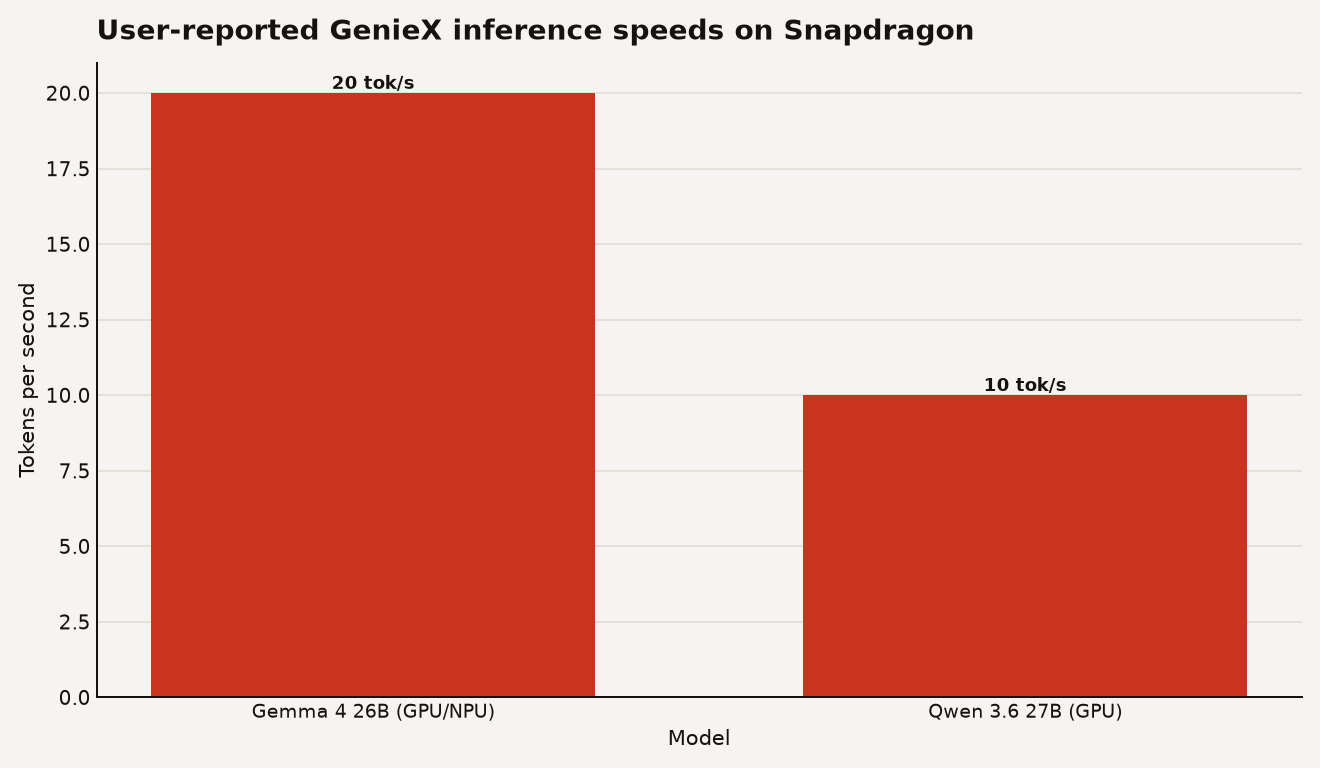
A token is roughly three-quarters of a word, so 20 tokens per second means about 15 words per second. That is faster than most people read, so the model generates text as fast as you can consume it. At 10 tokens per second, you will wait a beat between sentences, but it remains usable for interactive chat. The 0.5-second time-to-first-token (the delay between pressing enter and seeing the first word appear) is responsive enough that the interaction feels immediate.
For context, Apple Silicon Macs have had mature local AI tooling for years, and users on comparable models routinely report speeds in the same range. NVIDIA laptops with discrete GPUs remain the most widely supported platform for local AI, with a deeper ecosystem of optimized kernels and community guides. The Snapdragon numbers are competitive for a thin-and-light Windows laptop with no discrete GPU. They do not replace a dedicated gaming or workstation machine.
Qualcomm has not published official benchmarks. These numbers are from a single user running a developer preview. Treat them as directional evidence, not a definitive benchmark.
Installing GenieX from the command line
For a beginner on a Snapdragon laptop, the command-line tool is the fastest path. First, confirm you have a supported device. GenieX runs on Windows ARM64 laptops with Snapdragon X or X Elite chips. Download the installer from the Qualcomm AI Hub, run it, and open a new terminal.
To run a model from Hugging Face using the llama.cpp runtime, one command does everything:
geniex infer google/gemma-4-E4B-it-qat-q4_0-ggufThat downloads the model and starts a chat session. The Q4_0 in the model name refers to 4-bit quantization, which compresses the model to roughly a quarter of its original size with minimal quality loss. Qualcomm recommends Q4_0 specifically for the Hexagon NPU because it has the best hardware support for that precision format.
If you want to build an app instead of chatting in the terminal, the Python API mirrors the Hugging Face transformers library:
from geniex import AutoModelForCausalLM

model = AutoModelForCausalLM.from_pretrained(
    "unsloth/Qwen3.5-2B-GGUF", precision="Q4_0"
)

messages = [{"role": "user", "content": "What is 2+2?"}]
prompt = model.tokenizer.apply_chat_template(
    messages, add_generation_prompt=True
)

for chunk in model.generate(
    prompt, max_new_tokens=256, stream=True
):
    print(chunk, end="", flush=True)

model.close()
The OpenAI-compatible server is the easiest way to plug GenieX into existing tools. Run two commands and it starts a local API at port 18181:
geniex pull ai-hub-models/Qwen3-4B-Instruct-2507
geniex serve
Then point any OpenAI client library at http://127.0.0.1:18181/v1 and your existing code works without changes. The local server documentation shows the full configuration options.
For Linux ARM64 devices, there is a one-line install script with no sudo required:
curl -fsSL https://qaihub-public-assets.s3.us-west-2.amazonaws.com/qai-hub-geniex/install.sh | shBuy a Snapdragon laptop only if you need one
This depends on what you already own. If you have a recent MacBook, you have better-supported local AI tools today. Apple's MLX framework, llama.cpp builds for Metal, and the unified memory architecture (which lets the GPU access all system RAM) give you a smoother experience with a larger community writing guides and troubleshooting issues. The Snapdragon numbers are in the same ballpark, but the software ecosystem around GenieX is weeks old.
If you have a Windows laptop with an NVIDIA GPU, you already have the most widely supported local AI platform. CUDA is the standard. Every tool, every tutorial, every benchmark assumes NVIDIA hardware. GenieX does not change that.
Where GenieX matters is for people who already own or are considering a Snapdragon laptop for battery life and portability, and who want to run local models as a bonus. The open weights movement has made capable models available to anyone with a few gigabytes of RAM, and GenieX gives Snapdragon hardware a straightforward way to run them.
There are caveats. GenieX is a developer preview, not a stable release. Qualcomm acknowledges the preview status in their GitHub repository and asks for community feedback. The model selection on Qualcomm AI Hub is limited compared to what you can pull from Hugging Face directly. The Q4_0 quantization recommendation means you are trading some quality for speed and compatibility, though for many models the difference is barely noticeable in conversation.
If you want to try it, the cost is zero. Download the installer, run one command, and see if your model of choice works. If you are deciding which laptop to buy specifically for local AI, a Snapdragon machine is now viable. It is just not the obvious first choice.
The Snapdragon AI promise, half fulfilled
GenieX is the software Qualcomm should have shipped alongside its Snapdragon X laptops a year ago. The hardware was there. The NPU was there. What was missing was a way for a normal person to use it. GenieX fills that hole with a clean interface, two capable runtimes, and an OpenAI-compatible server that drops into existing workflows. The early speed numbers suggest the silicon can handle real workloads at conversation speed. What remains to be seen is whether the ecosystem around it grows fast enough to matter before the next round of hardware arrives.
Sources
- r/LocalLLaMA - Qualcomm launches GenieX to run LLMs on their Windows Laptops
- Qualcomm AI Hub - GenieX overview and installation
- github.com/qualcomm/GenieX - GenieX GitHub repository and documentation
- geniex.aihub.qualcomm.com - What is GenieX developer documentation
- geniex.aihub.qualcomm.com - GenieX local server guide
- github.com/quic/ai-hub-apps - LLM on Genie tutorial