Talking to AI has felt like a walkie-talkie conversation: you speak, the model speaks, and nobody interrupts gracefully. Google DeepMind wants to change that. On September 15, 2026, the lab shipped Gemini 3.8 Live and its bigger sibling, Gemini 3.8 Live Extended Thinking, two speech-to-speech models designed to listen, reason, and act at the same time they talk. The Extended Thinking variant already claims the top spot on the Speech to Speech Quality Index with a score of 82.6, beating every other frontier voice model on the leaderboard right now. If you have been waiting for voice AI that does not feel like a stilted phone tree, this release matters, and it matters more if you are a beginner thinking about building something with voice instead of text.
Gemini 3.8 Live is Google DeepMind's entry into real-time speech-to-speech AI, with an Extended Thinking variant that adds a reasoning layer on top.
Two live voice models
Two models, both live and both about voice. Gemini 3.8 Live is the base model: it listens to your speech, responds in speech, and can see images or your screen in near real-time while you talk. It detects 97 languages automatically and can switch between them mid-conversation without you asking it to. It can also call external tools and APIs in the background while keeping the chat going, so it acknowledges your request and then keeps talking while the work happens behind the scenes.
Gemini 3.8 Live Extended Thinking is the heavier version. It adds what Google calls parallel reasoning: the model thinks through a complex problem and speaks at the same time, instead of going silent for five seconds while it processes. It uses verbal fillers like "Let me check that" to buy time, then narrates its progress as it works through multi-step tasks. Think of it as the difference between a colleague who goes quiet when you ask a hard question, and one who says "Okay, give me a second, I am looking that up" while they search.
Both models are available starting today through the Gemini API, Google AI Studio, Google Workspace, and the Gemini app. The base Live model is also powering real-time conversations in Search Live, which Google's VP of Engineering for Search confirmed on X shortly after the announcement.
Number one on Speech to Speech Quality
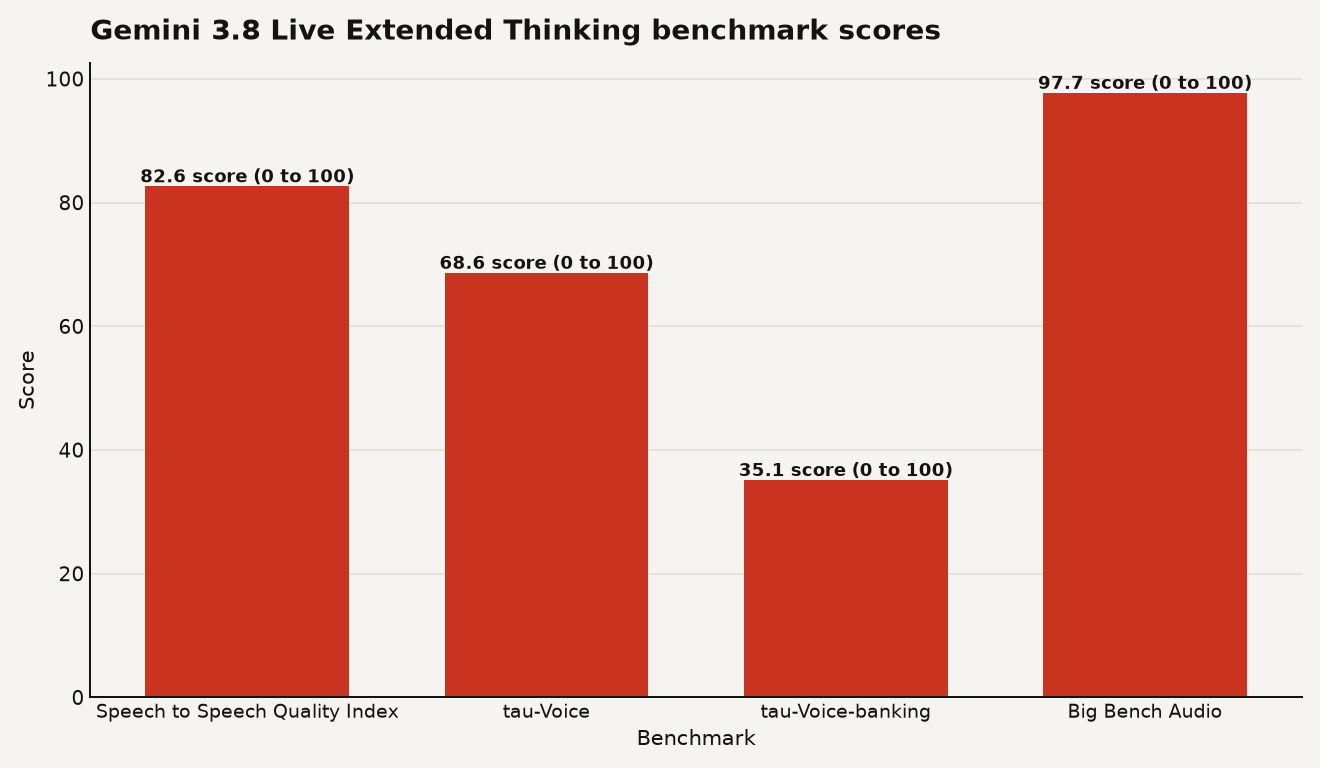
Google put up real numbers. Extended Thinking takes the number one position on Artificial Analysis' Speech to Speech Quality Index with a score of 82.6. That index ranks how natural and useful a voice model sounds in conversation, covering factors like latency, interruption handling, and response quality.
On agentic task benchmarks, which test whether a model can actually complete multi-step jobs rather than just chat, Extended Thinking scores 68.6 percent on the tau-Voice benchmark and 35.1 percent on Sierra's tau-Voice-banking benchmark. The banking number sounds low, but this benchmark asks the model to complete realistic banking workflows like transferring funds or opening accounts entirely by voice. Nobody is scoring high there yet, which tells you voice agents are still early for real-world task completion.
For reasoning quality, the model hits 97.7 percent on Big Bench Audio, a test of how well an AI understands and reasons about spoken information. The chart below shows all four benchmark scores side by side.
The base Gemini 3.8 Live model, without Extended Thinking, took second place on the Speech Agent Arena, a community preference ranking where real users vote on which voice agent they prefer. Google highlights that it remains cost-effective and built for scale, though exact per-minute pricing was not included in the announcement.
Voice AI that reasons while it talks
The breakthrough here is not that an AI can talk. That has been around. The breakthrough is that it can talk and think and do things at the same time, without freezing up. For a beginner building something with AI, this opens up use cases that were painful or impossible before.
Imagine you are building a simple app that helps people troubleshoot their internet connection. With a text chatbot, the user types "my wifi is down," the bot asks follow-up questions, and they go back and forth. With a voice model like 3.8 Live, the user just talks: "Hey, my internet keeps dropping." The model listens, asks which router they have, and while the user answers, it is already looking up common issues for that router model in the background. The conversation flows. No awkward pauses.
Now layer in Extended Thinking. Your user says "I think my billing is wrong." The model says "Let me pull up your account and check the last three invoices." It calls your billing API in the background, narrates what it finds, and walks the user through the discrepancy. All by voice. All in one continuous conversation.
Here is what changes for builders specifically:
- You can now build voice agents that call tools mid-conversation, so the user does not have to wait in silence. The model acknowledges the request, then works on it while chatting.
- The model can see what the user sees. If someone points their camera at a whiteboard sketch, 3.8 Live Extended Thinking can turn that sketch into a working React component while talking through what it is doing. Google demonstrated exactly this in the announcement.
- You get 97 language support out of the box, with automatic detection and mid-conversation switching. You do not need to build separate pipelines for each language.
- All audio output is watermarked with SynthID, Google's invisible audio watermark. This matters if you are deploying voice agents at scale and need to prove the audio came from AI, not a human.
If you already explored what full-duplex AI changes for you in our earlier guide, 3.8 Live is the next step in that same direction: the model does not just talk and listen at the same time, it also reasons and acts at the same time.
Partner platforms make it buildable today
Yes, and the developer story is more accessible than you might expect. Google partnered with several platforms to handle the hardest part of voice AI, the real-time audio streaming, so you can focus on the application logic.
The Gemini Live API works with LiveKit, Pipecat, LangChain, Agora, Vercel, and several others. These platforms manage the real-time media streaming infrastructure, which is the plumbing that gets audio from a user's microphone to the model and back to their speaker with low latency. If you have ever tried to build that yourself, you know it is the hardest part of voice AI. These partners handle it for you.
For a beginner, the simplest path is:
- Open Google AI Studio and select Gemini 3.8 Live as your model.
- Start with a basic voice chat in the playground to get a feel for how the model handles interruptions and follow-up questions.
- Add a tool call, something simple like checking the weather, and watch how the model calls the API in the background while keeping the conversation going.
- Move to the Gemini API in your code when you are ready to build a real interface.
For enterprise users, both models are available in private preview through Gemini Enterprise, with broader rollout to Gemini Enterprise for Customer Experience coming soon. Google Workspace users with AI Pro or Ultra subscriptions can try Extended Thinking in Docs, Gmail, and Keep.
The pricing question matters for beginners on a budget. Google calls the base Live model "cost-effective and built for scale" but did not publish per-minute rates in the announcement. If you are prototyping, the Google AI Studio playground is free to try. If you are planning production usage, check the Gemini API pricing page before committing.
You might also want to compare this against other voice AI options. Our guide to Gemini 3.8 Flash covers the text-and-image sibling in the same model family, which could be a cheaper alternative if you do not need real-time voice.
Google's own benchmarks and other catches
The benchmark numbers are Google's own, reported in Google's own blog post. That is standard for model launches, but it means you should test the model yourself before committing to a production voice pipeline. Artificial Analysis is an independent ranking site, so the Speech to Speech Quality Index number carries more weight than a purely internal benchmark. Still, the tau-Voice and tau-Voice-banking numbers are self-reported.
The 35.1 percent score on tau-Voice-banking is the honest number here. It means the model completes about a third of realistic banking voice workflows correctly. That is a starting point, not a finish line. If you are building a voice agent for complex real-world tasks, plan for human handoff. The model will get stuck, and you need a way to escalate to a real person without dropping the call.
Background tool calling is powerful but introduces complexity. If your model calls an API mid-conversation, you need to handle timeouts, errors, and partial results gracefully. The model will narrate what it is doing, but if the API hangs, the conversation stalls. Build retry logic and fallback responses into your tools.
SynthID watermarking is a genuine advantage. If you are building voice agents for customer service or any public-facing application, the ability to prove the audio is AI-generated protects you from deepfake accusations. Not every model offers this. Google does, and it is on by default.
Watch for third-party benchmarks in the coming weeks. The community preference ranking on Speech Agent Arena is already live, and independent testing on the Live API will follow. The real test is whether users prefer 3.8 Live over existing voice models in head-to-head conversations, not just on curated demos.
Voice AI moves past impressive demos
Voice AI has been stuck in a pattern: impressive demos, awkward reality. Gemini 3.8 Live and Extended Thinking narrow that gap by solving the three problems that made voice agents feel broken. The models handle interruptions instead of freezing. They call tools without going silent. And they reason out loud, so you know what they are doing instead of staring at a spinning loader. For a beginner, the takeaway is simple: if you have been waiting to build something with voice, the tools just got meaningfully better and easier to access. Start in Google AI Studio, prototype with a single tool call, and see whether the model keeps up with you when you interrupt it mid-sentence. That is the test that matters.
Sources
- deepmind.google Introducing Gemini 3.8 Live and 3.8 Live Extended Thinking
- x.com / Rajan Patel New Gemini audio models just dropped, 3.8 Live is now powering real-time conversations in Search Live