Dynamic Iceberg table replication fixes a small sentence with a big blast radius. If you used dynamic Iceberg tables for lakehouse transforms, your DR plan had an awkward hole: the table could live in a database that replicated, while the dynamic Iceberg table itself got skipped.
On June 29, 2026, Snowflake made dynamic Iceberg table replication generally available, saying dynamic Iceberg tables are now supported in replication and failover groups. The key number is 1 missing object class: the pipeline output that used to fall out of refresh operations can now travel with the group.
That matters if your Iceberg estate is no longer just raw lake data. Dynamic Iceberg tables combine scheduled Snowflake transforms with Iceberg output, so Spark, Trino, or another engine can read the materialized result directly. Snowflake says a dynamic Iceberg table stores output in Apache Iceberg format on Snowflake managed external storage and supports the same refresh modes and scheduling as a regular dynamic table, while external engines can read the data directly through the Iceberg files.
The vendor honest read: this is good DR plumbing, not magic. You still have to replicate the database, include the external volume, configure storage access in the target region, pay replication costs on the target account, and keep an eye on the dynamic table refresh bill. If you skip those parts, GA is just a nicer error message waiting for a maintenance window.
Dynamic Iceberg tables were skipped in DR before
Before this release, Snowflake says dynamic Iceberg tables were skipped during replication refresh operations. After the June 29, 2026 release, Snowflake says replication supports dynamic Iceberg tables as part of replication and failover groups.
That is the whole feature, and it is enough.
A dynamic Iceberg table is still created with CREATE DYNAMIC ICEBERG TABLE. Snowflake's dynamic Iceberg guide says the create statement requires the Iceberg specific EXTERNAL_VOLUME, CATALOG, and BASE_LOCATION parameters when you use an external volume, and the documented example uses a TARGET_LAG of 10 minutes.
CREATE OR REPLACE DYNAMIC ICEBERG TABLE lake_gold.dt_orders_iceberg
    TARGET_LAG = '10 minutes'
    WAREHOUSE = transform_wh
    EXTERNAL_VOLUME = 'exvol_lake_gold'
    CATALOG = 'SNOWFLAKE'
    BASE_LOCATION = 'dt_orders_iceberg'
    REFRESH_MODE = INCREMENTAL
AS
    SELECT
        order_id,
        customer_id,
        order_date,
        quantity * unit_price AS line_total
    FROM raw.orders
    WHERE order_status != 'returned';
A quick verification step belongs in your runbook because Snowflake exposes an is_iceberg flag in SHOW DYNAMIC TABLES; Snowflake's example shows is_iceberg returning true for a dynamic Iceberg table.
SHOW DYNAMIC TABLES LIKE 'dt_orders_iceberg';The DR side is group based. Snowflake's Iceberg replication guide says Snowflake replicates an Iceberg table when you add its parent database to a replication or failover group, but it also says Snowflake managed Iceberg tables rely on external volumes that need extra configuration before replication can work.
CREATE REPLICATION GROUP rg_lake_gold
    OBJECT_TYPES = DATABASES, EXTERNAL VOLUMES
    ALLOWED_DATABASES = lake_gold
    ALLOWED_EXTERNAL_VOLUMES = exvol_lake_gold
    ALLOWED_ACCOUNTS = myorg.prod_dr
    REPLICATION_SCHEDULE = '10 MINUTE';
On the target account, the replica is still explicit. Snowflake documents the secondary group syntax as AS REPLICA OF <org_name>.<source_account_name>.<name> for replication groups.
CREATE REPLICATION GROUP rg_lake_gold
    AS REPLICA OF myorg.prod_primary.rg_lake_gold;

ALTER REPLICATION GROUP rg_lake_gold REFRESH;
The shape of the design is simple: database plus external volume. If your table depends on an external volume and the group only includes DATABASES, you have copied the catalog object without the storage access object that makes it useful.
Two DR paths and their privileges
There are two DR paths, and they carry different operational meaning. A replication group gives you a secondary copy. A failover group is the route when you want planned promotion of the secondary account.
Snowflake's CREATE REPLICATION GROUP reference says database and share replication are available to all accounts, while replication of other account objects and failover or failback require Business Critical Edition or higher. Snowflake's CREATE FAILOVER GROUP reference is stricter: the command itself requires Business Critical Edition or higher.
| Choice | Use it when | Edition or privilege detail |
|---|---|---|
| Replication group | You need a readable secondary copy of the database and external volume object | CREATE REPLICATION GROUP on the account, MONITOR on the database, and USAGE on the external volume |
| Failover group | You need failover and failback planning for the secondary account | Business Critical Edition or higher, plus CREATE FAILOVER GROUP on the account |
| Database or schema backup | You need backup semantics rather than cross account DR | Dynamic Iceberg tables are excluded from database or schema backups in Snowflake's dynamic Iceberg limitations |
The privilege model is thankfully concrete. Snowflake says a role creating a replication group needs CREATE REPLICATION GROUP on the account, MONITOR on the database being added, and USAGE on the external volume being added.
GRANT CREATE REPLICATION GROUP ON ACCOUNT TO ROLE dr_admin;
GRANT MONITOR ON DATABASE lake_gold TO ROLE dr_admin;
GRANT USAGE ON EXTERNAL VOLUME exvol_lake_gold TO ROLE dr_admin;
For failover groups, Snowflake says the corresponding minimums are CREATE FAILOVER GROUP on the account, MONITOR on the database, and USAGE on the external volume.
GRANT CREATE FAILOVER GROUP ON ACCOUNT TO ROLE dr_admin;
GRANT MONITOR ON DATABASE lake_gold TO ROLE dr_admin;
GRANT USAGE ON EXTERNAL VOLUME exvol_lake_gold TO ROLE dr_admin;
There is one more setup step that is easy to bury in a platform ticket. Snowflake's Iceberg replication guide says a user with the ORGADMIN role must enable replication for each source and target account in the organization.
USE ROLE ORGADMIN;

SELECT SYSTEM$GLOBAL_ACCOUNT_SET_PARAMETER(
    'MYORG.PROD_PRIMARY',
    'ENABLE_ACCOUNT_DATABASE_REPLICATION',
    'true'
);
The lock down advice: do not run this forever as ACCOUNTADMIN. Create a narrow DR role, grant the three required privileges, and make every group definition code reviewed. The dangerous part is not the refresh command. The dangerous part is a broad OBJECT_TYPES list that quietly expands the blast radius.
Data transfer and compute charges
Snowflake splits replication cost into data transfer and compute resources, and it bills both categories to the target account that stores the secondary database or secondary replication or failover group. Snowflake also says replication compute appears with service type REPLICATION in Account Usage and Organization Usage views.
That target account detail is the budget trap. Your primary warehouse owner can ship a new dynamic Iceberg table, while the DR account absorbs refresh transfer and replication compute. If FinOps only watches the primary account, the bill moves sideways and looks like a mystery.
Snowflake's replication cost page gives two levers that matter every week: monthly billing is proportional to the amount of changed table data and the frequency of refreshes. For failover groups using optimized refresh, Snowflake documents 5 credits per TB of replicated data and 0.2 credits per 10,000 changed objects after the first 25,000,000 changed objects per account per month.
Dynamic table cost is separate from replication cost. Snowflake's dynamic table cost guide says dynamic tables have three cost components: virtual warehouse compute, Cloud Services compute, and storage, while dynamic Apache Iceberg tables use external storage and do not incur Snowflake storage costs for that materialized output. If you want the broader refresh economics, we covered the mechanics in our dynamic table refresh cost test.
Your first cost query should prove replication spend from the target account.
SELECT
    start_time::date AS usage_date,
    replication_group_name,
    ROUND(SUM(credits_used), 4) AS credits_used,
    SUM(bytes_transferred) AS bytes_transferred
FROM snowflake.account_usage.replication_group_usage_history
WHERE start_time >= DATEADD('day', -30, CURRENT_TIMESTAMP())
GROUP BY 1, 2
ORDER BY usage_date DESC, credits_used DESC;
Your second query should prove whether the dynamic table itself is churning. Snowflake's DYNAMIC_TABLE_REFRESH_HISTORY Account Usage view retains 365 days of refresh history and includes REFRESH_ACTION, STATE, QUERY_ID, timing columns, and row statistics.
SELECT
    database_name,
    schema_name,
    name,
    refresh_action,
    state,
    COUNT(*) AS refreshes,
    SUM(statistics:numInsertedRows::number) AS inserted_rows,
    SUM(statistics:numDeletedRows::number) AS deleted_rows
FROM snowflake.account_usage.dynamic_table_refresh_history
WHERE data_timestamp >= DATEADD('day', -7, CURRENT_TIMESTAMP())
  AND database_name = 'LAKE_GOLD'
GROUP BY 1, 2, 3, 4, 5
ORDER BY refreshes DESC;
Use the chart below as the monitoring rule of thumb: Information Schema is the short window for live debugging, while Account Usage is the durable audit trail. Snowflake documents 14 days for the replication usage table function and 365 days for the Account Usage replication group usage view.
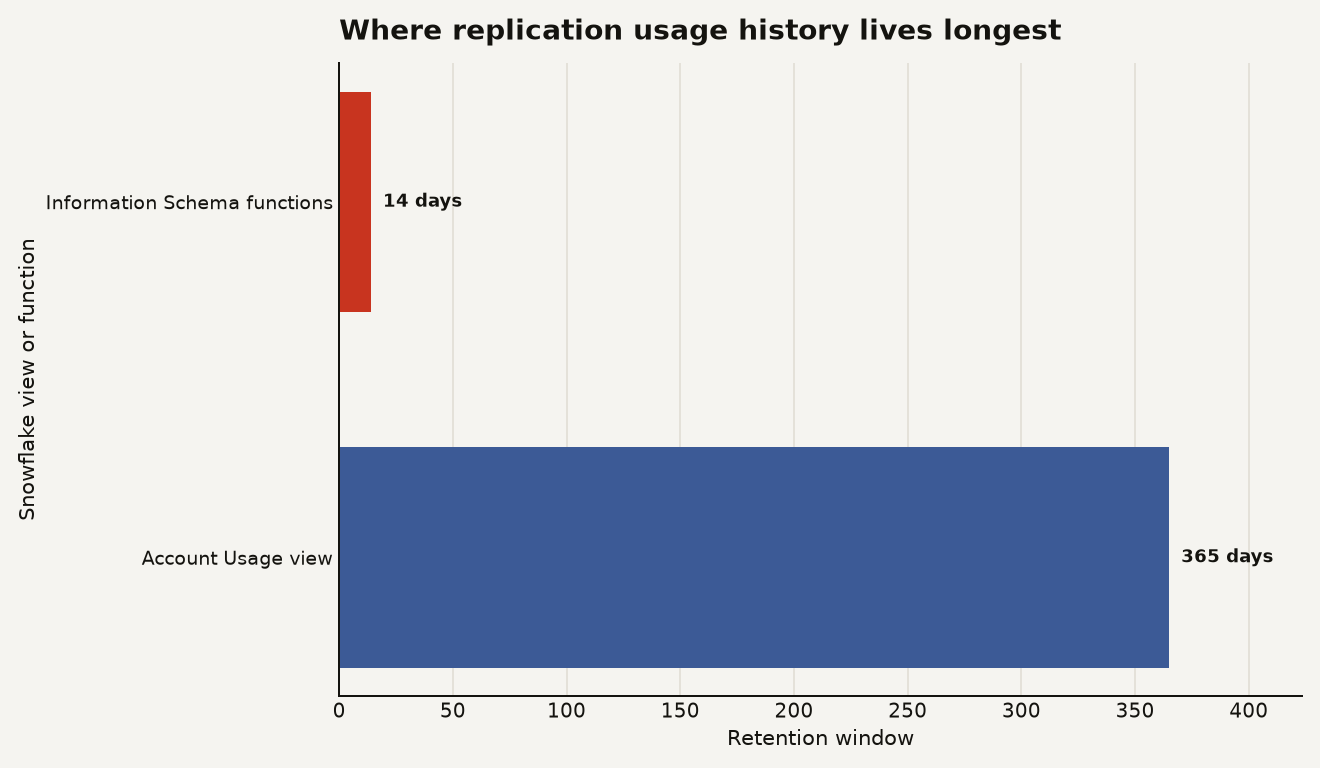
That difference should change where you put dashboards. If an incident review happens on day 21, the 14 day function is already gone. Account Usage is where the postmortem survives.
A wrong external volume fails the refresh
The refresh fails. There is no glamorous answer here.
Snowflake's Iceberg replication guide says replicated tables require access to a storage location in the same region as the target account, and it warns that refresh operations can fail if Snowflake cannot access the target account's storage location.
The external volume setup is easy to under-specify because the table DDL hides it behind one object name. Snowflake's sample workflow adds a storage location to the external volume, retrieves the target account's Snowflake service principal with SYSTEM$DESC_ICEBERG_ACCESS_IDENTITY, and then creates the replication or failover group with EXTERNAL VOLUMES in OBJECT_TYPES.
SHOW REPLICATION ACCOUNTS LIKE 'PROD_DR%';

SELECT SYSTEM$DESC_ICEBERG_ACCESS_IDENTITY(
    'S3',
    'PROD_DR'
);
Then include the external volume in the group. Snowflake explicitly documents ALLOWED_EXTERNAL_VOLUMES for both replication and failover groups.
ALTER REPLICATION GROUP rg_lake_gold SET
    OBJECT_TYPES = DATABASES, EXTERNAL VOLUMES
    ALLOWED_EXTERNAL_VOLUMES = exvol_lake_gold;
Two caveats deserve sticky notes. First, Snowflake says secondary tables in the target account are read only until you promote the target account to serve as the source account. Second, Snowflake says an external volume can only be added to one replication or failover group.
That second rule shapes your topology. A shared external volume across too many domains can block clean DR group boundaries. If finance, product analytics, and ML features all write through one external volume, your replication groups inherit that coupling.
Use it when the table is critical
Use dynamic Iceberg table replication when the dynamic Iceberg table is a production contract. That usually means at least one of three things is true:
- A downstream engine such as Spark or Trino reads the Iceberg output directly.
- The table is part of a recovery time objective that already names a secondary Snowflake account.
- Rebuilding the table from raw data would violate your recovery point objective or burn too many warehouse credits during an outage.
Hold back when the table is cheap to rebuild, experimental, or downstream only inside one Snowflake account. Replicating every derived object feels safe until every 10 minute schedule becomes a metronome for target account charges.
The practical rollout is four steps.
- Inventory dynamic Iceberg tables with
SHOW DYNAMIC TABLESand theis_icebergflag. - Put only production databases and their external volumes into the first replication group.
- Run a manual
ALTER REPLICATION GROUP ... REFRESHbefore setting a schedule. - Watch
REPLICATION_GROUP_USAGE_HISTORYandDYNAMIC_TABLE_REFRESH_HISTORYfor 7 days before expanding scope.
Here is the inventory query pattern once the SHOW output is captured with RESULT_SCAN.
SHOW DYNAMIC TABLES IN DATABASE lake_gold;

SELECT
    "database_name",
    "schema_name",
    "name",
    "refresh_mode",
    "scheduling_state",
    "is_iceberg"
FROM TABLE(RESULT_SCAN(LAST_QUERY_ID()))
WHERE "is_iceberg" = 'true';
The strongest bet: use this for DR coverage of curated Iceberg outputs that other engines consume. The weak bet: using it as a blanket substitute for pipeline rebuild discipline. Replication preserves objects. It does not prove your transform logic is affordable, your target storage permissions are correct, or your failover game day will pass.
The DR gap moved from feature support to operating discipline
Snowflake closed the obvious product gap on June 29, 2026. Dynamic Iceberg table replication now belongs in the standard DR checklist for Iceberg pipelines.
The new failure mode is more ordinary: a group without EXTERNAL VOLUMES, a target account nobody budgets, a 10 minute schedule copied from an example, and a runbook that never checks Account Usage. Enterprise data platforms rarely fail because one feature is missing. They fail because the feature arrived, and nobody updated the boring parts.
Sources
- Snowflake release notes: Dynamic Iceberg table replication, General availability
- Snowflake documentation: Configure replication for Snowflake managed Apache Iceberg tables
- Snowflake documentation: Create a dynamic Apache Iceberg table
- Snowflake documentation: Understanding replication cost
- Snowflake documentation: Monitoring replication and failover
- Snowflake SQL reference: CREATE REPLICATION GROUP
- Snowflake SQL reference: CREATE FAILOVER GROUP
- Snowflake documentation: DYNAMIC_TABLE_REFRESH_HISTORY view