Snowflake Dynamic Tables used to be a clean idea with a practical ceiling: great when your transformation fit a SELECT, less great when your pipeline needed CDC semantics, MERGE logic, Iceberg output, or a bill you could explain without squinting. The June 2026 update changes that trade. Snowflake Dynamic Tables now have a claimed up to 2.8x faster refresh performance on popular patterns measured from May 2025 to May 2026 on Gen2 warehouses, plus preview support for custom incrementalization with MERGE and INSERT logic in REFRESH USING, according to Snowflake's June 15 Dynamic Tables blog.
The useful read for a data engineer is simple: Dynamic Tables are becoming Snowflake's default managed transformation layer. That does not mean you should port every Stream and Task tomorrow. It means the boundary moved. SELECT based transformations, SCD type 1 dedupe, append heavy aggregates, dbt models, and some CDC style workloads now belong in the Dynamic Tables discussion before you design another orchestration DAG.
If you are also sizing Gen2 compute, read this alongside our guide to Snowflake Gen2 warehouses. The refresh win Snowflake is advertising is tied to Gen2 warehouses, and the bill will still be decided by target lag, refresh mode, reinitializations, and how many tables you keep active.
What actually got faster in Snowflake Dynamic Tables?
Snowflake says its benchmark suite for common Dynamic Table patterns improved by up to 2.8x between May 2025 and May 2026, with the tested optimizations covering top level aggregate functions, QUALIFY row or rank equals 1 patterns for SCD type 1, clustering operations, and joins on Gen2 warehouses in the product announcement.
That matters because Dynamic Tables do two separate jobs. They materialize query results, and they refresh those results on a schedule Snowflake controls from your TARGET_LAG. In the syntax reference, Snowflake defines TARGET_LAG as the maximum time the Dynamic Table should lag behind changes to its base tables, with a documented minimum of 60 seconds when the scheduler is enabled in CREATE DYNAMIC TABLE syntax.
A basic production definition should be boring on purpose:
CREATE OR REPLACE DYNAMIC TABLE mart.dt_orders_latest
  TARGET_LAG = '10 minutes'
  WAREHOUSE = transform_wh
  INITIALIZATION_WAREHOUSE = init_wh_l
  REFRESH_MODE = INCREMENTAL
AS
SELECT * EXCLUDE rn
FROM (
  SELECT
    o.*,
    ROW_NUMBER() OVER (
      PARTITION BY order_id
      ORDER BY updated_at DESC
    ) AS rn
  FROM raw.orders_cdc o
)
QUALIFY rn = 1;
Two details in that snippet are worth copying. First, REFRESH_MODE = INCREMENTAL makes the behavior deterministic instead of letting AUTO choose at creation time. Snowflake's refresh mode docs say AUTO resolves once when the table is created, then does not keep reevaluating on later refreshes, so production code should pin the mode after testing in refresh modes. Second, INITIALIZATION_WAREHOUSE lets you separate the warehouse for initializations and reinitializations from the smaller warehouse that handles normal refreshes, as documented in the CREATE DYNAMIC TABLE parameter reference.
The best design pattern is still chain shaped. Put cleanup in one Dynamic Table, joins in another, and aggregation in a downstream table. Snowflake documents TARGET_LAG = DOWNSTREAM for intermediate Dynamic Tables, which refresh only when dependent Dynamic Tables refresh, in the CREATE DYNAMIC TABLE syntax. That is where you avoid paying for a silver layer that no consumer asked to update.
CREATE OR REPLACE DYNAMIC TABLE silver.dt_orders_clean
  TARGET_LAG = DOWNSTREAM
  WAREHOUSE = transform_wh
  REFRESH_MODE = INCREMENTAL
AS
SELECT order_id, customer_id, order_ts, amount
FROM raw.orders
WHERE status != 'cancelled';

CREATE OR REPLACE DYNAMIC TABLE gold.dt_revenue_hourly
  TARGET_LAG = '15 minutes'
  WAREHOUSE = transform_wh
  REFRESH_MODE = INCREMENTAL
AS
SELECT DATE_TRUNC('hour', order_ts) AS hour, SUM(amount) AS revenue
FROM silver.dt_orders_clean
GROUP BY 1;
How does the refresh mode choice change your pipeline design?
The big change is that Dynamic Tables now cover more of the space Streams and Tasks used to own. Snowflake's docs list four Snowflake managed refresh modes, INCREMENTAL, FULL, AUTO, and ADAPTIVE, plus CUSTOM_INCREMENTAL for user defined refresh logic in refresh modes. The first three are familiar. The last two are where pipeline design gets interesting.
| Choice | Status or key behavior | Use it when | Cost risk |
|---|---|---|---|
INCREMENTAL |
Best practice when fewer than 5 percent of base data changes between refreshes | Append heavy tables, SCD type 1 dedupe, ordinary aggregates | Fails at create time if the query cannot incrementalize |
ADAPTIVE |
Public preview, available to all accounts | Mostly incremental tables with occasional INSERT OVERWRITE or bulk updates |
Can reinitialize when Snowflake's heuristics say full rebuild is cheaper |
CUSTOM_INCREMENTAL |
Public preview, available to all accounts | MERGE or INSERT logic, soft deletes, accumulators, Stream and Task migration | You own semantics, including nondeterministic MERGE cases |
The 5 percent number is a guideline, not a hard switch. Snowflake says incremental refresh is typically best when fewer than five percent of the base table data changes between refreshes, and also states that Dynamic Tables do not automatically switch modes based on that threshold in the refresh mode guide.
ADAPTIVE is the practical compromise for pipelines that are usually append heavy but occasionally get punched by a bulk operation. Snowflake documents ADAPTIVE as a public preview mode that uses incremental refresh by default, then automatically reinitializes when internal heuristics detect that incremental refresh would be significantly more expensive than rebuilding from scratch in refresh modes.
CREATE OR REPLACE DYNAMIC TABLE mart.dt_orders_adaptive
  TARGET_LAG = '10 minutes'
  WAREHOUSE = transform_wh
  INITIALIZATION_WAREHOUSE = init_wh_xl
  REFRESH_MODE = ADAPTIVE
AS
SELECT order_id, customer_id, order_date, amount
FROM raw.orders
WHERE order_status = 'COMPLETED';
CUSTOM_INCREMENTAL is the more opinionated feature. Snowflake's custom incrementalization docs say it is a public preview available to all accounts, requires an explicit column list, and allows only one DML statement inside REFRESH USING in the custom incrementalization guide. That is managed orchestration, not magic. If your old Task ran a stored procedure with three statements and side effects, you still have design work to do.
CREATE OR REPLACE DYNAMIC TABLE mart.dt_customer_status (
  customer_id NUMBER,
  status STRING,
  updated_at TIMESTAMP_NTZ
)
  TARGET_LAG = '5 minutes'
  WAREHOUSE = transform_wh
  REFRESH_MODE = CUSTOM_INCREMENTAL
  REFRESH USING (
    MERGE INTO SELF AS tgt
    USING (
      SELECT customer_id, status, updated_at
      FROM raw.customer_events CHANGES()
      QUALIFY ROW_NUMBER() OVER (
        PARTITION BY customer_id
        ORDER BY updated_at DESC
      ) = 1
    ) AS src
    ON tgt.customer_id = src.customer_id
    WHEN MATCHED THEN UPDATE SET
      status = src.status,
      updated_at = src.updated_at
    WHEN NOT MATCHED THEN INSERT
      (customer_id, status, updated_at)
      VALUES (src.customer_id, src.status, src.updated_at)
  );
This is where the lock-in gets real. A SELECT based Dynamic Table can often be reasoned about as a materialized transformation. A custom incremental table is Snowflake specific DML wrapped in Snowflake managed scheduling. That may be a good trade if it deletes Airflow glue and Task boilerplate. It is a bad trade if your lakehouse strategy depends on moving that logic across engines next quarter.
Where does the bill hide when refresh gets faster?
Faster refresh can lower warehouse time, but the recurring tax is refresh frequency. Snowflake says Cloud Services credits cover metadata operations such as change detection, compilation, and scheduling on every refresh cycle, and each active Dynamic Table incurs that overhead independently in the Dynamic Table cost guide.
The chart below shows the ugly arithmetic for a 200 table pipeline. Snowflake's own example says 200 Dynamic Tables at a 1 minute target lag produce about 288000 change detection checks per day. At 10 minutes, the same simple formula drops to 28800. At 60 minutes, it drops to 4800.
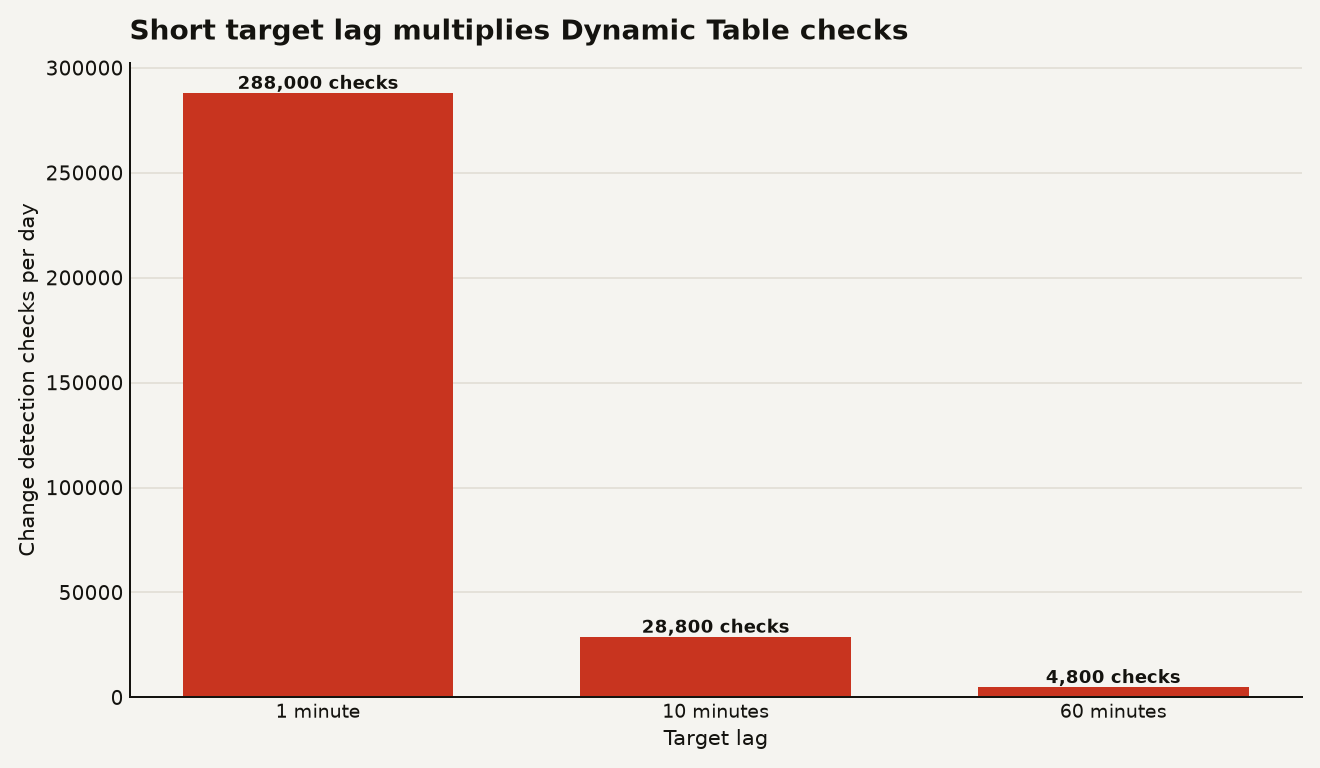
This is why TARGET_LAG = '1 minute' should require a product reason, not just an engineer with ambition. Snowflake also says Cloud Services credits are billed only when the daily account total exceeds 10 percent of that day's warehouse compute credits, calculated at the account level in UTC, in the cost documentation. Short lags across deep DAGs are how you turn background metadata into a visible line item.
Use a dedicated warehouse while testing. Then prove the usage before you move Dynamic Tables onto shared compute:
SELECT
  warehouse_name,
  ROUND(SUM(credits_used), 2) AS total_credits,
  ROUND(SUM(credits_used_compute), 2) AS compute_credits,
  ROUND(SUM(credits_used_cloud_services), 2) AS cs_credits
FROM SNOWFLAKE.ACCOUNT_USAGE.WAREHOUSE_METERING_HISTORY
WHERE start_time >= DATEADD('day', -7, CURRENT_TIMESTAMP())
GROUP BY warehouse_name
ORDER BY total_credits DESC;
For Adaptive mode, watch reinitializations directly. Snowflake says reinitializations appear as REFRESH_ACTION = 'REINITIALIZE', with the reason in REINIT_REASON, through DYNAMIC_TABLE_REFRESH_HISTORY in refresh modes.
SELECT
  name,
  state,
  refresh_action,
  reinit_reason,
  query_id,
  data_timestamp
FROM TABLE(INFORMATION_SCHEMA.DYNAMIC_TABLE_REFRESH_HISTORY(
  NAME => 'MART.DT_ORDERS_ADAPTIVE',
  DATA_TIMESTAMP_START => DATEADD('day', -7, CURRENT_TIMESTAMP())
))
ORDER BY data_timestamp DESC;
If that query shows weekly reinitializations on an XL initialization warehouse, your optimization story changed. You may still be saving money compared with slow incremental refresh after bulk rewrites. You just need to budget the rebuilds as a known event, not a spooky warehouse flare.
What should you lock down before teams start creating them?
Dynamic Tables are operational objects. Treat them like pipelines, not like tables someone happened to create in a worksheet. Snowflake's access control guide says creating one requires CREATE DYNAMIC TABLE on the schema, SELECT on referenced base objects, and USAGE on the database, schema, and refresh warehouse in Dynamic Table privileges.
GRANT USAGE ON DATABASE analytics TO ROLE transform_role;
GRANT USAGE ON SCHEMA analytics.mart TO ROLE transform_role;
GRANT USAGE ON WAREHOUSE transform_wh TO ROLE transform_role;
GRANT CREATE DYNAMIC TABLE ON SCHEMA analytics.mart TO ROLE transform_role;
GRANT SELECT ON TABLE raw.orders TO ROLE transform_role;
The owner role is the sleeper risk. Snowflake says the owner role runs background refreshes and must keep USAGE and SELECT on referenced objects, or refreshes fail, in the privileges guide. That means your production owner should be a service role with boring, durable grants. Do not let a project role own a critical mart if that role gets cleaned up after the migration sprint.
Give operators OPERATE, not OWNERSHIP, when they need to suspend, resume, or manually refresh. Give observability users MONITOR, which Snowflake documents as read only access to scheduling state, refresh history, and graph history in Dynamic Table privileges.
GRANT OPERATE ON DYNAMIC TABLE analytics.mart.dt_orders_adaptive
  TO ROLE pipeline_admin_role;

GRANT MONITOR ON FUTURE DYNAMIC TABLES IN SCHEMA analytics.mart
  TO ROLE data_ops_role;
Also decide your retention strategy before you build historical aggregates. Frozen regions let you declare rows that refresh should skip. Snowflake documents BACKFILL FROM as a create time option that copies existing data into a new Dynamic Table without recomputing it, and says it cannot be added later with ALTER in frozen regions and backfill. That is perfect for migrating a years old daily aggregate, as long as you accept that frozen rows are intentionally stale.
CREATE OR REPLACE DYNAMIC TABLE mart.dt_orders_daily
  TARGET_LAG = '1 hour'
  WAREHOUSE = transform_wh
  FROZEN WHERE (order_day < CURRENT_DATE() - 2)
  BACKFILL FROM mart.dt_orders_daily_legacy
AS
SELECT
  DATE_TRUNC('day', order_ts) AS order_day,
  region,
  COUNT(*) AS order_count,
  SUM(amount) AS revenue
FROM raw.orders_enriched
GROUP BY 1, 2;
Storage lifecycle policies are now generally available for Dynamic Tables. Snowflake's May 21, 2026 release note says a policy can delete or archive matching rows on its own schedule, and rows in the expired region are treated as frozen by refresh in the GA release note. That gives you a cleaner pattern for keeping raw or intermediate data short lived while keeping aggregates available.
When should you still use Streams and Tasks instead?
Keep Streams and Tasks when your pipeline is multi statement, procedural, or intentionally outside Dynamic Table semantics. Snowflake's custom incremental docs allow only one DML statement inside REFRESH USING, and they call out that stored procedures, UDTFs, or multi statement transactions need restructuring in the custom incrementalization guide.
Use Dynamic Tables first when the transformation is naturally SQL shaped and freshness is the product requirement. Use Streams and Tasks first when the workflow is a job with side effects: call an external service, write audit records in multiple places, conditionally branch across several tables, or coordinate work that must run exactly once after a non-Snowflake event.
The dbt story is practical but not free. Snowflake documents dynamic_table as a dbt materialization, and says SQL changes to a model trigger CREATE OR REPLACE, which causes reinitialization, while config only changes such as target lag and warehouse can be applied with ALTER when on_configuration_change is set to apply in the dbt integration docs. Translation: dbt plus Dynamic Tables is attractive for model discipline, but casual SELECT edits can become rebuilds.
SHOW DYNAMIC TABLES LIKE 'dt_orders_daily' IN SCHEMA analytics.mart;Check refresh_mode, warehouse, scheduling_state, target_lag, is_iceberg, and immutable_where. Snowflake documents those fields in SHOW DYNAMIC TABLES, including refresh_mode values for INCREMENTAL, FULL, AUTO, ADAPTIVE, and CUSTOM_INCREMENTAL in the SHOW DYNAMIC TABLES reference. If the metadata does not match your design doc, the bill will follow the metadata.
The sharp edge is no longer expressibility. It is control.
Snowflake closed a real gap. Faster Dynamic Tables on Gen2 warehouses, Adaptive refresh, frozen regions, backfill, dbt support, Iceberg output, and preview custom incrementalization make the feature much harder to dismiss as a prettier materialized view.
The next failure mode is overuse. A one minute lag on 200 tables creates 288000 daily checks. A custom incremental table can hide business semantics inside a Snowflake specific MERGE INTO SELF. A dbt model edit can trigger reinitialization. None of that makes the feature bad. It makes ownership matter.
The right move is boring and effective: pick one production pipeline, pin REFRESH_MODE, use Gen2 compute, set intermediate tables to DOWNSTREAM, split initialization and refresh warehouses, grant MONITOR broadly, and watch DYNAMIC_TABLE_REFRESH_HISTORY for seven days. If the latency drops and the credit curve stays flat, expand. If it does not, you learned before the pipeline became a platform.
Sources
- Snowflake Blog: What's New with Dynamic Tables: Faster and More Flexible
- Snowflake documentation: CREATE DYNAMIC TABLE
- Snowflake documentation: Dynamic table refresh modes
- Snowflake documentation: Custom incrementalization
- Snowflake documentation: Understanding costs for dynamic tables
- Snowflake documentation: Dynamic table access control
- Snowflake documentation: Frozen regions and backfill
- Snowflake documentation: Use dynamic tables in dbt
- Snowflake documentation: SHOW DYNAMIC TABLES
- Snowflake release notes: Storage lifecycle policies for dynamic tables, General availability
- Snowflake release notes: Custom incremental dynamic tables, Public Preview