FortiBleed is the kind of edge-device incident that makes patch dashboards look smug and incomplete. The useful number is ugly: SOCRadar reported 86,644 compromised Fortinet FortiGate firewall and SSL VPN access points across 194 countries in a June 19, 2026 update. CISA gave operators the government version of the same message on June 18, saying malicious actors had targeted internet-accessible Fortinet devices using compromised credentials and tying the activity to approximately 74,000 Fortinet devices.
The label sounds like a CVE. The work does not. FortiBleed is a credential exposure campaign against FortiGate appliances, especially firewall administration and SSL VPN paths sitting on the public internet. That distinction matters because your response cannot stop at firmware. You have to rotate secrets, kill sessions, review configuration, and treat the firewall as a possible beachhead.
The edge box has become an identity system. If you run one, your incident plan starts at the perimeter and ends in Active Directory.
What actually happened to FortiGate devices?
CISA said it was aware of global reports that malicious actors had targeted internet-accessible Fortinet devices across government and private-sector organizations using compromised credentials, and the agency urged FortiGate customers to terminate sessions, reset credentials, review logs, enable phishing-resistant MFA, and lock down management access in its June 18 alert. Fortinet followed on June 19 with a PSIRT post saying its initial analysis points to reused credentials from previous incidents and brute-force techniques against devices with weak password hygiene and no MFA, and the company said the activity is a credential campaign rather than a new Fortinet vulnerability.
That last clause is easy to misread as comfort. It should land as workload.
A vulnerability advisory gives you a version number. A credential campaign gives you uncertainty. Which admin accounts were valid? Which VPN users reused passwords? Which LDAP bind account sat in the firewall configuration? Which backup contains an old hash? Which session stayed alive after the first password change? These are the questions that turn a firewall event into a weekend.
SOCRadar’s count is higher than CISA’s public number because the two figures appear to measure different slices of a moving campaign. CISA cited approximately 74,000 Fortinet devices, while SOCRadar said its researchers had found 86,644 compromised access points and warned that counts were being updated as the campaign remained active in its FortiBleed report.
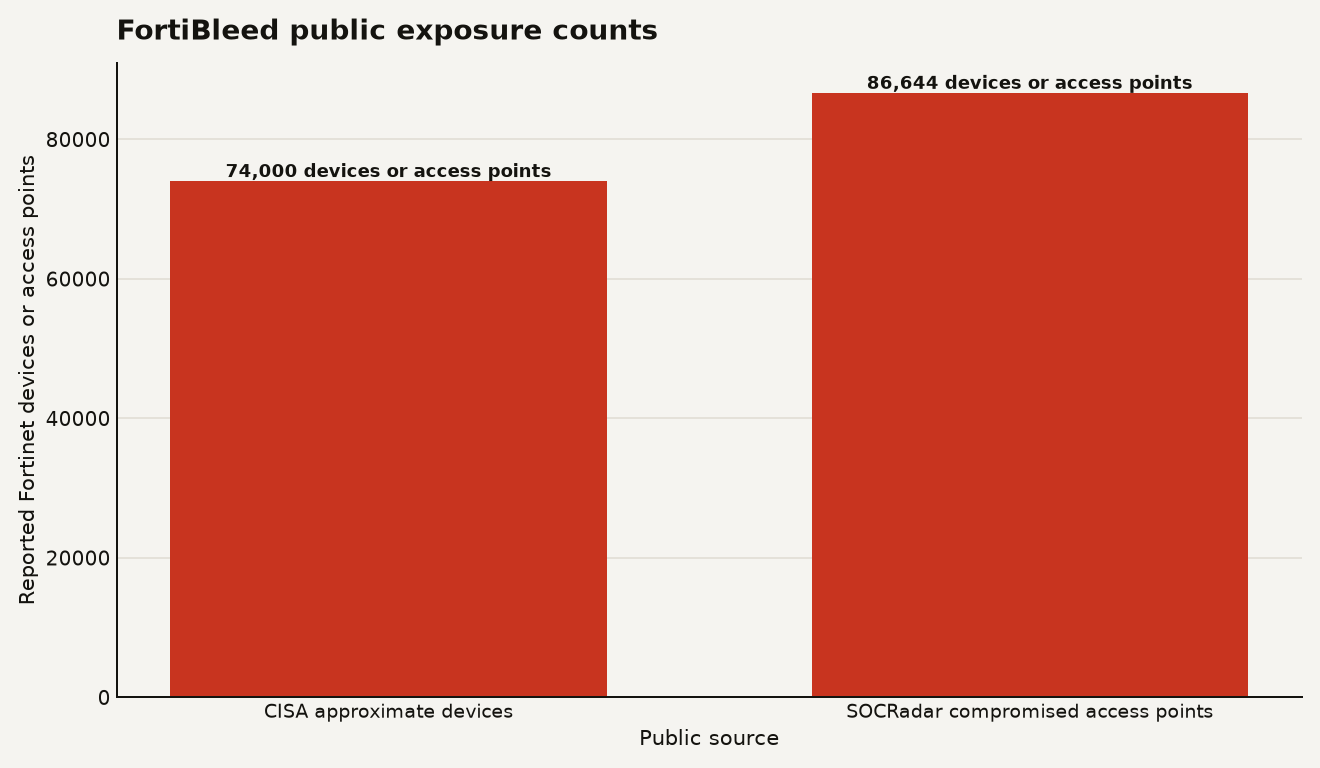
The chart above should not tempt you into source theology. Whether your risk register uses 74,000 or 86,644, the operator conclusion is the same: internet-facing FortiGate admin and SSL VPN exposure deserves same-day action, with credential reset treated as containment rather than housekeeping.
SOCRadar describes the attacker workflow as automated scanning, credential testing, and reuse of working logins, with compromised FortiGate devices allegedly used to collect more credentials passing through the environment. Fortinet’s own March 2026 writeup on automated edge attacks said a prior campaign succeeded through exposed management ports and weak credentials with single-factor authentication, and Fortinet wrote that the reported attack would have been impossible with MFA in place.
That is the part to tattoo on the runbook. A long password helps against guessing. It does little once the password has already leaked and the firewall happily accepts it from the internet.
Why should operators treat FortiBleed as more than a password reset?
Because a FortiGate box is rarely just a box. It often holds VPN access, administrator roles, routing rules, authentication integrations, logs, certificates, and enough network context to make an intruder’s next move cheaper. The perimeter device is an address book with packet forwarding.
Fortinet’s June 19 guidance tells customers to validate configuration and compare against a known-good configuration, with special attention to unrecognized accounts such as forticloud, fortiuser, fortinet-support, and fortinet-tech-support in its PSIRT analysis. That is a blunt signal: the risk includes persistence, not just one stolen login.
If you run production systems, split the impact into four buckets:
- Access: VPN and administrator credentials can become initial access for humans or automation.
- Persistence: A new local admin, altered VPN user, scheduled script, or changed policy can survive a simple password reset.
- Lateral movement: Fortinet said that if AD or LDAP integration is configured, operators should treat that account as compromised and monitor Active Directory for authentication and account creation activity in the same June 19 guidance.
- Blast radius: Firewall configuration can expose internal address ranges, trusted hosts, VPN groups, and remote access patterns.
The underrated operational problem is stale trust. Many teams rotate employee passwords, API keys, and cloud access keys while leaving firewall admin accounts in a different mental drawer. FortiBleed punishes that split-brain security model.
There is also a supply-chain angle for MSPs and multi-site operators. If your team used repeatable naming, shared break-glass patterns, or cloned firewall templates across 20 customer environments, one confirmed credential problem can become 20 investigations. That is why our earlier Fortinet guide argued that credential exposure needs a reset plan rather than a one-line ticket.
The business consequence is simple: edge-device identity now belongs in your production change process. A firewall credential rotation should have owners, maintenance windows, rollback steps, monitoring, and executive visibility. If it lives as tribal knowledge inside one network engineer’s head, FortiBleed is your audit finding with an attacker attached.
What should you do in the first 24 hours?
Start with containment. Do not wait for your domain to appear in a checker if you expose FortiGate admin or SSL VPN interfaces to the internet and have any uncertainty about credential rotation since earlier Fortinet incidents.
CISA’s five immediate steps are a good minimum: terminate active SSL VPN and administrative sessions, reset Fortinet VPN and administrative passwords, confirm PBKDF2 storage for administrator credentials, review logs, require phishing-resistant MFA, and remove public internet access to firewall administration in its Fortinet hardening alert. Fortinet’s technical note says FortiOS 7.2.11, 7.4.8, and 7.6.1 updated administrator credential storage from SHA256 to PBKDF2, but it also says upgraded administrators may retain weaker legacy hashes until the right login or password update steps occur in its PBKDF2 guidance.
Here is the operator sequence that makes sense:
- Inventory every FortiGate and SSL VPN endpoint. Include HA pairs, lab systems, branch firewalls, cloud appliances, and appliances managed by MSPs.
- Remove public administration first. Use trusted hosts as a stopgap, local-in policy as a stronger control, and internal or out-of-band management as the target state.
- Terminate sessions before rotation. Kill admin and SSL VPN sessions so old credentials do not ride through your reset.
- Rotate all relevant credentials. Reset local admins, VPN users, break-glass users, service accounts, LDAP bind accounts, RADIUS secrets, API tokens, and any shared secrets stored in FortiGate configuration.
- Turn on MFA for remote access and administration. Prefer phishing-resistant MFA where your stack supports it, especially for admin and VPN paths.
- Upgrade and verify password hashing. Move to supported FortiOS branches that support PBKDF2 and remove weaker legacy hashes.
- Diff the configuration. Compare current configuration to a known-good backup from before suspected exposure.
- Hunt beyond the firewall. Review domain controller logs, IdP logs, VPN logs, EDR alerts, and SIEM events for impossible travel, new accounts, privilege changes, and service-account misuse.
One hard rule: a clean firmware version does not prove clean identity. Firmware closes known product issues. Credential rotation closes attacker reuse. Log review tells you whether someone already walked through the door.
What should you watch after the first reset?
Watch for the second-order effects. Attackers with valid perimeter credentials rarely stop at admiring the FortiGate UI. They look for durable access, better credentials, and internal systems that trust the VPN path.
Fortinet’s guidance says to check for unexpected administrator access from unknown IP addresses, VPN users, unexpected password resets, and VPN activity from unexpected locations in its reported compromise analysis. That means your monitoring plan needs a time window. Pull at least 30 days if logs exist, longer if your FortiGate was exposed through earlier Fortinet advisory windows or if credentials have not rotated for years.
Prioritize these detections:
- New local FortiGate administrator accounts or renamed accounts.
- Changes to trusted hosts, local-in policy, VPN portals, firewall policies, routes, and scheduled scripts.
- SSL VPN logins from countries or ASNs with no business reason.
- Repeated failed logins followed by a success for the same account.
- LDAP, RADIUS, or SAML authentication from the firewall at odd hours.
- Domain account creation or group membership changes after suspicious VPN logins.
The uncomfortable caveat is that many shops will lack enough firewall logging to answer every question. Write that down. If the logs are gone, you cannot prove the absence of compromise. You can only reduce current exposure, rotate credentials, rebuild trust, and improve telemetry before the next edge-device campaign arrives.
For leadership, the ask should be concrete: one emergency change window, one owner for Fortinet identity, one owner for AD or IdP review, and a written decision on whether exposed management access is allowed anywhere. If the answer is yes, require an exception with an expiration date measured in days, not quarters.
The edge device is now an identity system
FortiBleed is a reminder that perimeter security has inherited identity security’s messiest failure mode: old secrets that still work. The firewall used to be treated like hardened plumbing. In 2026, it is a login surface, a credential store, a policy engine, and a map of your network.
If you run FortiGate, do the boring work with urgency. Rotate. Isolate. Diff. Hunt. Then make sure the next edge appliance you deploy ships with an owner for secrets, not just an owner for packets.
Sources
- CISA: CISA Urges Hardening Fortinet Devices After Reports of Credential Exposure
- Fortinet: Analysis of Reported Credential Compromise of FortiGate Devices
- SOCRadar: FortiBleed 2026, The Compromise of 86,644 Fortinet FortiGate Firewalls and Credential Leak
- Fortinet Community: Enforcing PBKDF2 as hash function for administrator accounts in FortiOS v7.2.11 and later
- Fortinet: Attacks at the Speed of AI