Edge devices are where security programs go to become urgent. They sit on the public internet, terminate remote access, often bridge straight into identity systems, and somehow still end up with old local admin accounts that nobody wants to touch on a Friday.
Fortinet credential exposure is the problem CISA put in front of operators on June 18, 2026: credentials associated with approximately 74,000 Fortinet devices are exposed, including firewalls and SSL VPN gateways, and malicious actors have reportedly targeted internet-accessible Fortinet devices across government and private sector organizations. CISA urged impacted Fortinet customers to terminate sessions, reset passwords, confirm stronger credential hashing, review logs, require phishing-resistant MFA, and lock down public management access.
That list sounds basic. That is exactly why it matters.
If you run production systems, treat this as an edge access incident until your logs and device state prove otherwise. A leaked firewall or VPN credential does not need a zero-day to hurt you. It needs one exposed login page, one valid account, and one path from the appliance into the rest of your network.
What did CISA actually warn Fortinet operators about?
CISA said the activity, referred to as FortiBleed, involves leaked credentials tied to roughly 74,000 Fortinet devices. The affected class is operationally important: FortiGate appliances and associated SSL VPN gateways, the gear many teams use for remote access, administrative entry, segmentation, and traffic enforcement.
The alert did not frame this as a new CVE with a patch-and-close remediation path. It framed the risk as credential exposure against internet-accessible edge infrastructure. That distinction changes the job. A patch may still be required in your environment, but patching alone does not invalidate a password that has already left your control.
CISA’s immediate guidance boils down to five operator moves:
- Kill active SSL VPN and administrative sessions.
- Reset Fortinet VPN and administrative passwords, especially on internet-facing systems.
- Confirm PBKDF2 storage for administrator credentials and remove weaker legacy hashes.
- Review firewall, VPN, authentication, and domain controller logs for lateral movement and unauthorized changes.
- Require phishing-resistant MFA and remove public management exposure.
The fifth item is the one that should trigger a design review, not a ticket comment. If firewall administration is reachable from the public internet, your control plane is part of your attack surface. That is a business choice dressed up as convenience.
The FortiBleed number also lands in familiar territory. Fortinet disclosed in September 2021 that a malicious actor had published SSL VPN access information for 87,000 FortiGate SSL VPN devices, tied to systems that had remained unpatched against CVE-2018-13379 at the time of scanning. The lesson aged badly for teams that rotated firmware without rotating credentials.
The chart below shows why operators should view the 2026 alert as part of a repeated edge-credential failure pattern, not a weird one-off. The 2021 Fortinet disclosure named 87,000 devices, while the 2026 CISA alert names approximately 74,000.
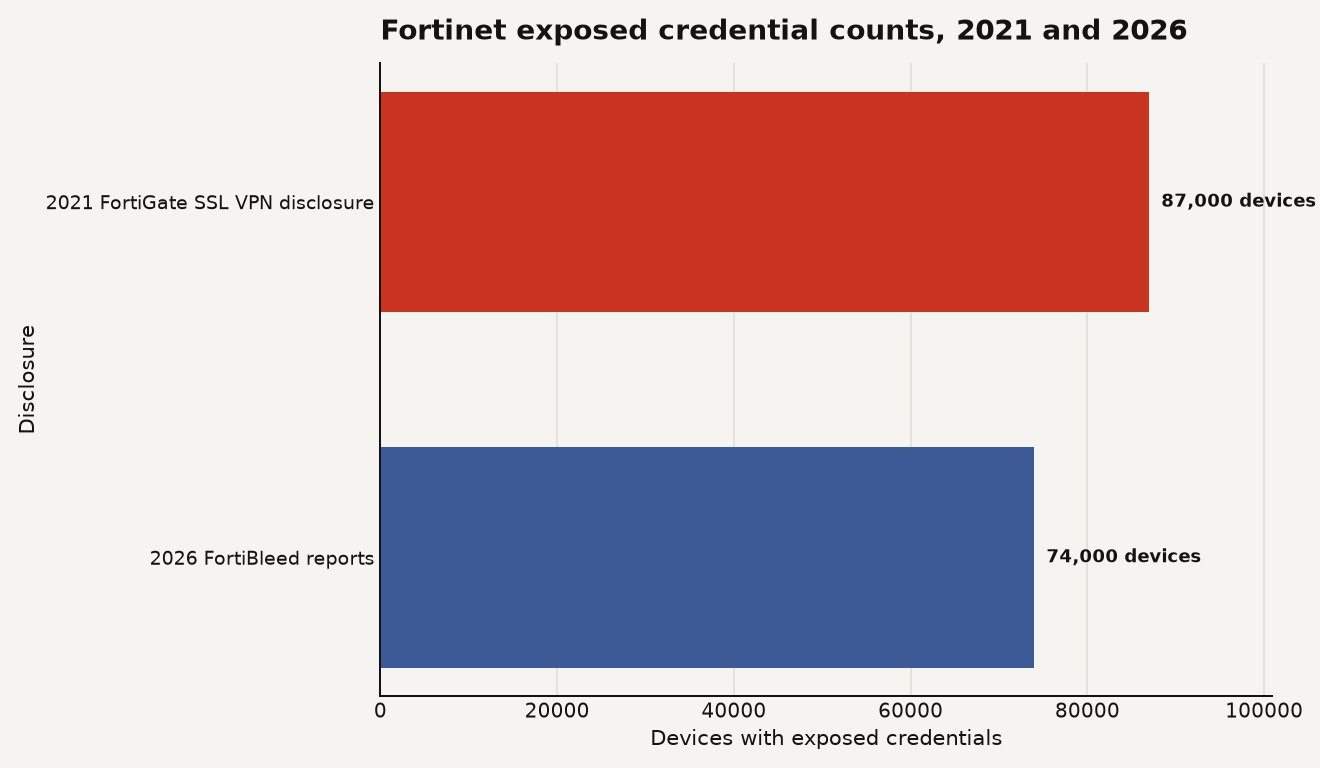
Those two bars are close enough to be uncomfortable. Four and a half years separate the disclosures. The remediation muscle memory should be automatic by now.
Why is credential exposure on a firewall worse than a normal password leak?
A leaked SaaS password is bad. A leaked firewall or VPN credential can be worse because it may land an attacker at the edge of a trusted network zone, next to identity plumbing, admin interfaces, routes, logs, and configuration secrets.
That is why CISA’s log review list includes domain controllers. Once an attacker authenticates through a VPN gateway or administrative interface, the next useful question is where that account can go. Can it reach management networks? Can it query Active Directory? Can it see backup infrastructure? Can it pull configuration that contains LDAP bind accounts, RADIUS shared secrets, SAML settings, or local break-glass accounts?
Builders should care because this is where tidy architecture diagrams meet the damp basement. The firewall is supposed to enforce boundaries. In many environments it also carries exceptions, legacy routes, broad admin profiles, and years of accumulated operational shortcuts.
Three practical consequences follow.
First, password rotation must include connected identity paths. If a FortiGate configuration references LDAP, RADIUS, SAML, TACACS, automation users, or monitoring accounts, rotate and review those credentials too. Resetting only the obvious local admin account can leave the useful credential untouched.
Second, session termination matters. CISA explicitly told operators to terminate all active SSL VPN and administrative sessions. If you reset credentials while leaving active sessions alive, you may only have improved the attacker’s day by giving them a quiet persistence window.
Third, MFA has to cover the external gateways and administrative interfaces that matter. CISA called for phishing-resistant MFA across remote access and administrative accounts. SMS codes and push fatigue prompts are the bargain-bin version of this control. For high-value edge access, favor FIDO2 security keys, platform passkeys with hardware-backed protection, or certificate-bound flows where your stack supports them.
Fortinet has been warning about the same class of access problem. Fortinet wrote in March 2026 that one observed campaign succeeded through exposed management ports and weak credentials with single-factor authentication, using password spraying for initial access. You do not need to buy the AI framing to accept the operational point: exposed management plus weak authentication scales beautifully for attackers.
The underrated risk is configuration theft. Once an attacker can authenticate to an edge device, they may learn far more than a password. Routes, objects, VPN users, policy names, certificates, syslog destinations, identity integrations, and admin account structure all help build a map. For a production operator, that map is almost as sensitive as source code.
How should you respond in the first 24 hours?
Start with containment, then move to evidence. Do not begin with a meeting whose first agenda item is naming the incident. Your FortiGate estate can be triaged before the slide deck exists.
Use this 24-hour order of operations.
-
Inventory every Fortinet edge device. Pull from asset management, FortiManager, cloud inventories, DNS, certificate transparency, external attack surface tooling, and Shodan-style exposure checks if you use them. Your target list should include physical FortiGate appliances, virtual appliances, SSL VPN gateways, and management interfaces.
-
Identify internet exposure. Separate devices with public SSL VPN, public administrative GUI, public SSH, and public API access. Public administration should be treated as a defect unless there is a tightly justified exception.
-
Terminate sessions. End active SSL VPN and administrative sessions before or during credential rotation. Capture session metadata first if your incident process requires it, but do not leave live sessions in place for convenience.
-
Rotate credentials broadly. Reset local Fortinet administrator passwords, VPN user credentials, break-glass accounts, service accounts, and upstream identity credentials connected to the appliance. Prioritize accounts with admin profiles and accounts reused across sites.
-
Enforce phishing-resistant MFA. Apply it to remote access and administrative access. Confirm enforcement at the gateway, not only in a policy document or identity provider group that nobody tested.
-
Review logs with a lateral movement lens. Look for unusual VPN source locations, successful logins outside normal hours, new admin accounts, configuration exports, policy changes, new local users, altered LDAP settings, and domain controller authentication spikes.
-
Lock down management. Move administrative access behind trusted internal networks, out-of-band management, ZTNA, bastions, or a dedicated admin VPN with strong MFA. If a vendor appliance admin page is public, attackers will find it faster than your next audit.
The PBKDF2 item deserves its own check because it can look like a compliance footnote. It is not. Fortinet’s FortiOS 7.2.11 release notes say FortiGate uses PBKDF2 with randomized salts to hash and store system administrator passwords. Fortinet’s documentation also shows PBKDF2-encoded administrator passwords with a PB2 prefix and describes older SHA256 hashes with an SH2 prefix.
For operators, the practical check is simple: verify that current administrator credentials are stored with the stronger scheme, then remove legacy hash exposure where your firmware and downgrade posture allow it. If you keep older hashes around for downgrade convenience, document who accepted that risk and when it expires.
What should you audit after the passwords are changed?
Credential rotation is the starting gun. The audit determines whether the attacker got farther.
Focus on the paths an authenticated edge user could actually touch. Pull logs from the Fortinet device, FortiAnalyzer or your SIEM, identity providers, RADIUS or TACACS servers, VPN auth logs, EDR, DNS, proxy logs, and domain controllers. Your timeline should cover at least the period when the credential may have been exposed, plus the 7 days after rotation to catch reuse attempts.
Look for these signals:
- Successful VPN logins from unusual autonomous systems, countries, residential proxy ranges, or cloud hosting providers.
- Logins to dormant accounts or accounts that should never use remote access.
- New local admins, changed admin profiles, altered trusted hosts, or unexpected API users.
- Configuration backups, exports, or downloads that line up with suspicious sessions.
- Changes to firewall policies, static routes, VIPs, VPN portals, LDAP servers, RADIUS servers, SAML settings, or certificates.
- Authentication attempts from the Fortinet device toward domain controllers that do not match normal operations.
- Post-login scanning from VPN address pools into management subnets, backup networks, virtualization platforms, or source control systems.
The cleanest outcome is boring: you find exposed devices, rotate credentials, close management exposure, and logs show no suspicious post-authentication activity. The messy outcome is more common than teams like to admit: logs are incomplete, VPN attribution is weak, and nobody knows whether the local admin account was shared by 3 engineers or 30.
If your logs are thin, widen containment. Force password resets for users who had VPN access. Rotate service accounts connected to the appliance. Reissue certificates if private key exposure is plausible. Review configurations from known-good backups. Treat unknowns as risk, not as free passes.
There is one trap to avoid: declaring victory because the device is now patched. CISA’s alert is about exposed credentials. A fully patched device can still accept a valid password. The operator move is state change: sessions killed, credentials invalidated, MFA enforced, management narrowed, logs reviewed.
What changes should stay after FortiBleed fades from the queue?
The durable fix is to stop treating edge devices as special boxes with special exceptions. They are production systems. Put them under the same discipline you expect for databases, Kubernetes control planes, and CI/CD administrators.
That means four standing controls.
First, maintain an edge access register. Every firewall, VPN gateway, load balancer admin panel, ZTNA connector, and remote access portal should have an owner, internet exposure status, firmware version, MFA status, logging destination, and credential rotation date. If you cannot answer those fields in 10 minutes, your estate is already too fuzzy.
Second, ban public management by default. Use trusted host restrictions, management VLANs, bastions, device certificates, and phishing-resistant MFA. Exceptions should expire automatically. A public admin page should feel as weird as a public database console.
Third, separate human admin accounts from service and automation accounts. Shared local admin accounts make incident response mushy. Named accounts with least privilege and centralized logging give you evidence when something breaks.
Fourth, rehearse credential compromise for edge devices. Once per quarter, run the playbook: identify affected devices, terminate sessions, rotate local and upstream credentials, validate MFA, check logs, and produce a short incident report. The first time you test this should not be while CISA is warning about 74,000 exposed devices.
For product and business leaders, the budget ask is smaller than the outage it prevents. You need time for firmware maintenance, MFA rollout, attack surface management, and log retention. Those do not ship features, but they protect the path through which every feature gets accessed by employees, vendors, and attackers.
The overhyped angle is the name. FortiBleed sounds like a branded mega-bug. The useful read is more mundane and more damning: exposed edge access, stale credentials, and weak authentication still beat expensive security stacks.
The edge is part of your identity system
A firewall used to be a traffic control point. In 2026, it is also an identity enforcement point, a remote work gateway, a secrets-adjacent configuration store, and a high-value admin surface.
Treat the Fortinet credential exposure like a production identity incident. Rotate the keys, check the doors, read the logs, and remove the public handles attackers keep grabbing.