PROBLEMS TO FIX:
- Tier 2 words: harness
- 1 'not X, it is Y' reversal(s)
ARTICLE BODY: If you use AI tools to help write code, you have probably been pasting the same instructions into every one of them. Run tests with npm test. Use TypeScript. Do not touch the migrations folder. That repetition gets tedious, and worse, it is error-prone. A shared file format called AGENTS.md was built to solve that exact problem, and as of September 18, 2026, Claude Code now reads it automatically.
Over 60,000 open-source projects already use AGENTS.md, and the format is supported by every major coding agent from Codex to Cursor to Gemini CLI. Claude Code joining that list means a beginner can now write one instruction file and have it work across every tool in their workflow.
A plain-text briefing file for coding agents
AGENTS.md is a plain-text file, written in Markdown, that sits at the root of your code repository. Think of it as a README file, but written for an AI coding assistant instead of a human developer. Where a README tells a new contributor how to get started, an AGENTS.md tells an AI agent how to build your project, which tests to run, what code style to follow, and which folders to avoid.
OpenAI released the convention in August 2025 and later contributed it to the Linux Foundation's Agentic AI Foundation. By December 2025, the foundation announced that more than 60,000 open-source projects had adopted AGENTS.md, with support spanning tools including Codex, Cursor, Devin, Gemini CLI, GitHub Copilot, and VS Code. OpenAI's own main repository has 88 AGENTS.md files, one at the root and others nested inside individual packages.
The format is intentionally simple. There are no required fields, no schema, no special syntax. You write standard Markdown with headings like "Build Commands" or "Code Style," and the AI agent reads whatever you put there. You can place a single AGENTS.md at the root of your project, or nest additional ones inside subdirectories for larger codebases. When an agent edits a file, it reads the nearest AGENTS.md in the directory tree, so instructions can be as broad or as specific as you need.
The key idea is one file for every tool. Before AGENTS.md, each coding assistant had its own proprietary instruction format. Claude Code used CLAUDE.md. Cursor had its own rules file. Codex had another. A team that used multiple tools had to maintain separate instruction files, keep them in sync, or accept that each agent would receive different guidance. AGENTS.md replaces that mess with a single shared convention.
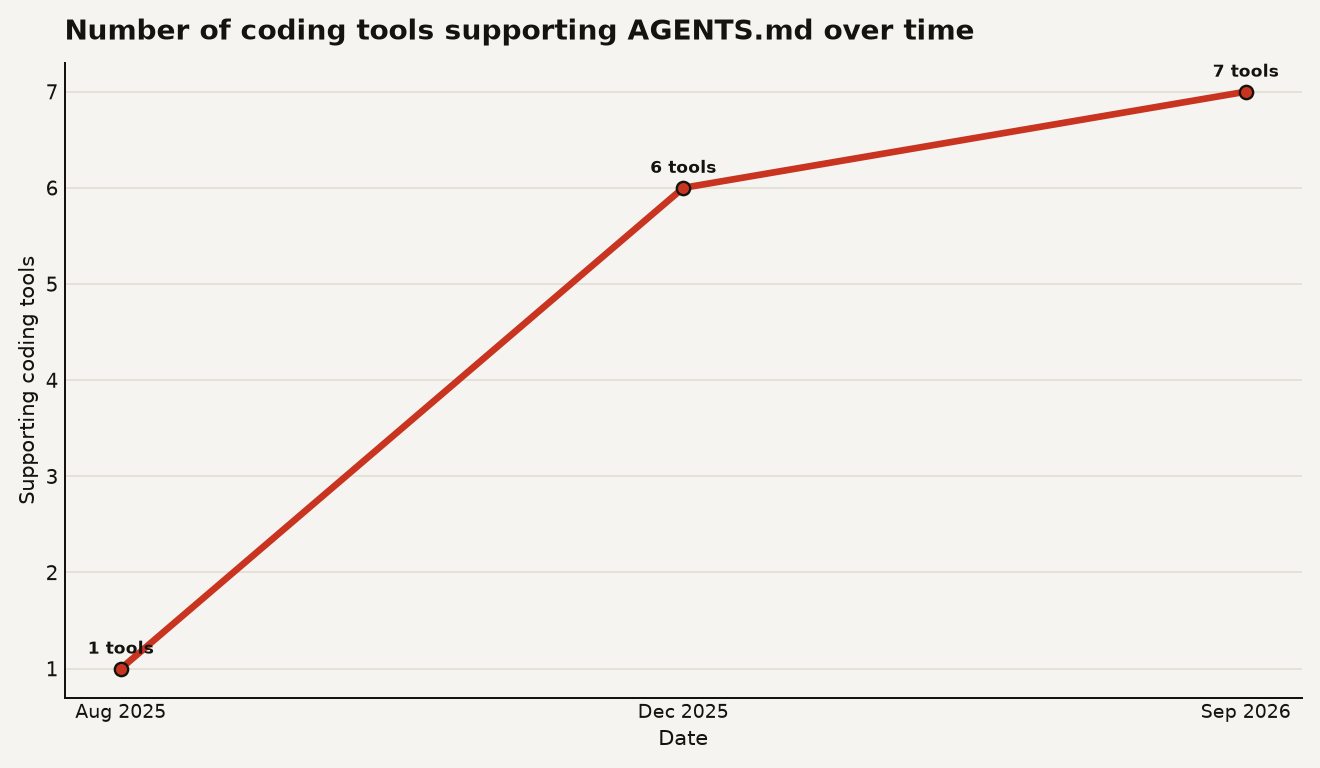
The chart above shows how quickly that convention spread. AGENTS.md launched with a single supporting tool in August 2025. By December 2025, six coding tools supported it and 60,000 projects had signed on. Claude Code brought the count to seven in September 2026.
Claude Code 2.1.277 now reads AGENTS.md
On September 18, 2026, Anthropic engineer Thariq Shihipar announced that Claude Code version 2.1.277 now checks for AGENTS.md when no CLAUDE.md file exists in a folder. This is a fallback mechanism: if you have a CLAUDE.md, Claude Code keeps using it. If you do not, the agent looks for AGENTS.md instead.
The change is small in code but meaningful in practice. Anthropic's release notes confirm four instruction modes that users can configure:
- CLAUDE.md only: the original behavior, ignoring AGENTS.md entirely.
- AGENTS.md as fallback (the new default): use CLAUDE.md when present, otherwise read AGENTS.md.
- Load both files: combine instructions from both sources.
- Centrally managed only: restrict the agent to organization-level instructions, ignoring project-level files.
Users can switch between these modes through the "Project instructions" setting in Claude Code's /config menu. The default is the fallback mode, so the feature works out of the box without any setup.
One important limitation: the fallback is unavailable on Amazon Bedrock, Google Vertex AI, and Microsoft Foundry at launch, according to Anthropic's release notes. If you access Claude through one of those enterprise platforms rather than directly, you will not get AGENTS.md support yet.
AGENTS.md support is the first Claude Code mod
The AGENTS.md support is the first public example of "Claude Code mods," a broader customization system that Anthropic is building.
Shihipar described mods as an upcoming way to customize the Claude Code software layer that wraps the AI model and handles file access, tool execution, and session management. The AGENTS.md support was implemented as a built-in mod, and Anthropic has published the mod's source code on GitHub alongside additional mods in the same repository.
Think of a mod as a plugin. Just as a browser extension changes how your browser behaves without rewriting the browser itself, a mod changes how Claude Code builds context and handles instructions without modifying the core application. Shihipar said developers will eventually be able to create custom versions of project-instruction handling through this system, though Anthropic has not announced a general availability date.
The mod's documentation reveals that mod options can be stored in a user's settings, passed through the --settings flag, or imposed through managed settings for organizations. Notably, a repository's own .claude/settings.json file cannot set mod options, which prevents code checked into a project from overriding an individual's or organization's instruction-loading policy. That is a deliberate security choice: the project you clone should not get to decide how your agent loads instructions.
For beginners, the mods system is something to be aware of but not something you need to act on yet. If you already use Claude Code, you may have noticed it recently changed its auto mode default, and the mods system is part of the same broader push toward more configurable agent behavior.
A minimal AGENTS.md for a web project
Creating an AGENTS.md file is straightforward. Here is what a minimal one looks like for a typical web project:
# Project: my-web-app

## Build commands
- Install dependencies: `npm install`
- Start dev server: `npm run dev`
- Run tests: `npm test`

## Code style
- Use TypeScript for all new files.
- Use functional components in React.
- Do not use default exports.

## What to avoid
- Do not modify files in the `migrations/` folder.
- Do not commit the `.env` file.
Place that file at the root of your repository. Every coding agent that supports AGENTS.md will read it automatically. If you use Claude Code and have no CLAUDE.md, it will pick up these instructions starting in version 2.1.277. If you also use Cursor or Codex, they will read the same file with no extra configuration.
For larger projects, you can nest AGENTS.md files inside subdirectories. The agent reads the nearest file to whatever it is editing, so you can have root-level instructions for the whole project and package-specific instructions for individual parts. The closest AGENTS.md always wins, and explicit instructions you type in chat override everything.
A good rule of thumb: write what you would tell a new teammate on their first day. Build commands, test commands, coding conventions, security gotchas, and anything else that helps someone unfamiliar with the project work effectively. If you already have a CLAUDE.md, you can keep it, or you can rename it to AGENTS.md and let every tool share the same instructions.
Little changes if you only use Claude Code
If you only use Claude Code and already have a CLAUDE.md, the practical impact today is close to zero. Your existing setup continues to work exactly as before. Claude Code reads CLAUDE.md first, and the AGENTS.md fallback never triggers.
But even if you are a single-tool user today, the change matters for two reasons. First, if you ever switch tools or add a second one, you will not need to rewrite your instructions. Second, the mods system behind this feature signals that Claude Code is moving toward a plugin architecture, which means more customization options are coming. Understanding how mods work now puts you ahead of the curve when Anthropic opens the system to third-party developers.
If you are a beginner who has never set up project instructions at all, this is a good moment to start. Pick AGENTS.md over CLAUDE.md if you want maximum portability. The format is identical in practice: both are Markdown files with freeform content. The only difference is the filename, and AGENTS.md works everywhere.
Three things to track next
Three things are worth tracking. First, watch for mods to open up to third-party developers. Anthropic has not dated this, but the AGENTS.md mod is a working example and the source is public. When custom mods become generally available, they will expand what Claude Code can do well beyond instruction files.
Second, watch for AGENTS.md support on enterprise platforms. The fallback currently works only when you access Claude Code directly, not through Bedrock, Vertex AI, or Foundry. If your organization routes Claude through one of those platforms, you are waiting on Anthropic to extend the feature.
Third, watch whether other coding tools add CLAUDE.md fallback support in the other direction. Right now the standardization is mostly one-way: Claude Code reads AGENTS.md, but tools like Cursor or Codex do not read CLAUDE.md. If that changes, the dream of a single instruction file becomes fully real.
The one file every project should have
The biggest shift here is cultural. For the first time, every major AI coding tool agrees on a single place to put project instructions. A beginner who creates an AGENTS.md today gets compatibility with seven tools and counting, for the cost of writing one Markdown file. That is the kind of standardization that makes the whole ecosystem easier to use, and it is worth adopting before you need it rather than after you discover your agent has been ignoring your conventions the whole time.
Sources
- simonwillison.net - Thariq Shihipar quoted on AGENTS.md support in Claude Code
- agents.md - AGENTS.md official documentation and format specification
- runtimewire.com - Claude Code adds AGENTS.md fallback for repositories shared across coding agents
- tpsreport.news - Claude Code Adds AGENTS.md Support in v2.1.277
- letsdatascience.com - Claude Code Adds AGENTS.md Project-Instruction Fallback
- github.com - Claude Code repository with built-in mods source code