You have probably used ChatGPT, Claude, or Gemini to answer questions, write text, or summarize a document. You type a prompt, the AI sends back words, and the conversation ends there. Meta's Muse, which launched on September 25, 2026, does something different. It takes actions on your behalf: sending emails, booking travel, filling out forms, negotiating prices, and working on your goals after you close the app.
Agentic AI takes real-world actions on your behalf: sending emails, filling out forms, making purchases. John Gruber, writing on Daring Fireball, called Muse "the first consumer-accessible agentic AI system" and warned that most people have no idea what that means for their safety.
Muse is free for most tasks, available now on iOS, Android, and muse.ai, with paid subscriptions for heavier use. It is built on Muse Spark, Meta's most capable model, designed specifically for agentic work. And it gives every user their own dedicated Linux computer in the cloud, a persistent virtual machine that keeps working even when you are not watching.
What is agentic AI, in plain language?
An LLM (large language model) is the brain behind systems like ChatGPT and Claude. You send it text, it predicts the most most likely next words, and it sends text back. The LLM lives in a text box. It cannot click a mouse, open a browser tab, or send an email.
An agent wraps an LLM in tools and permissions. When you give it a goal, it decides what steps to take, calls functions that open a web browser, navigates to a site, fills in forms, and clicks buttons. The LLM is still the brain. The agent gives it hands.
Until September 2026, agents like this lived in two places. Research labs built them for experiments. Developer tools like Claude Code and GitHub Copilot used them to write and run code. OpenAI's ChatGPT Work mode quietly runs a virtual machine with 15 GB of RAM and over 9 CPU cores, as The Decoder reported based on user discoveries. But none of these were built for a mainstream consumer who wants help managing their life, not their codebase.
Muse closes that gap. You talk to it in WhatsApp or the Muse app, the same way you message a friend. You tell it a goal, like "sell my car for the best price" or "plan a birthday dinner for 12 people." It breaks the goal into steps, works through them on its own, and comes back when it needs your approval for something sensitive: making a purchase, sending a message from your account, or spending money.
For more on how these systems fit into the broader landscape, our guide on which AI to use for tasks in 2026 walks through the options.
Why does the persistent Linux VM matter?
This is the technical detail that matters most. Every Muse user gets their own dedicated Linux computer in Meta's cloud, running a complete Ubuntu image. It is persistent: it stays running, keeps your files, remembers your context, and works on tasks while you sleep.
A normal AI chat session is stateless. When you close the tab, the conversation ends, and the system resets for the next prompt. Muse's VM keeps everything: your files, your browser sessions, your installed tools, your login cookies. When you come back the next morning, the VM has been working, and it has results to show you.
The ChatGPT Work VM gives you a sense of the scale here. The chart below shows its known specs.
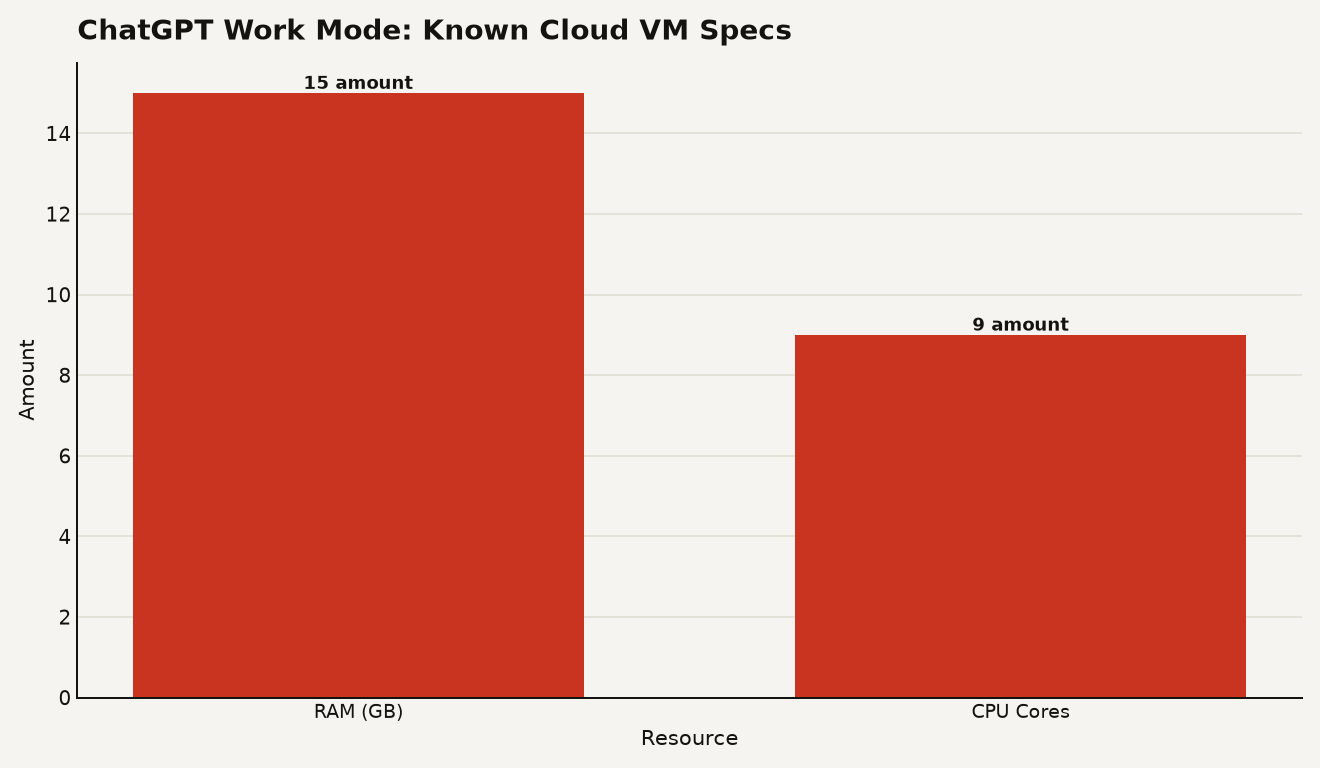
Meta has not published equivalent numbers for Muse's VM, but the architecture is similar. Meta's research team describes the VM as an isolated Linux box with a browser and enough storage, CPU, and memory to do real work, including compiling code the agent writes, running concurrent sub-agents, and handling scheduled tasks. Muse can spawn smaller agents inside the VM to work on sub-tasks in parallel, then bring the results together. Think of it as a personal computer in the cloud that never turns off, with an AI assistant living inside it.
Later this year, Meta plans to ship Muse Confidential VM, which encrypts the entire VM with a key only you hold. Even Meta cannot access your data. That is a meaningful privacy guarantee for an agent that sees your email, your calendar, and your payment methods.
How does the safety system actually work?
An agent that can send emails, make purchases, and browse the web on your behalf is dangerous if it goes wrong or if someone tricks it. Gruber's warning is blunt: "If you buy a power saw that can cut your fingers off, you are almost certainly aware that you are buying a power saw that can sever your fingers." He questions whether people installing a cute mascot on their phone understand the risk.
Meta's answer is a two-part architecture inside the VM. There are two isolated security domains:
-
The Runtime Cell: This is where Muse works. It has a full Debian Linux filesystem, a virtual network interface, and filtered system calls. Muse can install software, browse the web, and write files here. But root inside this cell is mapped to an unprivileged user on the host machine, so even if Muse misbehaves, it cannot escape the cell. The cell blocks dangerous kernel capabilities like CAP_SYS_PTRACE (which lets processes inspect other processes) and CAP_NET_ADMIN (which controls network configuration), and it filters out io_uring, a Linux feature that has been the source of several security vulnerabilities.
-
The Sentinel: A separate process that runs outside the Runtime Cell. Nothing Muse does reaches the internet unless the Sentinel approves it. When Muse wants to send an email, make a purchase, or take any sensitive action, the Sentinel checks with you first. Muse cannot override the Sentinel. The Sentinel is the guardrail between the agent and the outside world.
Passwords and credentials sit in secure storage outside the cell. Muse can use them to log into a service on your behalf, but it never sees the actual password. When you type a password into the browser inside the VM, it goes straight to secure storage, not into Muse's context window.
You choose which apps Muse connects to and exactly how much access it gets. For email, you can decide whether Muse reads your inbox, whether it can send on your behalf, or both. You can revoke access or disconnect any service at any time. You can tell Muse to forget specific things it has learned, and you can opt out of having your interactions used to train Meta's AI models. Muse does not share your conversations or VM data with Meta's advertising systems.
What should a beginner actually do?
Start small. Download the Muse app, connect it to one or two low-stakes services, and watch what it does. Do not hand it your bank credentials on day one. Try something like email triage or a research task where the worst outcome is a wasted afternoon.
Read the audit trail. Muse shows you everything it has done and everything it plans to do. When it asks for approval before sending an email or making a purchase, pay attention. Those prompts are your firebreak. If you approve something without reading it, you are handing a power saw to someone who has not read the manual.
Understand the permissions. You control what Muse can read and what it can act on. Tight permissions are boring. Use them anyway. Start with read-only access to one service, see how Muse behaves, and expand from there.
If you want the local alternative, Meta also released Muse Glimmer 30B, an open-weights model for running agents on your own hardware. It is less capable than the full Muse agent and does not come with a cloud VM or the Sentinel safety system, but it gives you a taste of agentic AI without sending your data to anyone. Our guide to Muse Glimmer 30B and local agents covers what you need to run it at home.
The broader pattern to watch: agentic AI is moving from developer tools to consumer apps, and the safety models that work for developers (who read documentation and set permissions carefully) may not work for consumers (who tap "allow all" to make the pop-up go away). Meta has built a thoughtful architecture. Whether it survives contact with real users is a different question.
The power saw problem
Gruber's core point is that Muse is powerful, and the gap between what the mascot looks like and what it can do is where the danger lives. The technology is real. The safety architecture is serious. But an agent that can negotiate your bills, book your travel, and send emails from your account while you sleep is a tool that deserves respect. Treat Muse the way you would treat a power saw: useful, impressive, and worth understanding before you plug it in.
Sources
- about.fb.com - Meta, "Introducing Muse: The World's First Personal AI Agent Built for Everyone"
- research.meta.ai - Meta AI Research, "How We Built Safety Into Muse"
- the-decoder.com - The Decoder, "Meta's Muse agent gives every user a full cloud computer running Ubuntu Linux"
- simonwillison.net - Simon Willison's Weblog, quoting John Gruber on Muse