You write to Postgres and query from Snowflake. That two-step workflow just replaced your entire CDC pipeline. Snowflake Postgres data mirroring, now in public preview, continuously replicates data from a managed PostgreSQL 18 service directly into Snowflake tables using Apache Iceberg, with roughly 30-second lag on live views and zero external infrastructure to manage.
Snowflake shipped data mirroring to eliminate the Kafka clusters, Debezium connectors, and Airbyte syncs that traditionally sit between OLTP databases and analytical warehouses. The feature uses a Postgres extension called snowflake_cdc to push transactional batches into Iceberg tables, which Snowflake then applies to target tables on a serverless schedule. If you own a Snowflake bill or manage data pipelines, this changes how you think about getting operational data into your analytical layer.
The headline number: the $live view exposes committed Postgres changes with an approximately 30-second lag, regardless of how infrequently you configure the APPLY task to run.
A managed PostgreSQL 18 service
Snowflake Postgres is a fully managed PostgreSQL 18 service running inside your Snowflake account. Data mirroring is the built-in CDC feature that replicates tables from that Postgres instance into a Snowflake database. It uses standard PostgreSQL logical replication, a replication slot, and WAL decoding under the hood, combined with pg_lake, an open-source Snowflake Postgres extension that writes change logs directly to Apache Iceberg tables.
The CDC worker on the source Postgres instance captures changes and writes them to per-table $changes Iceberg tables and a metalog table carrying schema-change and batch operations in commit order. A scheduled Snowflake serverless task then reads the metalog and applies pending changes to the target tables in a single Snowflake transaction. If an apply run fails, the transaction rolls back and the next run resumes from the same metalog position, so exactly-once delivery is part of the design.
For each mirrored table, Snowflake creates three objects in the target database:
| Object | Type | Purpose |
|---|---|---|
customers |
Snowflake table or Iceberg table | Current state, updated by APPLY task |
customers$changes |
Iceberg table | 7-day queryable CDC audit log with transaction metadata |
customers$live |
View | Combines base table with unmerged $changes for near-real-time reads |
The $changes tables are the same Iceberg objects on both the Postgres and Snowflake sides, readable from both systems without a copy step. This open-format approach means your change data lives in Apache Iceberg, not a proprietary wire format.
One SQL call creates a mirror
You create a mirror with a single SQL call to the SNOWFLAKE.POSTGRES.CREATE_MIRROR procedure. You specify the Postgres instance, the tables to replicate, the target database, and a refresh interval.
CALL SNOWFLAKE.POSTGRES.CREATE_MIRROR(
  mirror_name       => 'orders_mirror',
  postgres_instance => 'mirror-test-sql',
  postgres_database => 'postgres',
  target_database   => 'POSTGRES_MIRROR',
  postgres_tables   => ['public.devices', 'public.sensors', 'public.readings'],
  postgres_schemas  => NULL,
  refresh_interval  => '1 minute'
);
By default, CREATE_MIRROR creates standard Snowflake tables as the target. To mirror into Snowflake-managed Iceberg tables instead, add target_table_type => 'ICEBERG' to the call. Iceberg targets use Snowflake-managed storage, so you do not need an external catalog or external storage.
Schema evolution is automatic. If you run ALTER TABLE ADD COLUMN in Postgres, the change propagates to Snowflake without reconfiguring the mirror. The snowflake_cdc extension coordinates schema changes and complex DML and DDL transactions, so it can take snapshots while also pushing changes and align the snapshots with the changes.
Freshness compared with batch CDC
This is where mirroring separates itself from batch-oriented CDC tools. The APPLY task runs on your configured refresh_interval, which could be 1 minute, 5 minutes, or longer. But the $live view reads from $changes independently, exposing not-yet-applied changes on top of the target table.
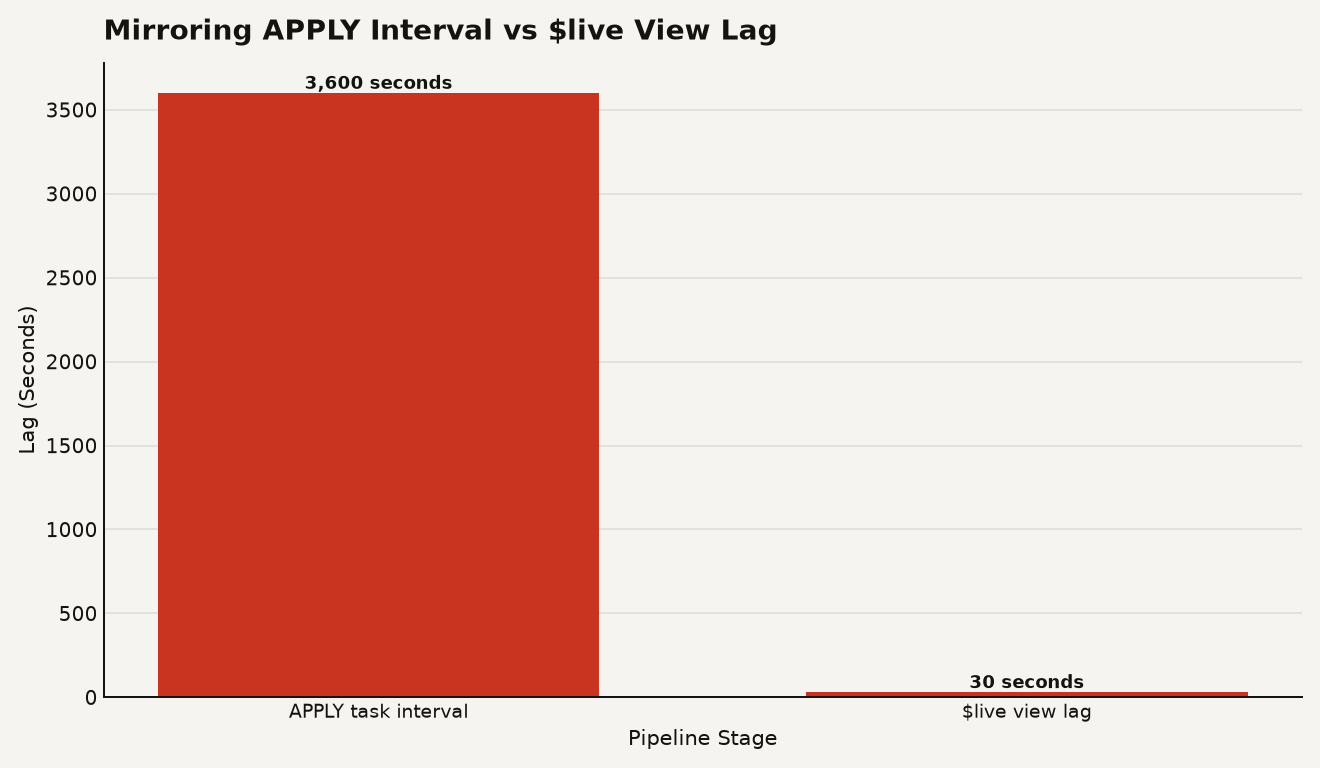
The chart above shows the gap between the APPLY task interval and the $live view lag. If you set a 60-minute APPLY interval to save compute credits, readers still see committed changes within roughly 30 seconds through the $live view. That means you can tune the APPLY task for cost efficiency without sacrificing read freshness.
The $live view pushes filters and projections down into the storage layer, scanning both the Parquet files in the change log and the base table. It is a storage-layer optimization that keeps live reads fast even as the change log grows.
Two cost components
Mirror costs have two main components, and you need to understand both to avoid surprises.
The first is compute for the serverless APPLY task. This runs at the standard Snowflake serverless task rate, billed per second based on actual usage. You do not pay for an always-on connector process. If your Postgres tables are quiet, the APPLY task does minimal work and costs minimal credits. The refresh_interval parameter directly controls how often the task wakes up, so widening it from 1 minute to 10 minutes can cut apply compute significantly for tables that do not need frequent merges.
The second is storage, split between the source Postgres instance and the target Snowflake database. The Postgres instance holds the $changes and metalog Iceberg tables via pg_lake, and the target Snowflake database holds the materialized target tables. Both are billed at standard Snowflake storage rates. The $changes tables auto-purge after 7 days, so change log storage is bounded.
Notice the spike on Day 3, which might correspond to a bulk data load in Postgres triggering a larger apply batch. You can monitor your actual consumption with ACCOUNT_USAGE.SERVERLESS_TASK_HISTORY:
SELECT
  TASK_NAME,
  SUM(CREDITS_USED) AS TOTAL_CREDITS,
  AVG(CREDITS_USED) AS AVG_CREDITS_PER_RUN,
  COUNT(*) AS NUM_RUNS
FROM SNOWFLAKE.ACCOUNT_USAGE.SERVERLESS_TASK_HISTORY
WHERE TASK_NAME LIKE '%MIRROR%APPLY%'
  AND DATE_TRUNC('day', START_TIME) >= DATEADD(day, -7, CURRENT_TIMESTAMP())
GROUP BY 1
ORDER BY TOTAL_CREDITS DESC;
This query aggregates credits used by mirror apply tasks over the past 7 days, helping you spot which mirrors are the most expensive to operate.
Mirroring versus pg_lake
Snowflake Postgres offers two data movement mechanisms, and they serve different purposes. You need to pick the right one for your workload.
| Feature | Data Mirroring | pg_lake |
|---|---|---|
| Trigger | Continuous, automatic | On-demand, developer-controlled |
| Operations | INSERT, UPDATE, DELETE, schema changes | Append-only exports primarily |
| Target | Snowflake tables or Snowflake-managed Iceberg | Customer-managed S3 in open Iceberg format |
| Latency | ~30 seconds via $live view |
Depends on export schedule |
| Change history | 7-day queryable $changes feed |
No built-in change log |
| Infrastructure | Zero external services | Zero external services |
The golden rule from the Snowflake engineering team: if you need automatic updates and deletes, use mirroring. If you need data on your own S3 bucket in open format, readable by Spark or Trino, use pg_lake. You can use both together on the same Postgres instance.
pg_lake is now generally available, while data mirroring is in public preview. For a deeper look at how pg_lake fits into the broader Iceberg strategy on Snowflake, see our Snowflake Iceberg tables guide.
Not a universal replacement
Mirroring is compelling, but it is not a universal replacement for every pipeline. If your source is not Postgres, this feature does not apply. If you need complex transformations between source and target, mirroring gives you a raw replicate, and you should layer Dynamic Tables or dbt models on top rather than expecting the mirror to transform.
The 7-day $changes retention is a built-in limit. If you need a longer CDC history for compliance or audit, you should stream $changes into a permanent audit table on a schedule. And while the $live view provides 30-second freshness, it is a view, not a materialized table. Heavy analytical workloads that scan millions of rows repeatedly may perform better against the base table after APPLY has merged the changes.
Worth piloting if you run both
If you are already running Postgres and Snowflake, data mirroring is worth a serious look for any table where you currently use a third-party CDC connector. The setup is one SQL call, the cost model is transparent serverless compute, and the open Iceberg format means you are not locked into a proprietary change data format.
Start with a non-critical workload. Create a mirror with a 5-minute refresh interval, monitor the serverless credits for a week, and test the $live view against your actual query patterns. If the lag and cost meet your bar, expand to production tables.
Watch the preview-to-GA transition for changes to the cost model, the 7-day retention limit, and the set of supported Postgres types. Types without a direct equivalent, such as jsonb, hstore, and ranges, are automatically cast to VARCHAR, BINARY, or VARIANT, so validate your type mappings early.
OLTP to OLAP on one platform
Data mirroring collapses the OLTP-to-OLAP pipeline into a single platform feature, and the 30-second $live view is the detail that makes it viable for near-real-time analytics without the infrastructure tax.