Every data team has been handed the same ask: "can we use AI on this?" The usual answer involves standing up a separate service, shipping data to an external API, and owning a new security review. Snowflake Cortex removes most of that by exposing large language models as plain SQL functions that run inside the Snowflake perimeter. You call AI_COMPLETE('llama3.1-70b', prompt) in a query, against data that never leaves your account, and get a result back in the same result set. The catch that decides your bill: these functions are billed per token by model, and the spread between a small model and a frontier one is roughly 40x. Model choice is not a detail here, it is the budget.
This guide is for the data engineer or data scientist who wants to add LLM work to a Snowflake pipeline without standing up new infrastructure, and who needs to know what is production-ready versus what is a demo.
Task-specific and general SQL functions
Cortex ships LLM capability as two kinds of SQL function. The task-specific functions do one job well with no prompt engineering: AI_CLASSIFY sorts text or images into categories you define, AI_FILTER returns true or false so you can use a model inside a WHERE or JOIN, AI_SENTIMENT extracts sentiment, AI_EXTRACT pulls structured fields out of text and documents, AI_TRANSLATE localizes, and AI_AGG and AI_SUMMARIZE_AGG summarize across many rows without hitting a context-window limit. The general function is AI_COMPLETE, the one you reach for when you want a specific model to do an open-ended generation.
The point that makes this worth using is that it is just SQL, so a model call composes with everything else you do in a query:
-- Triage support tickets in one pass: classify, score sentiment,
-- and summarize, all inside the warehouse, no data leaving Snowflake.
SELECT
    ticket_id,
    AI_CLASSIFY(body, ['billing', 'bug', 'feature_request', 'churn_risk']):labels[0]::string AS topic,
    AI_SENTIMENT(body):categories[0]:sentiment::string AS sentiment,
    AI_COMPLETE('llama3.1-8b',
        'Summarize this ticket in one sentence: ' || body) AS one_line
FROM support_tickets
WHERE created_at > DATEADD('day', -1, CURRENT_TIMESTAMP());
To run any of this, the role needs the USE AI FUNCTIONS account privilege plus the CORTEX_USER database role. Models from OpenAI, Anthropic, Meta, Mistral, and DeepSeek are available depending on your region, and all of them run inside Snowflake's service perimeter rather than calling out to a third-party endpoint, which is the entire security argument for using Cortex over a raw API.
Beyond the one-shot text functions, Cortex also covers the building blocks for retrieval. AI_EMBED turns text or images into embedding vectors you can store in a VECTOR column and search with VECTOR_COSINE_SIMILARITY, which is the foundation of a retrieval-augmented generation pipeline that never leaves Snowflake. For teams that need more than SQL functions, Snowpark runs custom Python, including your own models, on Snowflake compute, so the classic build-versus-buy line sits between a managed Cortex function and a Snowpark job you own end to end.
Billed by tokens processed
Cortex AI functions are billed by tokens processed, metered as Snowflake credits, and the rate depends on the model. That is the lever that dominates everything else.
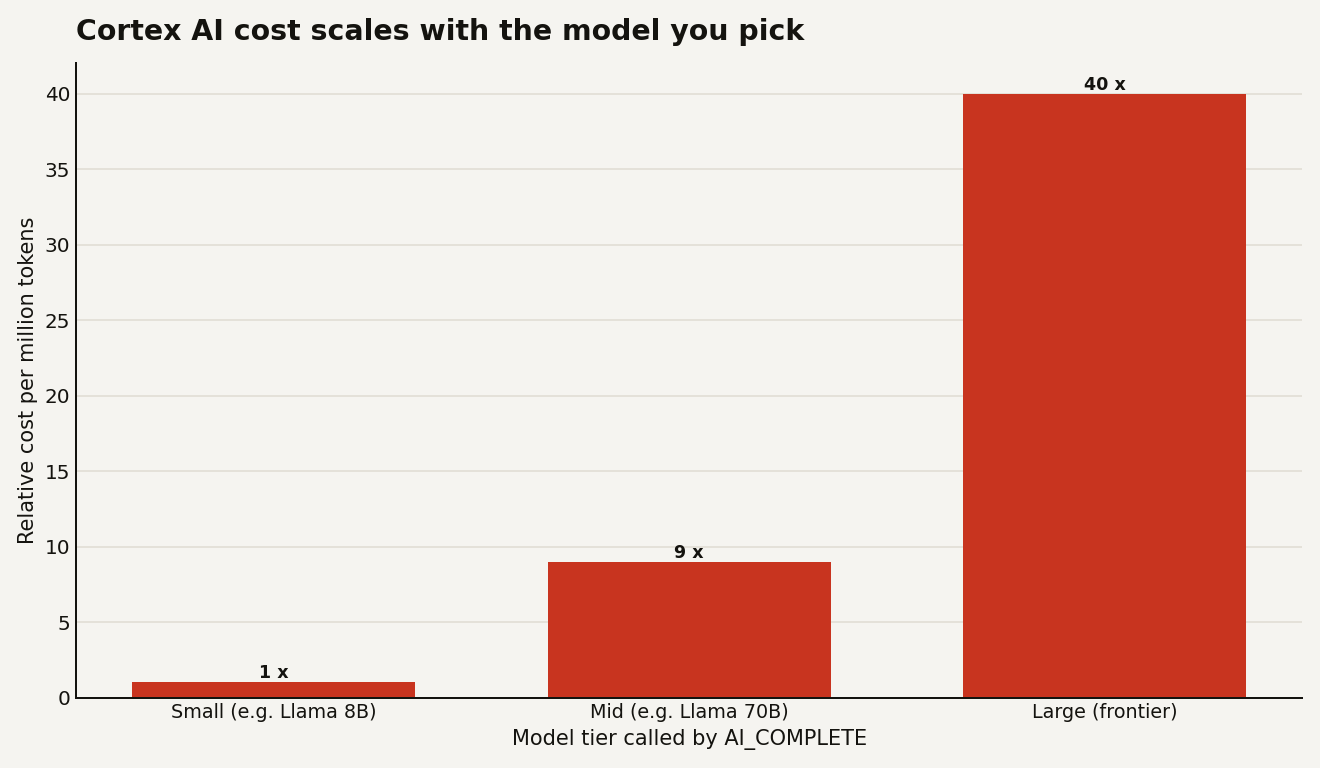
The practical consequence: defaulting every call to the biggest model is how a proof-of-concept turns into a budget incident. Most classification, sentiment, and extraction work runs fine on a small model, and the small models are where the per-token rate is a fraction of frontier. Reserve the large models for genuinely hard generation, and you can cut the bill by an order of magnitude without anyone noticing a quality drop. Three habits keep Cortex spend honest:
- Right-size the model per task. Use a small model for classification and tagging; only escalate to a frontier model when the output quality demonstrably needs it.
- Count tokens before you run at scale.
AI_COUNT_TOKENStells you the token load of a prompt, so you can estimate the cost of a batch before you point it at a 50-million-row table. - Batch, do not trickle. Cortex functions are optimized for throughput over large tables. Running them row-by-row from an app is the slow, expensive path; for interactive latency Snowflake points you at the REST APIs instead.
Track spend with the Cortex functions in ACCOUNT_USAGE so model cost lands in the same FinOps view as your warehouses. The same right-sizing instinct from the warehouse sizing guide applies here: the cheapest unit that does the job, not the biggest one available.
One more cost trap worth naming: the prompt is part of the token count, not just the answer. Stuffing a 4,000-token system prompt and the full document into every row of a large table means you pay for that context on every single call. If you are classifying ten million rows, a 200-token prompt versus a 2,000-token prompt is a 10x difference on the input side alone. Trim the prompt, pass only the columns the model needs, and use the task-specific functions instead of hand-rolling the same job through AI_COMPLETE, because they are tuned for exactly that work.
The maturity line for stakeholders
Be honest with stakeholders about the maturity line, because Cortex spans both sides of it. The task-specific functions and AI_COMPLETE are generally available and fine to ship; they are SQL functions with predictable billing. Higher up the stack, Cortex Search (retrieval) and Cortex Analyst (natural-language-to-SQL) are powerful but deserve real evaluation before you put them in front of users, and some individual functions are still Preview features, which means they can change and should not anchor a production SLA. The rule: check whether the specific function you are calling is GA or Preview before it goes near a customer path. Generally available functions are safe to build on; Preview ones are for prototypes.
The number to watch
Track credits per thousand Cortex calls, broken down by model. That single view exposes the most common failure mode, an expensive model quietly handling work a cheap one could do, and it turns "can we use AI on this?" into a question you can actually price. When the per-call cost is dominated by one frontier model on a high-volume task, that is your first optimization, not a bigger budget. Get that one number on a dashboard and the AI line in your Snowflake bill stops being a mystery.