Snowflake has spent years training data teams to think in warehouse sizes. XS for cheap work. XL for impatient executives. Multi-cluster when the BI crowd arrives at 9:03 a.m. Snowflake Adaptive Compute changes that muscle memory.
The feature is now generally available on AWS, and the important number is 1.2x: Snowflake says Snowflake Adaptive Compute delivered 1.2x better price-performance than Gen2 standard warehouses on its TPC-DS 10TB Concurrency Benchmark in the June 16, 2026 GA announcement. That is useful, but it is also vendor benchmark math. The operational change matters more: Adaptive Warehouses replace fixed warehouse sizing with per-query scheduling and query-based billing, so your FinOps model moves from uptime math toward query attribution.
If you already read our earlier bill-owner framing for Adaptive Compute costs, the GA update narrows the action: AWS customers in six named regions can now run production conversion tests instead of treating this as roadmap theater.
What actually changed in Snowflake Adaptive Compute GA?
Snowflake Adaptive Compute is exposed through Adaptive Warehouses. In Snowflake's docs, Adaptive Warehouses remove the need to manage warehouse size, multi-cluster settings, Query Acceleration Service settings, and suspend or resume policies through the Adaptive Compute guide. That is four knobs gone from the day-to-day operating loop.
You still create a warehouse object. You still grant roles access. You still get warehouse-level chargeback. The difference is that all jobs across Adaptive Warehouses in an account route to a compute pool dedicated to that account, and Snowflake says that pool is separate from standard, interactive, and Snowpark-optimized warehouses in the same Adaptive Compute guide.
The smallest useful DDL is almost rude in its simplicity:
CREATE ADAPTIVE WAREHOUSE finops_adaptive_wh;That creates an Adaptive Warehouse with Snowflake's defaults: MAX_QUERY_PERFORMANCE_LEVEL = XLARGE and QUERY_THROUGHPUT_MULTIPLIER = 2, according to the Adaptive Warehouse creation docs. Start there before you invent a tuning doctrine.
For a workload that already needs a tighter cap, use the two Adaptive-specific properties explicitly:
CREATE ADAPTIVE WAREHOUSE bi_burst_wh
  WITH MAX_QUERY_PERFORMANCE_LEVEL = LARGE
       QUERY_THROUGHPUT_MULTIPLIER = 4;
MAX_QUERY_PERFORMANCE_LEVEL is an upper bound on per-query performance, expressed as t-shirt sizes from XSMALL through X4LARGE, and Snowflake says it does not map to a specific underlying compute configuration in the performance control docs. QUERY_THROUGHPUT_MULTIPLIER is the concurrency-ish budget, with default 2; setting it to 0 means unlimited throughput subject to available burst capacity in the throughput multiplier docs.
That last detail is the trap door. 0 sounds convenient during a launch. It is also the number that tells Snowflake, effectively, to stop capping burst throughput at the warehouse property level.
Where can you run it, and what is still missing?
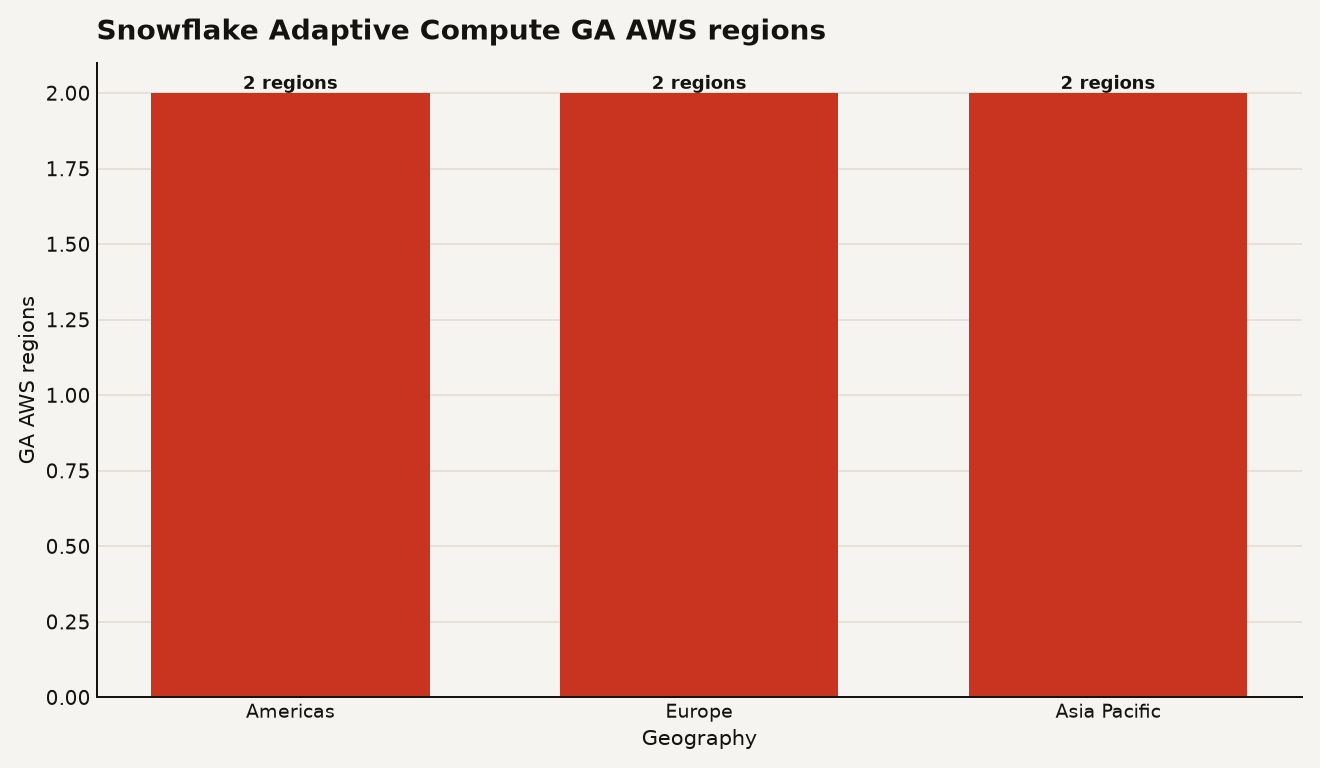
Snowflake says Adaptive Compute is generally available on AWS in six regions: US West 2 in Oregon, US East 2 in Ohio, EU West 1 in Ireland, EU Central 1 in Frankfurt, AP Northeast 1 in Tokyo, and AP Southeast 2 in Sydney in the region availability section. That is enough for real enterprise testing, including some cross-region business continuity pairings, but it is still a selective footprint.
The chart below shows the launch footprint by geography: 2 Americas regions, 2 Europe regions, and 2 Asia Pacific regions.
There are two hard constraints you should put in the migration ticket. Adaptive Warehouses require Enterprise Edition or higher, and Snowflake lists that limitation in the Adaptive Compute limitations. Snowflake also says conversion to or from X5LARGE and X6LARGE warehouses is unsupported, as are conversions to or from Snowpark-optimized or interactive warehouses in the same limitations section.
Here is the practical comparison for platform owners:
| Choice | What you control | Cost evidence | Best production fit |
|---|---|---|---|
| Standard Gen2 warehouse | WAREHOUSE_SIZE, generation, multi-cluster, QAS settings |
WAREHOUSE_METERING_HISTORY for 365 days |
Predictable BI or ETL where size policy is already tuned |
| Adaptive Warehouse | MAX_QUERY_PERFORMANCE_LEVEL and QUERY_THROUGHPUT_MULTIPLIER |
QUERY_METERING_HISTORY per query for 365 days |
Bursty analytics, mixed BI and ETL, spiky SQL from agents |
| Interactive or Snowpark-optimized | Specialized warehouse type, separate from Adaptive conversion | Warehouse usage views, but no Adaptive conversion path | Very low latency dashboards or high-memory Snowpark and ML |
The right first candidate is a warehouse with lumpy concurrency and high variance in query shape. The wrong first candidate is your weirdest Snowpark memory hog.
How do you convert without breaking running work?
The conversion path is a single property change:
ALTER WAREHOUSE reporting_wh SET WAREHOUSE_TYPE = 'ADAPTIVE';Snowflake says conversion to Adaptive Warehouse is an online operation: running queries continue on existing compute while new queries use the new warehouse type, and you can convert back with WAREHOUSE_TYPE = 'STANDARD' in the conversion docs. That makes the feature unusually testable for a warehouse change.
There is one billing wrinkle you should schedule around. During conversion, Snowflake says existing queries continue on the old compute while new queries run on the new type, and you are charged for both sets of compute resources until the old queries finish in the same conversion note. Convert a warehouse during a clean window, not while a 3-hour backfill is already crawling through month-end partitions.
After conversion, Snowflake computes values for MAX_QUERY_PERFORMANCE_LEVEL and QUERY_THROUGHPUT_MULTIPLIER from the old configuration, including warehouse size, MAX_CLUSTER_COUNT, QAS scale factor, and warehouse generation in the property behavior docs. That is a migration convenience, not a substitute for measurement.
Check what Snowflake gave you:
SHOW WAREHOUSES LIKE 'REPORTING_WH';For Adaptive Warehouses, SHOW WAREHOUSES includes MAX_QUERY_PERFORMANCE_LEVEL, QUERY_THROUGHPUT_MULTIPLIER, and DISABLED_REASONS, according to the Adaptive Warehouse metadata docs. Capture those values in the change record. Future you will thank present you, quietly, during the budget review.
How is Snowflake Adaptive Compute billed?
Adaptive Warehouses use query-based billing, where each query cost depends on compute and software resources used, including cluster sizes and extra capacity from features like QAS, according to Snowflake's billing and pricing section. Snowflake also says you are not charged for creating an Adaptive Warehouse and charges start when the first query runs in that same section.
This is the core FinOps shift. Standard warehouses train you to ask, "How long was the warehouse running?" Adaptive asks, "Which query burned the credits?"
Use the new per-query view for the first answer:
SELECT
  query_id,
  user_name,
  role_name,
  query_tag,
  SUM(credits_used) AS credits_used
FROM SNOWFLAKE.ACCOUNT_USAGE.QUERY_METERING_HISTORY
WHERE warehouse_name = 'REPORTING_WH'
  AND query_start_time >= DATEADD(day, -7, CURRENT_TIMESTAMP())
GROUP BY ALL
ORDER BY credits_used DESC
LIMIT 20;
QUERY_METERING_HISTORY returns per-query credit usage for Adaptive Warehouse queries over the last 365 days, and Snowflake says the view can lag by up to 1 hour in the Account Usage reference. Each long query can produce multiple rows, one per metering hour, so always SUM(credits_used) before you point fingers.
For showback, keep the old hourly warehouse view in place:
SELECT
  DATE_TRUNC('day', start_time) AS usage_day,
  warehouse_name,
  SUM(credits_used_compute) AS compute_credits,
  SUM(credits_used_cloud_services) AS cloud_services_credits
FROM SNOWFLAKE.ACCOUNT_USAGE.WAREHOUSE_METERING_HISTORY
WHERE warehouse_name = 'REPORTING_WH'
  AND start_time >= DATEADD(day, -30, CURRENT_DATE())
GROUP BY ALL
ORDER BY usage_day;
WAREHOUSE_METERING_HISTORY returns hourly warehouse credit usage for the last 365 days, and Snowflake documents CREDITS_USED, CREDITS_USED_COMPUTE, and CREDITS_USED_CLOUD_SERVICES in the view reference. For Adaptive Warehouses, Snowflake says QAS usage is included in compute credits and does not appear as a separate credit column in the Adaptive Account Usage section.
The price-performance headline is real enough to test, but too blunt to buy on faith. Snowflake's benchmark says Adaptive Compute is 1.2x better than Gen2 on TPC-DS 10TB concurrency, which normalizes to 1.0 for Gen2 and 1.2 for Adaptive in the chart.
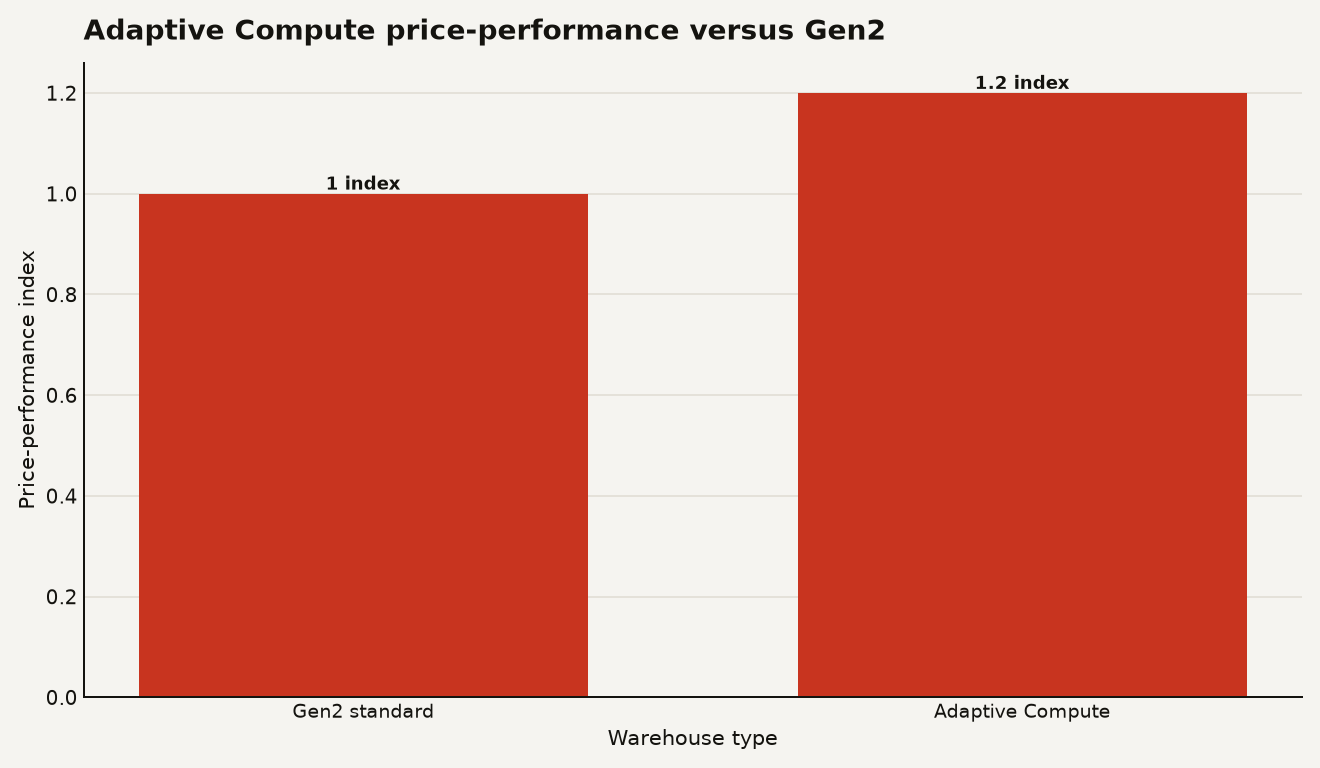
A 20 percent benchmark edge can disappear if your workload is dominated by one bad join, a leaky BI extract, or a queue cap you set too low. The feature gives you better instruments. It does not absolve you from running the experiment.
What should you lock down before a rollout?
Treat Adaptive Warehouses like a new spend surface. The permission model is still Snowflake RBAC, which is good news for teams that already separate platform ownership from workload usage.
Grant runtime access narrowly:
GRANT USAGE ON WAREHOUSE reporting_wh TO ROLE analyst_role;
GRANT MONITOR ON WAREHOUSE reporting_wh TO ROLE finops_readonly_role;
GRANT OPERATE ON WAREHOUSE reporting_wh TO ROLE platform_ops_role;
Snowflake says USAGE lets a role execute queries on a warehouse, MONITOR lets a role view current and past queries plus usage statistics, and OPERATE lets a role change warehouse state and abort running queries in the ALTER WAREHOUSE access control docs. Keep MODIFY away from casual owners, because it allows altering warehouse properties.
Then add a resource monitor. Snowflake says a resource monitor can suspend a standard warehouse or disable an Adaptive Warehouse when a credit limit is reached in the resource monitor docs. The word is different because Adaptive Warehouses do not use suspend and resume in the same way.
USE ROLE ACCOUNTADMIN;

CREATE OR REPLACE RESOURCE MONITOR rm_reporting_wh
  WITH CREDIT_QUOTA = 500
  FREQUENCY = MONTHLY
  START_TIMESTAMP = IMMEDIATELY
  TRIGGERS ON 80 PERCENT DO NOTIFY
           ON 100 PERCENT DO SUSPEND_IMMEDIATE;

ALTER WAREHOUSE reporting_wh
  SET RESOURCE_MONITOR = rm_reporting_wh;
Snowflake says only ACCOUNTADMIN can create resource monitors, and only ACCOUNTADMIN can assign warehouses to resource monitors in the resource monitor setup docs. For Adaptive Warehouses, SUSPEND and SUSPEND_IMMEDIATE map to disable behavior, and the warehouse can show STATE = DISABLED with DISABLED_REASONS listing the monitor in the Adaptive resource monitor section.
My rollout rule: one Adaptive Warehouse, one resource monitor, one owner, one week of query tags. If the workload cannot survive that much discipline, it is already too messy for automatic scaling.
When is Adaptive Compute the wrong call?
Use Adaptive for workloads where static sizing is already making you choose between queue pain and idle spend. Snowflake explicitly lists analytical workloads, data loading pipelines, mixed BI and ETL, and workloads with query sizes ranging from XSMALL to XLARGE as good candidates in the when to use guidance.
Avoid it for three cases. First, primarily HTAP workloads should use standard Gen2 warehouses, according to Snowflake's alternative warehouse guidance. Second, very low latency dashboards and applications should look at interactive warehouses. Third, high-memory Snowpark or ML workloads on a single node should look at Snowpark-optimized warehouses.
The most underrated risk is organizational, not technical. Adaptive Compute removes familiar controls, which means the bill owner loses the comfort of a fixed size and gains a stream of per-query charges. That is a better model for agentic SQL and bursty BI, but only if your team already uses QUERY_TAG, knows who owns each role, and reviews ACCOUNT_USAGE before the invoice arrives.
The bet to make now
Do not convert the estate because Snowflake published a 1.2x benchmark. Convert one noisy AWS warehouse because query-level billing gives you a cleaner argument about who caused the spend.
Snowflake Adaptive Compute is strongest where your current tuning ritual is guesswork: the BI warehouse that is too small at 9 a.m., too large at noon, and politically impossible to resize. Start there. If Adaptive turns that mess into measurable per-query economics, keep going. If it only makes the bill harder to explain, roll back with one ALTER WAREHOUSE and enjoy the rare cloud migration with an escape hatch.
Sources
- Snowflake Blog: Snowflake Adaptive Compute Is Now Generally Available
- Snowflake Documentation: Adaptive Compute
- Snowflake Documentation: CREATE WAREHOUSE
- Snowflake Documentation: ALTER WAREHOUSE
- Snowflake Documentation: QUERY_METERING_HISTORY view
- Snowflake Documentation: WAREHOUSE_METERING_HISTORY view
- Snowflake Documentation: Working with resource monitors