Snowflake warehouse sizing used to be a tax you paid in meetings, runbooks, and Slack threads. Someone asks whether the finance dashboard should be on Medium or Large. Someone else asks why the ELT warehouse queued for 11 minutes at 8:05 a.m. Then the bill arrives and everybody rediscovers AUTO_SUSPEND.
Snowflake Adaptive Compute is Snowflake's attempt to make that whole ritual optional. It replaces fixed warehouse sizing with an adaptive warehouse that chooses compute per query, while you set two guardrails: MAX_QUERY_PERFORMANCE_LEVEL and QUERY_THROUGHPUT_MULTIPLIER. The catch is the same as the gift: Snowflake hides more of the machinery, and during public preview it does not give you per query cost visibility.
Snowflake lists Adaptive Compute as an open preview feature introduced in April 2026, and its documentation says it currently requires Enterprise Edition or higher and is available only in 3 AWS regions: US West 2 Oregon, EU West 1 Ireland, and AP Northeast 1 Tokyo. That makes this a migration candidate for real workloads, but not a blind replacement for your most politically sensitive warehouse.
If you already read our guide to how Snowflake Adaptive Compute rewrites warehouse sizing, treat this as the bill owner's companion piece: how it works, what to monitor, and where the control moves.
What did Snowflake actually change in the warehouse model?
Adaptive Compute gives you a new warehouse type, not a new SQL engine you call directly. You create an adaptive warehouse, point sessions and jobs at it, and Snowflake routes queries into an account dedicated compute pool. Snowflake says that pool is not shared with other accounts, but it is separate from your standard and Snowpark optimized warehouses.
The basic DDL is intentionally boring:
CREATE ADAPTIVE WAREHOUSE wh_adaptive_bi;That creates an adaptive warehouse with Snowflake's documented defaults: MAX_QUERY_PERFORMANCE_LEVEL = XLARGE and QUERY_THROUGHPUT_MULTIPLIER = 2. You can also use the standard warehouse syntax with WAREHOUSE_TYPE = 'ADAPTIVE', which matters if your provisioning code already emits CREATE WAREHOUSE statements. Snowflake documents both forms in its Adaptive Compute SQL reference.
CREATE WAREHOUSE wh_adaptive_bi
  WITH WAREHOUSE_TYPE = 'ADAPTIVE'
       MAX_QUERY_PERFORMANCE_LEVEL = LARGE
       QUERY_THROUGHPUT_MULTIPLIER = 3;
What disappears is the old sizing choreography. You no longer set WAREHOUSE_SIZE, MIN_CLUSTER_COUNT, MAX_CLUSTER_COUNT, SCALING_POLICY, or a separate Query Acceleration Service scale factor on the adaptive warehouse. Snowflake's docs are explicit that standard warehouse properties such as WAREHOUSE_SIZE, MIN_CLUSTER_COUNT, MAX_CLUSTER_COUNT, and SCALING_POLICY cannot be set on an adaptive warehouse.
The chart below counts the configuration surface that matters for day to day tuning. It is illustrative, but the inputs come from Snowflake's documented properties: a standard warehouse exposes the usual size, cluster, scaling, and QAS controls, while an adaptive warehouse exposes 2 primary controls.
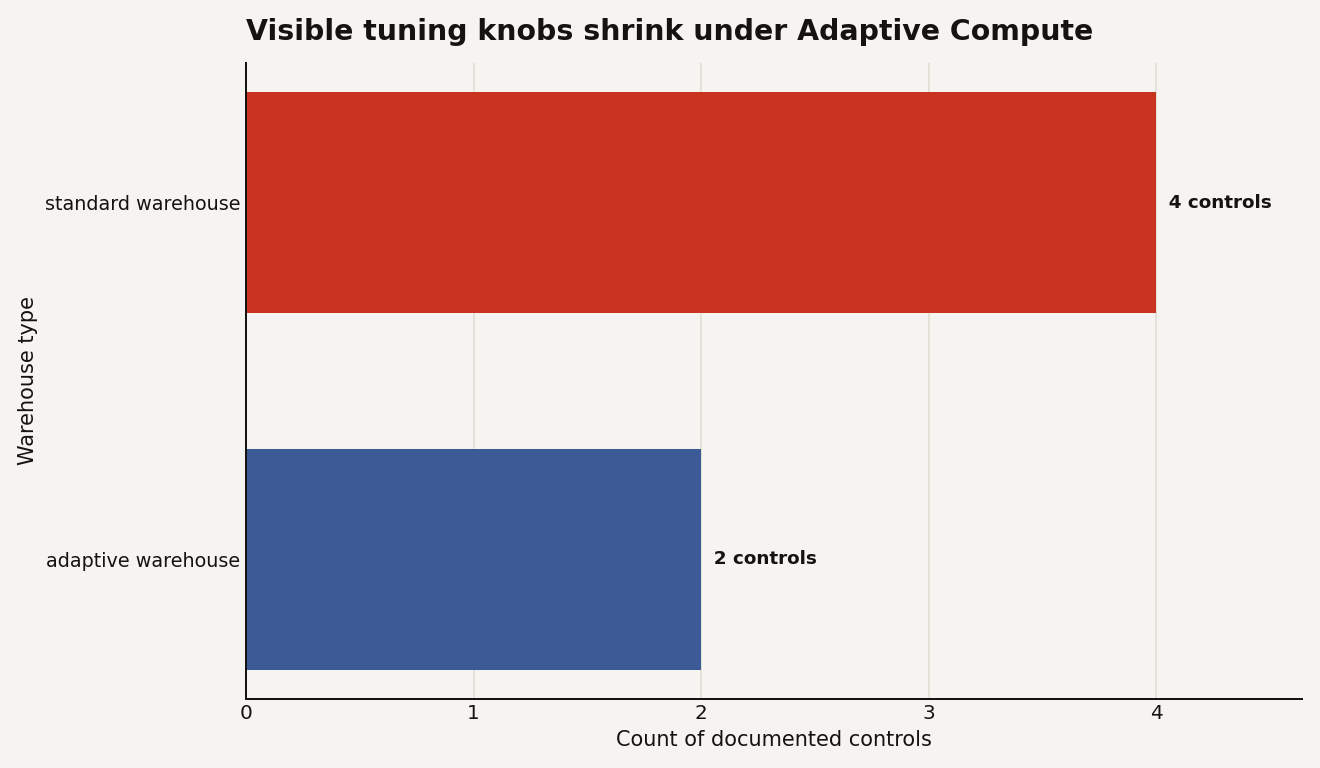
That reduction is the product bet. Snowflake is saying most teams do not really want finer grained knobs. They want bounded latency, bounded spend, and fewer 9 a.m. warehouse autopsies.
The two remaining knobs are worth reading literally:
| Control | Applies to | Default or special value | What it really limits |
|---|---|---|---|
MAX_QUERY_PERFORMANCE_LEVEL |
Adaptive warehouse | XLARGE default |
Upper bound for a single statement's performance level |
QUERY_THROUGHPUT_MULTIPLIER |
Adaptive warehouse | 2 default |
Burst throughput as a multiplier over Snowflake's computed minimum |
QUERY_THROUGHPUT_MULTIPLIER = 0 |
Adaptive warehouse | Special value 0 |
Unlimited throughput, subject to available capacity |
WAREHOUSE_SIZE |
Standard warehouse | XSMALL default in standard CREATE WAREHOUSE docs |
Fixed cluster size for a running warehouse |
The important word is cap. Setting MAX_QUERY_PERFORMANCE_LEVEL = XLARGE does not mean every tiny lookup burns XLARGE equivalent resources. Snowflake says smaller queries can run below the cap when they do not need that much compute. That is why this is not just auto resize with a fresh coat of paint.
How do you migrate without breaking jobs or chargeback?
The clean migration path is conversion in place. Snowflake documents that converting to or from an adaptive warehouse is an online operation: running queries continue on existing compute, while new queries use the new warehouse type. The warehouse name survives, which is more important than it sounds if your dbt profiles, Airflow DAGs, BI connections, and stored procedures have warehouse names hardcoded.
ALTER WAREHOUSE wh_bi_prod SET WAREHOUSE_TYPE = 'ADAPTIVE';Snowflake automatically derives the adaptive values from the old warehouse's size, MAX_CLUSTER_COUNT, QAS scale factor, and generation. That is a sensible first move because it preserves the intent of the old shape. It is not a reason to skip review.
After conversion, inspect the visible properties:
SHOW WAREHOUSES LIKE 'WH_BI_PROD';Snowflake adds adaptive specific SHOW WAREHOUSES columns such as MAX_QUERY_PERFORMANCE_LEVEL, QUERY_THROUGHPUT_MULTIPLIER, STATE, and DISABLED_REASONS. Properties that no longer apply show as NULL.
If the derived values are too generous for a dashboard warehouse, bring them down before the business discovers a new definition of interactive:
ALTER WAREHOUSE wh_bi_prod SET
  MAX_QUERY_PERFORMANCE_LEVEL = LARGE
  QUERY_THROUGHPUT_MULTIPLIER = 2;
If the migration goes sideways, you can convert back:
ALTER WAREHOUSE wh_bi_prod SET WAREHOUSE_TYPE = 'STANDARD';There is one billing wrinkle in the conversion path that deserves a bright yellow sticky note. Snowflake says that while old queries finish and new queries run on the new warehouse type, you are charged for both sets of compute resources. For a quiet BI warehouse that may be noise. For a heavy ETL warehouse with 2 hour transformations already running, choose the migration window with intent.
Do not convert unsupported shapes. During preview, Snowflake says you cannot convert to or from X5Large or X6Large warehouses, Snowpark optimized warehouses, or interactive warehouses. That means a compute heavy Snowpark workload should stay where it is unless Snowflake broadens support.
How is Adaptive Compute billed, and what can you prove today?
Adaptive warehouses use query based billing. That sounds like a clean break from classic warehouse uptime billing, but Snowflake still reports the usage as virtual warehouse credits under compute. You are not charged for creating an adaptive warehouse. Charges start when the first query runs.
This is the cost model in one sentence: you manage spend with caps and monitors, not with idle time math.
That is a meaningful change for teams that spent years training everyone to fear idle warehouses. On a standard warehouse, the size determines the compute resources in each cluster and therefore the credits consumed while the warehouse is running. On an adaptive warehouse, Snowflake says each query's cost depends on compute and software resources used, including cluster sizes and additional capacity used by features like QAS.
Here is the part finance will ask about first: QAS does not show up as a separate adaptive warehouse credit line during preview. Snowflake says QAS usage is included in compute credits for adaptive warehouses. That simplifies showback, but it also removes a familiar line item you may have used to explain spikes.
Use WAREHOUSE_METERING_HISTORY for daily warehouse level credits:
SELECT
  start_time::DATE AS usage_date,
  warehouse_name,
  SUM(credits_used) AS credits_used
FROM snowflake.account_usage.warehouse_metering_history
WHERE warehouse_name = 'WH_BI_PROD'
  AND start_time >= DATEADD(day, -14, CURRENT_TIMESTAMP())
GROUP BY 1, 2
ORDER BY 1;
Use QUERY_HISTORY to confirm that the workload is actually running as adaptive, and to watch latency and queuing:
SELECT
  warehouse_name,
  COUNT(*) AS queries,
  AVG(total_elapsed_time) AS avg_elapsed_ms,
  AVG(queued_overload_time) AS avg_queued_overload_ms
FROM snowflake.account_usage.query_history
WHERE warehouse_name = 'WH_BI_PROD'
  AND warehouse_size = 'ADAPTIVE'
  AND start_time >= DATEADD(day, -7, CURRENT_TIMESTAMP())
GROUP BY 1;
Snowflake's docs also recommend WAREHOUSE_LOAD_HISTORY for queuing behavior. That is the view you should wire into an alert before you increase the throughput multiplier:
SELECT
  start_time,
  warehouse_name,
  avg_running,
  avg_queued_load
FROM snowflake.account_usage.warehouse_load_history
WHERE warehouse_name = 'WH_BI_PROD'
  AND start_time >= DATEADD(hour, -24, CURRENT_TIMESTAMP())
ORDER BY start_time;
What you cannot prove yet is per query cost. Snowflake says query level cost visibility is not available during public preview and is planned for general availability. That is the biggest practical reason to pilot Adaptive Compute on workloads with good warehouse level ownership. If 12 teams share one warehouse, adaptive billing will not magically produce clean accountability.
When is Adaptive Compute better than Gen2, and when is it just less control?
Gen2 warehouses and Adaptive Compute solve different problems. Gen2 keeps the familiar fixed warehouse model and improves the engine and hardware under it. Adaptive Compute changes the operating model.
Snowflake's 2025 product blog said Standard Warehouse Generation 2 delivered 2.1x faster performance for core analytics workloads over the 12 months ending May 2, 2025, and positioned Adaptive Compute as the next step toward less infrastructure tuning. If you moved to Gen2 and got the performance you needed, you do not have to treat Adaptive Compute as an emergency migration.
| Choice | Status or number | What you still tune | Billing behavior | Best fit |
|---|---|---|---|---|
| Standard warehouse Gen1 | Default generation 1 in CREATE WAREHOUSE docs |
Size, clusters, scaling, suspend, QAS | Credits while the warehouse runs | Stable workloads with tight manual control |
| Standard warehouse Gen2 | Snowflake cited 2.1x faster core analytics performance in 2025 | Same warehouse model, newer generation | Credits while the warehouse runs | Existing warehouses that need faster execution without model change |
| Adaptive warehouse | Open preview introduced April 2026 | 2 primary knobs | Query based compute credits | Variable concurrency where tuning overhead is the pain |
The strongest fit is a warehouse where the hard problem is workload variance: Monday dashboards, hourly ELT bursts, ad hoc analyst queries, and the occasional monster join. Adaptive Compute can choose resources per query and let you cap the worst case.
The weaker fit is a warehouse where you need deterministic cost attribution or a tightly reasoned performance envelope. If a regulated team asks why one query cost what it cost, preview Adaptive Compute may not satisfy them yet. You can show warehouse level credits and query level timing. You cannot show query level credits.
There is also a lock in angle. With standard warehouses, the mental model maps to other platforms: cluster size, concurrency, queueing, idle time. With Adaptive Compute, the most important scheduling logic is Snowflake proprietary. That may be fine. Most teams are not looking to lovingly hand tune cluster topology. But if your internal platform team has built a router that assigns queries to warehouses based on fingerprints, SLAs, and chargeback tags, Adaptive Compute competes with part of that control plane.
How should you lock it down before the pilot grows legs?
Start with roles. Adaptive warehouses are still warehouses, so do not give every enthusiastic analyst the ability to create or modify them. Snowflake's CREATE WAREHOUSE docs say the account level CREATE WAREHOUSE privilege is required to create warehouses, and only SYSADMIN or higher has it by default.
A simple pattern is one owner role, one operator role, and one user role:
CREATE ROLE adaptive_wh_admin;
CREATE ROLE adaptive_wh_operator;
CREATE ROLE adaptive_wh_user;

GRANT CREATE WAREHOUSE ON ACCOUNT TO ROLE adaptive_wh_admin;
After the admin creates the warehouse, grant usage widely and modification narrowly:
GRANT USAGE ON WAREHOUSE wh_bi_prod TO ROLE adaptive_wh_user;
GRANT MONITOR ON WAREHOUSE wh_bi_prod TO ROLE adaptive_wh_operator;
GRANT OPERATE ON WAREHOUSE wh_bi_prod TO ROLE adaptive_wh_operator;
GRANT MODIFY ON WAREHOUSE wh_bi_prod TO ROLE adaptive_wh_admin;
That split matters because MODIFY can change cost affecting properties. OPERATE can change state, including warehouse operations. For adaptive warehouses, Snowflake also supports ENABLE and DISABLE; disabling rejects new jobs while already running queries continue.
ALTER WAREHOUSE wh_bi_prod DISABLE;
ALTER WAREHOUSE wh_bi_prod ENABLE;
Use this for preview blast radius. A disabled adaptive warehouse is a cleaner stop sign than dropping a warehouse that your jobs still reference.
Then add a resource monitor or budget. Snowflake says existing budgets and resource monitors work with adaptive warehouses. The product story is automatic performance. Your job is automatic regret prevention.
A practical pilot plan looks like this:
- Pick 1 warehouse with a clear owner and at least 14 days of baseline history in
WAREHOUSE_METERING_HISTORY. - Convert in a low traffic window, especially if long queries are already running.
- Keep
QUERY_THROUGHPUT_MULTIPLIERat the derived value or the default 2 for the first week unlessWAREHOUSE_LOAD_HISTORYshows sustained queueing. - Do not use
QUERY_THROUGHPUT_MULTIPLIER = 0on a shared production warehouse unless a resource monitor is already attached. - Report weekly on credits, query count, average elapsed time, and average queued overload time.
That is boring FinOps. Boring is the point.
So is this the end of warehouse sizing?
For many teams, yes, eventually. Snowflake Adaptive Compute moves the warehouse decision from "what size should this be?" to "what is the largest single query we are willing to fund, and how much burst do we allow?" That is a better conversation for most data teams.
But the preview version is not a blank check. It is available in 3 AWS regions, requires Enterprise Edition or higher, excludes several warehouse types, and lacks per query credit visibility. If you own the Snowflake bill, your first move should be a measured pilot, not a fleet wide conversion script.
The best use of Adaptive Compute is not to save you from understanding cost. It is to stop spending human time on knobs that Snowflake can probably tune better than your Tuesday afternoon hunch.
Sources
- Snowflake Documentation: Adaptive Compute
- Snowflake Documentation: Preview features
- Snowflake Documentation: CREATE WAREHOUSE
- Snowflake Documentation: ALTER WAREHOUSE
- Snowflake Documentation: Access control privileges
- Snowflake Blog: Introducing Even Easier-to-Use Snowflake Adaptive Compute with Better Price/Performance