Snowflake warehouse sizing used to be a small act of fiction. You picked a size, guessed at concurrency, argued about auto-suspend, and hoped next month’s bill did not punish last month’s optimism. Snowflake Adaptive Compute changes that bargain. It replaces fixed warehouse sizing with adaptive warehouses that set compute per query, bill by query usage, and expose only 2 primary knobs: MAX_QUERY_PERFORMANCE_LEVEL and QUERY_THROUGHPUT_MULTIPLIER.
The important correction: Snowflake’s June 2, 2026 blog says Snowflake Adaptive Compute is generally available soon, but the current Snowflake Adaptive Compute documentation lists it as an Open Preview feature. For platform teams, that is the whole story in miniature. This is not just a faster warehouse type. It is a new operating model for Snowflake credits, observability, and accountability.
If you already moved steady workloads to Snowflake Gen2 warehouses, Adaptive Compute is the next question you need to answer. Gen2 keeps the old control surface. Adaptive Compute asks you to let Snowflake schedule and scale inside an account-level compute pool, then prove whether the bill got better.
What actually changes when you create an adaptive warehouse?
An adaptive warehouse is still a Snowflake virtual warehouse from the user’s point of view. You USE WAREHOUSE, run SQL, load data, and monitor usage in SNOWFLAKE.ACCOUNT_USAGE. The difference is what you stop managing. Snowflake says adaptive warehouses remove manual warehouse size, multi-cluster settings, Query Acceleration Service settings, and suspend or resume policies from your tuning loop.
The default create statement is deliberately boring:
CREATE ADAPTIVE WAREHOUSE bi_adaptive_wh;That creates a warehouse with MAX_QUERY_PERFORMANCE_LEVEL = XLARGE and QUERY_THROUGHPUT_MULTIPLIER = 2, according to the SQL examples in Snowflake’s adaptive warehouse docs. Those defaults matter because they are not cosmetic. MAX_QUERY_PERFORMANCE_LEVEL is the upper bound Snowflake may apply for a single statement when it has high confidence an optimization helps. QUERY_THROUGHPUT_MULTIPLIER controls how much total query work can run at once relative to Snowflake’s computed baseline.
Here is the version you should put in Terraform or a migration script when you want intent on the page:
CREATE ADAPTIVE WAREHOUSE etl_adaptive_wh
  WITH MAX_QUERY_PERFORMANCE_LEVEL = LARGE
       QUERY_THROUGHPUT_MULTIPLIER = 4
       STATEMENT_QUEUED_TIMEOUT_IN_SECONDS = 300
       STATEMENT_TIMEOUT_IN_SECONDS = 3600;
The supported performance levels run from XSMALL through X4LARGE. A throughput multiplier is a non-negative integer, and 0 means unlimited throughput. That last value is powerful and dangerous. In a FinOps review, 0 should read as no instantaneous cap, not as a clever shortcut.
Snowflake’s claimed benchmark gains are large enough to justify a pilot, but not large enough to skip one. Its June 2026 blog reports Adaptive Compute gains of 1.6x for analytics, 2.2x for operational throughput, and 3.5x for DML-heavy workloads, based on TPC-DS and internal benchmarks measured in May 2026 against standard compute.
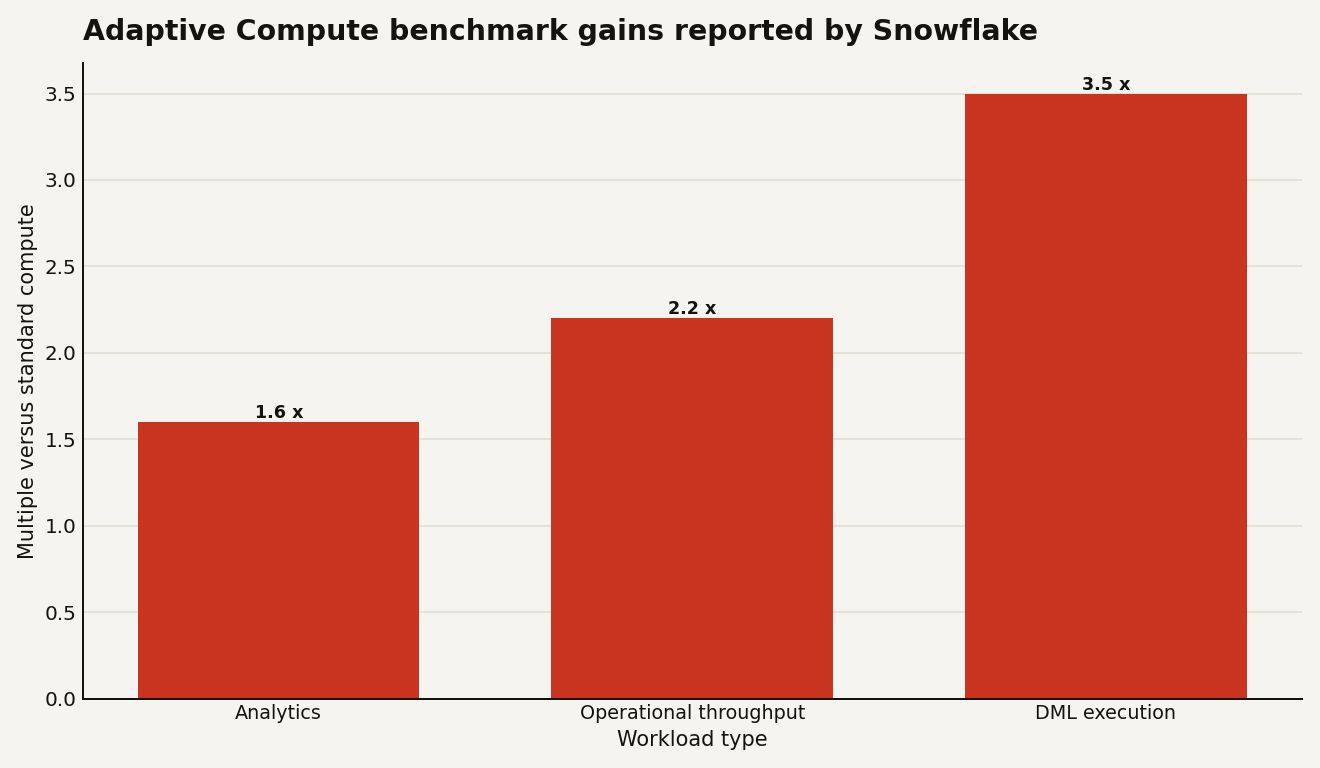
Read the chart as a migration hypothesis, not as your savings forecast. The strongest number, 3.5x faster DML execution, points at pipelines, ingestion, and transformation workloads. The least surprising number, 1.6x faster analytics, still matters if your analysts live in ad hoc query land and your warehouse queue is a standing meeting with better snacks.
How is Snowflake Adaptive Compute billed?
The billing change is the feature. Standard warehouses make you reason about size, run time, idle time, and cluster count. Adaptive warehouses use query-based billing. Snowflake says the cost of each query depends on compute and software resources used, including cluster sizes and capacity used by features like Query Acceleration Service. Creating the warehouse is free. Charges start when the first query runs.
That shift kills one familiar FinOps metric: idle waste. On standard warehouses, WAREHOUSE_METERING_HISTORY.CREDITS_ATTRIBUTED_COMPUTE_QUERIES helps separate query work from idle compute. Snowflake’s WAREHOUSE_METERING_HISTORY documentation says that column is NULL for adaptive warehouses. So do not port your old idle-cost dashboard and call the migration measured.
For adaptive warehouses, start at the query level:
SELECT
  query_id,
  warehouse_name,
  SUM(credits_used) AS credits_used,
  SUM(credits_used_compute) AS compute_credits,
  SUM(credits_used_cloud_services) AS cloud_services_credits
FROM SNOWFLAKE.ACCOUNT_USAGE.QUERY_METERING_HISTORY
WHERE warehouse_name = 'BI_ADAPTIVE_WH'
  AND query_start_time >= DATEADD(day, -7, CURRENT_DATE())
GROUP BY query_id, warehouse_name
ORDER BY credits_used DESC;
The QUERY_METERING_HISTORY view returns per-query credit usage for queries run on adaptive warehouses over the last 365 days, with view latency of up to 1 hour. That is the view your FinOps team should care about first. It lets you find the expensive query patterns that a warehouse-level total hides.
Use warehouse metering for the monthly control plane:
SELECT
  warehouse_name,
  DATE_TRUNC(day, start_time) AS usage_day,
  SUM(credits_used) AS total_credits,
  SUM(credits_used_compute) AS compute_credits
FROM SNOWFLAKE.ACCOUNT_USAGE.WAREHOUSE_METERING_HISTORY
WHERE warehouse_name = 'BI_ADAPTIVE_WH'
  AND start_time >= DATEADD(day, -30, CURRENT_DATE())
GROUP BY warehouse_name, usage_day
ORDER BY usage_day;
The old question was whether an XLARGE warehouse sat idle. The new question is whether an XLARGE performance cap let a handful of queries consume more instantaneous compute than your service-level objective deserved.
Which workloads should you move first?
Start with workloads where static sizing is already lying to you. Snowflake’s docs call out analytics, data loading pipelines, mixed BI and ETL, high size variance, and occasional HTAP queries as adaptive warehouse candidates. They also say you may prefer Gen2 for workloads that need direct sizing control, interactive warehouses for very low latency dashboards or applications, and Snowpark-optimized warehouses for high-memory Snowpark or ML workloads.
A practical migration order looks like this:
| Workload | First adaptive setting to test | Why it belongs in the pilot |
|---|---|---|
| Bursty BI plus ad hoc SQL | MAX_QUERY_PERFORMANCE_LEVEL = XLARGE, multiplier 2 |
Matches the default and tests whether queues fall without manual multi-cluster tuning. |
| Cost-sensitive ELT | MAX_QUERY_PERFORMANCE_LEVEL = MEDIUM, multiplier 4 |
Lets more work run while capping per-statement optimization. |
| DML-heavy pipelines | MAX_QUERY_PERFORMANCE_LEVEL = LARGE, multiplier 4 or 6 |
Snowflake reports the largest benchmark gain here: 3.5x faster DML execution. |
| User-facing low-latency apps | Do not start here | Snowflake points those to interactive warehouses, not adaptive warehouses. |
The table is intentionally conservative. Adaptive Compute is Open Preview, requires Enterprise Edition or higher, and is currently limited in Snowflake’s docs to AWS US West 2 (Oregon), EU West 1 (Ireland), and AP Northeast 1 (Tokyo). That is enough to run serious tests. It is not enough to rewrite every warehouse standard across a global estate on Monday morning.
The most interesting candidate is the messy shared warehouse you already dislike. The one with BI dashboards at 9 a.m., analyst exploration at noon, and transformation work after someone forgot to reschedule a task. Adaptive Compute’s account-level shared pool is built for that mess. It routes jobs from all adaptive warehouses in the account to a dedicated pool that is not shared with other accounts or other warehouse types.
How do you convert without breaking running queries?
Snowflake says converting a standard warehouse to or from adaptive is an online operation. Existing queries continue on the old compute resources, while new queries use the new warehouse type. During that overlap, Snowflake says you are charged for both sets of compute resources.
That detail deserves a runbook line in bold: convert during a quiet window even when the operation is online.
The SQL is simple:
ALTER WAREHOUSE bi_wh SET WAREHOUSE_TYPE = 'ADAPTIVE';Rolling back is just as direct:
ALTER WAREHOUSE bi_wh SET WAREHOUSE_TYPE = 'STANDARD';On conversion, Snowflake computes adaptive values from the existing warehouse size, MAX_CLUSTER_COUNT, Query Acceleration Service scale factor, and warehouse generation. After conversion, standard properties such as WAREHOUSE_SIZE, MIN_CLUSTER_COUNT, MAX_CLUSTER_COUNT, and SCALING_POLICY no longer apply. Adaptive properties do not apply after converting back to standard.
You can inspect the new state with SHOW WAREHOUSES:
SHOW WAREHOUSES LIKE 'BI_WH';For adaptive warehouses, Snowflake adds columns such as STATE, MAX_QUERY_PERFORMANCE_LEVEL, QUERY_THROUGHPUT_MULTIPLIER, and DISABLED_REASONS. STATE is ENABLED or DISABLED, which is separate from the old mental model of a warehouse being suspended.
There are hard conversion limits. Snowflake’s docs say conversions to or from X5LARGE or X6LARGE are not supported, and neither are conversions to or from Snowpark-optimized or interactive warehouses. If you run those, create a new adaptive warehouse for testing instead of trying to be clever with ALTER.
What should your cost guardrails look like?
Do not hand Adaptive Compute to every team with CREATE WAREHOUSE. The control surface is smaller, which makes the blast radius easier to miss. QUERY_THROUGHPUT_MULTIPLIER = 0 can remove the throughput cap, and a high MAX_QUERY_PERFORMANCE_LEVEL can raise per-query spend when Snowflake believes optimization will help.
Start with roles:
GRANT CREATE WAREHOUSE ON ACCOUNT TO ROLE platform_compute_admin;

GRANT USAGE ON WAREHOUSE bi_adaptive_wh TO ROLE bi_analyst;
GRANT MONITOR ON WAREHOUSE bi_adaptive_wh TO ROLE finops_analyst;
GRANT OPERATE ON WAREHOUSE bi_adaptive_wh TO ROLE platform_operator;
Snowflake’s access control docs say CREATE WAREHOUSE is required at the account level, while warehouse privileges include USAGE, MONITOR, OPERATE, MODIFY, and OWNERSHIP. Keep MODIFY away from workload teams unless you want multiplier changes to become the new shadow scaling policy.
Then track queuing and latency before you raise the multiplier:
SELECT
  DATE_TRUNC(hour, start_time) AS hour_start,
  warehouse_name,
  AVG(queued_overload_time) AS avg_queued_overload_ms,
  AVG(total_elapsed_time) AS avg_elapsed_ms,
  COUNT(*) AS query_count
FROM SNOWFLAKE.ACCOUNT_USAGE.QUERY_HISTORY
WHERE warehouse_name = 'BI_ADAPTIVE_WH'
  AND start_time >= DATEADD(day, -7, CURRENT_TIMESTAMP())
GROUP BY hour_start, warehouse_name
ORDER BY hour_start;
If queued_overload_time stays high, increase QUERY_THROUGHPUT_MULTIPLIER one step and watch query-level credits. If credits spike while latency barely moves, lower the cap. This is the new tuning loop. It is less warehouse babysitting, but it is not zero governance.
A controlled adjustment looks like this:
ALTER WAREHOUSE bi_adaptive_wh SET
  MAX_QUERY_PERFORMANCE_LEVEL = LARGE
  QUERY_THROUGHPUT_MULTIPLIER = 3;
For production, pair that with a resource monitor or Snowflake budget. Snowflake says the same cost tools work with adaptive warehouses, including budgets, resource monitors, QUERY_METERING_HISTORY, and WAREHOUSE_METERING_HISTORY. The point is to govern total spend over time while the warehouse adapts inside those guardrails.
What should you do before moving production spend?
Run a two-week A/B pilot, not a belief exercise. Pick one existing warehouse with volatile demand. Clone the workload routing, set query tags, and compare p50, p95, total credits, credits per successful query, and queued time. Use the same 7-day and 30-day windows on both sides. Snowflake’s benchmark chart is useful because it tells you where to look first: analytics at 1.6x, operational throughput at 2.2x, and DML execution at 3.5x.
Your acceptance criteria should fit on one screen:
- Credits per business event fall, or latency falls enough to justify flat credits.
QUERY_METERING_HISTORYidentifies the top 10 query patterns by adaptive spend.- No team can change
MAX_QUERY_PERFORMANCE_LEVELorQUERY_THROUGHPUT_MULTIPLIERwithout platform approval. - Preview-region and Enterprise Edition constraints match the accounts you plan to use.
- Rollback to
WAREHOUSE_TYPE = 'STANDARD'has been tested once, not merely admired in a doc.
The feature is promising because it moves Snowflake closer to the way teams actually run data platforms: mixed workloads, uneven demand, and bills that need attribution below the warehouse. The lock-in is also plain. You are outsourcing more scheduling intelligence to Snowflake, and your cost model becomes more Snowflake-specific at the query level.
That trade can be worth it. Just make Snowflake earn the credits query by query.
Sources
- Snowflake Documentation: Adaptive Compute
- Snowflake Blog: Adaptive Compute Delivers High Performance That Evolves with Your Workloads
- Snowflake Documentation: QUERY_METERING_HISTORY view
- Snowflake Documentation: WAREHOUSE_METERING_HISTORY view
- Snowflake Documentation: CREATE WAREHOUSE
- Snowflake Documentation: ALTER WAREHOUSE
- Snowflake Documentation: Preview features