Matillion just made Maia much harder for Google Cloud teams to ignore. The June update adds Matillion Maia BigQuery support, which means a team building in the Data Productivity Cloud can now create Maia projects against Google BigQuery instead of treating Snowflake, Databricks, or Redshift as the default center of gravity.
The practical finding is simple: Matillion says Google BigQuery is supported on the Current runner track now, with Stable track availability expected around August 1, 2026, and the first cut is already broad enough to matter: 29 transformation components, 40 orchestration components, and 122 connectors listed for BigQuery projects in the Matillion changelog. The feature was surfaced in Matillion's June 26 New Features Blog, while the underlying Maia changelog records the BigQuery platform support under June 23, 2026.
That gap between Current and Stable is the whole story for operators. You can start testing now if your runner policy allows Current. You should hold production rollout if your shop standardizes on Stable, especially if your pipelines influence finance reporting or customer facing SLAs.
BigQuery joins the supported warehouses
Matillion added Google BigQuery as a supported cloud data warehouse in Maia, which means BigQuery now appears as a selectable data platform when you create a build project. The Google BigQuery projects documentation says the project setup flow includes a Data platform drop-down where you select Google BigQuery, then choose either Maia managed or Advanced settings depending on how you want infrastructure and secrets handled.
The component surface is larger than a cautious preview would suggest. Matillion's 2026 Maia changelog lists 29 transformation components, 40 orchestration components, and 122 connectors available for Google BigQuery data pipelines, with minimum Maia runner version 11.478.0.
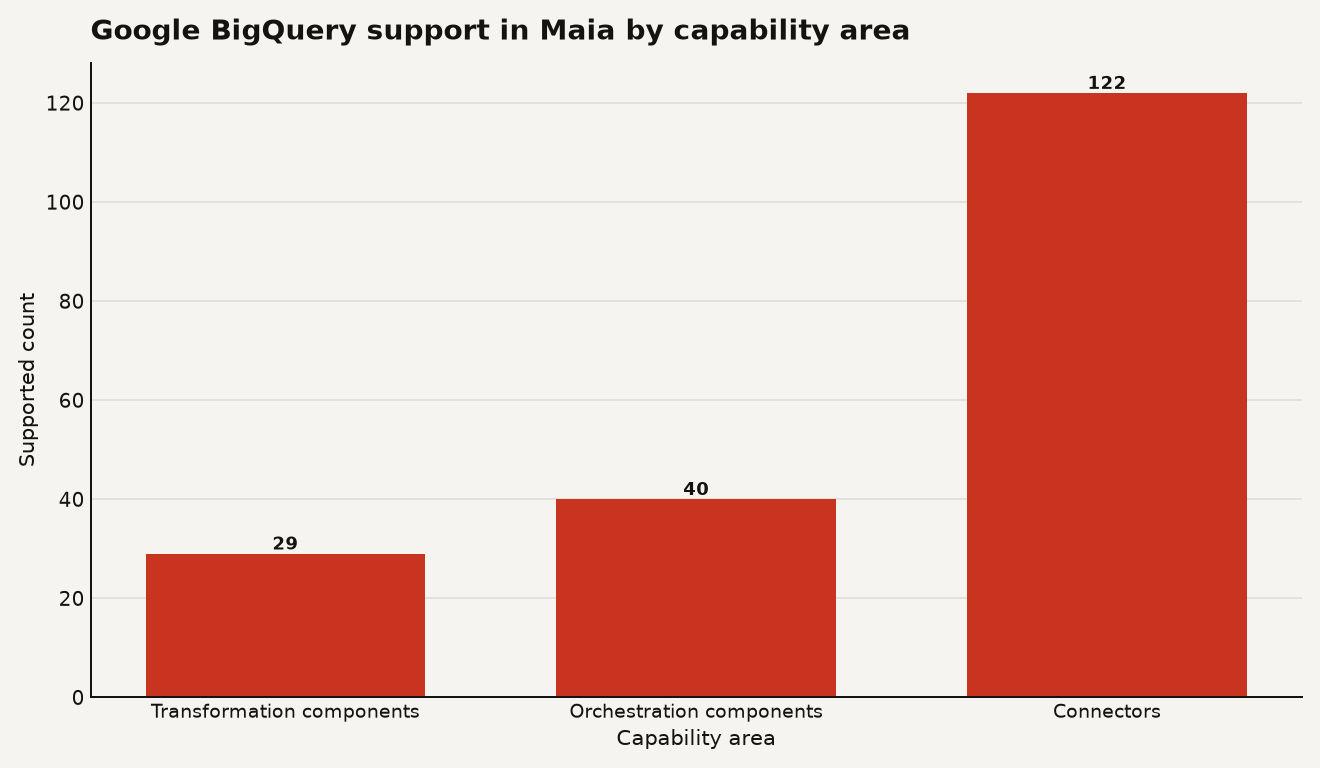
The chart above is the important sanity check. BigQuery support is useful because the initial component list includes production staples such as Table Input, Table Output, SQL, Join, Window Calculation, Run Transformation, SQL Script, dbt Core, Cloud Pub/Sub, Query Result to Grid, and Google Cloud Storage Unload. That is enough to build a real warehouse workflow, not just a demo that loads a CSV and waves at governance.
The release track matters more than the launch blog tone. Matillion says BigQuery is available on the Current runner track from the changelog date and that Stable users should expect availability around August 1, 2026 in the same changelog entry. In calendar terms, that is roughly 39 days between the Current availability date of June 23, 2026 and the expected Stable date of August 1, 2026.
Here is the operational read:
| Choice | What Matillion documents | Use it when | Cost and risk shape |
|---|---|---|---|
| Current runner track | BigQuery support is available now | You can test new platform support before the Stable window | Faster validation, higher change risk |
| Stable runner track | BigQuery expected around August 1, 2026 | You need conservative runner updates | Slower rollout, lower surprise risk |
| Minimum runner version | BigQuery component support starts at 11.478.0 | You are checking a Hybrid SaaS runner or release policy | Upgrade work may sit on your team |
The other items in the June feature bundle, bulk variable management and Designer command palette improvements, are useful background. They are not the lead event. The lead event is that Maia can now build and manage workflows against a warehouse many GCP shops already use as their system of record.
Authentication without upsetting security
BigQuery authentication is the first non-obvious piece. Most Matillion warehouse environments put warehouse authentication directly on the environment. BigQuery uses Google Cloud credentials instead, and Matillion's Full SaaS BigQuery setup guide says a Full SaaS BigQuery environment must have access to a Google Cloud service account credential supplied as a configured cloud credential on the environment.
For Full SaaS, your setup checklist is short but sharp:
- Create a Google Cloud project.
- Create or choose a BigQuery dataset.
- Create a Google Cloud service account.
- Assign IAM roles that let Maia run BigQuery jobs and touch the required datasets.
- Add the service account key as a cloud credential in the Matillion project.
- Create a BigQuery environment with a default GCP Project ID and Dataset.
Matillion's setup page includes an example Google Cloud service account key structure. Keep the real key out of Git, tickets, prompt history, and copied pipeline notes. A safe shape for the credential looks like this:
{
  "type": "service_account",
  "project_id": "example-project",
  "private_key_id": "redacted",
  "private_key": "-----BEGIN PRIVATE KEY-----\nREDACTED\n-----END PRIVATE KEY-----\n",
  "client_email": "[email protected]",
  "token_uri": "https://oauth2.googleapis.com/token"
}
For Hybrid SaaS, the better GCP native pattern is runner-assigned credentials when you can use it. Matillion's Hybrid SaaS BigQuery guide says that when the environment has no associated cloud credential, the Maia runner uses Application Default Credentials, with the Google Cloud service account attached to the runner acting as the principal.
That gives you three credential patterns worth comparing:
| Deployment pattern | Credential source | What to watch |
|---|---|---|
| Full SaaS | Environment cloud credential backed by service account key JSON | Key rotation and allowlisted Matillion access |
| Hybrid SaaS on GCP with runner credentials | Runner service account through Application Default Credentials | Runner IAM scope, GKE deployment hygiene, least privilege |
| Hybrid SaaS with environment credential | Environment-associated service account key | More explicit per-environment identity, more key management |
The cleanest production version is usually Hybrid SaaS on GCP with runner-assigned credentials, because it avoids distributing service account keys. The catch is operational: your team owns the runner, its GKE deployment, and its IAM posture. Full SaaS is quicker for teams that want Matillion to handle more of the platform layer, but you still own the Google credential blast radius.
The minimum IAM roles
Matillion documents the minimum shape rather than a single magic role. The service account needs permission to create BigQuery jobs, query tables and views, retrieve metadata, list projects and datasets, insert or load data, and create, update, or delete tables and views when your pipelines do that work.
The Hybrid SaaS setup guide says you must grant either roles/bigquery.jobUser or roles/bigquery.user at minimum because both include bigquery.jobs.create, and it lists roles/bigquery.dataEditor for read and write workflows plus roles/bigquery.dataViewer for read access.
A least-privilege starting point for a transformation project that reads and writes a single dataset looks like this in intent:
gcloud projects add-iam-policy-binding example-project \
  --member="serviceAccount:[email protected]" \
  --role="roles/bigquery.jobUser"
Then scope dataset access separately in BigQuery for the dataset Maia should read or write. If a pipeline stages data in Google Cloud Storage before loading to BigQuery, Matillion's setup guide lists common Storage roles: roles/storage.objectViewer for reading staged files, roles/storage.objectCreator for uploads, and roles/storage.objectAdmin for full object access.
The mistake to avoid is granting roles/bigquery.admin because the first setup test failed at 5:30 p.m. That role appears in Matillion's documented list as full administrative access, but broad admin rights turn an AI-assisted pipeline builder into a very well credentialed foot-gun. Start narrow, run the pipeline, read the failure, then add the missing permission deliberately.
Two bills: Matillion and Google Cloud
There are two bills to separate: Matillion consumption and Google Cloud consumption. BigQuery support does not make SQL free. Maia can help build or modify the workflow, but BigQuery still charges for the warehouse work it performs under your Google Cloud account.
Matillion exposes consumption through its REST API. The Maia API overview says the API base URLs are https://eu1.api.matillion.com/dpc for EU accounts and https://us1.api.matillion.com/dpc for US accounts, and it documents a 1000 requests per minute fixed API rate limit that returns HTTP 429 Too Many Requests when exceeded.
A FinOps check for Maia pipeline usage starts with the consumption endpoint, then you join that against BigQuery job history in your own GCP project:
curl --request GET \
  --url "https://us1.api.matillion.com/dpc/v1/consumption" \
  --header "Authorization: Bearer $MATILLION_TOKEN"
Matillion's 2026 changelog shows recent work on the consumption schema: GET /v1/consumption added pipelineName in January, changed results.consumption.credits to a number in April, and added an environment field for orchestration and transformation consumption in May. That matters because BigQuery cost control depends on attribution. A monthly credit total without pipeline and environment is a blame smoothie.
What I would track for the first 30 days:
- Matillion credits by pipelineName and environment, pulled from
GET /v1/consumption. - BigQuery bytes processed by job, pulled from Google Cloud's job metadata or billing export.
- Runner track and version, especially if you are testing on Current before Stable.
- Connector choice, because a full load connector and an incremental load connector can have very different downstream BigQuery costs.
The cheap mistake is letting Maia generate a correct but expensive pattern: full refresh, wide table scan, write-back to a large table, repeat hourly. Ask Maia for the pipeline, then inspect the generated SQL and component choices like you would review a pull request from a very fast junior engineer.
For teams already watching Matillion spend, the same discipline applies here as in our guide to Context Engine setup and costs: ground the AI feature in observable consumption before you put it behind a schedule.
Use it now for migrations and greenfield projects
Use it now for migration proofs, greenfield GCP projects, connector evaluation, and internal productivity tests. A data engineer can ask Maia to build the first pass of a BigQuery transformation pipeline, wire in Table Input, Filter, Join, SQL, and Table Output, then review the generated shape in Designer before committing.
A good first prompt is specific about the warehouse defaults and the cost guardrails:
Build a BigQuery transformation pipeline in the dev environment.
Read analytics.orders and analytics.customers.
Filter orders to the last 7 days.
Join on customer_id.
Write the result to mart.recent_customer_orders.
Avoid full scans where a partition filter is available.
Wait for Stable if the pipeline is regulated, high volume, customer facing, or already fragile. The Current track is the right place to learn how Maia behaves with your BigQuery datasets. Stable is the better place to run the job that wakes up your CFO if the numbers drift.
Also wait if your IAM model is still mushy. BigQuery support puts Maia closer to a powerful production surface: jobs, datasets, tables, views, GCS staging, and metadata. That is exactly where service account discipline matters.
The strongest use case is a GCP team that already has BigQuery, has a small data engineering group, and needs more pipelines than the team can hand build. Maia can remove some canvas work and boilerplate SQL. It cannot remove your obligation to validate lineage, permissions, costs, and data contracts.
The moment GCP shops waited for
Yes, for GCP shops that were waiting for Maia to meet them where the data already lives.
The bigger point is less glamorous: BigQuery support moves Maia from an interesting AI layer to an operational option for another major warehouse camp. The release is broad on components, early on runner track, and very dependent on IAM hygiene. Treat it like a new production platform surface, not a magic button. The builders who win with it will be the ones who let Maia draft the work and make their review process boring.
Sources
- Matillion Maia changelog: 2026 changelog
- Matillion Maia documentation: Setup guide, Matillion Full SaaS Google BigQuery
- Matillion Maia documentation: Setup guide, Hybrid SaaS Google BigQuery
- Matillion Maia documentation: Google BigQuery projects
- Matillion Maia documentation: Google BigQuery environments
- Matillion Maia documentation: Overview of the Maia API