Databricks PAT auto-scoping sounds like housekeeping until a build agent, ingestion script, or BI connector loses an API it only calls on quarter close.
Databricks made token auto-scoping generally available on June 18, 2026, and the useful fact is simple: Databricks observes API usage for 30 days, then narrows a personal access token to the scopes it inferred from that usage. The June 2026 release notes say the feature is GA, enabled by default for new long-lived PATs of 30 days or longer, and applied to existing tokens with all APIs access based on historical usage.
That is good security. It is also a production change aimed directly at lazy automation.
A personal access token, or PAT, authenticates workspace level calls to Databricks APIs. Databricks still supports PATs, but its own authentication docs recommend OAuth where possible for user account authentication. Auto-scoping is the bridge for teams that still have PATs spread through GitHub Actions, Airflow, dbt jobs, Tableau extracts, shell scripts, and that one Jenkins worker nobody wants to touch.
If you influence the Databricks bill, your cost risk is indirect. This feature does not ask you to pick a warehouse size or a Databricks Runtime. The meter shows up when a token loses a scope, jobs retry, engineers investigate, SLAs slip, and someone reopens the all APIs barn door.
What exactly changed for Databricks PATs?
Before this change, many PATs behaved like broad workspace keys unless a user or admin explicitly chose API scopes. Databricks now has a default path toward least privilege for long-lived tokens.
The PAT documentation says scoped personal access tokens restrict permissions to specific API operations, with examples such as sql, unity-catalog, and scim. That same page says auto-scoping narrows a token to only the APIs it actively uses after a 30 day observation period.
The release note matters because it changes the default posture. New long-lived tokens, meaning 30 days or longer, are now in the auto-scoping path by default. Existing all APIs tokens can also be narrowed based on historical usage.
Here is the operational shape.
| Token situation | Databricks behavior | What you should check |
|---|---|---|
| New PAT with lifetime of 30 days or longer | Auto-scoping is on by default during creation | Confirm the first 30 days include every API the automation will need |
| Existing PAT with all APIs access | Auto-scoping can apply based on historical API usage | Find low frequency API calls before Databricks infers the token is narrower than reality |
| Manually scoped PAT | Manual scopes define access | Keep it manual if the token has known, stable duties |
Token with authentication scope |
Can create new tokens with any scope | Treat it like a privileged credential, not a normal job secret |
The dangerous row is the second one. Existing all APIs tokens often belong to older automation. Those tokens are exactly where unusual calls hide: a monthly jobs update, a quarterly unity-catalog permission change, an emergency clusters restart, or a one time workspace export.
The default creation flow also changed. The PAT page now includes an autoscope_enabled field in the Token API example:
curl -X POST https://<databricks-instance>/api/2.0/token/create \
  -H "Authorization: Bearer <existing-token>" \
  -H "Content-Type: application/json" \
  -d '{
    "lifetime_seconds": 2592000,
    "scopes": ["sql"],
    "autoscope_enabled": true
  }'
That 2592000 value is 30 days in seconds. Use it as a mental boundary: below that lifetime, Databricks is pushing you toward shorter lived credentials; at that lifetime or above, Databricks is also pushing you toward observed least privilege.
How does auto-scoping decide what a token can do?
Databricks says it observes API usage over 30 days and then applies inferred scopes to the token. During the observation window, the all-apis scope is applied temporarily, so existing automation can keep running while Databricks watches which endpoints the token actually calls.
The lifecycle numbers are easy to remember, and the chart below is the one to put in your admin runbook: 30 days of observation, a 7 day reminder before enforcement, 90 days before unused PATs are automatically revoked, and 730 days as the default maximum lifetime for new tokens unless you configure a shorter maximum.
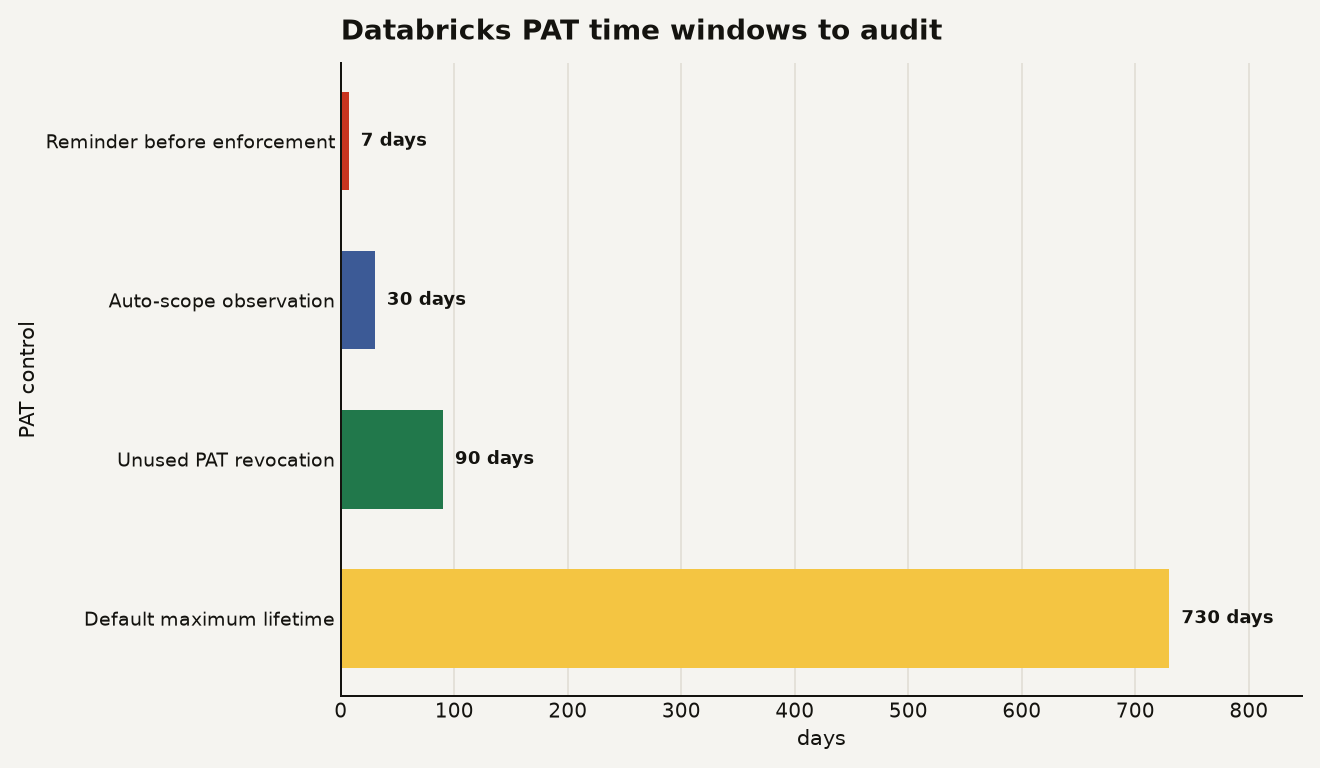
Databricks also says it sends a reminder email 7 days before enforcement and another email when scopes are applied. That helps, but it does not replace an audit. Service accounts, service principals, and human users have different inbox realities, and the person who receives the warning may have no idea what job owns the token.
The inference model is endpoint driven. Databricks publishes an API scopes reference that maps scopes to API families, including jobs with 40 operations, sql with 53 operations, unity-catalog with 123 operations, clusters with 36 operations, and mlflow with 89 operations. The point is practical: a token that successfully queries Databricks SQL with sql still cannot necessarily manage a Lakeflow job or update Unity Catalog metadata.
This is where builders get bitten. Workloads rarely fail on their main path. They fail on a repair path.
A nightly script might use sql every evening and jobs only when it rotates a schedule. A Lakeflow related automation might run normal pipeline calls through one scope and need workspace or secrets during deployment. A model promotion job might call MLflow every release and Unity Catalog only when registering a new governed model.
For a broader platform view, this fits the same theme as our guide to the Databricks Data Intelligence Platform for builders: Databricks keeps moving governance into default platform behavior, which is great until your automation relied on informal privilege.
How do you audit tokens before access tightens?
Start with the token inventory, not the codebase. Code lies by omission. Token metadata tells you what exists.
Databricks says workspace admins can use the CLI or Token Management API to monitor and revoke existing workspace tokens, and its admin docs show databricks token-management list as the basic command. The same admin page says account admins can filter a token report by owner, workspace, created date, expiration date, and last used date.
databricks token-management listIf you are working inside a notebook or admin utility, Databricks shows the SDK pattern for loading token metadata into Spark:
from databricks.sdk import WorkspaceClient

w = WorkspaceClient()
tokens = [token.as_dict() for token in w.token_management.list()]
display(spark.createDataFrame(tokens).orderBy("creation_time"))
Build a review queue with four columns:
- token owner
- token comment
- current scopes
- last used day
Then add the missing column yourself: workload owner. If the comment says test, old airflow, or do not delete, revoke or replace it. Those comments are archaeology, not operations.
For each live automation token, map the workload to API families. A deployment token for Databricks Asset Bundles might need jobs, workspace, pipelines, or unity-catalog depending on what it deploys. A BI extract token may only need sql. A service principal that creates other tokens needs authentication, and Databricks warns that tokens with the authentication scope can create new tokens with any scope.
That last one deserves a policy. Do not give authentication to a token just because a script failed once. Create a separate break glass path, log its use, and rotate it quickly.
If the inferred scopes are wrong, manually set scopes and opt out for that token. The PAT documentation says manually setting a token's scopes in the workspace UI or API permanently disables auto-scoping for that token.
curl -X PATCH https://<databricks-instance>/api/2.0/token/<token_id> \
  -H "Authorization: Bearer <admin-token>" \
  -H "Content-Type: application/json" \
  -d '{
    "token": {
      "scopes": ["sql", "jobs", "unity-catalog"]
    },
    "update_mask": "scopes"
  }'
Databricks says scope changes can take up to 10 minutes to propagate. In practice, that means you should update scopes before a deployment window, not during a failing run.
What does Databricks PAT auto-scoping cost?
The clean answer: Databricks does not document a separate DBU meter for PAT auto-scoping in the release note or PAT docs. It is a security control on API access, not a warehouse, cluster, Lakeflow pipeline, Mosaic AI endpoint, or Databricks SQL query.
The messy answer: the bill can still move.
A failed job can retry on all purpose compute. A broken ingestion workflow can leave upstream data stale, causing expensive backfills. A disabled deployment token can pin engineers in manual recovery while a production warehouse keeps serving partial data. Those are not feature charges. They are consequence charges.
The admin controls around PATs do have plan implications. Databricks says managing personal access tokens in a workspace requires the Premium plan or above, and personal access token permissions are available only in the Premium plan or above.
There is also a token sprawl number worth using in your cleanup. Databricks says each PAT is valid for only one workspace, and a user can create up to 600 PATs per workspace. If that limit sounds absurdly high, remember what happens in a large platform: every migration, integration test, notebook export, and proof of concept leaves behind one more credential unless someone owns deletion.
Set a shorter maximum lifetime while you are here. Databricks documents maxTokenLifetimeDays, with a default maximum of 730 days, and shows this CLI setting for a 90 day maximum:
databricks workspace-conf set-status --json '{
  "maxTokenLifetimeDays": "90"
}'
That does two useful things. It reduces the blast radius of leaked tokens, and it forces teams to find the automation they forgot to migrate.
When should you keep PAT auto-scoping on, and when should you opt out?
Keep auto-scoping on for human generated long-lived tokens, BI tools with stable API needs, and older all APIs tokens you are actively cleaning up. It gives you a default path away from broad access without asking every analyst to understand the full API scope catalog.
Opt out, by manually setting scopes, when a token backs production automation with rare but legitimate operations. The key word is legitimate. If a token needs jobs once a quarter, document that need and set the scope. If nobody can explain why it needs authentication, remove it.
Use this decision rule:
- If the workload is exploratory, leave auto-scoping on and keep the token short lived.
- If the workload is production and predictable, set explicit scopes and monitor failures.
- If the workload creates tokens, replace the pattern with OAuth or a tightly controlled service principal flow.
- If the workload crosses account level administration, stop using PATs because Databricks says PATs cannot automate account level functionality.
The bigger migration is OAuth. Databricks says PATs are legacy authentication for many user account scenarios, and it recommends OAuth access tokens for stronger security and convenience. Auto-scoping makes PATs safer, but it should also make your remaining PAT inventory more visible.
That is the part worth doing this month. Do not wait for the 7 day enforcement email to discover that a token named airflow-prod-old2 deploys your most important Databricks SQL dashboard.
What should change in your token culture?
Databricks PAT auto-scoping turns least privilege from a policy slide into a platform default. Good.
Now make the human process match it. Every production token needs an owner, a workload name, a lifetime, a scope list, and a migration plan. If a token cannot survive that sentence, it should not survive the audit.