If you last touched Databricks as "the Spark notebooks company", the platform has grown into something much wider, and the bill grows with it. The Databricks Data Intelligence Platform is the lakehouse stack that sits on top of your own cloud storage and tries to be the one place a data team ingests, governs, queries, and runs AI on its data. This guide is the starting point for our Databricks studio: what the platform actually is, how a workload executes, and where the money goes.
The pitch is that a single platform on open Delta tables can replace the old split between a data lake for raw files and a warehouse for SQL. The interesting question for a builder is not the marketing, it is the plumbing: what runs where, what a DBU really is, and where the platform earns its keep versus where it quietly drains the budget.
What is the Data Intelligence Platform, concretely?
The platform is a managed control plane that Databricks hosts, connected to compute and storage that run in your own cloud account on AWS, Azure, or GCP. Your data sits in your cloud object storage as Delta Lake tables, an open format built on Parquet with a transaction log that adds ACID transactions, time travel, and schema enforcement to plain files.
Four layers stack on top of that storage, and it helps to hold them separate in your head:
- Storage: Delta tables in your object store, the open foundation everything else reads and writes.
- Governance: Unity Catalog, the single metastore that owns permissions, lineage, and discovery across every workspace.
- Compute: clusters, SQL warehouses, and serverless, the engines that actually do work and burn money.
- Intelligence: Mosaic AI, the model serving, AI functions, and agent tooling layered across the rest.
The architectural fact worth internalizing is that storage and compute are fully decoupled. Your tables persist whether or not anything is running, and you pay for compute only while an engine is on. That single design choice explains most of the platform's cost behaviour, which we will come back to.
How does a workload actually run?
Every piece of work runs on compute you choose, and picking the wrong type is the most common and most expensive beginner mistake. There are three broad families.
| Compute type | What it is for | Billing shape |
|---|---|---|
| All-purpose clusters | Interactive notebooks and ad hoc exploration | Highest DBU rate, easy to leave running |
| Job clusters | Scheduled pipelines and production jobs | Lower DBU rate, spun up and torn down per run |
| SQL warehouses | BI and SQL queries on Databricks SQL | Sized in T-shirt sizes, autoscale on concurrency |
The unit on the Databricks side of the bill is the DBU, a Databricks Unit, which meters processing per second at a rate that depends on the compute type and tier. Crucially, you pay that DBU charge on top of the underlying cloud VM cost, which your cloud provider bills you separately. So a cluster left running overnight costs you twice: once in idle DBUs and once in idle EC2 or equivalent.
The single most common cost surprise is an all-purpose cluster used for a job that should have run on a cheaper job cluster, often with auto-termination disabled. Moving that workload to a job cluster with a short auto-termination window is usually the highest-return change a new team can make.
Where does the cost actually go?
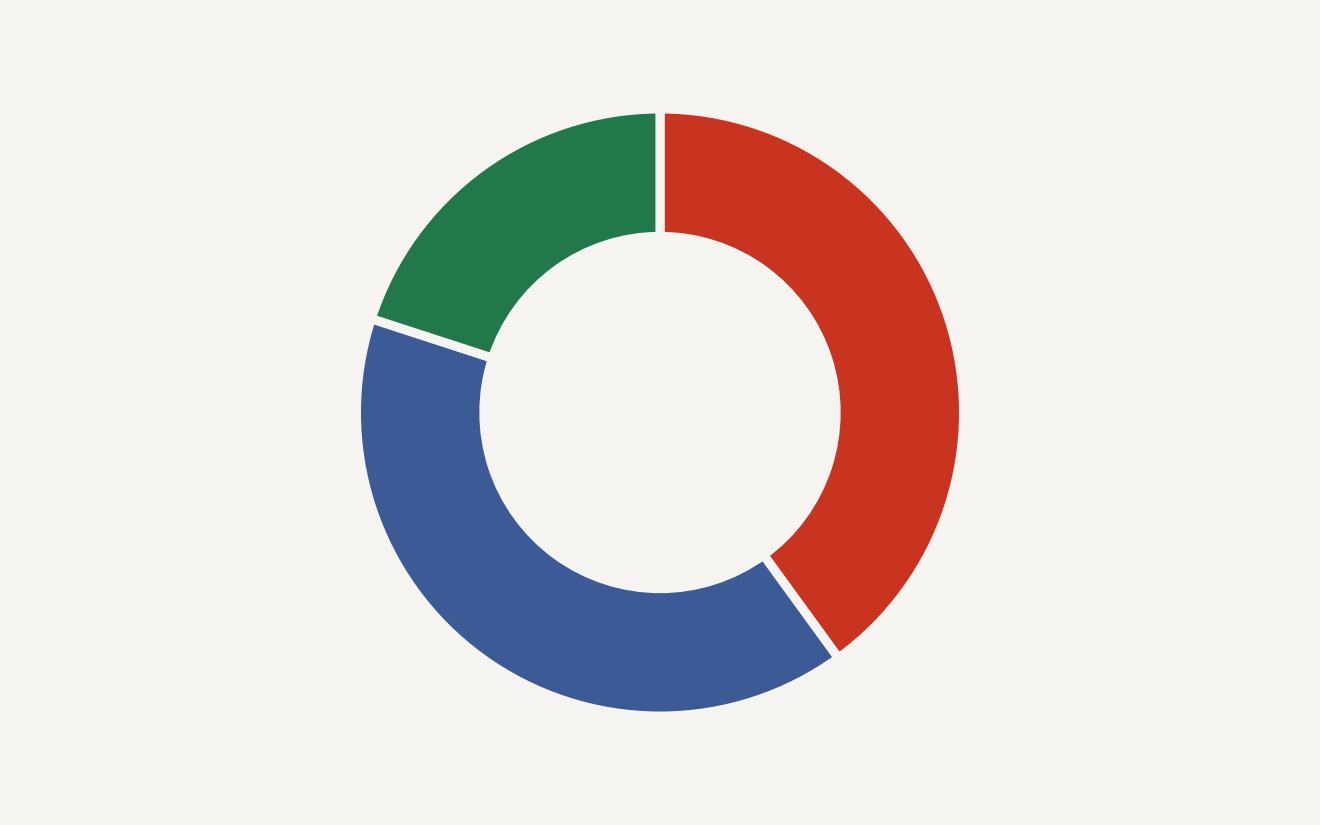
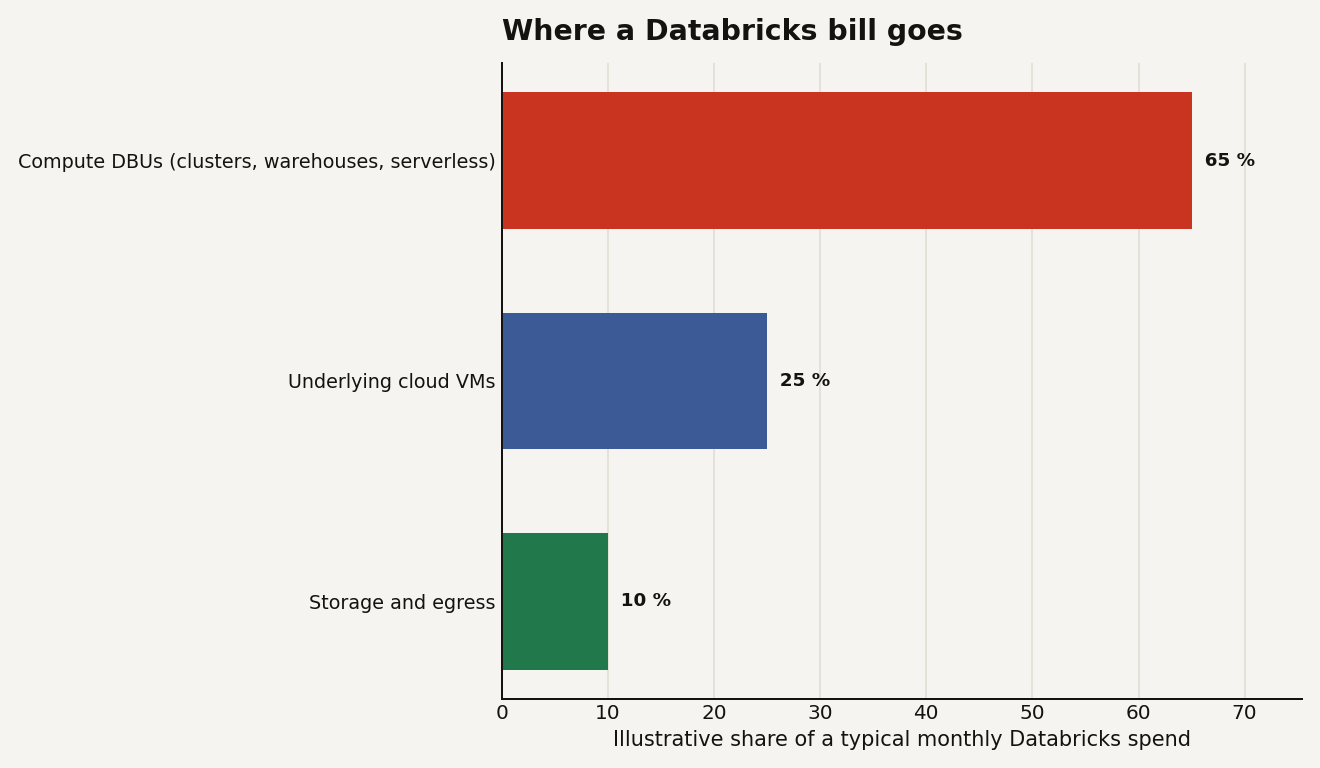
This is the question that decides whether a Databricks workspace stays affordable, and the answer has layers you pay separately. The chart below shows the rough shape of a typical monthly spend: compute DBUs dominate at around 65 percent, the underlying cloud VMs are roughly 25 percent, and storage and egress are about 10 percent. The exact mix moves with your workload, but the lesson holds: compute, not storage, is where the bill lives.
The good news is that the platform now bills its own usage into system tables you can query directly. The system.billing.usage view in Unity Catalog records DBU consumption per workload, so you can attribute spend instead of guessing.
SELECT
  usage_metadata.job_id,
  sku_name,
  SUM(usage_quantity) AS dbus
FROM system.billing.usage
WHERE usage_date >= current_date() - INTERVAL 30 DAYS
GROUP BY usage_metadata.job_id, sku_name
ORDER BY dbus DESC
LIMIT 20;
That one query tells you which jobs are actually expensive, which is where any FinOps effort should start. We treat cost as its own recurring topic for exactly this reason.
How does Unity Catalog change governance?
Unity Catalog is the platform's governance layer, and it is the piece that turns a pile of workspaces into one governed estate. It uses a three-level namespace, catalog.schema.table, so a fully qualified name like prod.sales.orders means the same thing in every workspace attached to the metastore.
Grants are standard SQL, which makes access reviews legible:
GRANT SELECT ON TABLE prod.sales.orders TO `analysts`;Beyond plain grants, Unity Catalog tracks column and table lineage automatically, enforces row filters and column masks, and powers Delta Sharing for handing governed data to another organization without copying it. If you run more than one workspace, getting the catalog design right early is the decision that ages best, well before you tune a single query.
Where does Mosaic AI fit?
Mosaic AI is Databricks' name for the AI features layered across the platform: Model Serving for hosting models behind an endpoint, Vector Search for retrieval, agent tooling like Agent Bricks, and SQL-native AI functions. The last of these is the easiest on-ramp, because you can call a model straight from a query:
SELECT ai_query(
  'databricks-meta-llama-3-3-70b-instruct',
  'Summarize this ticket: ' || ticket_body
) AS summary
FROM support.tickets
LIMIT 100;
The honest read is that this is the fastest-moving and least settled part of the platform, which is precisely why it deserves sceptical coverage rather than hype. The practical stance for a builder is to let these functions accelerate well-bounded tasks, summarization, extraction, classification, while keeping a human reviewing anything that touches a customer or a production write. We will track each Mosaic AI capability as it ships and judge whether it is genuinely production-ready or still a demo.
What should you do with this?
If you are evaluating or running the Data Intelligence Platform, a few principles travel well:
- Match compute to the workload. Job clusters for jobs, SQL warehouses for BI, serverless where the startup latency hurts. Never run production on an all-purpose cluster by default.
- Set auto-termination everywhere. Idle compute is the most common line of waste, and it bills twice.
- Query
system.billing.usage. Attribute DBUs to jobs before you try to optimize anything. - Design Unity Catalog early. The three-level namespace and lineage pay off most when set before the estate sprawls.
- Adopt Mosaic AI deliberately. Use it where review is cheap; gate it where mistakes are expensive.
This guide is the foundation. From here the studio goes deeper on each piece: Lakeflow pipelines and ingestion, Databricks SQL warehouses and materialized views, Unity Catalog governance patterns, the compute and FinOps habits that keep DBUs in check, and the Mosaic AI features as they land. The platform is moving quickly, and the goal here is the same as everywhere on Data Today: tell you what actually changed and what it means for the thing you are building.