Every Delta table with legacy change data feed enabled pays a write-time tax. Each INSERT, UPDATE, DELETE, and MERGE produces extra change files alongside the data, slowing writes and growing storage. If nobody reads the feed, you have spent compute and storage producing a product nobody consumed.
Automatic change data feed, now generally available as of September 1, 2026, flips that model. Auto CDF computes row-level changes at query time using row tracking metadata, instead of materializing them at write time. The result: MERGE and UPDATE operations run about 15% faster on tables you query for changes, and you stop paying write-time overhead for change records you may never read. The cost moves to the read side, where it belongs.
The trade-off is real. Auto CDF requires Databricks Runtime 19 LTS or above, row tracking enabled on Delta tables, and Unity Catalog registration for all supported tables. External readers cannot consume the automatic feed. And because changes are computed on demand, frequent CDF reads cost more compute than they did when the data was pre-materialized.
Automatic change data feed is GA
Databricks marked automatic change data feed as generally available on September 1, 2026, after a preview period. The feature computes row-level changes between table versions at query time, using row tracking on Delta Lake tables and row lineage on Apache Iceberg v3 tables. No per-table configuration is needed: any table that meets the requirements gets CDF support automatically.
The automatic change data feed documentation confirms the same APIs you already use for legacy CDF. The table_changes() SQL function and the readChangeFeed DataFrame option both work with automatic CDF. Batch queries, Structured Streaming, and Databricks-to-Databricks Delta Lake Sharing all support it. If you have code that reads legacy CDF today, the query syntax does not change when the source table switches to auto CDF.
What changes is when the work happens. Legacy CDF materializes change records during writes, storing them as extra files. Auto CDF defers that computation to read time, deriving changes from row tracking metadata that Delta and Iceberg already maintain for other purposes. The write path gets leaner. The read path gets more expensive per query, but only fires when someone actually asks for changes.
Three things make this release different from the preview:
- Cross-format support: Auto CDF works on both Delta Lake and Apache Iceberg v3 tables registered in Unity Catalog. Legacy CDF only supported Delta.
- No per-table toggle: You do not set
delta.enableChangeDataFeedon each table. Row tracking is the only prerequisite for Delta tables. Iceberg v3 tables with row lineage work automatically. - Write performance: The release notes cite about 15% faster MERGE and UPDATE operations on tables queried for changes, because the write path no longer materializes CDF files.
Automatic CDF moves work from write to read
The two approaches share APIs and output schema but diverge on when work happens, what tables they support, and who can read the result.
| Dimension | Legacy CDF | Automatic CDF |
|---|---|---|
| When changes are computed | Write time (materialized to files) | Query time (computed from row tracking) |
| Per-table configuration | Required: delta.enableChangeDataFeed = true |
None; row tracking is the only prerequisite |
| Table formats | Delta Lake only | Delta Lake and Apache Iceberg v3 |
| Unity Catalog required | No | Yes, tables must be registered |
| Write performance | Overhead on every write | About 15% faster MERGE and UPDATE |
| Storage cost | Extra CDF files per write | No additional CDF files |
| External reader support | Delta readers outside Databricks | Databricks readers only |
| Minimum runtime | Earlier runtimes | Databricks Runtime 19 LTS |
The biggest functional gap is the reader limitation. Legacy CDF writes standard Delta change files that external tools can read. Auto CDF for Delta Lake is readable only by Databricks clients, and the same applies to Iceberg v3: the change feed is not part of the Iceberg spec, so external Iceberg readers cannot query it. If your downstream consumers include non-Databricks tools, that is a hard blocker.
The storage savings are straightforward. Legacy CDF writes change records as additional files on every write operation. Auto CDF derives changes from row tracking metadata that already exists, so no extra files are written. For tables with frequent writes and infrequent CDF reads, this is where the savings compound.
The cost model inverts
The cost model inverts. Legacy CDF taxes writes and makes reads cheap. Auto CDF makes writes cheaper and taxes reads.
On the write side, the release notes report about 15% faster MERGE and UPDATE operations on tables queried for changes. That is a direct DBU saving on every write job. You also save storage: no CDF files are written, so cloud object storage costs drop for tables that previously had legacy CDF enabled.
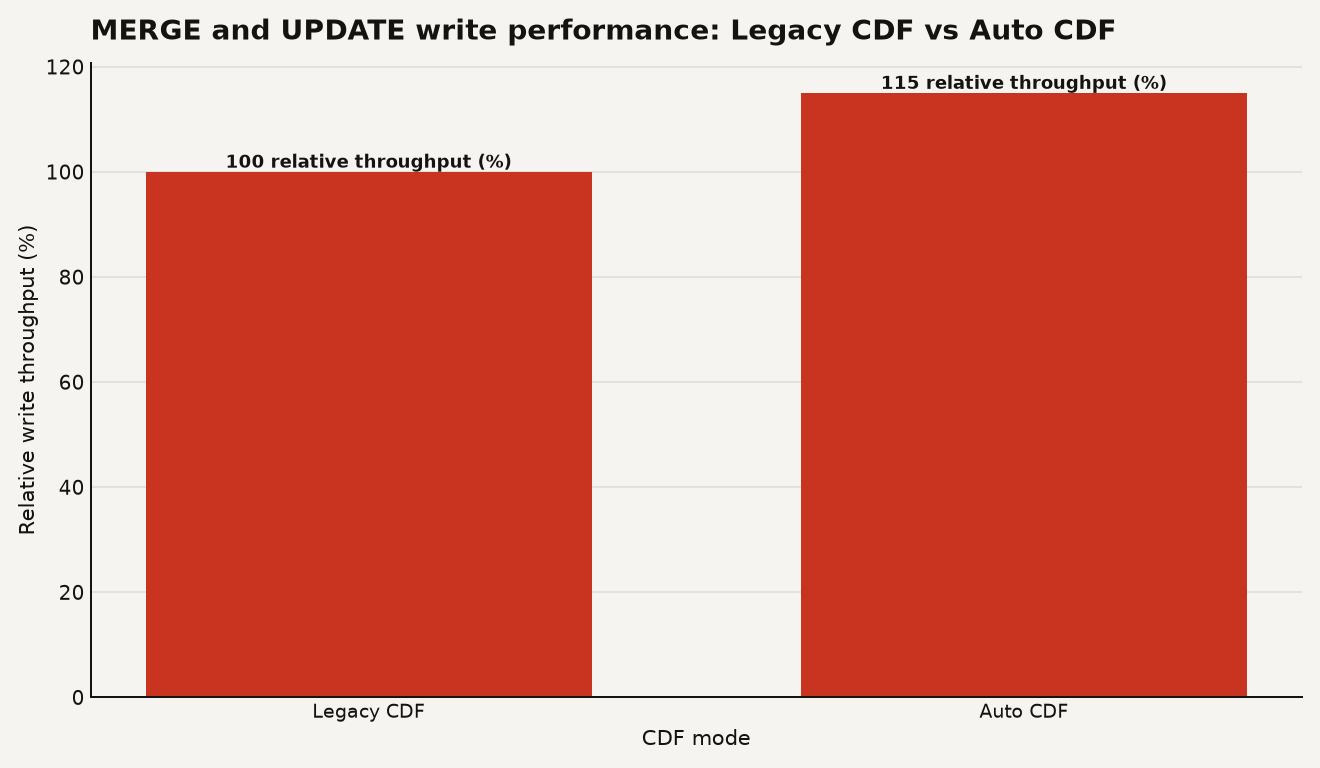
The chart above shows the relative write throughput: Auto CDF at 115 compared to legacy CDF at 100 as the baseline, reflecting the 15% speedup Databricks measured for MERGE and UPDATE on tables queried for changes.
On the read side, every CDF query now computes changes from row tracking metadata at query time. For a batch read that scans a small version range, the cost is modest. For a Structured Streaming job that reads CDF continuously, the cost is incremental but recurring. For a high-frequency dashboard or API that polls CDF every minute, the compute cost of on-demand change computation could exceed what legacy CDF's pre-materialized files would have cost to scan.
The decision framework is simple. If your workload is write-heavy and read-light (you write often, read changes rarely), Auto CDF saves you money on both compute and storage. If your workload is read-heavy (you consume CDF frequently, perhaps feeding multiple downstream pipelines), the write savings may not offset the increased read compute. Profile your read patterns before switching.
For Lakeflow pipelines that use AUTO CDC to process change feeds, the source table's CDF mode affects pipeline cost. A pipeline that reads CDF every trigger interval is making a read-time computation call on every micro-batch. If you are designing a new pipeline, consider the read frequency carefully. The Databricks Lakeflow Designer cost guide covers how pipeline trigger frequency maps to compute cost.
Row tracking is the prerequisite
For Delta Lake tables, the prerequisite is row tracking. Enable it with a single table property:
ALTER TABLE my_catalog.my_schema.my_table
SET TBLPROPERTIES ('delta.enableRowTracking' = 'true');
For managed Iceberg v3 tables registered in Unity Catalog, row lineage is the prerequisite, and it is enabled by default for Iceberg v3 format tables. No additional configuration is needed.
Once row tracking is on, any table that meets the requirements supports automatic CDF. You query it with the same functions you use for legacy CDF:
-- Read changes between versions 2 and 10
SELECT * FROM table_changes('my_catalog.my_schema.my_table', 2, 10);
Or with the DataFrame API in PySpark:
df = (spark.read
      .format("delta")
      .option("readChangeFeed", "true")
      .option("startingVersion", 2)
      .table("my_catalog.my_schema.my_table"))
The output schema includes the row data plus change metadata: _change_type (insert, update_preimage, update_postimage, delete), _commit_version, and _commit_timestamp. This is the same schema as legacy CDF.
If you are feeding changes into a Lakeflow pipeline with AUTO CDC, the source table's CDF mode is transparent. The AUTO CDC APIs replace the older APPLY CHANGES API and use the same syntax. AUTO CDC reads from the change feed regardless of whether it is legacy or automatic. You declare your keys, sequence column, and SCD type, and the pipeline handles dedup, ordering, and history:
-- Create a target streaming table
CREATE STREAMING TABLE dim_customer;

-- Declare CDC processing with AUTO CDC
AUTO CDC INTO dim_customer
  FROM STREAMING TABLE raw_cdc_events
  KEYS (customer_id)
  SEQUENCE BY event_ts
  APPLY AS DELETE WHEN op = 'DELETE'
  STORED AS SCD TYPE 2;
AUTO CDC is in Beta and requires a serverless SQL warehouse or Lakeflow pipeline compute on Databricks Runtime 17.3 or later. The feature supports SCD Type 1 and Type 2, partial updates with IGNORE NULL UPDATES, selective history tracking with TRACK HISTORY ON, and bitemporal storage in Beta.
One detail worth knowing: materialized views in Databricks SQL already use automatic change data feed for incremental refreshes. If you have Databricks managed Iceberg materialized views or Delta-based materialized views, they are already running on this machinery. The advanced AUTO CDC documentation confirms you can read their change feed with Databricks Runtime 18 LTS or above on classic compute, serverless compute, or Databricks SQL.
Three reasons to pause
Three situations should make you pause.
First, if downstream consumers include non-Databricks tools, Auto CDF will not work. Legacy CDF writes Delta change files that external engines can read. Auto CDF for both Delta and Iceberg v3 is readable only by Databricks clients. If a third-party data integration tool, a non-Databricks Spark engine, or an external query engine needs to consume your change feed, stick with legacy CDF on Delta tables.
Second, if your CDF read frequency is high, the query-time computation cost may exceed the write savings. A table that gets MERGE operations once an hour but has its CDF read by five downstream pipelines every minute is a poor candidate. The 15% write speedup saves you once per hour; the read computation cost hits you five times per minute. Do the math for your workload before switching.
Third, if your tables are not in Unity Catalog or you are on Databricks Runtime 18 or earlier, Auto CDF is not available. Legacy CDF works without Unity Catalog and on earlier runtimes. If you have external Delta tables outside Unity Catalog or clusters on older runtime versions, those tables will need to stay on legacy CDF or be migrated.
There is also a subtler concern: row tracking adds its own metadata overhead to Delta tables. It is required for Auto CDF, but it is not free. If you enable row tracking solely for CDF and never read the feed, you have added metadata overhead without benefiting from the feature. Row tracking also powers other features like clone and time travel optimizations, so the cost may be justified for other reasons, but it is worth understanding what you are enabling.
Watch read compute after switching
Monitor read compute costs after switching. The write savings are predictable (15% on MERGE and UPDATE), but read costs are workload-dependent. Set up alerts on CDF query durations and DBU consumption for jobs that read change feeds frequently. If read costs spike after the switch, you may need to adjust read frequency, cache results, or reconsider whether auto CDF is the right fit for that specific table.
Watch the AUTO CDC ecosystem. AUTO CDC in Lakeflow pipelines is the primary consumer of CDF in dimensional modeling workflows. As AUTO CDC moves toward GA and bitemporal tracking matures, the demand for reliable, low-cost CDF will grow. Auto CDF is the foundation for that, but the read-time cost model means pipeline costs will scale with read frequency, not write frequency.
Track the external reader story. The Databricks-only reader limitation is the biggest functional constraint. If Databricks adds external reader support for auto CDF in a future release, the calculus for cross-platform data sharing changes significantly. For now, if Delta Sharing consumers include non-Databricks clients, they cannot read auto CDF.
Pay attention to Runtime 19 LTS adoption. Auto CDF is gated on Runtime 19 LTS or above. If your clusters and warehouses are still on Runtime 18 LTS or earlier, you will need to upgrade before you can use the feature. The September 1, 2026 maintenance updates cover Runtime 18 LTS and several other versions, but Auto CDF specifically requires 19 LTS.
The read side is the new write side
Automatic change data feed is a well-designed trade-off for the majority of Delta and Iceberg workloads on Databricks. Most tables are written to more often than their change feeds are read, and for those tables, moving CDC cost from writes to reads is a net win. The 15% write speedup is real and measurable. The storage savings are real. The APIs are unchanged.
The risk is on the read side. If you have a handful of tables whose CDF is consumed constantly by many downstream pipelines, those tables may cost more under auto CDF than they did under legacy. Profile before you switch, and keep legacy CDF on tables where the read pattern is frequent and the write pattern is rare. The feature is GA, the APIs are stable, and the direction is clear. But the cost model is your responsibility to manage.