Self-hosted Git servers are supposed to be the safe bet. You control the box, the network, the data. But when the official Docker image for Gitea, one of the most popular open-source alternatives to GitHub, shipped with a configuration that trusted identity headers from any IP address on the internet, that control evaporated. CVE-2026-20896 is a critical Gitea Docker auth bypass that lets an unauthenticated attacker become any user, including admin, by sending a single HTTP header. Sysdig researchers confirmed active exploitation within two weeks of disclosure, and Singapore's cybersecurity agency has issued its own warning about in-the-wild attacks.
A critical Gitea Docker auth bypass, CVE-2026-20896, lets attackers impersonate any user with one HTTP header. Over 6,200 instances are exposed online.
How does the Gitea Docker auth bypass actually work?
The vulnerability is almost embarrassingly simple. Gitea supports a reverse proxy authentication mode, where an external proxy like Nginx or Traefik authenticates the user and then passes the authenticated identity to Gitea via an HTTP header called X-WEBAUTH-USER. This is a common pattern for single sign-on setups: the proxy handles the hard work of authentication, and Gitea trusts what the proxy says.
The problem is what the official Docker image trusted. According to Michael Clark, a security researcher at Sysdig who documented the exploitation, the image shipped with REVERSE_PROXY_TRUSTED_PROXIES=*. That wildcard means Gitea will accept the X-WEBAUTH-USER header from any source IP, not just from a trusted reverse proxy sitting in front of it.
The attack is one HTTP request. No password. No token. No exploit chain. An attacker sends a request to the Gitea container's HTTP port with a header like X-WEBAUTH-USER: gitea_admin and Gitea logs them in as that user. The Gitea maintainer who shared reproduction steps warned that any process that can reach the Gitea container's HTTP port directly, bypassing the intended authenticating proxy, can impersonate any user whose login name is known or guessable. Admin accounts like admin and gitea_admin are the obvious targets.
This matters because Gitea is not just a code repository. It handles pull requests, issue tracking, CI/CD pipelines, and deployment configurations. An attacker who becomes an admin can read your source code, modify build pipelines, inject backdoors into your CI/CD, and pivot into whatever infrastructure Gitea touches. The same risk profile that makes self-hosted Git attractive, full control over the development workflow, makes a compromised instance a supply chain nightmare.
How many instances are exposed and how fast did attackers move?
Shodan-style scans put the number of Gitea instances visible on the public internet at roughly 6,200. It is unclear how many of those run the vulnerable default Docker configuration versus a hardened setup behind a properly configured reverse proxy. But the attack is cheap enough that scanning all 6,200 and trying default admin usernames is a trivial exercise for any botnet operator.
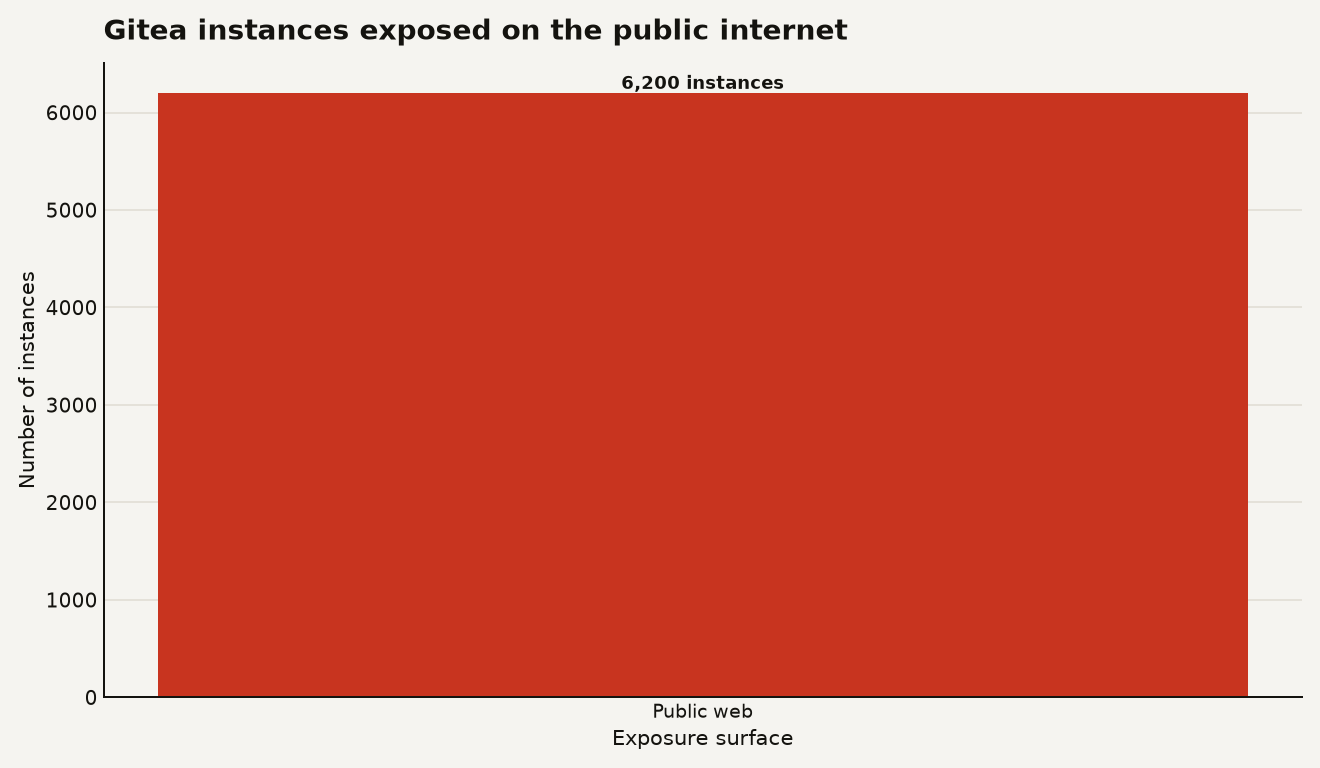
The chart above shows the scale of the exposure surface. The number that should concern you more is the timeline. Sysdig sensors caught the first in-the-wild exploitation just 13 days after the advisory was published. The initial probe came from a VPN-exit scanner, a signal that threat actors were already sweeping for vulnerable instances before the public disclosure cycle had fully played out. The Hacker News independently reported on the probing activity, suggesting the scanning was broad enough to register across multiple monitoring sources.
Singapore's Cyber Security Agency, which often moves quickly on active exploitation alerts, issued its own warning about CVE-2026-20896. That is a strong signal: when a national CERT flags a CVE as actively exploited, it has moved from theoretical risk to real attacks.
What does this mean for your codebase and CI/CD pipeline?
A compromised Gitea instance gives an attacker far more than a stolen repository. Gitea Actions, the built-in CI/CD system, can execute arbitrary workflows on runner machines. An attacker with admin access can create or modify workflow files that run on your build infrastructure. That means they can:
- Exfiltrate secrets stored in CI/CD variables and runner environment variables
- Push malicious code into your repositories via direct commits to protected branches
- Tamper with release artifacts and container images built through Gitea Actions
- Use webhook configurations to exfiltrate push events and metadata to external servers
- Pivot to any system that trusts Gitea as an identity provider or OAuth source
If you are running Gitea as your team's primary Git platform and it is exposed to the internet, treat this as a potential supply chain compromise. You need to upgrade. You also need to audit what happened while you were vulnerable.
For teams that have moved toward self-hosted infrastructure to avoid relying on GitHub or GitLab, this is a reminder that self-hosting shifts the security burden rather than eliminating it. The convenience that makes the default Docker image easy to deploy, reasonable defaults that work out of the box, is what made this vulnerability possible. We have seen this pattern before in Langflow RCE attacks where self-hosted AI app endpoints became miner bait, and the CISA KEV vulnerabilities putting edge gear on watch follow the same playbook: internet-exposed services with permissive defaults get probed fast.
What should you do right now to fix or mitigate it?
Gitea has released versions 1.26.3 and 1.26.4. Version 1.26.3 introduced the fix for CVE-2026-20896 but also introduced a regression, so the maintainers advised upgrading directly to 1.26.4, which addresses both the original vulnerability and the regression.
If you cannot upgrade immediately, the Singapore CSA recommends a specific mitigation: change the REVERSE_PROXY_TRUSTED_PROXIES setting from the wildcard * to the specific IP addresses of your trusted reverse proxies. If you are not using reverse proxy authentication at all, disable it entirely. There is no reason to accept X-WEBAUTH-USER headers from any source if no proxy is sending them.
Beyond the patch, do the following:
- Review your Gitea access logs for any requests that include
X-WEBAUTH-USERheaders from untrusted IP ranges. Look for admin usernames in particular. - Check for any new admin accounts, modified repository settings, or changes to Gitea Actions workflow files that you did not make.
- Rotate any secrets that were accessible through Gitea, including CI/CD tokens, deploy keys, and any credentials stored in Gitea Actions variables.
- If your Gitea instance does not need to be internet-facing, move it behind a VPN or zero-trust network access layer. The easiest way to stop a header spoofing attack is to make sure the attacker cannot reach the HTTP port in the first place.
If you find evidence of compromise, assume the attacker had access to your source code and CI/CD secrets. Rotate everything. The cost of a few hours of key rotation is trivial compared to the cost of a backdoored release pipeline.
What does this tell us about reverse proxy auth as a pattern?
Reverse proxy authentication is a useful pattern, but it has a failure mode that keeps biting projects: the security of the entire system depends on the proxy being the only thing that can reach the backend. When the backend trusts identity headers from any source, the authentication model collapses.
This is not unique to Gitea. Any application that supports proxy-based authentication, from Grafana to Airflow to countless internal tools, has the same potential for misconfiguration. The fix is architectural: either the backend must only accept identity headers from a loopback address or a specific proxy IP, or the network topology must make it physically impossible for external clients to bypass the proxy.
The broader lesson for operators is to audit default configurations in any self-hosted tool you deploy. Docker images are built to work for the widest possible audience, and that often means permissive defaults. Before you expose any self-hosted service to the internet, check what authentication headers it trusts, what IPs it accepts them from, and whether the default configuration assumes a network topology you do not actually have.
The one header that should not have been free
CVE-2026-20896 is a reminder that the most dangerous vulnerabilities are often configuration defaults that quietly disable authentication for anyone who can reach the port. A single wildcard character in a trusted proxies setting turned a self-hosted Git server into an open door for anyone who could guess a username. The patch is trivial. The exposure is enormous. And the attackers were already probing before the ink dried on the advisory.
If you run Gitea, patch now and audit your logs. If you run anything else with reverse proxy auth, check your trusted proxy settings before someone else does it for you.