Snowflake has spent years telling you the warehouse is the abstraction. Snowflake Adaptive Compute quietly says the old abstraction still leaked too much. If your team has a spreadsheet full of MEDIUM versus LARGE, max cluster counts, QAS settings, and angry dashboard owners, this feature is aimed directly at you.
Snowflake Adaptive Compute is a new adaptive warehouse model that replaces fixed warehouse sizing with workload-aware compute. The key finding for bill owners is simple: you get 2 primary knobs instead of warehouse size, multi-cluster settings, Query Acceleration Service settings, and suspend policies. That is a real simplification, but it is not a magic cost cutter. It moves the FinOps job from choosing node shapes to setting performance ceilings, throughput caps, and evidence-based guardrails.
Snowflake lists Adaptive Compute as an open preview feature introduced in April 2026, and the docs say adaptive warehouses currently require Enterprise Edition or higher and are available only in 3 AWS regions during public preview: US West 2 (Oregon), EU West 1 (Ireland), and AP Northeast 1 (Tokyo). The official Adaptive Compute documentation is the source of truth here, because early blog posts and preview behavior can drift.
What does Snowflake Adaptive Compute actually change?
Adaptive Compute changes the unit you manage. A standard Snowflake warehouse asks you to pick a size, maybe add multi-cluster scaling, choose a scaling policy, decide whether Query Acceleration Service belongs on that warehouse, and tune suspend behavior. An adaptive warehouse asks you to create a warehouse of type ADAPTIVE and set 2 properties: MAX_QUERY_PERFORMANCE_LEVEL and QUERY_THROUGHPUT_MULTIPLIER.
The simplest valid DDL is intentionally boring:
CREATE ADAPTIVE WAREHOUSE analytics_adaptive_wh;That creates an adaptive warehouse with Snowflake's documented defaults: MAX_QUERY_PERFORMANCE_LEVEL = XLARGE and QUERY_THROUGHPUT_MULTIPLIER = 2. If you want to make the guardrails explicit, do it at creation time:
CREATE ADAPTIVE WAREHOUSE analytics_adaptive_wh
  WITH MAX_QUERY_PERFORMANCE_LEVEL = LARGE
       QUERY_THROUGHPUT_MULTIPLIER = 3
       STATEMENT_TIMEOUT_IN_SECONDS = 1800;
MAX_QUERY_PERFORMANCE_LEVEL is the per-statement performance ceiling. It accepts 8 values: XSMALL, SMALL, MEDIUM, LARGE, XLARGE, XXLARGE, XXXLARGE, and X4LARGE. Snowflake says this value does not map to a specific underlying compute configuration. Read that twice before you put it in a chargeback deck. XLARGE here is a cap on what the system may use when it has high confidence an optimization helps, not a promise that every query burns XLARGE-style resources.
QUERY_THROUGHPUT_MULTIPLIER is a non-negative integer that controls how much total query work the warehouse can run at once relative to Snowflake's internal baseline for the chosen performance level. The default is 2. A value of 0 means unlimited throughput, which is the sort of setting that should require a change ticket, not a Slack shrug.
Snowflake also supports the standard warehouse syntax if your IaC templates expect CREATE WAREHOUSE:
CREATE WAREHOUSE analytics_adaptive_wh
  WITH WAREHOUSE_TYPE = 'ADAPTIVE'
       MAX_QUERY_PERFORMANCE_LEVEL = LARGE
       QUERY_THROUGHPUT_MULTIPLIER = 3;
Here is the practical translation for an engineer who owns both latency and credits:
| Decision you used to make | Standard or Gen2 warehouse | Adaptive warehouse |
|---|---|---|
| Size ceiling | WAREHOUSE_SIZE, up to X6LARGE for standard warehouses |
MAX_QUERY_PERFORMANCE_LEVEL, 8 levels from XSMALL to X4LARGE |
| Burst control | MIN_CLUSTER_COUNT, MAX_CLUSTER_COUNT, and SCALING_POLICY |
QUERY_THROUGHPUT_MULTIPLIER, default 2, 0 for unlimited |
| Query Acceleration Service | Separate feature behavior and metering | Included in adaptive compute credits, no separate QAS credit column |
| Idle billing behavior | Virtual warehouses consume credits while running, with documented minimums | Adaptive charges begin when queries run |
| Main permission to change settings | MODIFY on the warehouse |
MODIFY on the warehouse |
That table is why this is a FinOps story. Adaptive Compute removes several places where humans make bad sizing calls. It also removes several places where humans used to understand the bill through familiar warehouse-hour math.
How is an adaptive warehouse billed?
Adaptive warehouses use query-based billing. Snowflake's docs say you are not charged for creating an adaptive warehouse, and charges start when the first query runs. The Snowflake Service Consumption Table, effective June 4, 2026, says Adaptive Compute Services consume Platform Credits when queries run on an adaptive warehouse, with consumption scaling based on factors such as compute usage, software optimizations, and active queries.
The important operational shift is this: there is no fixed credits-per-hour table for Adaptive Compute like the standard XS to 6XL table. For standard warehouses, Snowflake publishes familiar hourly credit rates. For Adaptive Compute, the rate depends on what the query actually uses under the customer-provided settings.
That makes the old mental model less useful. You can no longer say, "this team ran a Large for 4 hours, so we know the upper bound." You need to measure the actual adaptive warehouse and per-query usage.
For warehouse-level showback, keep using SNOWFLAKE.ACCOUNT_USAGE.WAREHOUSE_METERING_HISTORY:
SELECT
  start_time::DATE AS usage_date,
  warehouse_name,
  SUM(credits_used) AS credits_used
FROM SNOWFLAKE.ACCOUNT_USAGE.WAREHOUSE_METERING_HISTORY
WHERE warehouse_name = 'ANALYTICS_ADAPTIVE_WH'
  AND start_time >= DATEADD(day, -7, CURRENT_DATE())
GROUP BY 1, 2
ORDER BY 1;
For adaptive per-query credit usage, the newer view is the one to watch. Snowflake's QUERY_METERING_HISTORY documentation says the view returns per-query credit usage for adaptive warehouses over the last 365 days, may lag by up to 1 hour, and can emit multiple rows for a query that spans multiple metering hours.
SELECT
  query_id,
  user_name,
  role_name,
  query_tag,
  SUM(credits_used) AS credits_used,
  SUM(credits_used_compute) AS compute_credits,
  SUM(credits_used_cloud_services) AS cloud_services_credits
FROM SNOWFLAKE.ACCOUNT_USAGE.QUERY_METERING_HISTORY
WHERE warehouse_name = 'ANALYTICS_ADAPTIVE_WH'
  AND query_start_time >= DATEADD(day, -7, CURRENT_DATE())
GROUP BY 1, 2, 3, 4
ORDER BY credits_used DESC
LIMIT 50;
That query should be in your migration runbook before the first production conversion. If it is not, you are not testing Adaptive Compute. You are donating a workload to a preview.
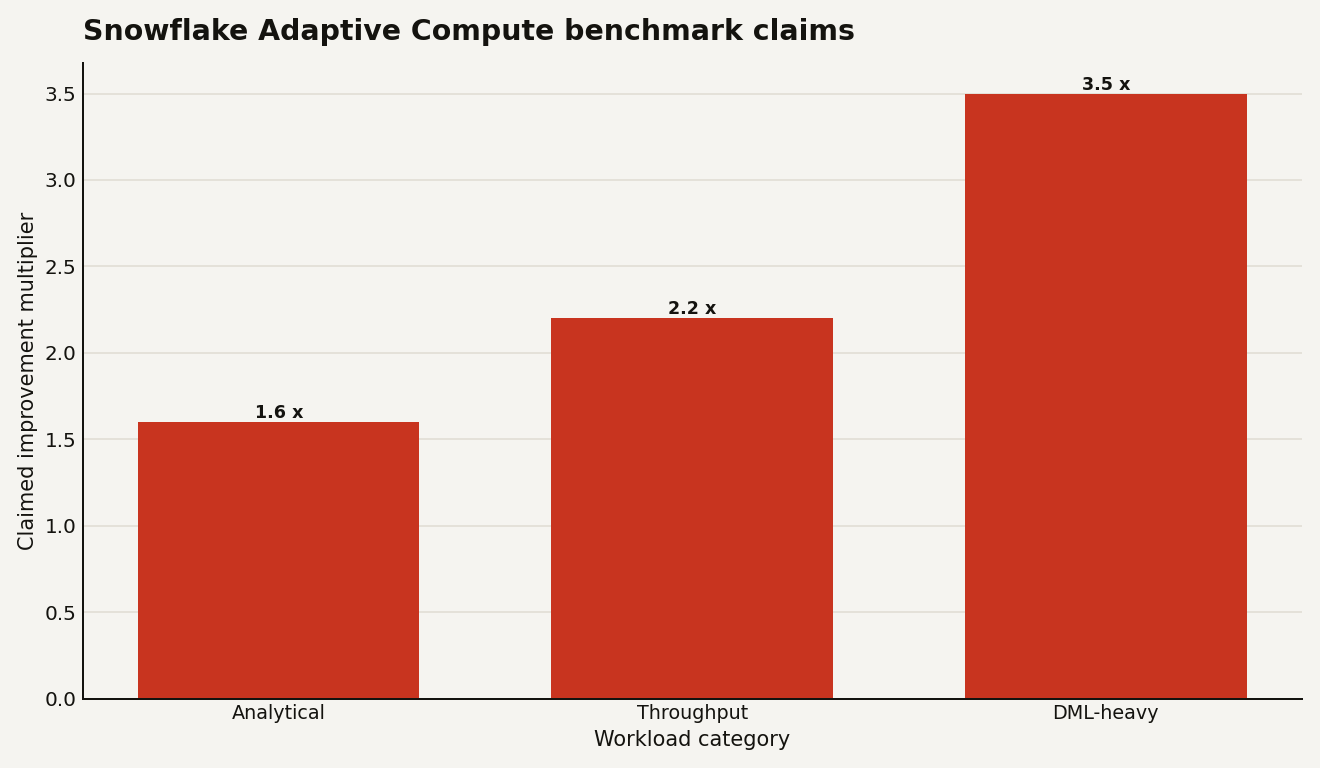
Snowflake's June 2, 2026 performance blog claims Adaptive Compute delivered up to 1.6x faster analytical workloads, 2.2x higher throughput for highly concurrent operational analytics, and 3.5x faster execution for DML-heavy workloads in benchmarks measured in May 2026. Treat those as vendor benchmark claims, not your committed savings plan. The chart below shows the claims you should try to reproduce on your own workload before raising throughput caps.
The sharp read: if your current waste comes from idle warehouses, bad suspend settings, or forgotten dev clusters, Adaptive Compute can help by changing the billing shape. If your current waste comes from expensive SQL, bad clustering, runaway BI extracts, or unlimited concurrency, Adaptive Compute can make that waste finish faster.
How do you convert without breaking workloads?
Snowflake says converting to or from an adaptive warehouse is an online operation and does not interrupt running queries. Existing queries continue on the old compute resources while new queries use the new warehouse type. During that overlap, Snowflake says you are charged for both sets of compute resources. That overlap detail is easy to miss and painful to explain after a batch window.
The conversion syntax is one line:
ALTER WAREHOUSE finance_wh SET WAREHOUSE_TYPE = 'ADAPTIVE';Snowflake derives adaptive property values from the existing warehouse configuration, including warehouse size, MAX_CLUSTER_COUNT, QAS scale factor, and warehouse generation. That is useful for first migration. It is not a substitute for review. After conversion, inspect the result:
SHOW WAREHOUSES LIKE 'FINANCE_WH';For a safer pilot, convert one warehouse that has clean query tags, stable consumers, and a known weekly pattern. A messy shared warehouse called REPORTING_WH used by 19 tools is a lousy first candidate. If you need a refresher on the old sizing model you are leaving behind, our Snowflake Gen2 warehouse guide covers the fixed-size trade-offs Adaptive Compute is trying to retire.
You can tune the adaptive properties after conversion:
ALTER WAREHOUSE finance_wh SET
  MAX_QUERY_PERFORMANCE_LEVEL = LARGE
  QUERY_THROUGHPUT_MULTIPLIER = 2;
If the pilot goes badly, convert back:
ALTER WAREHOUSE finance_wh SET WAREHOUSE_TYPE = 'STANDARD';Do not bulk convert until you have 2 weeks of before and after evidence. Snowflake provides SYSTEM$BULK_UPDATE_WH, including a dry-run mode, but the existence of a bulk function is not an argument for using it on Monday morning.
SELECT SYSTEM$BULK_UPDATE_WH(
  'WAREHOUSE_TYPE',
  'ADAPTIVE',
  '{"WAREHOUSE_TYPE": "STANDARD"}',
  'DRY_RUN'
);
When the dry run matches exactly what you expect, and only then, use ACTIVE:
SELECT SYSTEM$BULK_UPDATE_WH(
  'WAREHOUSE_TYPE',
  'ADAPTIVE',
  '{"WAREHOUSE_TYPE": "STANDARD"}',
  'ACTIVE'
);
Preview limits matter. During public preview, Snowflake says you cannot convert to or from X5LARGE or X6LARGE warehouses, and you cannot convert to or from Snowpark-optimized or interactive warehouses. If you run high-memory Snowpark jobs, do not force them through Adaptive Compute just because the word adaptive sounds modern.
What should you monitor after the switch?
Start with queuing. QUERY_THROUGHPUT_MULTIPLIER is an admission-control lever, so WAREHOUSE_LOAD_HISTORY should be in the first dashboard. If queued overload time rises after migration, you probably set the multiplier too low for the workload's peak shape.
SELECT
  start_time,
  warehouse_name,
  avg_running,
  avg_queued_load,
  avg_queued_provisioning
FROM SNOWFLAKE.ACCOUNT_USAGE.WAREHOUSE_LOAD_HISTORY
WHERE warehouse_name = 'ANALYTICS_ADAPTIVE_WH'
  AND start_time >= DATEADD(day, -7, CURRENT_TIMESTAMP())
ORDER BY start_time;
Then compare latency and queuing by query tag. This is where teams with sloppy tagging pay the tax. If your dbt jobs, BI dashboards, notebooks, and ad hoc admin queries all share a blank QUERY_TAG, Adaptive Compute will not fix your accountability problem.
SELECT
  query_tag,
  COUNT(*) AS queries,
  AVG(total_elapsed_time) / 1000 AS avg_elapsed_seconds,
  AVG(queued_overload_time) / 1000 AS avg_queue_seconds
FROM SNOWFLAKE.ACCOUNT_USAGE.QUERY_HISTORY
WHERE warehouse_name = 'ANALYTICS_ADAPTIVE_WH'
  AND start_time >= DATEADD(day, -7, CURRENT_TIMESTAMP())
GROUP BY 1
ORDER BY avg_queue_seconds DESC;
Use the adaptive-specific metering view for credits, and use query history for behavior. The combination tells you whether a setting change bought throughput, masked bad SQL, or simply moved spend around.
One more governance point: separate the people who can use the warehouse from the people who can widen the blast radius. Snowflake's ALTER WAREHOUSE access-control docs list MODIFY, MONITOR, OPERATE, and USAGE as warehouse privileges, and the global MANAGE WAREHOUSES privilege is equivalent to MODIFY, MONITOR, and OPERATE across all warehouses.
GRANT USAGE, MONITOR
  ON WAREHOUSE analytics_adaptive_wh
  TO ROLE analytics_engineer;

GRANT MODIFY
  ON WAREHOUSE analytics_adaptive_wh
  TO ROLE finops_platform_owner;

GRANT OPERATE
  ON WAREHOUSE analytics_adaptive_wh
  TO ROLE platform_operations;
That split matters because QUERY_THROUGHPUT_MULTIPLIER = 0 means unlimited throughput. You do not want every dashboard owner to discover that setting during quarter close.
When is Adaptive Compute the wrong choice?
Adaptive Compute is the wrong first move when you need strict predictability more than managed optimization. If a finance reporting workload runs the same 120 queries every morning with stable concurrency and a well-tuned Gen2 warehouse, Adaptive Compute may add a layer of opacity without enough benefit. The docs explicitly say standard Gen2 warehouses remain the better fit when you need direct control over warehouse size and scaling policy.
It is also the wrong fit for workloads Snowflake calls out elsewhere: primarily HTAP workloads may belong on standard Gen2, very low-latency dashboards and data-backed applications may belong on interactive warehouses, and high-memory Snowpark or machine-learning jobs may belong on Snowpark-optimized warehouses.
The best candidates have variance. Think mixed BI and ETL, ad hoc analytics, data loading pipelines with changing parallelism, and teams that keep overprovisioning because the worst 15 minutes of the day dominate the warehouse setting. If you are already running 12 warehouses mostly to preserve chargeback names and avoid stepping on each other's concurrency, adaptive warehouses let you keep those logical names while routing work into an account-dedicated adaptive pool.
Here is the decision rule: migrate where human sizing decisions are the bottleneck, not where deterministic control is the product requirement.
What would I do before trusting it with production spend?
Run a controlled pilot with a budget, a rollback, and a scoreboard. Pick 1 warehouse, 3 success metrics, and 14 days. The metrics should include credits from WAREHOUSE_METERING_HISTORY, top query costs from QUERY_METERING_HISTORY, and queue behavior from WAREHOUSE_LOAD_HISTORY. If you cannot name the success metric before the migration, the migration is theater.
A practical pilot sequence looks like this:
- Capture 14 days of baseline credits, p95 elapsed time, and queued overload time for the standard or Gen2 warehouse.
- Convert with
ALTER WAREHOUSE ... SET WAREHOUSE_TYPE = 'ADAPTIVE'during a low-risk window. - Keep the default
XLARGEand2for the first 48 hours unless a resource monitor fires. - Lower
MAX_QUERY_PERFORMANCE_LEVELif a few queries dominate spend without business value. - Raise
QUERY_THROUGHPUT_MULTIPLIERonly if queueing hurts a named workload. - Roll back if credits rise and the latency gain is not worth it to the business owner.
Adaptive Compute is Snowflake admitting that warehouse tuning became a product surface area of its own. Good. Most data teams have better things to do than debate MEDIUM versus LARGE for the fifth time this quarter. But the bill does not disappear. It just becomes more query-shaped.
The teams that win with Adaptive Compute will not be the teams that turn every knob to maximum. They will be the teams that treat the 2 knobs like production APIs: versioned, monitored, reviewed, and boring on purpose.
Sources
- Snowflake Documentation: Adaptive Compute
- Snowflake Documentation: QUERY_METERING_HISTORY view
- Snowflake Documentation: ALTER WAREHOUSE
- Snowflake Documentation: Preview features
- Snowflake Blog: Adaptive Compute Delivers High Performance That Evolves with Your Workloads
- Snowflake Legal: Snowflake Service Consumption Table