Snowflake Hybrid Tables used to sit in an awkward box: promising enough to simplify app architectures, but not quite boring enough for the team that gets paged when an OLTP-ish workload misbehaves inside a warehouse. The new Snowflake Hybrid Tables update changes that calculus, at least for a specific class of workloads: repetitive point reads and small writes that look more like application state than BI.
The headline is simple: Snowflake says its public preview operational query optimization can deliver up to 8x better throughput on a Gen2 warehouse for a 100 percent read Yahoo Cloud Serving Benchmark workload, while the March 2026 billing change removed separate hybrid table request credits. That combination matters more than either claim alone. Faster point lookups are nice. Faster point lookups without a separate request meter are the part your FinOps reviewer will notice.
This is not Snowflake turning into Postgres. Hybrid Tables are still Snowflake tables, with Snowflake constraints, warehouses, account usage views, and Snowflake lock-in. But for workflow state, metadata, recommendation serving, entitlements, and agent state where the alternative is another database plus another sync pipeline, the feature deserves a fresh benchmark.
What changed in Snowflake Hybrid Tables, exactly?
Snowflake shipped three related changes around Hybrid Tables: a preview optimization for operational queries, optimized bulk loading, and simplified pricing. The operational query work is the most important technical change. Snowflake describes operational queries as hybrid table statements that select or modify a small number of rows and execute in less than 100 ms, and says the optimization applies when the same SQL structure runs repeatedly, the query touches only hybrid tables, and the result is no larger than 100 KB in the operational query optimization docs.
Enablement is warehouse-level, not table-level. That is the right shape. You can isolate a benchmark warehouse, turn the preview on, and avoid changing application DDL while you measure.
CREATE OR REPLACE WAREHOUSE ht_app_wh
  WAREHOUSE_SIZE = XSMALL
  AUTO_SUSPEND = 60
  AUTO_RESUME = TRUE;

ALTER WAREHOUSE ht_app_wh
  SET ENABLE_USE_STABLE_PATH = TRUE;
The feature is still a preview as of June 15, 2026, and that is not a footnote. Snowflake says cloud services compute incurred for queries on the optimized path is not currently billed, but that this will change when the feature reaches general availability. If you benchmark now and ship a production design on preview economics, write that assumption down in your cost model in red ink.
The chart below shows the reported relative gains Snowflake published for the update. The clean read: operational point lookup throughput is the flagship number, while bulk load improvements are the practical unlock for backfills and state syncs.
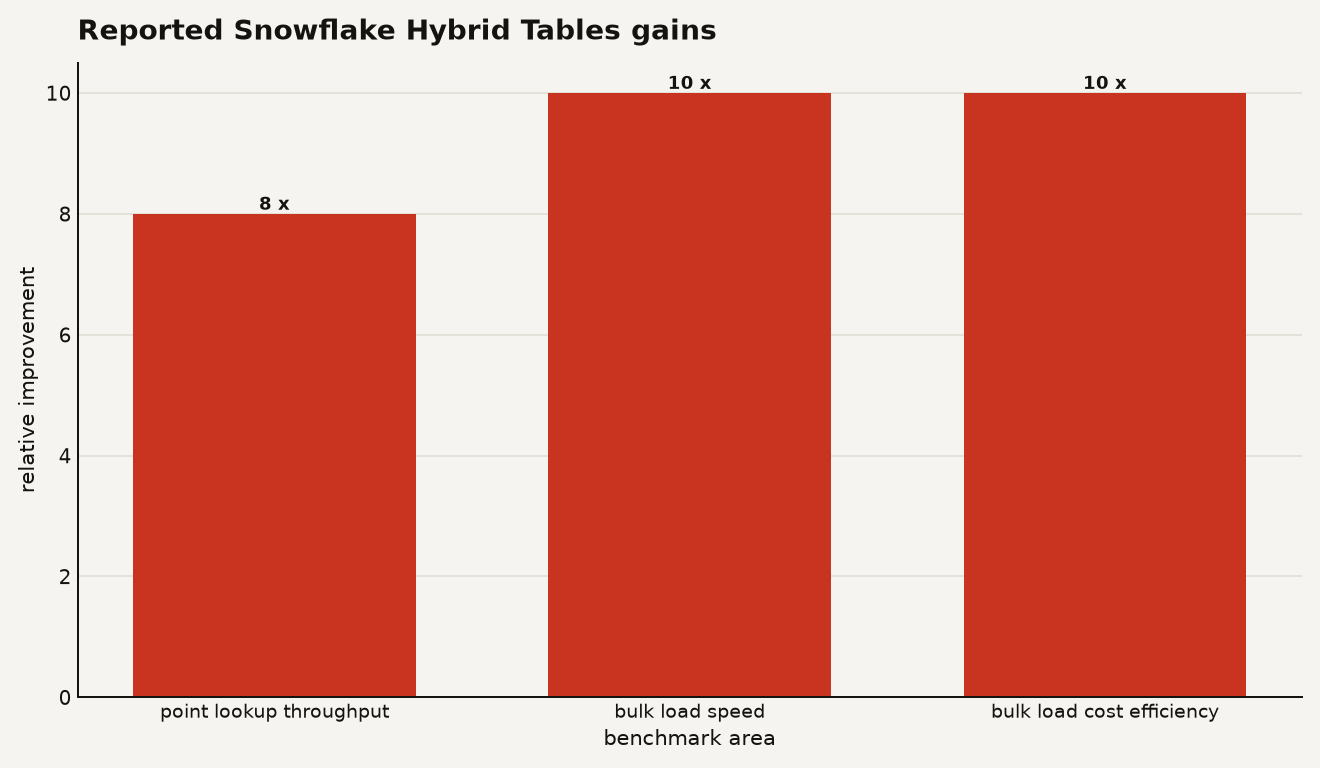
Snowflake reports 8x better point lookup throughput in the YCSB read benchmark, and 10x faster bulk loads at 10x lower cost for a 50 GB load into Hybrid Tables in its June 10, 2026 blog post, Hybrid Tables Just Got Up to 8x Faster. Treat those as vendor benchmarks, not a substitute for your own concurrency test.
Bulk loading also got more useful. Snowflake says optimized bulk loading supports CTAS, COPY, and all variants of INSERT except INSERT ALL, including loads into tables that already contain data, in the Hybrid Tables best practices guide. That is the difference between a feature you can demo and a feature you can backfill on a Tuesday.
CREATE OR REPLACE HYBRID TABLE app_state (
  entity_id NUMBER NOT NULL,
  state_version NUMBER NOT NULL,
  status VARCHAR NOT NULL,
  payload VARIANT,
  updated_at TIMESTAMP_NTZ NOT NULL,
  PRIMARY KEY (entity_id)
);

INSERT INTO app_state
SELECT entity_id, state_version, status, payload, updated_at
FROM staging_app_state;
There is one catch in that CTAS path. Hybrid Tables require an explicit primary key, and Snowflake says CTAS for a hybrid table cannot infer the schema from the SELECT. If you need foreign keys, Snowflake says CTAS does not support them, so use COPY or INSERT INTO SELECT instead.
How does the optimized path actually decide what to accelerate?
The preview is not a magic turbo button for any query that mentions a Hybrid Table. Snowflake says optimization is limited to statements that interact only with hybrid tables. If you join a Hybrid Table to a standard Snowflake table, the query still works, but it does not get this optimization.
The sweet spot looks like application code with stable prepared statements:
SELECT status, payload, updated_at
FROM app_state
WHERE entity_id = ?;
That question mark matters. Snowflake says parameterized statements with the same structure but different bind values are eligible after repeated execution. If your application injects random comments, builds bespoke SQL strings for every request, or adds ornamental CTEs to point lookups, you are making the optimizer’s job harder for no prize.
Supported statement patterns include SELECT, INSERT, UPDATE, and DELETE, with WHERE comparisons using operators such as equals, less than, and greater than. ORDER BY with or without LIMIT is eligible. The optimized join patterns are narrower: primary key to primary key joins, foreign key to foreign key joins, and index nested loop joins on a primary key.
That constraint is useful. It tells you what to migrate first.
| Workload pattern | Good fit for the preview? | Concrete behavior to check |
|---|---|---|
| Point lookup by primary key | Yes | Result must stay at or below 100 KB |
| Small single-row update | Yes | Preview supports single-statement transactions with AUTOCOMMIT enabled |
| Join to standard fact table | No | Optimization is limited to queries that touch only Hybrid Tables |
| GROUP BY over app state | No | GROUP BY works, but does not benefit from the preview optimization |
| Multi-statement transaction | No for preview | Snowflake documents only single-statement transactions for this preview |
For a builder, this means you should not start by moving your analytical model into Hybrid Tables. Start with a hot state table that has a primary key, predictable predicates, and a pile of repeated calls from a service. If you are also testing Gen2 warehouses, read our guide to Gen2 warehouse trade-offs before you compare old and new numbers.
How is it billed now, and what should FinOps watch?
The billing story got much simpler on March 1, 2026. Snowflake’s release note says hybrid table requests are no longer charged as a separate billing category, replacing the old three-part model with two charges: hybrid table storage and virtual warehouse compute in the simplified pricing release note. Snowflake followed on March 16, 2026 by disabling new metering events for hybrid table requests in HYBRID_TABLE_USAGE_HISTORY and METERING_DAILY_HISTORY.
That removes one nasty surprise from the bill. It does not make Hybrid Tables cheap by default.
Hybrid table storage is row-store storage, and Snowflake says it is more expensive than traditional Snowflake storage. The current data copy in columnar object storage is not billed as a separate copy, while historical Time Travel data is billed at standard storage rates in the cost evaluation docs. The Snowflake Service Consumption Table lists region-specific hybrid storage prices, including $0.34 per GB per month for AWS US East at the time of this guide.
Use account usage views before debating architecture in a meeting.
SELECT
  usage_date,
  ROUND(hybrid_table_storage_bytes / POWER(1024, 3), 2) AS hybrid_table_gb,
  ROUND(storage_bytes / POWER(1024, 3), 2) AS total_storage_gb
FROM snowflake.account_usage.storage_usage
ORDER BY usage_date DESC
LIMIT 30;
Warehouse compute is the other meter. Queries against Hybrid Tables run on virtual warehouses, with the same warehouse consumption model as standard table queries. The pricing risk is therefore familiar: a chatty application can keep an X-Small warehouse warm all day, and low-latency settings often mean lower AUTO_SUSPEND values are not enough by themselves.
SELECT
  warehouse_name,
  DATE_TRUNC('day', start_time) AS usage_day,
  SUM(credits_used) AS credits_used
FROM snowflake.account_usage.warehouse_metering_history
WHERE warehouse_name = 'HT_APP_WH'
  AND start_time >= DATEADD('day', -14, CURRENT_TIMESTAMP())
GROUP BY 1, 2
ORDER BY 2 DESC;
Also check that request metering really stopped in your account. Historical rows remain available, so query after the cutoff.
SELECT *
FROM snowflake.account_usage.hybrid_table_usage_history
WHERE start_time >= '2026-03-16'::TIMESTAMP_LTZ
ORDER BY start_time DESC
LIMIT 10;
If that returns new request usage rows after March 16, open a ticket before you ship assumptions into a forecast. If it returns nothing, good. Your cost argument moves to storage footprint, warehouse uptime, and whether the architecture deletes another system.
What limits can still wreck a production rollout?
The most important limit is throughput per database. Snowflake currently documents approximately 16,000 operations per second per Snowflake database for a balanced workload of 80 percent point reads and 20 percent point writes, with throttling visible through AGGREGATE_QUERY_HISTORY in the Hybrid Tables limitations page.
SELECT
  interval_start_time,
  warehouse_name,
  SUM(calls) AS calls,
  SUM(hybrid_table_requests_throttled_count) AS throttled_requests
FROM snowflake.account_usage.aggregate_query_history
WHERE interval_start_time >= DATEADD('hour', -6, CURRENT_TIMESTAMP())
  AND warehouse_name = 'HT_APP_WH'
GROUP BY 1, 2
ORDER BY interval_start_time DESC;
Storage has a hard planning boundary too: Snowflake documents a 2 TB hybrid storage quota per Snowflake database. That limit applies to active hybrid table data in the row store. If you blow through it, writes that add data can be blocked until you remove data or tables. Deleting rows may take hours to reclaim space because background compaction has to run, while DROP or TRUNCATE can reclaim space in seconds.
Region support is another practical gate. Hybrid Tables are generally available in commercial AWS and Microsoft Azure regions, but Snowflake says they are not available in Google Cloud, U.S. SnowGov Regions, or trial accounts. If your enterprise standard is GCP Snowflake, this guide is mostly a future-looking planning note.
There are also feature gaps that matter to data engineers. Hybrid Tables do not support streams, dynamic tables, materialized views, replication, data sharing, Snowpipe, Snowpipe Streaming API, clustering keys, Search Optimization Service, Query Acceleration Service, Fail-safe, or UNDROP for the hybrid tables themselves. That list is not trivia. It tells you Hybrid Tables are an application-serving and state-management tool, not a drop-in replacement for your pipeline substrate.
Constraints are stricter than standard Snowflake tables. A Hybrid Table must have a primary key, and primary key, unique, and foreign key constraints are enforced. That is good for app correctness. It also means bad backfill rows fail instead of quietly becoming tomorrow’s data quality incident.
CREATE OR REPLACE HYBRID TABLE workflow_run (
  run_id NUMBER NOT NULL,
  pipeline_name VARCHAR NOT NULL,
  status VARCHAR NOT NULL,
  started_at TIMESTAMP_NTZ NOT NULL,
  finished_at TIMESTAMP_NTZ,
  PRIMARY KEY (run_id),
  INDEX idx_pipeline_status (pipeline_name, status)
);
Watch index width. Snowflake warns that wide indexed columns can fail during loads because row-based storage imposes a limit on the size of data and metadata stored per record. VARIANT can live in the table, but not as a primary key or indexed column.
Who should try it first, and who should wait?
Try Snowflake Hybrid Tables now if your current architecture has one small operational database whose main job is to sit next to Snowflake and remember things Snowflake already understands: job state, recommendation IDs, customer entitlements, agent checkpoints, application configuration, or workflow status. That external database has a bill, a security model, backups, alerts, schema migrations, and a sync path. Consolidation is a legitimate performance feature when it deletes all of that.
Do not start with your highest-volume customer-facing OLTP system. If the service has strict single-digit millisecond SLOs, multi-region failover requirements, heavy multi-statement transactions, or expects Postgres-compatible behavior, Snowflake is still not pretending to be that database. Good. You should not pretend either.
A sane rollout looks like this:
- Pick one table under 100 GB with a primary-key access pattern.
- Put it in a dedicated database so the 16,000 ops per second quota is easy to reason about.
- Use a dedicated X-Small or multi-cluster warehouse, not your BI warehouse.
- Enable
ENABLE_USE_STABLE_PATHonly on the test warehouse first. - Benchmark with bind variables, warm the workload for a few minutes, and track throttling in AGGREGATE_QUERY_HISTORY.
- Compare the full cost against the database and pipeline you can retire, not against warehouse credits alone.
Privileges need attention because Snowflake documentation is in transition. The current command reference lists CREATE TABLE on the schema as the required privilege and notes no separate CREATE HYBRID TABLE privilege, while Snowflake’s 2026_02 behavior change announcement says CREATE HYBRID TABLE becomes a new separate privilege for roles that create new Hybrid Tables in the behavior change note. The safest enterprise move is to grant narrowly and verify bundle behavior in your account.
GRANT USAGE ON DATABASE app_db TO ROLE app_state_owner;
GRANT USAGE ON SCHEMA app_db.state TO ROLE app_state_owner;
GRANT CREATE TABLE ON SCHEMA app_db.state TO ROLE app_state_owner;

GRANT SELECT, INSERT, UPDATE, DELETE
  ON ALL TABLES IN SCHEMA app_db.state
  TO ROLE app_service_role;
If your account requires the new privilege, add it to the owner role and keep it away from broad analyst roles.
GRANT CREATE HYBRID TABLE
  ON SCHEMA app_db.state
  TO ROLE app_state_owner;
The lock-in trade is real. Hybrid Tables make Snowflake more attractive as an application data plane, but they also move operational state into Snowflake-specific DDL, quotas, and observability. That is worth it when the state mostly serves Snowflake-adjacent workflows. It is much harder to justify when Snowflake is just the third system in a request path.
What is the practical call?
Benchmark the workloads you previously rejected because Hybrid Tables were too slow or too weird to bill. The new performance path and request-fee removal are enough to reopen that spreadsheet.
But be precise. This is not a blanket migration story. It is a narrow, useful answer to a common enterprise mess: too many small operational databases orbiting the warehouse like space junk.
If Snowflake Hybrid Tables let you delete one of those databases, they are probably worth the test. If they only let you brag that your warehouse can do OLTP now, congratulations on finding the expensive version of a familiar database.
Sources
- Snowflake Blog: Hybrid Tables Just Got Up to 8x Faster
- Snowflake Documentation: Performance improvements for operational queries on hybrid tables
- Snowflake Documentation: Create hybrid tables
- Snowflake Documentation: CREATE HYBRID TABLE
- Snowflake Documentation: Best practices for hybrid tables
- Snowflake Documentation: Limitations and unsupported features for hybrid tables
- Snowflake Documentation: Evaluate cost for hybrid tables
- Snowflake Documentation: Mar 02, 2026, Simplified pricing for hybrid tables
- Snowflake Documentation: Mar 16, 2026, Metering disabled for hybrid table requests
- Snowflake Documentation: New CREATE HYBRID TABLE privilege
- Snowflake Legal: Service Consumption Table